Markdown Preview Enhanced now lives in another repository, and this one keeps the docs
One of the 'BEST' markdown preview extensions for Atom editor!
At a glance
- What is it?
- shd101wyy/markdown-preview-enhanced renders Markdown with scroll sync, math, mermaid, PlantUML, pandoc export and code chunks, but the repository you land on holds the documentation, not the extension source. What you install comes from the marketplace, and the README tells you which repository takes the bug reports.
- Who is it for?
- Adopt the extension if you want an executable Markdown pipeline inside VS Code, with math, mermaid and runnable code chunks in the same file. Do not adopt it expecting Atom support or expecting to file issues here: the package description still names Atom while the README says the VS Code extension lives in shd101wyy/vscode-markdown-preview-enhanced.
- Can I use it commercially?
- Check first. The repository uses a licence we do not classify automatically, so read its LICENSE file before any commercial use.
- Is it still maintained?
- Yes. The repository last received commits 37 days ago.
- What is it written in?
- Mainly HTML, according to GitHub's language statistics.
Answers come from the project's GitHub data, last synced on November 15, 2026, and from our analysis. They are not legal advice.
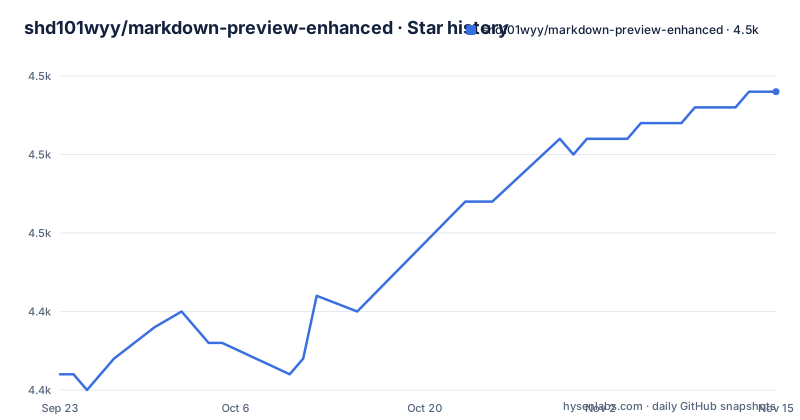
Star history
- shd101wyy/markdown-preview-enhanced4,459 ★ · +18
| Repository | 2026-09-23 | 2026-11-15 |
|---|---|---|
| shd101wyy/markdown-preview-enhanced | 4.4k | 4.5k |
18 Stars in the last 53 days, measured from the daily GitHub snapshot. Compare with other projects
Editorial analysis
This repository renders nothing; it hosts the documentation the extension links to
The first thing to settle is what this repository is. Its own README opens with a note that the repository is now only used for hosting documentation, and that the source code of the VSCode extension has moved to shd101wyy/vscode-markdown-preview-enhanced. Issues and feature requests for the extension belong at that second address, not here.
That note sits above a description that has not been updated to match. The package manifest still declares "description": "One of the 'BEST' markdown preview extensions for Atom editor!", and its version field still reads 0.19.6, a number that belongs to the Atom build rather than to anything you install from the Marketplace. Anyone who installs by package name arrives in an Atom-era manifest and lands in a repository that no longer builds the thing they want.
The documentation itself is real and substantial. Ten language versions are linked from the README, from English through Simplified Chinese, Traditional Chinese, Japanese, Korean, French, Spanish, Portuguese, Dutch and Turkish, and the English site is the one to read if you are deciding. The repository tree backs this up: a docs directory, an html directory, a styles directory, assets, and a package.json whose docsify script serves that docs tree directly. So the answer to "where does the documentation live" is inside this repo, and the answer to "where does the extension live" is a click away.
Scroll sync and diagrams run through the @shd101wyy/mume dependency, not through this tree
Almost everything the extension does is delegated to a package called @shd101wyy/mume, pinned at version 0.7.1 in the dependencies of this manifest. That single dependency line explains a lot of the feature list: automatic scroll sync, math typesetting, mermaid, PlantUML, pandoc, PDF export, code chunk and the presentation writer all read like one engine with several renderers behind it, rather than a bundle of unrelated preview extensions.
The difference shows up in how the features compose. Code chunk is the sharpest case: shift+enter runs a chunk, and ctrl+shift+enter runs all of them, which means the preview is treated as an execution surface rather than a read-only pane.
The keywords array in the manifest names the same breadth in a compressed form: beamer, graphviz, katex, latex, mathjax, mermaid, pandoc, pdf, plantuml, toc and wavedrom, plus ePub and ebook. The README also credits Markdown Preview Plus and RStudio Markdown as the sources of many of these ideas, so the design lineage is stated rather than implied. The build entry point remains "./out/src/extension" and the shipped files list includes assets, keymaps, menu, styles and out.
There is no install command to copy: the README points at the marketplace and at vscode.dev
If you were expecting a fenced install line, the README does not give one. It links to the VS Code Marketplace listing for shd101wyy.markdown-preview-enhanced and to vscode.dev, which is the browser-hosted build of the editor where the extension can be exercised without a local install. The npm name in this manifest is markdown-preview-enhanced, but the manifest describes an Atom extension, so installing that name will not give you the preview you are reading about.
What you can reproduce locally is the documentation site, which is the part this repository still owns. The manifest carries a docsify script:
"docsify": "docsify serve ./docs"Running that serves the docs directory from this tree, which is the quickest way to check whether a behaviour you are about to depend on is documented or whether you are about to guess. The rest of the script set is a TypeScript toolchain aimed at building the extension rather than reading its docs:
"build": "tsc --project .",
"docsify": "docsify serve ./docs"
The lint chain in the same file is worth knowing about if you plan to touch anything here: prettier checks every file, tsc runs with --noEmit, tslint runs against the project, and yarn-deduplicate runs with --strategy=fewer. There is no test script in the manifest even though a test directory exists at the top level.
The keybinding table treats the preview as a work surface, not a mirror
Eight shortcuts are listed, and four of them do something other than redraw the pane. ctrl+shift+m toggles the preview, ctrl+shift+s syncs preview to source or source to preview, and esc toggles the sidebar table of contents. The other five run or resize: shift+enter runs a code chunk, ctrl+shift+enter runs every code chunk in the file, and cmd+= with cmd+shift+= zooms the preview in while cmd+- zooms it out and cmd+0 resets the zoom. On Windows the cmd key is ctrl.
Reading that table tells you what kind of tool this is. A generic markdown preview gives you a toggle and nothing else. Here the run commands sit next to the render commands with no mode switch, and zoom is bound to three separate chords including a reset, which matters for anyone presenting slides from the same file. A sidebar TOC on esc is the third hint that the document, not the window, is the organizing unit.
Two things the table does not cover are worth naming. There is no shortcut listed for export, and none for the pandoc pipeline, so export is a separate path rather than part of the running loop. And nothing in the README explains where the output of a code chunk goes, or whether chunk state persists between preview sessions. A Changelog section at the bottom of the README points into the other repository, which is also where any answer to those questions will have moved.
An Atom manifest and a VS Code README disagree, and the README is the newer one
The contradiction is worth stating plainly because it decides where your time goes. This repository's package.json says version 0.19.6, names Atom in its description, lists @types/atom in devDependencies, and ships a main entry of ./out/src/extension with files including keymaps and menu. Everything about that manifest describes a package for an editor that Atom stopped being. The README at the same commit says the source code of the VSCode extension has moved to shd101wyy/vscode-markdown-preview-enhanced and that this repository only hosts documentation.
The repository contents agree with the README rather than the manifest. You will find no src directory at the top level. What you find is docs, html, styles, assets, a nix directory alongside flake.nix and shell.nix at the root, a .envrc, a transfer_issues.sh script and a simplified_chinese_2_traditional_chinese_script.js, which are documentation tooling and translation helpers rather than extension code.
So if your plan was to fork this repository and build your own preview, the pieces you need are not here. That is not a maintenance judgement. The last push to this repository was on 2026-10-09 and it is not archived, which is consistent with a docs site that still receives edits; it says nothing about the extension, whose own changelog lives at the other address.
Export paths through pandoc carry dependencies the README does not spell out
PDF export and pandoc conversion are named as features in the README and pandoc and pdf appear as keywords in the manifest, but the documentation link for pandoc is a section of the hosted site rather than a set of steps in the README. Nothing here states whether pandoc must be installed separately, which formats are accepted, or what happens when the binary is missing.
That is a concrete failure mode rather than a vague caveat: the export command is the part that depends on software outside your editor. Before you commit a pipeline that depends on PDF output, open the pandoc section of the documentation site and check what it expects on your platform. If your documents are Beamer presentations, note that beamer appears in the manifest keywords and the presentation writer is called out in the README, but the export path for slides is the same undocumented external dependency.
Another boundary: the README does not document rollback, proxy settings, or a way to pin a specific version of the extension through a project config file. For an editor extension that is ordinary, but for anyone managing editor configuration across a team it is a question the documentation does not answer.
Crossnote is the author's own move from an editor extension to a web app
The README invites readers to try a prototype web app, 0xGG/crossnote, and that is the most honest comparison available because it comes from the same author. The difference in approach is the deployment boundary. Markdown Preview Enhanced runs inside the editor, so it inherits the editor's filesystem access, its keybindings and its per-workspace settings, and its output is a preview pane next to the source. A web app cannot assume any of that; it has to work from what the browser gives it.
The other stated influences describe where the feature set came from rather than what to switch to. Markdown Preview Plus was an Atom-era preview package, and RStudio Markdown is the rmarkdown workflow, which treats Markdown as a reproducible document that is knitted into PDF, HTML or slides rather than merely read on screen. That knitted-output model is closer to what the pandoc and PDF features here are reaching toward, and it is a useful lens on the export path described above.
For a reader choosing today, the practical comparison is scope against surface area. If the file lives in your editor's project and you want to execute chunks from it, the extension form is the one that matches. If the document needs to be read and exported outside any particular editor, the web app direction is the one the author is pushing, and the documentation site at shd101wyy.github.io is the place both forms are documented.
Editorial conclusion
Adopt the extension if you want an executable Markdown pipeline inside VS Code, with math, mermaid and runnable code chunks in the same file. Do not adopt it expecting Atom support or expecting to file issues here: the package description still names Atom while the README says the VS Code extension lives in shd101wyy/vscode-markdown-preview-enhanced. Before switching, open shd101wyy/vscode-markdown-preview-enhanced and confirm that the pandoc export and code chunk features you plan to use are still described there.
Frequently asked questions
what is markdown preview enhanced
It is an extension that previews Markdown inside an editor, adding automatic scroll sync, math typesetting, mermaid, PlantUML, pandoc conversion, PDF export, code chunk execution and a presentation writer. The project describes itself as inspired by Markdown Preview Plus and RStudio Markdown.
how to use markdown preview enhanced in vs code
ctrl+shift+m toggles the preview, ctrl+shift+s syncs preview and source, shift+enter runs a single code chunk and ctrl+shift+enter runs all chunks. On Windows the cmd key used for zoom is ctrl.
markdown preview enhanced vscode not working
Issues and feature requests for the VS Code extension are directed to shd101wyy/vscode-markdown-preview-enhanced, because the repository named shd101wyy/markdown-preview-enhanced now only hosts the documentation and no longer holds the extension source.
is markdown preview enhanced safe
The README gives no security assessment of the extension, so there is nothing to verify there. It names the other repository as the place the changelog and the issue tracker live, and stops there.
markdown preview enhanced vsix
The README does not publish a vsix file or a download command. It points to the VS Code Marketplace listing for shd101wyy.markdown-preview-enhanced and to vscode.dev, where the extension can be used without a local install.
markdown preview enhanced vscode pdf
PDF export is listed as a feature, and pandoc and pdf both appear among the package keywords. The README links pandoc to a section of the documentation site and does not itself state what must be installed to make the export work.
Official sources
Add this badge to your README
If you maintain this project, the badge below links readers to this analysis and shows its maintenance status from the daily GitHub snapshot. Paste the markdown into your README; add ?metric=license or ?metric=stars to the image URL for a different field.

[](https://hysenlabs.com/projects/shd101wyy-markdown-preview-enhanced)Star history chart for your README
[](https://hysenlabs.com/projects/shd101wyy-markdown-preview-enhanced)Was this useful?