aerial.nvim turns your symbols into a window you can jump from
Neovim plugin for a code outline window
At a glance
- What is it?
- aerial.nvim builds a persistent outline window from symbols that tree-sitter or a language server already knows, and its real behaviour is decided by one short backend list and a handful of window options whose documented defaults stop mid-sentence.
- Who is it for?
- Adopt aerial.nvim if your Neovim 0.11+ setup already carries a language server or tree-sitter parsers, and leave it alone if you hop between files with a picker you already trust. Check three things first: whether your language sits in the sixty-one entry parser list, whether `backends` needs a filetype map for a mixed project, and whether the option you were about to tune is written in the generated help under `doc/` rather than in the defaults block that stops mid-comment.
- Can I use it commercially?
- Yes. MIT is a permissive licence: you can use, modify and sell software built on it, as long as you keep its copyright and licence notices.
- Is it still maintained?
- Yes. The repository last received commits 143 days ago.
- What is it written in?
- Mainly Lua, according to GitHub's language statistics.
Answers come from the project's GitHub data, last synced on October 23, 2026, and from our analysis. They are not legal advice.
Star history
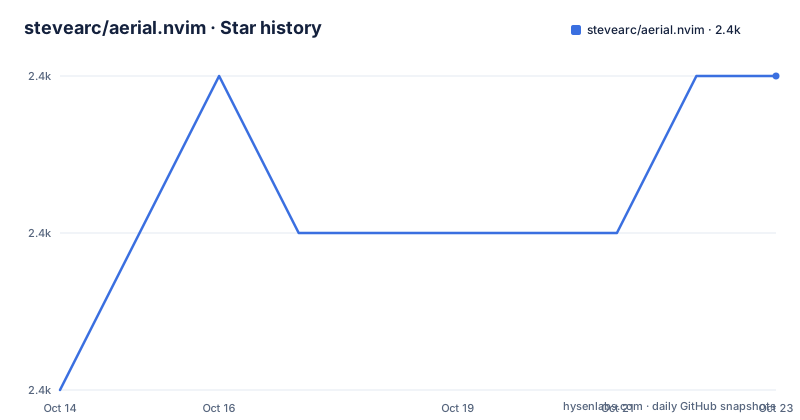
- stevearc/aerial.nvim2,356 ★ · +2
| Repository | 2026-10-14 | 2026-10-23 |
|---|---|---|
| stevearc/aerial.nvim | 2.4k | 2.4k |
2 Stars in the last 9 days, measured from the daily GitHub snapshot. Compare with other projects
Editorial analysis
A side window listing the symbols in the buffer you are editing
aerial.nvim calls itself a code outline window for skimming and quick navigation, and that is the whole scope: a live list of the symbols in the buffer you have open, parked beside your code. It suits people who cross a long file by jumping between functions, classes and headings instead of scrolling top to bottom. It adds nothing at all to files whose symbols nobody can extract.
Two prerequisites are named, a working LSP setup with nvim-lspconfig given as the reference, or tree-sitter parsers. Neither is required on its own. At least one is required, because if neither source answers, the outline has nothing to draw. The plugin also assumes a modern editor, since the requirement line reads Neovim 0.11+.
A priority list that also covers markdown, asciidoc and man pages
The whole mechanism is one ordered list. `backends` holds symbol sources, and the outline fills from the first one that can answer for the file in front of you. The documented default has five entries:
backends = { "treesitter", "lsp", "markdown", "asciidoc", "man" },The setup text spells out the order for the first pair: tree-sitter is preferred when it is available, with LSP as the fallback. Read the whole default before you judge an install as broken, because three of those five entries never appear in the requirements, which name only an LSP setup and tree-sitter parsers. A markdown file with no language server and no parser still gets an outline, while an unlisted file type with neither source gets nothing. The same option can be a filetype map instead of a flat list, and `:help aerial-filetype-map` is where that is documented, so per-language backend choices live in the generated help rather than in the defaults block.
The bang suffix decides whether your cursor leaves the buffer
The command table splits its window commands on a single character. `AerialToggle[!]` and `AerialOpen[!]` take `left/right/float` as an argument, and adding the bang keeps the cursor in the window you were editing instead of moving it into the outline. That makes the side of the editor a command argument rather than a global setting.
Bulk operations come in pairs: `AerialOpenAll` and `AerialCloseAll` act on every visible window, while `AerialClose` acts on the current one. Movement is count aware, so `[count]AerialNext` and `[count]AerialPrev` step through symbols and `[count]AerialGo[!]` jumps to the numbered one, all defaulting to a single symbol. The setup example binds the first two to the two brace keys inside `on_attach`, and `<leader>a` to `<cmd>AerialToggle!<CR>`. A second family, `AerialNavToggle`, `AerialNavOpen` and `AerialNavClose`, drives a nav window, and the command table treats that as a separate thing from the outline without describing the difference. `AerialInfo` prints debug info when you need to know which backend answered.
max_width compares columns against a screen share
The layout block is where this stops being a plain list. Width is expressed as a pair, and `max_width = { 40, 0.2 }` is read as the lesser of 40 columns or 20% of the total:
    max_width = { 40, 0.2 },
    width = nil,
    min_width = 10,
Direction is five-valued, and the `prefer` entries are conditional rather than absolute:
    -- Determines the default direction to open the aerial window. The 'prefer'
    -- options will open the window in the other direction *if* there is a
    -- different buffer in the way of the preferred direction
    -- Enum: prefer_right, prefer_left, right, left, float
    default_direction = "prefer_right",
So `prefer_right` opens on the right unless a different buffer already sits there. `placement` then decides whether the outline hugs the editor edge or attaches to the current window, `resize_to_content` refits the window as symbols change inside those limits, and `preserve_equality` mirrors the equality command in `:help CTRL-W_=` for people who keep splits the same size. `win_opts` takes window local options, with `winhl` given as the example.
Sixty-one tree-sitter languages, including vimdoc and ssh_config
The parser route covers sixty-one languages, and the list is more informative as a list than as a count, since entries such as help, markdown, rst, vimdoc, editorconfig, ssh_config, objdump and usd are not programming languages. If your file type appears there, a parser is enough and no language server is needed.
If it does not appear there, tree-sitter drops out and the backend order decides what happens next, which for kotlin, perl, ocaml and clojure means falling back to lsp, and for a file with neither a parser nor a server means an empty window. Nothing documented warns you about that case, `AerialInfo` is the only debugging entry point listed, and new languages are added through an issue template rather than by specification. Read the list as the real ceiling on parser support before you commit to it.
The default options list ends on an unfinished comment
The published defaults stop in the middle of a thought. The last visible line of that block is the comment `Determines how the aerial window decides which buffer to display symbols for`, followed by a partial line beginning `window - aerial window will display symbol`, and then the text ends. The key name for that option is never shown, and nothing after it in the options list is shown either. That is the gap to know about before tuning anything: the plugin ships a generated help file under `doc/`, points the filetype map at `:help aerial-filetype-map`, and the Makefile rebuilds that documentation with `python scripts/main.py generate`.
Testing is snapshot based rather than manual. `./run_tests.sh` runs the suite, `./run_tests.sh --update` rewrites the symbol snapshot files, and `luacheck lua tests --formatter plain` with `stylua --check lua tests` cover style. The newest tag is v4.0.0, dated 2026-05-24, and the last push came after it, on 2026-06-02. Distributed under the MIT licence, the plugin can be vendored into a private config as long as that notice travels with the code.
Seven install paths, and one note pointing at another repository
aerial.nvim supports every usual plugin manager, and the lazy.nvim form is the shortest complete spec:
{
  'stevearc/aerial.nvim',
  opts = {},
  -- Optional dependencies
  dependencies = {
     "nvim-treesitter/nvim-treesitter",
     "nvim-tree/nvim-web-devicons"
  },
}
Both dependencies are marked optional, which matches the two ways in: parsers or a language server. `aerial.setup()` then has to be called somewhere in your init, and the example wires the navigation keys at the same time:
require("aerial").setup({
  -- optionally use on_attach to set keymaps when aerial has attached to a buffer
  on_attach = function(bufnr)
    -- Jump forwards/backwards with '{' and '}'
    vim.keymap.set("n", "{", "<cmd>AerialPrev<CR>", { buffer = bufnr })
    vim.keymap.set("n", "}", "<cmd>AerialNext<CR>", { buffer = bufnr })
  end,
})
-- You probably also want to set a keymap to toggle aerial
vim.keymap.set("n", "<leader>a", "<cmd>AerialToggle!<CR>")
The managers covered are lazy.nvim, packer, paq, vim-plug, dein, pathogen and the Neovim native package. Three of those snippets still point at Vim era layouts:
Plug 'stevearc/aerial.nvim'call dein#add('stevearc/aerial.nvim')git clone --depth=1 https://github.com/stevearc/aerial.nvim.git ~/.vim/bundle/while the native package path uses `${XDG_DATA_HOME:-$HOME/.local/share}`. Here is the detail a skim misses: the sentence that sends older Neovim users to an nvim-0.x branch links to stevearc/conform.nvim, a different repository by the same author. The branch name is not given in that line, so anyone below 0.11 has to find it in the branch list of aerial.nvim alone.
A picker closes, the outline window stays open
Every window operation in this plugin is explicit and reversible, and that is the design difference against a modal picker driven by the same symbols. The repository ships integrations for Snacks, Telescope, fzf-lua, fzf and Lualine under third-party integrations, with their settings in sections that follow the options block rather than in the defaults shown above.
A picker takes the screen, filters on demand and closes on the choice, which suits a file you visit once. The outline window stays beside the code, refits through `resize_to_content` as symbols change, and jumps without ever going modal, since `[count]AerialNext` and `[count]AerialPrev` move you while the cursor stays in the buffer. If your habit is jump once and move on, that window costs a column you never read from. If you move through code by symbol while reading, the column is the reason to install it.
Editorial conclusion
Adopt aerial.nvim if your Neovim 0.11+ setup already carries a language server or tree-sitter parsers, and leave it alone if you hop between files with a picker you already trust. Check three things first: whether your language sits in the sixty-one entry parser list, whether `backends` needs a filetype map for a mixed project, and whether the option you were about to tune is written in the generated help under `doc/` rather than in the defaults block that stops mid-comment. A side window that quietly shows nothing is worse than no window at all.
Frequently asked questions
Does aerial.nvim work without a language server?
Yes, if tree-sitter parsers are installed for the file type. The default backends list puts treesitter ahead of lsp, and the documentation states that the default prefers treesitter when it is available and falls back to LSP.
Which Neovim version does aerial.nvim require?
Neovim 0.11+ is the stated requirement. The requirements section points users of older versions at an nvim-0.x branch, and that link resolves to the branches page of stevearc/conform.nvim rather than to aerial.nvim.
How do I make the aerial window narrower?
Set `max_width` to a single value or to a mixed list such as `{ 40, 0.2 }`, which is read as the lesser of 40 columns or 20% of the total. Use `min_width` to set the floor and `resize_to_content` to keep the window fitted inside those limits.
What happens for a file type with no tree-sitter parser and no language server?
Nothing documented fills the outline in that case, so the window has no symbols to show. `AerialInfo` prints debug information, and the `backends` option decides which source is asked first.
Does opening the outline move my cursor away from my code?
It does unless you add the bang modifier. The command table lists `AerialToggle[!]` and `AerialOpen[!]`, and the note records that with ! the cursor stays in the current window.
Official sources
Add this badge to your README
If you maintain this project, the badge below links readers to this analysis and shows its maintenance status from the daily GitHub snapshot. Paste the markdown into your README; add ?metric=license or ?metric=stars to the image URL for a different field.

[](https://hysenlabs.com/projects/stevearc-aerial-nvim)Star history chart for your README
[](https://hysenlabs.com/projects/stevearc-aerial-nvim)Was this useful?