Claude Counter: two usage sources, a relative release link, and a cookie read
A minimal browser extension that shows token count, cache timer, and usage bars on claude.ai.
At a glance
- What is it?
- claude-counter is a small JavaScript browser extension that puts an approximate token count, a cache countdown and session and weekly usage bars on top of claude.ai. It works by intercepting the site's API responses, and its own installation notes are the weakest part of it.
- Who is it for?
- Claude Counter is worth installing if you want a usage readout inside the conversation window and do not mind an extension sitting between you and the site, reading conversation responses and one cookie to do it. Before installing, note that the count is approximate by design, that the figures come from the same endpoints the site already calls, and that the Chrome instructions do not cover unpacking the downloaded archive.
- Can I use it commercially?
- Yes. MIT is a permissive licence: you can use, modify and sell software built on it, as long as you keep its copyright and licence notices.
- Is it still maintained?
- Activity is slowing. The repository last received commits 8 months ago.
- What is it written in?
- Mainly JavaScript, according to GitHub's language statistics.
Answers come from the project's GitHub data, last synced on November 25, 2026, and from our analysis. They are not legal advice.
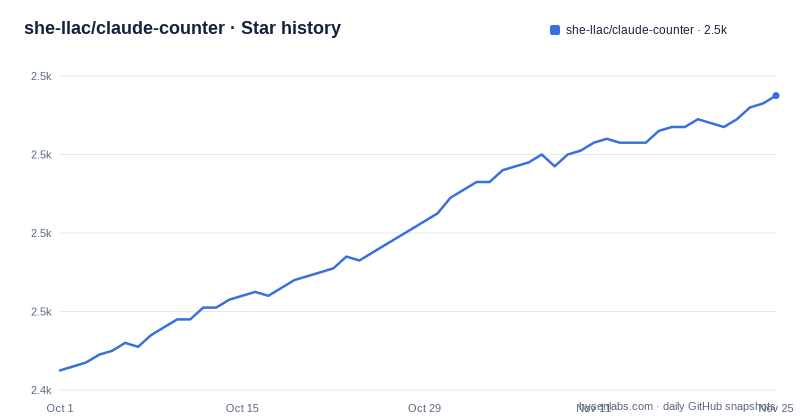
Star history
- she-llac/claude-counter2,515 ★ · +70
| Repository | 2026-10-01 | 2026-11-25 |
|---|---|---|
| she-llac/claude-counter | 2.4k | 2.5k |
70 Stars in the last 55 days, measured from the daily GitHub snapshot. Compare with other projects
Editorial analysis
Both download links are relative and carry the version in the filename
The installation section gives three routes, and the two archive links are written as relative paths rather than full URLs: `../../releases/download/v0.4.2/claude-counter-0.4.2.zip` for Chrome, Edge and Chromium, and `../../releases/download/v0.4.2/claude-counter-0.4.2.xpi` for Firefox. The path climbs two directories above the file it appears in, so it only resolves where a repository checkout sits at a particular depth. A reader following a rendered copy of the page outside GitHub gets nothing to click.
The version then appears a second time inside each filename, so the text has to be edited in two places per release rather than one. That is a small maintenance cost, and it is the kind of thing that goes stale quietly, since a link pointing at an old tag still resolves and still installs.
The Chrome route ends at dropping the zip on the page
Three steps are given for Chromium browsers: download the archive, open `chrome://extensions` and turn on Developer mode, then drag and drop the zip onto that page. The last step is where the instruction stops. Nothing in the file covers unpacking the archive, and the pages reached through Developer mode load an unpacked directory, so the three steps as written do not describe a path from a zip to a loaded extension.
The Firefox route has no such gap, because the artifact there is already in the form that browser expects: drag the `.xpi` into any window and click Add. The third route is a userscript installed from `userscript/claude-counter.user.js`. Three artifacts, three lifecycles, and only one of the three instructions is complete.
The token count is approximate by design and measured with an OpenAI tokenizer
The token counter is described twice as approximate, and the mechanism explains why: the extension vendors the `o200k_base` tokenizer, which is the encoding used on the other side of the industry rather than this one. Counting therefore happens locally with no request to any service, which is why the file can promise that nothing leaves the machine for this part.
The bar it fills is measured against a fixed 200k context limit, so the denominator is a constant in the code rather than something read back from the conversation. Both the numerator and the denominator are approximations, and a bar drawn from them should be read as an indicator of how full a conversation is, not as a count anyone can reconcile against a bill.
The usage bars prefer the SSE stream over the page's own numbers
Session and weekly usage come from two places at once. The extension calls Claude's `/usage` endpoint, which is the same source as the page's own usage view, and it also listens to the live server sent events stream for `message_limit` data. The stated reason for the second source is accuracy: the event carries exact, unrounded utilization fractions, so the progress bars and the reset countdowns are more precise than the rounded percentages the native page displays.
The two windows are a 5-hour session and a 7-day week, each with its own reset countdown. This is the one feature in the extension with a documented data path, and it is also the feature that depends on the site's internal event names staying put.
The cache timer has no documented source
The cache countdown is presented in the same list as the other two features and described plainly: it shows how long the current conversation remains cached, and continuing while it runs is cheaper. What the file does not say is where that duration comes from.
The mechanism section is specific everywhere else. It says the extension intercepts Claude's API responses to read conversation data and usage info, names the vendored tokenizer, names the `/usage` endpoint and the `message_limit` event, and explains that it watches for DOM changes to inject its interface while you navigate. The cache countdown is the single reading with no endpoint, event or field attached to it, so a reader has no way to tell whether it comes from a response header, a field in the intercepted payload, or a local guess.
All data stays local sits next to a cookie read
The privacy section makes three claims: all data stays local, there are no external servers and no tracking, and requests go only to `claude.ai`. The second and third are precise and checkable.
The first needs its qualifier spelled out, because the extension does read something sensitive. It reads your `lastActiveOrg` cookie in order to query the `/usage` endpoint, which is the account identifier that endpoint needs. It also intercepts the site's API responses, so conversation content passes through the extension on its way to being counted. Nothing here leaves the machine, but the extension is not blind to what is on the page, and anyone reasoning about trust should read the interception line before the locality claim.
Three artifacts ship from one tree with no build step
The repository holds a manifest, a source directory, a userscript directory, an icons directory, a screenshot, the licence, a third party notices file and the readme. There is no package manifest and no lockfile in that list, so nothing in the tree declares a dependency graph or a build. The extension is the source, and the vendored tokenizer is accounted for in `THIRD_PARTY_NOTICES.md`, credited to the gpt-tokenizer project under the MIT licence.
Attribution also names the project it was inspired by, a usage extension by another author. Both credits are about counting and display. Nothing in the file explains which parts of the approach are original, which matters if you are reading this to decide whether to fork it.
The newest release predates the last push by seven weeks
The tags run v0.4.1 on 2025-12-18 and v0.4.2 on 2026-01-31, and the default branch was last pushed on 2026-03-21. Commits therefore continued for roughly seven weeks after the 0.4.2 tag, which is what you would expect from a repository that keeps iterating without cutting a release for every change.
The consequence for an installer is concrete. The download links in the instructions name v0.4.2, so the archive you fetch is the January build, and the work done on the branch in February and March is not in it. Nothing in the file marks that gap, so the version in the filename and the state of the repository are two different things.
Editorial conclusion
Claude Counter is worth installing if you want a usage readout inside the conversation window and do not mind an extension sitting between you and the site, reading conversation responses and one cookie to do it. Before installing, note that the count is approximate by design, that the figures come from the same endpoints the site already calls, and that the Chrome instructions do not cover unpacking the downloaded archive. Check the version in the download links against the tags before fetching anything, and remember that the branch was last pushed on 2026-03-21, so the two release links in the instructions may already point at an older build than the one you are reading.
Frequently asked questions
what is claude counter
A minimal browser extension for claude.ai that shows three things: an approximate token count for the current conversation with a bar against the 200k context limit, a countdown for how long the conversation stays cached, and session and weekly usage bars with reset countdowns. It is MIT licensed and written in JavaScript.
how to use claude counter
Install it for the browser you use, then open claude.ai. The extension intercepts the site's API responses to read conversation and usage information, uses a vendored o200k_base tokenizer for the approximate count, and watches for DOM changes so it can inject its interface as you navigate. Session usage covers 5 hours and weekly usage covers 7 days.
how to install claude counter
There are three routes. On Chrome, Edge or Chromium, download claude-counter-0.4.2.zip, open chrome://extensions, enable Developer mode and drag the archive onto the page. On Firefox, drag claude-counter-0.4.2.xpi into a window and click Add. Or install the userscript from userscript/claude-counter.user.js. Both download links are relative paths pointing at the v0.4.2 tag.
how to install claude counter extension
The extension itself has no package manifest or build step, so the repository root is the release. Chromium browsers get a zip that Developer mode is meant to load, Firefox gets an xpi to drag into a window, and a userscript variant sits at userscript/claude-counter.user.js. The tokenizer is credited to gpt-tokenizer under the MIT licence in THIRD_PARTY_NOTICES.md.
Official sources
Add this badge to your README
If you maintain this project, the badge below links readers to this analysis and shows its maintenance status from the daily GitHub snapshot. Paste the markdown into your README; add ?metric=license or ?metric=stars to the image URL for a different field.

[](https://hysenlabs.com/projects/she-llac-claude-counter)Star history chart for your README
[](https://hysenlabs.com/projects/she-llac-claude-counter)Was this useful?