vue-multiselect: a Vue 3 select component that still needs the Options API
Universal select/multiselect/tagging component for Vue.js
At a glance
- What is it?
- vue-multiselect is a dependency free select, multiselect and tagging component for Vue, maintained as a Vue 3 port of the v2 line. It gives you label and track-by for identity, an @tag event for free text, @search-change for remote options, and one hard requirement: Vue's Options API must stay enabled in your build.
- Who is it for?
- Pick vue-multiselect when your Vue 3 build keeps Vue's Options API enabled and you need selection, multi selection and free text tagging in one dependency free component. Skip it if your build disables Vue's Options API, because the component relies on it and there is no documented setup that avoids that.
- Can I use it commercially?
- Yes. MIT is a permissive licence: you can use, modify and sell software built on it, as long as you keep its copyright and licence notices.
- Is it still maintained?
- Yes. The repository last received commits 59 days ago.
- What is it written in?
- Mainly JavaScript, according to GitHub's language statistics.
Answers come from the project's GitHub data, last synced on November 15, 2026, and from our analysis. They are not legal advice.
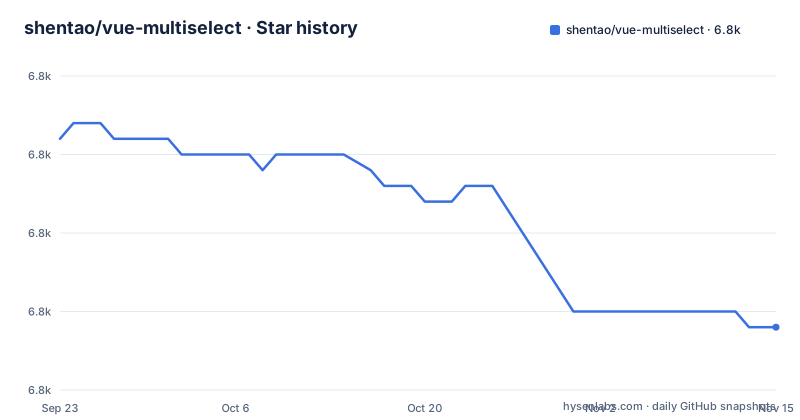
Star history
- shentao/vue-multiselect6,769 ★ · -12
| Repository | 2026-09-23 | 2026-11-15 |
|---|---|---|
| shentao/vue-multiselect | 6.8k | 6.8k |
-12 Stars in the last 53 days, measured from the daily GitHub snapshot. Compare with other projects
Editorial analysis
The upgrade plan was to swap the component and keep the code
The Vue 3 line of vue-multiselect exists so that moving an application to Vue 3 does not force a rewrite of every dropdown on the page. The stated idea is that you swap the two components out and everything else keeps working, and the documentation for v3.0.0 is described as almost the same as for v2.x because the port is mostly backward compatible. Matt Elen is credited with contributing this version, and the full documentation lives at vue-multiselect.js.org rather than in the repository. That makes the component a drop-in candidate for an existing form layer, which is also the main thing to verify before committing to it.
Three selection modes sit on one component
The component covers single select, multiple select and tagging, plus the dropdown and search behaviour around them. A single select dropdown turns off searching with `:searchable="false"`, keeps the menu open with `:close-on-select="false"`, and forbids an empty value with `:allow-empty="false"`. Switching on `:multiple="true"` turns the same component into a multiselect. Tagging is a third mode on top of that: `:taggable="true"` lets a user turn text they typed into a new entry. Filtering and search suggestions are part of the same component rather than a separate add-on, and there are no runtime dependencies to install alongside it.
label shows the option, track-by decides what gets stored
Two props carry the identity of an option, and they are not always the same field. In the dropdown and multiselect examples the display field and the identity field are both `name`, given as `label="name"` and `track-by="name"`. In the tagging and asynchronous examples the display field stays `name` while the tracking field becomes `code`, with `track-by="code"`. That split is the point: you can show a readable string and keep a stable identifier in the model, which matters when your tag handler generates an identifier of its own. Selection is bound through v-model, and the dropdown example uses `@update:model-value` when you want to react to the change yourself.
The @tag handler owns the object, the component only hands over the string
With tagging enabled, the component does not create the tag for you. It emits the text the user typed on the `@tag` event, and your handler decides what object that becomes. The example builds a record with the typed name and a generated code, then pushes it into both the options array and the selected array, so the new tag shows up in the list and stays selected:
``` javascript addTag (newTag) { const tag = { name: newTag, code: newTag.substring(0, 2) + Math.floor((Math.random() * 10000000)) } this.taggingOptions.push(tag) this.taggingSelected.push(tag) } ```
The `tag-placeholder` prop controls the hint shown in the input, and the placeholder itself can say that typing either searches or adds.
Remote options arrive through @search-change, not through the options prop
Asynchronous dropdowns work by letting the component ask for data instead of waiting for it. You bind `:options` to an array your component owns, listen for `@search-change`, and assign the result of your own find service to that array inside the handler. The component never fetches anything itself, and it has no idea whether your service is local or remote. When a search matches nothing, you render your own message through the `#noResult` slot, shown in the example as a note to consider changing the query.
@vitejs/plugin-vue 5.2.2 and later can switch the Options API off
The component needs Vue's Options API to function, and there is a documented collision with the build plugin. Versions of `@vitejs/plugin-vue` from 5.2.2 onwards can disable the Options API as a side effect of how their configuration handling changed, even when nothing in your own config asks for it. The workaround given is to go back one version:
npm install @vitejs/[email protected]The underlying discussion is issue 1901 in this repository. Note that the development dependencies here still sit on `@vitejs/plugin-vue` at `^4.2.3`, so a project copying this package manifest does not inherit the problem, while an application that has moved to 5.x can walk into it without touching the component.
npm run bundle is a Vue CLI library build followed by a Rollup pass
The distribution is produced by two build systems in sequence. The `bundle` script runs `vue-cli-service build --target lib ./src/index.js`, deletes the generated demo page, and then runs `rollup -c --environment BUILD:production`; the documentation itself is a Vite site built with `vite build documentation`. The published entry points are `dist/vue-multiselect.esm.js` as both `main` and `jsnext:main`, with `dist/vue-multiselect.umd.min.js` for unpkg. Only three entries ship: `dist`, `src` and `index.d.ts`, so the source travels with the package. Unit tests run through `vue-cli-service test:unit`, and `finish` chains lint, test and bundle together before a release.
Styling, options data and type declarations stay on your side of the boundary
Three things the component does not do are worth naming before you adopt it. It ships no styling framework integration, so the visual result comes from the stylesheet you import yourself, `vue-multiselect/dist/vue-multiselect.css`, plus your own theme. It does not supply data: single select, multiselect, tagging and the async case all expect an options array that your component maintains. And it does not generate identifiers, since the tag handler above writes the code field by hand. TypeScript users get a declaration file, `index.d.ts`, but the component itself is JavaScript, and the package manifest still reads version 3.5.0 while a v4.0.0 alpha tag exists, so pick a line deliberately.
Editorial conclusion
Pick vue-multiselect when your Vue 3 build keeps Vue's Options API enabled and you need selection, multi selection and free text tagging in one dependency free component. Skip it if your build disables Vue's Options API, because the component relies on it and there is no documented setup that avoids that. Before upgrading, pin @vitejs/plugin-vue to 5.2.1 if you build with Vite, decide whether the v4 alpha or the 3.5.0 line suits your project, and check that your own code supplies the options array, the styling and the tag objects, since the component hands all three back to you.
Frequently asked questions
Is vue-multiselect compatible with Vue 3?
Yes. Documentation for v3.0.0 is described as almost the same as for v2.x because the Vue 3 port is mostly backward compatible, so an application can swap the component during a Vue 3 upgrade. The component does require Vue's Options API to function.
How do I install vue-multiselect and use it in a Vue 3 app?
Run `npm install vue-multiselect`, register the component from an options object, and add `vue-multiselect/dist/vue-multiselect.css` to your styles. The package has no runtime dependencies.
Why does vue-multiselect break after updating @vitejs/plugin-vue?
Versions 5.2.2 and later of the plugin can disable the Options API through their own configuration handling, and the component needs that API. The suggested fix is `npm install @vitejs/[email protected]`; the background is issue 1901.
How do I turn text a user typed into a new tag?
Set `:taggable="true"` and handle the `@tag` event. The handler receives the typed string, and your own code builds the option object and pushes it into both your options array and your selected array.
How do I load options from a remote search in vue-multiselect?
Bind `:options` to an array your component owns and listen for `@search-change`, then assign the result of your own find service to that array. The component performs no fetching itself, and you supply the empty state through the `#noResult` slot.
Official sources
Add this badge to your README
If you maintain this project, the badge below links readers to this analysis and shows its maintenance status from the daily GitHub snapshot. Paste the markdown into your README; add ?metric=license or ?metric=stars to the image URL for a different field.

[](https://hysenlabs.com/projects/shentao-vue-multiselect)Star history chart for your README
[](https://hysenlabs.com/projects/shentao-vue-multiselect)Was this useful?