Hope Agent ships four package managers, eleven locales and a container pinned to a newer glibc
A cross-device desktop AI agent with memory, autonomous goals, dynamic workflows, and headless deployment to NAS or the cloud.
At a glance
- What is it?
- Hope Agent is a Rust and TypeScript desktop agent built on Tauri, with a Cargo workspace of thirty one crates, a web server mode for NAS and cloud use, and an Ollama sidecar in its compose file. Its own documentation is unusually candid about which parts of the demo are real and which are fixed data.
- Who is it for?
- Hope Agent fits an individual who wants one agent core reachable from a desktop app, a browser, a server on a NAS and chat channels, and who is prepared to read the compose file and the container build before running it. It fits a team less well if it needs a published library, since the npm manifest is marked private and the Rust crates are not on crates.io.
- Can I use it commercially?
- Yes. MIT is a permissive licence: you can use, modify and sell software built on it, as long as you keep its copyright and licence notices.
- Is it still maintained?
- Yes. The repository last received commits 1 day ago.
- What is it written in?
- Mainly Rust, according to GitHub's language statistics.
Answers come from the project's GitHub data, last synced on November 22, 2026, and from our analysis. They are not legal advice.
Star history
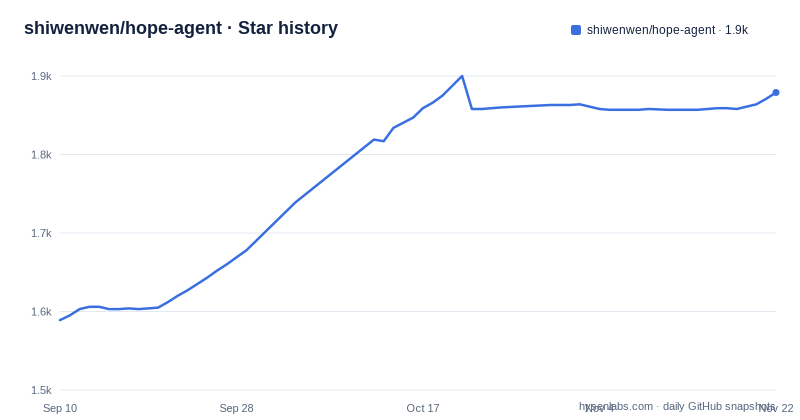
- shiwenwen/hope-agent1,879 ★ · +290
| Repository | 2026-09-10 | 2026-11-22 |
|---|---|---|
| shiwenwen/hope-agent | 1.6k | 1.9k |
290 Stars in the last 73 days, measured from the daily GitHub snapshot. Compare with other projects
Editorial analysis
The demo says which parts of it are real, and the dashboard numbers are not
The presentation and the screenshots come with caveats written into the page, and they are specific. The video is described as a product presentation built with real Hope Agent components and fixed demo data. The screenshots are 1920 by 1080 captures of the running web GUI, and the caption states that projects, sidebar entries and notes use demo content, that deliverables come from actual runs, and that dashboard metrics use illustrative sample data.
So the interface is real, the outputs are real, and the numbers on the dashboard are not measurements. That is a narrower claim than a typical product page, and it is worth reading before judging the feature list, since a dashboard is exactly where a reader would look for evidence.
The positioning paragraph that follows makes a claim of a different kind. It says the project did not begin after desktop AI agents became a popular category, that work started when desktop agents were still uncommon and Codex itself was in an earlier form, and that the team has always focused on the product rather than on manufacturing attention. No date, commit or release backs that sentence, so it reads as positioning rather than as a verifiable history. The verifiable history is the release list: v0.59.0, v0.60.0 and v0.61.0 on three consecutive days.
Eleven locales are audited, and two READMEs are published
The interface is checked for translation quality by a script pair, and the locale list is long:
"i18n:check": "node scripts/sync-i18n.mjs --check && node scripts/audit-i18n-quality.mjs --locales ar,es,ja,ko,ms,pt,ru,tr,vi,zh,zh-TW --source src --all --fail-on-same"Eleven locales, run in check mode against a single source directory, with a flag that fails the build when a translated string is identical to the source. That last flag is the interesting part: it treats an untranslated string as an error rather than as a warning, which is a stricter gate than most projects apply to their own translations.
Documentation is not held to the same standard. The root carries README.md, README.en.md and README.zh-CN.md, three files, while the language switcher at the top of the page offers only English and Simplified Chinese. Ten audited locales and no translated README for any of them. The repository also has no homepage field set, even though the page links a separate website, and the contributing guide exists in two languages where the README exists in three, which is a different split again.
A pnpm script is what keeps thirty one crate versions aligned
The Rust side is a workspace rather than a single crate, and the member list runs to thirty one entries, from ha-base and ha-core through ha-agent-loop, ha-agent-runtime, ha-goal, ha-workflow, ha-memory, ha-knowledge, ha-browser, ha-mcp, ha-skills, ha-design, ha-server, ha-channel, ha-cron, ha-dash, ha-updater and several evaluation crates. Resolver version 2, MIT, one author, edition 2021.
The version story is unusual. A comment says the version stays per crate and is synchronised by a pnpm script, which is the frontend toolchain being used to keep a Rust workspace consistent. The npm manifest confirms the arrangement, since it carries a script for that purpose and pins the package manager by version and hash:
"packageManager": "[email protected]+sha512.05ba3c1d5d1c18f68df06470d74055e62d41fc110a0c660db1b2dfb2785327f04cf0f68345d4609bc52089e7fa0343c31593b2f9594e2c5d5da426230acc9820"A second comment in the same file justifies not declaring a minimum supported Rust version by pointing at a toolchain file that pins the compiler, and refers to three crates that are not published to crates.io. Three, in a workspace of thirty one members, without naming which three. The same file also documents a lint policy that allows structural and stylistic groups so that enabling denied warnings in continuous integration can happen later as a dedicated change.
Four package managers live in the repository, not in a release pipeline
Distribution is handled by four separate directories at the root: an AUR directory, a homebrew directory, a scoop directory and a linux-repo directory. Alongside them sit a Dockerfile, a docker directory, a compose file and GitHub releases. For a project that also builds a Tauri desktop application, that is five packaging channels maintained in-tree, and each one carries its own packaging recipe and its own update cadence.
The desktop shell is the Tauri crate in src-tauri, driven from a pnpm workspace with a Vite frontend. The development scripts show how many moving parts a build has: a plain dev script, a desktop selector that runs a node script, a Tauri dev invocation with a dedicated configuration file, and three composite variants that start a browser host, an evaluation sidecar, or both before the desktop process. The full variant exists as a named script, which suggests the three processes are frequently needed together rather than independently.
The manifest is marked private, so the npm package is never published, and the Rust crates are not on crates.io either by the workspace's own account. Everything a user installs therefore arrives through a release asset, a package manager recipe or a container image, and there is no library consumer to keep compatible.
That has one visible consequence in the repository itself. A tool that updates four ecosystems has to notice when any of them lags, and the scripts directory carries a crate dependency analysis command aimed at exactly that kind of bookkeeping, alongside the version synchronisation and the translation audit. The maintenance surface is wider than the feature list suggests.
The compose file binds loopback and trades a root token for an HttpOnly session
The server mode is the part with the security surface, and the shipped compose file is careful about it:
services:
  hope-agent:
    image: ghcr.io/shiwenwen/hope-agent:latest
    container_name: hope-agent
    restart: unless-stopped
    ports:
      - "127.0.0.1:8420:8420"
    environment:
      HA_API_KEY: ${HA_API_KEY:-}
      HA_CORS_ORIGINS: ${HA_CORS_ORIGINS:-}
      TZ: ${TZ:-UTC}
    volumes:
      - hope-data:/data
The default mapping is loopback only, and a comment notes that Docker still generates an owner token on first boot, so changing the mapping never silently disables authentication. Two environment variables carry the credential: one supplies an externally managed owner token, and the other points at a mounted secret file, which the comment prefers in production. When neither is set, a token is generated and stored under the credentials directory inside the data volume.
The exposure instructions are the part to read carefully. Publishing the port means dropping the loopback prefix, and the first browser visit asks for the root token and exchanges it for an HttpOnly session cookie. One line says never to put the root token in a URL, which is the correct instruction and the reason the exchange exists. A separate origin variable is only needed when a separately hosted web GUI calls the API cross-origin, and a TLS-terminating reverse proxy is recommended for anything beyond a home network.
Uncommenting the socket mount is the difference between a sandbox and host control
The compose file carries a commented volume for the Docker socket, and the comment next to it says the socket grants host level Docker control, that it enables an isolated sandbox mode for trusted local deployments, and that a group id variable must be set before uncommenting. One line of configuration therefore decides whether the agent's sandbox is a container boundary or the host's own daemon.
That sits against the capability table, which promises that with permission and approval the agent can control the computer and browser, run commands, edit files, call MCP tools, connect to workspaces and coordinate multiple agents, and which groups these under a local-first claim: data stays local by default and model requests go directly to providers. The protections listed alongside are tool approvals, Docker sandboxing, configuration rollback, crash recovery and keepalive layers.
Two of those deserve a reader's attention. Configuration rollback matters because the same agent that edits files is the one holding the configuration, and crash recovery and keepalive matter because the product's headline is work that continues after you step away. The compose file is where the sandbox boundary is actually drawn, and it is one commented line away from being different.
The image is pinned to a newer Debian because an ONNX binary links a newer glibc symbol
The container build has three stages and a long comment explaining the base image choice, which is unusual and useful. A Node stage on bookworm builds the Vite frontend and is pinned to the build platform so that pnpm runs once even for a multi-arch image, since the frontend output is architecture independent. A Rust stage on trixie builds the binary, with the frontend output copied in before the build so that the server crate's build script sees the real assets and an embedding step bakes them into the executable. A runtime stage on trixie slim installs certificates, timezone data and a few shared libraries, then runs as a non-root user with uid 1000 and a configurable data directory.
The glibc note gives the reason: the embedding path pulls in a crate that ships prebuilt ONNX runtime binaries, and those reference a symbol introduced in a glibc version newer than the one in bookworm, so a bookworm build fails to link. The comment also records that the standalone release builds target a newer Ubuntu baseline, and warns that mixing a trixie build with a bookworm runtime would fail at startup rather than at build time.
So the base image is dictated by a binary blob in a transitive dependency, and the project's own comment says so plainly. That is better than a silent constraint, but it does mean the vector retrieval feature is what pins the distribution.
Autonomy is four named parts, and the workspace has a crate for each
The capability table names the mechanism behind long running work: a goal defines the outcome, a workflow organises execution dynamically, and a loop decides whether to continue. The page adds that the work stays visible, pausable, resumable and adjustable, which is four properties of the same run rather than four features. Four run modes share one core, with desktop, server, web and an agent protocol surface listed as peers, and the claim is that the same session, memory and task state continues across a desktop app, a browser and chat channels.
The workspace layout backs that up. There are separate crates for the goal, the workflow, the agent loop, the agent runtime, a cron crate for scheduling, a channel crate for messaging surfaces, a dash crate, an improve crate, and an updater. Memory and knowledge are also split, with a memory crate and a knowledge crate, which matches the split between cross-session recall and the Markdown notes described as a second brain with full-text and vector retrieval, backlinks, a graph view and reviewable organisation proposals.
Memory also has its own scripts, one named for a smoke test and one for a scale benchmark, both shell. Neither is wired into the test script, which runs the JavaScript test runner, so the memory benchmarks appear to be run by hand.
The same split shows up in the knowledge half. Full-text and vector retrieval, backlinks, a graph view and atomic notes are described over real Markdown files, existing Obsidian vaults can be attached, and external changes sync live with source evidence kept traceable. Attachable vaults plus live sync plus a vector index means the knowledge space is a bidirectional editor rather than a read only store, which is the part most likely to surprise someone who expected an import.
Editorial conclusion
Hope Agent fits an individual who wants one agent core reachable from a desktop app, a browser, a server on a NAS and chat channels, and who is prepared to read the compose file and the container build before running it. It fits a team less well if it needs a published library, since the npm manifest is marked private and the Rust crates are not on crates.io. Before deploying it, check five things. Read the port mapping before exposing the server, because the default is loopback and the root token is a bearer credential until it is exchanged. Decide whether you will mount the Docker socket, since that is the difference between a sandbox and host level control. Check your glibc, because the container requires a newer one than the older Debian base and the reason is an ONNX runtime binary rather than a choice. Read the demo caveats, because the dashboard figures in the presentation are illustrative. And decide who maintains the version sync, because thirty one crate versions are kept aligned by a pnpm script.
Frequently asked questions
What is Hope Agent and what is it built on?
Hope Agent is a desktop AI assistant with cross-session memory, autonomous goals and dynamic workflows that can also run continuously as a service on a NAS or in the cloud. The desktop shell is Tauri with a React frontend, the core is a Cargo workspace of thirty one crates, and the npm manifest is marked private.
How do you run Hope Agent on a server?
With the shipped compose file. It starts the image from the project's GitHub container registry with a loopback-only port mapping of 127.0.0.1:8420:8420, then you print the auto-generated owner token with the server token show command and enter it once at http://127.0.0.1:8420. An Ollama sidecar is available as a profile.
How does Hope Agent protect the server token?
The port mapping is loopback only by default, and a token is generated on first boot and stored under the data volume's credentials directory. The first visit exchanges the root token for an HttpOnly browser session, the documentation says never to put the root token in a URL, and an environment variable can point at a mounted secret file instead.
Is the Hope Agent demo video real?
Partly, and the page says which part. The presentation is built with real Hope Agent components and fixed demo data, and the screenshot captions state that project and note content is demo material, that deliverables come from actual runs, and that dashboard metrics are illustrative sample data.
Which languages does the Hope Agent interface ship in?
The translation audit covers eleven locales including Arabic, Spanish, Japanese, Korean, Portuguese, Russian, Turkish, Vietnamese and both Chinese variants, and it fails when a translated string is identical to the source. Documentation is narrower: three README files exist, while the page's language switcher offers only English and Simplified Chinese.
Can I install Hope Agent from a package manager?
The repository carries recipe directories for four channels, namely AUR, homebrew, scoop and a Linux repository, alongside GitHub releases and a container image. The npm manifest is marked private and the Rust crates are not published to crates.io, so there is no library install path.
Official sources
Add this badge to your README
If you maintain this project, the badge below links readers to this analysis and shows its maintenance status from the daily GitHub snapshot. Paste the markdown into your README; add ?metric=license or ?metric=stars to the image URL for a different field.

[](https://hysenlabs.com/projects/shiwenwen-hope-agent)Star history chart for your README
[](https://hysenlabs.com/projects/shiwenwen-hope-agent)Was this useful?