Node Banana Review: A Visual Editor for AI Media Workflows
Free and open node based generative workflows.
At a glance
- What is it?
- Node Banana is a TypeScript-based visual workflow editor for chaining AI image, video, audio, 3D, and text generation APIs. It suits users who want local workflow files, provider flexibility, and desktop or browser operation under an MIT license, with external provider keys and billing remaining central dependencies.
- Who is it for?
- Node Banana suits people building repeatable AI media pipelines who value visual composition, local workflow files, and BYOK provider access. It is a poor fit for users who need a fully offline generation service, a guaranteed no-cost service, or a simple single-request interface.
- Can I use it commercially?
- Yes. MIT is a permissive licence: you can use, modify and sell software built on it, as long as you keep its copyright and licence notices.
- Is it still maintained?
- Yes. The repository last received commits 1 day ago.
- What is it written in?
- Mainly TypeScript, according to GitHub's language statistics.
Answers come from the project's GitHub data, last synced on November 7, 2026, and from our analysis. They are not legal advice.
Star history
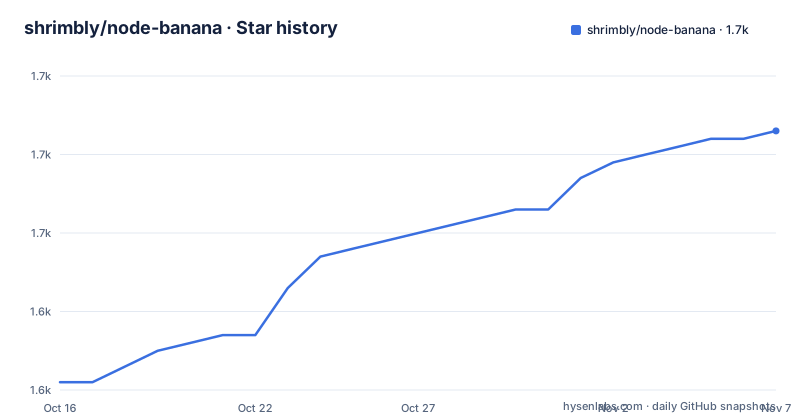
- shrimbly/node-banana1,663 ★ · +32
| Repository | 2026-10-16 | 2026-11-07 |
|---|---|---|
| shrimbly/node-banana | 1.6k | 1.7k |
32 Stars in the last 22 days, measured from the daily GitHub snapshot. Compare with other projects
Editorial analysis
What Problem Node Banana Solves
Node Banana addresses the problem of assembling multi-step AI media jobs without writing a separate integration script for every model or provider. The README describes it as an open visual workflow editor for AI APIs. Users place nodes on an infinite canvas, connect them through typed handles, and execute the resulting pipeline in dependency order. Its audience includes people experimenting with or automating image, video, audio, 3D, and text generation, particularly when a workflow calls more than one provider.
The project supports Google Gemini, Replicate, fal.ai, Kie.ai, WaveSpeed, ComfyUI, and OpenAI. The README also lists prompt variables, LLM-powered prompt construction, natural-language workflow generation, batch runs, asset organization, image annotation, and portable JSON workflows. This is more than a prompt interface. Its purpose is to express relationships between operations, such as generating an input, editing it, passing it into another model, and retaining an association between the resulting asset and its source workflow.
Node Banana is not itself an AI model. It does not remove the need for provider accounts, API credentials, or usage charges. According to the README, Node Banana calls providers directly with the user's keys, and provider usage is billed by those companies. That distinction matters when evaluating the project's privacy model. Workflows and generated media remain on disk, while the selected service still receives the requests required to perform generation.
How the Node Graph Reaches Local Files and APIs
The application uses a browser or Electron interface backed by a local Node.js server. In `package.json`, `npm run dev` starts `node server.js`, while `npm start` runs the same server in production mode after a build. The README states that the development and production servers listen on `127.0.0.1` only. The Electron server uses `127.0.0.1:47831` and accepts authenticated requests from the Electron session. Browser storage is tied to the origin, which is why the README warns that the Electron port should remain consistent if existing browser storage must continue to work.
The workflow model is dependency based. A node receives inputs through typed handles and passes outputs onward, allowing a workflow to chain several AI models. Dynamic Prompting adds variables, reusable prompt chains, and LLM- or VLM-assisted text construction. Group locking changes execution by allowing selected node groups to be skipped. Batch runs repeat a workflow or group N times and tag each output with its run.
The Assets view handles output separately from the canvas. The README says generated items are saved as they are created and can be browsed with filters, favourites, tags, and links to the workflow that produced them. `Cmd/Ctrl+S` saves manually, and autosave follows edits. Portable JSON provides a file-based interchange format, but the README does not define a formal backward-compatibility policy for workflow schemas created by different Node Banana versions.
Installing Node Banana and Opening a Browser Workflow
The documented source installation requires Node.js 18 or later and npm. The following commands clone the repository, install its dependencies, start the development server, and leave the editor available locally. This installation path is suitable for evaluating the browser interface, although provider keys are still needed for generation.
git clone https://github.com/shrimbly/node-banana.git
cd node-banana
npm install
npm run dev
After the server starts, open `http://localhost:3000` as stated in the README. Then open Settings and paste the keys for the providers used by the workflow. The `.env.example` names `GEMINI_API_KEY`, `OPENAI_API_KEY`, `ANTHROPIC_API_KEY`, `REPLICATE_API_KEY`, `FAL_API_KEY`, `KIE_API_KEY`, `WAVESPEED_API_KEY`, and `COMFY_API_KEY`. It also states that `COMFY_CLOUD_API_KEY` is accepted as a fallback for the Comfy API configuration. These variables are optional according to the provider comments except where a particular generation task requires one.
A first workflow can begin with a prompt or text node, connect it to an image, video, audio, or 3D generation node, inspect the selected provider and model in the node settings, and run the graph. The README does not provide one model-selection command because provider configuration is performed in the interface. The repository includes `examples/kitchen-sink.json`, `examples/stress-workflow.json`, and `examples/Seedance-2-Parametric-Prompt.json`, which offer existing workflow files to inspect through the application.
Running Node Banana in Electron
The desktop build changes the packaging and local server boundary without replacing the graph-based workflow system. The README describes a signed and notarised Mac download for Apple Silicon and a Windows x64 installer. Windows requires Windows 10 or later, while the Mac build requires macOS 13 or later. The Windows installer is not code-signed, so SmartScreen may display a warning on first launch.
Electron development has a separate Node.js requirement. The README calls for Node.js 22.12 or newer because of the Electron tooling. After dependencies are installed, this command starts the development application and its local Next.js server:
npm run electron:devThe desktop source version reads the same `.env.local` as the browser version, and keys can also be entered through Settings. Electron settings use a separate persistent profile, so existing browser settings are not imported automatically. Workflow files remain ordinary files that either version can open. `NODE_BANANA_ELECTRON_USER_DATA` can point to an alternate absolute profile directory, while `NODE_BANANA_ELECTRON_PORT` can override the desktop port when `47831` is occupied.
A production-style Electron run uses the documented build and start scripts:
npm run build
npm run electron:start
The desktop app updates itself from GitHub Releases. The README says each release lists SHA-256 checksums for its installers, which gives users a way to compare downloaded files. It does not document an application rollback procedure, so users should not assume that an update can be reversed from the interface.
Local Storage and Network Exposure Constraints
Node Banana's default local servers bind to `127.0.0.1`, which prevents ordinary network access from other devices. The README documents an override for users who intentionally need access from another machine:
HOST=0.0.0.0 npm startThis command changes the server binding address, but it does not add an authentication layer. The README says to use it only on a trusted network or behind an authenticated proxy. Its reason is concrete: the local API reads and writes workflow files and can spend the provider keys stored in `.env.local`. Exposing that endpoint without protection would place application data and paid API access at risk.
Desktop installations store keys encrypted in the OS profile, according to the README. Workflows and generated media are stored as files in a Node Banana folder, with Documents as the default location. Those protections should not be confused with an entirely offline system. Text, image, video, audio, and 3D requests can still leave the machine whenever a workflow calls a cloud provider.
The agent feature introduces another dependency. The README says its chat window builds workflows and edits the canvas through the user's own Claude Code or Codex subscription and the vendor CLI, rather than API credits. This may avoid a separate API bill for agent work, but it depends on the selected vendor CLI and subscription. The README does not provide a complete description of agent permissions or filesystem boundaries.
Provider Coupling and Workflow Failure Modes
The main limitation is that Node Banana orchestrates AI services rather than hosting them. A workflow depends on configured external accounts, valid keys, available quotas, supported models, provider response behavior, and provider billing. The README identifies supported services, but it does not claim that every provider exposes the same model parameters, output formats, error handling, or media types. A node connection that appears valid in the graph may still depend on incompatible upstream and downstream output settings.
Complex graphs also impose inspection costs. A workflow can accumulate many typed connections, prompt chains, provider nodes, annotations, batch runs, and output branches. Grouping and locking help organize or skip portions of the graph, yet they do not replace execution diagnostics. The README does not document automatic retries, partial batch recovery, idempotency, scheduling, or a complete audit record for failed requests. Users who require those semantics should inspect the relevant provider and workflow behavior before adoption.
Batch execution introduces another boundary. The README says a workflow or group can run N times and that each output is tagged by its run. It does not state whether a provider failure stops the entire batch, whether completed outputs remain available after a later failure, or whether rerunning a batch reuses previous outputs. These details matter when generation can incur per-request charges.
ComfyUI and Scripted Provider Integrations Compared
ComfyUI is also supported through Comfy Router, but Node Banana and ComfyUI should not be treated as identical. Node Banana supports Comfy Router and hosted ComfyUI models alongside Replicate, fal.ai, Kie.ai, WaveSpeed, Gemini, and OpenAI. Its application adds typed visual handles, dynamic prompting, an asset library, image annotation, desktop packaging, autosave, and portable JSON workflows.
Node Banana's provider list says that Comfy Router exposes models including Flux, GPT Image, Nano Banana, Seedream, Kling, Veo, Runway, and LTX. That means Node Banana can call Comfy services as one provider among several. It does not mean Node Banana adopts every ComfyUI custom node, execution feature, model definition, or extension. The README gives no claim of full ComfyUI feature parity.
A custom script offers a different tradeoff. A program can call provider APIs directly, store runs in its own database, and define exact retry and scheduling behavior. Node Banana exchanges that explicit control for manual graph composition, reusable workflow files, local asset browsing, and a desktop interface. The visual editor is more useful when users need to inspect and rearrange steps, while a custom script is preferable when execution semantics must be defined in code.
MIT Licensing and Recent Release Activity
The repository identifies Node Banana under the MIT license. That permits use, modification, and distribution under the license's conditions, but it does not transfer the rights or billing obligations of external AI providers. Users remain responsible for provider accounts, usage charges, and compliance with each provider's terms. The MIT license also does not make network requests free or guarantee the availability of third-party models.
The repository is not archived, and its last push was on 2026-10-14. Releases listed for v2.1.0, v2.1.1, and v2.0.0 occurred on 2026-10-11, 2026-10-14, and 2026-10-04. That is recent release activity, but it does not establish how often each supported provider is updated or whether every previous workflow remains compatible.
The desktop updater pulls releases from GitHub, and the README says release entries include installer checksums. It does not document a migration guide, release-candidate policy, or rollback command for Electron profiles and local workflow data. Upgrade planning must therefore account for the application's files as well as the installer itself.
The `package.json` also defines `npm run test:run`, `npm run typecheck`, `npm run electron:test`, `npm run electron:acceptance`, and `npm run electron:performance`. These are contributor-facing verification commands, but the README does not define their pass criteria or connect them to a particular release's compatibility guarantees.
Editorial conclusion
Node Banana suits people building repeatable AI media pipelines who value visual composition, local workflow files, and BYOK provider access. It is a poor fit for users who need a fully offline generation service, a guaranteed no-cost service, or a simple single-request interface. Verify first that the required providers support your intended models, that your operating system has an appropriate desktop build where code signing matters, and that you understand provider billing and the security boundary around `HOST=0.0.0.0`.
Frequently asked questions
How do I install Node Banana?
The source installation requires Node.js 18 or later and npm. Clone the repository, run `npm install`, start `npm run dev`, and open `http://localhost:3000`.
Does Node Banana work without API keys?
AI generation requires a configured provider. The README directs users to enter provider keys in Settings and states that provider usage is billed by the provider.
Where does Node Banana store workflows and generated media?
The README says workflows and generated media are files in the Node Banana folder, with Documents used by default. Desktop keys are stored encrypted in the OS profile.
Can I run the Node Banana desktop app from source?
Yes. The README requires Node.js 22.12 or newer for Electron tooling. Run `npm run electron:dev`, or use `npm run build` followed by `npm run electron:start` for a production build.
Official sources
Add this badge to your README
If you maintain this project, the badge below links readers to this analysis and shows its maintenance status from the daily GitHub snapshot. Paste the markdown into your README; add ?metric=license or ?metric=stars to the image URL for a different field.

[](https://hysenlabs.com/projects/shrimbly-node-banana)Star history chart for your README
[](https://hysenlabs.com/projects/shrimbly-node-banana)Was this useful?