SmolChat-Android: a vector database module with no feature attached yet
Running any GGUF SLMs/LLMs locally, on-device in Android
At a glance
- What is it?
- A Kotlin app that runs GGUF language models on an Android phone through llama.cpp reached as a git submodule and driven over JNI. Three distribution channels, two inference parameters, and a tree that contains more than the page describes: a vector database module nobody mentions, a model hub API layer with no explanation of where models come from, and Vulkan still on the roadmap.
- Who is it for?
- SmolChat-Android is worth trying if you want a local model on a phone and you are willing to move a model file onto the device yourself, because the page never tells you how one gets there and the three install channels cover the application, not the weights. Check three things first.
- Can I use it commercially?
- Yes. Apache-2.0 is a permissive licence: you can use, modify and sell software built on it, as long as you keep its copyright and licence notices.
- Is it still maintained?
- Yes. The repository last received commits 11 days ago.
- What is it written in?
- Mainly Kotlin, according to GitHub's language statistics.
Answers come from the project's GitHub data, last synced on November 25, 2026, and from our analysis. They are not legal advice.
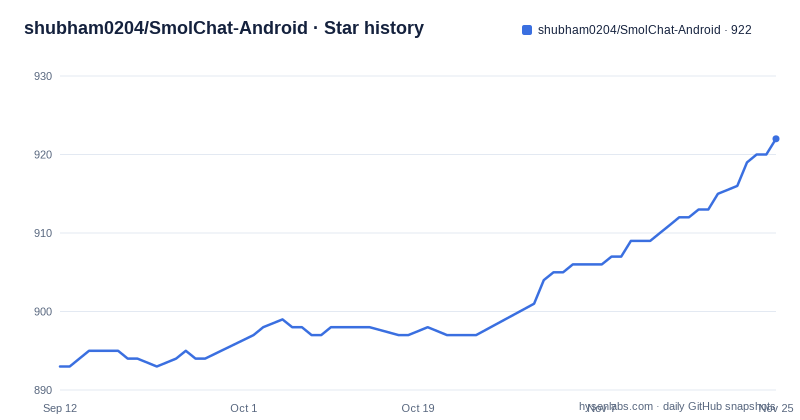
Star history
- shubham0204/SmolChat-Android922 ★ · +29
| Repository | 2026-09-12 | 2026-11-25 |
|---|---|---|
| shubham0204/SmolChat-Android | 893 | 922 |
29 Stars in the last 74 days, measured from the daily GitHub snapshot. Compare with other projects
Editorial analysis
The Play package name still carries the app's old name
Three distribution channels sit at the top of the page. There is a Google Play listing, a sideloaded APK from the repository's releases page, and Obtainium, a third-party updater that takes a repository URL as its source. The package identifier behind the Play listing is `io.shubham0204.smollmandroid`, which carries neither SmolChat nor SmolChat-Android. That matters twice over. Anything you script against the Play entry has to use that identifier, and it is the artefact most people install before they discover the other two channels exist. Obtainium is the only one of the three that surfaces a new version without you going to look: you add the repository URL once, and it notifies you and downloads the release itself. The sideload route is the one that needs the most hand-holding, since the instructions tell you to enable installs from unknown sources and point you at a search for your device to find out how.
A vector database module is in the tree and absent from the page
The top-level listing includes a directory named `smolvectordb`, and the README never mentions it. Not in the project goals, not in the four-part explanation of how the app works, not in the technology list. There is no reference to a vector store, an index, or embeddings anywhere in the visible text. What the roadmap does say is that on-device retrieval-augmented question answering from documents is planned for a future release, and it names a separate repository for that work. So a vector database module is present in the tree ahead of the feature that is supposed to need it, with nothing written about whether it is wired up, partially wired, or left over. If you are evaluating this app for retrieval rather than plain chat, that directory is the first thing to open, and the more useful question is what indexes it.
Nothing on the page explains where a GGUF model comes from
The project goals say users can add and remove models, named as GGUF models, and modify their system prompts. The working section walks through opening a chat, instantiating the inference class, and adding messages by role, and at no point says how a model file arrives on the device. The installation section covers getting the application and nothing else. The single hint is a top-level directory named `hf-model-hub-api`, which suggests the Hugging Face hub is reached through a bundled layer rather than from the app module directly. A reader who wants to try this has to work that part out themselves. Two things the page does pin down: the inference parameters exposed are temperature and min-p, and the one piece of model state the app actually hands down is a file path, held by the `LLMModel` entity and passed to the inference class when a chat opens.
The build needs its submodule, and the clone is deliberately shallow
Building from source is three commands, and the middle one is not optional:
git clone --depth=1 https://github.com/shubham0204/SmolChat-Android
cd SmolChat-Android
git submodule update --init --recursive
The reason is in the tree: `llama.cpp` is a submodule, with a `.gitmodules` file at the root, so the inference engine is not carried in this repository's history. The clone asks for a depth of one, which is the right trade if you only intend to build and the wrong one if you intend to read history or bisect, and the recursive submodule step is what actually brings the engine down. After that, Android Studio starts the build on its own, or you select Build and then Rebuild Project. A device has to be connected and its name visible in the top menu bar for any of it to be useful, so this path is a development setup rather than a way to install.
Chats and tasks differ by one argument passed to loadModel
The Kotlin app reaches the engine through two named classes on the C++ side: an `llm_inference.cpp` class that talks to llama.cpp's C-style API, and a `smollm.cpp` JNI binding, with a Kotlin `SmolLM` class providing the methods on top. The two kinds of conversation are separated by a single argument. A chat persists. The app instantiates the Kotlin class, hands it the model file path held by the `LLMModel` entity, then pulls messages with the `user` and `system` roles out of the database and adds them through `LLMInference::addChatMessage`. A task does not persist, and the app says so by passing `_storeChats=false` to `LLMInference::loadModel`. That single switch is the whole mechanism behind the goal of spinning up a specific downstream task quickly, and it has a consequence worth stating plainly: anything you run as a task leaves no chat history to come back to.
One sibling project link points at a different repository than its label
The closing list points at seven other on-device projects by the same author, and one entry has a label and a target that disagree. The third item is labelled as a FaceNet project built on ML Kit, but the address it links to is the repository named for on-device face recognition in general, which the second item describes as using FaceNet together with MediaPipe and an ObjectBox vector database. Two different stacks, one address, so one of the two descriptions is wrong about which project it is describing. The rest of the list is unambiguous: on-device question answering from documents, CLIP for searching images with text, Meta's segmentation model through onnxruntime, monocular depth estimation through onnxruntime, and sentence embeddings from a MiniLM-class model. Two of those entries name ObjectBox and onnxruntime explicitly, and neither library appears in this app's own technology list.
Vulkan and the mobile GPU are an open question, not a setting
Inference runs on the CPU. The page explains that llama.cpp is written in pure C and C++ and is therefore straightforward to compile for Android targets through the NDK, and that is the path taken here. The roadmap closes with an item asking whether llama.cpp can be compiled to use Vulkan on Android devices, and if so to use the mobile GPU, which reads as an open question rather than a feature waiting for a flag. The other roadmap items are the small conveniences you would expect: naming chats automatically the way two named commercial assistants do, a search bar in the navigation drawer for finding messages inside chats, a background service that talks to a desktop over Bluetooth, HTTP, or WiFi to send inference queries to the phone, and integration of the separate document question answering repository. Release tags here are plain integers, v14 through v16, so a build is pinned by counting.
Editorial conclusion
SmolChat-Android is worth trying if you want a local model on a phone and you are willing to move a model file onto the device yourself, because the page never tells you how one gets there and the three install channels cover the application, not the weights. Check three things first. Nothing on the front page says where GGUF models come from, and the only hint is a top-level directory named for a model hub API, so assume you supply the file. A vector database module sits in the tree while retrieval-augmented question answering is still on the roadmap, so do not count on that feature. And inference runs on the CPU, with Vulkan compilation named as an open question rather than a setting. Two smaller notes for anyone automating around it: the Play listing uses a package identifier that predates the current app name, and the release tags are plain integers rather than semantic versions.
Frequently asked questions
How do I install SmolChat-Android?
Three ways. A Google Play listing under the package identifier io.shubham0204.smollmandroid, a sideloaded APK from the repository's GitHub Releases page, or Obtainium, a third-party updater that tracks the repository URL and notifies you about newer releases so you can download them without visiting the repository.
What is SmolChat?
It is an Android application for running small language models locally on the device. The app is written in Kotlin and reaches llama.cpp through JNI bindings to execute GGUF models, letting you add or remove models, edit their system prompts, and change the temperature and min-p inference parameters.
Does SmolChat-Android use the phone GPU?
Not yet. The page explains that llama.cpp is pure C and C++ and is compiled for Android through the NDK, and the roadmap lists checking whether llama.cpp can be compiled to use Vulkan on Android devices, and if so to use the mobile GPU, as a future task rather than a current setting.
How do I build SmolChat-Android from source?
Clone with a depth of one, change into the directory, and then run git submodule update --init --recursive, which is required because llama.cpp is a submodule. Android Studio then starts the build, or you can select Build and Rebuild Project, and a connected device whose name appears in the top menu bar is needed for a runnable build.
Where does SmolChat-Android keep chat history?
Chats persist and are read back from the database, with messages carrying the user and system roles, added through LLMInference::addChatMessage. Tasks do not persist: the app passes _storeChats=false to LLMInference::loadModel so a downstream task leaves no chat history behind.
Official sources
Add this badge to your README
If you maintain this project, the badge below links readers to this analysis and shows its maintenance status from the daily GitHub snapshot. Paste the markdown into your README; add ?metric=license or ?metric=stars to the image URL for a different field.

[](https://hysenlabs.com/projects/shubham0204-smolchat-android)Star history chart for your README
[](https://hysenlabs.com/projects/shubham0204-smolchat-android)Was this useful?