Houdini Engine for Unreal: one branch, three version numbers, two install paths
Houdini Engine Plugin for Unreal Engine.
At a glance
- What is it?
- sideeffects/HoudiniEngineForUnreal publishes the plugin source, and the file that explains it disagrees with itself in useful ways: the heading says version 3, the newest release is 4.0.2, the build step tells you to enable a plug-in called HoudiniEngine v2, and the project install path drops the Runtime folder the engine path keeps.
- Who is it for?
- This is the right repository if you have a SideFX account, a matching Houdini build and either a source build of Unreal or a project directory you are willing to modify, and the plugin source itself is unusually readable for a vendor repository. Check four things before you commit.
- Can I use it commercially?
- Check first. The repository uses a licence we do not classify automatically, so read its LICENSE file before any commercial use.
- Is it still maintained?
- Yes. The repository last received commits 6 days ago.
- What is it written in?
- Mainly C++, according to GitHub's language statistics.
Answers come from the project's GitHub data, last synced on October 23, 2026, and from our analysis. They are not legal advice.
Star history
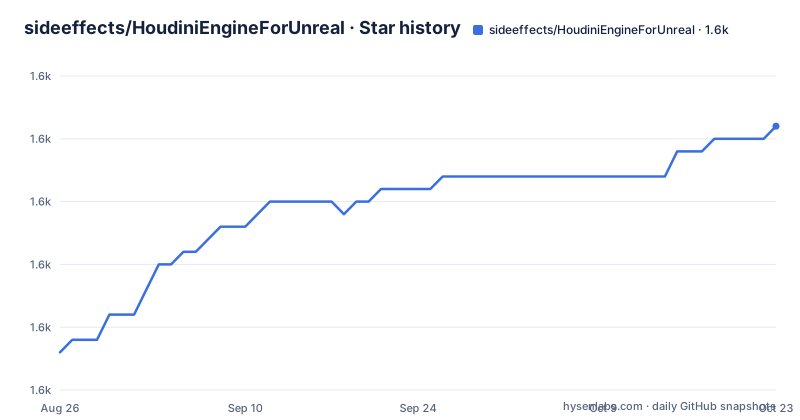
- sideeffects/HoudiniEngineForUnreal1,611 ★ · +18
| Repository | 2026-08-26 | 2026-10-23 |
|---|---|---|
| sideeffects/HoudiniEngineForUnreal | 1.6k | 1.6k |
18 Stars in the last 58 days, measured from the daily GitHub snapshot. Compare with other projects
Editorial analysis
Three version markers disagree inside one plugin
The first line of the file is a heading that says version 3, while the newest published tag is v4.0.2 and the one before it is v4.0.1. Three names in the same repository also appear in the build instructions, where the step after compiling tells you to enable the `HoudiniEngine v2` plug-in in the Rendering section. So a reader following the file top to bottom moves from version 3, to v4.0.2 in the release list, to a menu entry named v2, and none of those three is explained as being legacy. The default branch adds a fourth marker: it is called `Houdini22.0-Unreal5.00`, so a branch name encodes a Houdini major and an Unreal engine minor rather than a plugin version. The root holds `.gitignore`, `Config/`, `Content/`, `HoudiniEngine.uplugin`, `LICENSE.md`, `README.md`, `Resources/` and `Source/`, and the descriptor plus the source are the whole plugin. One more detail belongs here: a `LICENSE.md` sits at the root while no license is recorded for the repository, so what that file grants is not explained anywhere in the instructions.
The version number you check is your Houdini build number
The verification step is the most specific instruction in the whole file, and it explains how the plug-in decides whether it works. Open Edit then Plugins in the Unreal main menu, find Houdini Engine, and check the version number against your Houdini version, written as `HX.Y.Z.` where X.Y.Z is the Houdini version number. The plug-in does not carry an independent version for this purpose, so matching is done against the Houdini build itself. The release names follow the same convention: v4.0.2 is published as Version 4.0.2 with Houdini 22.0.459, v4.0.1 carries Houdini 22.0.429, and v3.0.7 carries Houdini 21.0.729. That is also why the install step says to download the zip that matches your Houdini version rather than the newest one. If you are building the source instead, the same information lives in a different place: the header of `Source/HoudiniEngine/HoudiniEngine.Build.cs` under `Houdini Version` tells you which 64-bit Houdini build to download, and the file tells you to check that spot rather than guess.
One branch serves UE 5.6 through 5.8
Version coverage is handled by reuse rather than by branching. All UE5.X versions of the plug-in use the same source files and branches, and the file says the sources in the 5.0 branch are also intended for more recent plug-in versions such as 5.8 and 5.7, so a tree named for Unreal 5.00 is the source you compile against 5.8. The stated support policy is narrow underneath that: the latest two releases of UE5.X are supported, with an effort to stay compatible with earlier versions. Binaries are published for UE5.8 and UE5.7 and are linked with the latest production build of Houdini, which means the release zip you download is tied to a Houdini production build and not just to a plug-in number. The opening note gives the range in full: 5.8, 5.7 and 5.6, and earlier UE5 versions should also work. Linux is the exception to all of this and gets its own section below, because the binary path stops at Windows and Mac.
The project install path drops the Runtime folder the engine path keeps
The extraction step says to put the `HoudiniEngine` folder into the `Plugins\Runtime` directory of your Unreal directory, then gives two concrete paths. For the engine it is `PATH\TO\UE_5.X\Engine\Plugins\Runtime\HoudiniEngine`. For a project it is `PATH\TO\PROJECT\Plugins\HoudiniEngine`, with no Runtime level. The source build instructions repeat the mismatch from the other direction: cloning into `Engine/Plugins/Runtime` matches the engine path, but the alternative offered there is the `Plugins/Runtime` directory of a project, which is one level deeper than the project path given for the release zip. So two of the four locations in the file disagree with the other two, and nothing says which one wins when Unreal scans for plug-ins. The one piece of advice on placement is about Epic Games Launcher installs: if you are not building Unreal from source, the file recommends the project directory over the engine directory, because an engine directory owned by the launcher is the one likely to be replaced on an update.
Linux gets no binaries, and the source exists in two places
Support for Linux is stated in one sentence and left there: Houdini Engine is not officially supported on Linux. What follows is a workaround rather than a promise. You are told to follow the building from source instructions and use the source code on the repository to build the plug-in yourself. The second sentence is the useful one, because it tells you the plug-in source does not exist only on GitHub. A copy ships inside your Houdini installation, in the `engine\unreal` subdirectory, so a Linux machine with Houdini installed already has the C++ and build files locally and does not need to clone anything. Nothing in the file states which of the two copies is newer when they disagree, and nothing covers the Editor target, the Linux toolchain or the Python plug-ins. Practical effect: on Linux this repository is a source reference rather than a distribution channel, and the release assets published for the other two platforms are not part of the path.
Disabling PCG means three edits and a wildcard delete
PCG was officially released in UE5.7, and before that the project shipped two variants of the plug-in, one with PCG support and one without, for Houdini 21.0 with UE5.6 and earlier. That is why the source in this repository has PCG enabled and why there is now a documented way to turn it off. The procedure edits one flag in three different modules: `private int HOUDINI_USE_PCG = 1;` becomes `0;` in the build.cs of the HoudiniEngine module, and the same change is repeated for HoudiniEngineEditor and HoudiniEngineRuntime. Then it asks you to delete every file matching `*HoudiniPCGXXX.h/cpp`, delete the `Intermediate` and `Binaries` folders if they exist, regenerate the project files and rebuild. Two things make that fragile. The deletion is by wildcard rather than by a listed set of files, and the regenerate step is spelled `Generate Viual Studio Project Files` in the file, with the s missing from Visual. Note also that this procedure applies only to people who clone the repository; anyone taking source from a Houdini install or a release page is told that both variants are already provided.
Cooking runs on another thread and every parameter change recooks
The runtime behaviour is described in a single paragraph and it is worth reading closely, because it explains what the editor is doing. Artists adjust Houdini Digital Asset parameters inside the editor, Unreal assets can be used as inputs, and Houdini cooks the asset so the result is available in the editor with no baking step. The sequence starts by importing a `.otl` or `.hda` file or dragging it into the Content Browser, then dragging the asset into the editor viewport, which spawns a Houdini Asset Actor. Geometry cooking happens in a separate thread and the geometry appears when the cooking completes, at which point the asset parameters show up in the Details pane. Changing any parameter forces the asset to recook and possibly update its geometry. So the cost model is a thread and a recook per edit rather than a bake: fast to iterate, and the work repeats on every change, which is the tradeoff the no-baking sentence is really about.
Building from source begins with the Unreal source drop
The first build step is to get the Unreal Engine source from the `https://github.com/EpicGames/UnrealEngine/releases` location, and the file says nothing about what obtaining it involves, so anyone without access to that source has no path here. The remaining steps are ordinary Unreal plug-in work: clone this repository into a folder named `HoudiniEngine` under `Engine/Plugins/Runtime`, or place it in a project instead; install the 64-bit Houdini build named in the `Houdini Version` header of `Source/HoudiniEngine/HoudiniEngine.Build.cs`; run `GenerateProjectFiles`; and build either x64 `Debug Editor` or x64 `Development Editor`. Two targets are offered and neither is recommended for a given case. Verification has its own two steps that are easy to miss: enable the `HoudiniEngine v2` plug-in from the Plug-ins menu in the Rendering section and restart the editor if you had to, then look for a new Houdini Engine entry in the main menu bar positioned between Edit and Window. That position is the confirmation the file asks you to trust.
Editorial conclusion
This is the right repository if you have a SideFX account, a matching Houdini build and either a source build of Unreal or a project directory you are willing to modify, and the plugin source itself is unusually readable for a vendor repository. Check four things before you commit. Match the Houdini build first, because the version the plug-in reports is the Houdini version and the release zips are named by it, so a mismatch shows up as a plug-in that will not work. Decide whether you want the PCG dependency, since the source here has it enabled and turning it off means editing three build files and deleting source by wildcard. Work out which of the two project paths your layout actually uses, since the extraction step and the listed path disagree. And if your team cares about reuse terms, read `LICENSE.md` yourself: no license is recorded for the repository and that file does not explain its own terms.
Frequently asked questions
How do I install the Houdini Engine plugin for Unreal?
Download from Releases the zip whose version matches your Houdini build, extract the HoudiniEngine folder to the engine's Plugins\Runtime directory or your project's Plugins directory, then open Edit then Plugins and confirm the HX.Y.Z number equals your Houdini version.
What do you use Houdini for inside Unreal Engine?
Houdini Digital Assets. Artists adjust asset parameters in the editor, Unreal assets serve as inputs, and Houdini cooks the asset so the result is available without baking. The cook runs on a separate thread and any parameter change forces a recook.
Is the Houdini Engine plug-in supported on Linux?
Not officially, and no binaries are published for it. The file says to build from source, and notes that the plug-in source is also present in the engine\unreal subdirectory of a Houdini installation.
How do I turn off PCG support when building from source?
Set private int HOUDINI_USE_PCG to 0 in the build.cs of the HoudiniEngine, HoudiniEngineEditor and HoudiniEngineRuntime modules, delete the HoudiniPCG header and source files, remove the Intermediate and Binaries folders, then regenerate project files and build.
Which Unreal Engine versions does the current branch target?
Unreal Engine 5.8, 5.7 and 5.6, with earlier UE5 versions expected to work as well. Published binaries cover 5.8 and 5.7, and all UE5.X versions share the same source files and branches.
Official sources
Add this badge to your README
If you maintain this project, the badge below links readers to this analysis and shows its maintenance status from the daily GitHub snapshot. Paste the markdown into your README; add ?metric=license or ?metric=stars to the image URL for a different field.

[](https://hysenlabs.com/projects/sideeffects-houdiniengineforunreal)Star history chart for your README
[](https://hysenlabs.com/projects/sideeffects-houdiniengineforunreal)Was this useful?