calendar_view: month, week and day views for Flutter, with events in sync across them
A Flutter package allows you to easily implement all calendar UI and calendar event functionality. 👌🔝🎉
At a glance
- What is it?
- calendar_view is a Flutter package that gives an application a calendar interface and the event handling to go with it, with month, day and week views, add, remove and update for events, reminders and full-day items, and a shared state so that a change made in one view appears in the others. Its most useful documentation is the warning about version pinning, because the maintainers say outright that every 2.x release may contain breaking changes.
- Who is it for?
- Adopt calendar_view if you are building an application that needs a calendar with month, week and day views and you would rather not solve the problem of keeping those views in sync yourself, because that synchronisation is the part of the work most likely to be done badly. Do not expect it to be a settled API, because the maintainers say every 2.x release may contain breaking changes and tell you to pin the exact version rather than use a caret.
- Can I use it commercially?
- Yes. MIT is a permissive licence: you can use, modify and sell software built on it, as long as you keep its copyright and licence notices.
- Is it still maintained?
- Yes. The repository last received commits 6 days ago.
- What is it written in?
- Mainly Dart, according to GitHub's language statistics.
Answers come from the project's GitHub data, last synced on November 10, 2026, and from our analysis. They are not legal advice.
Star history
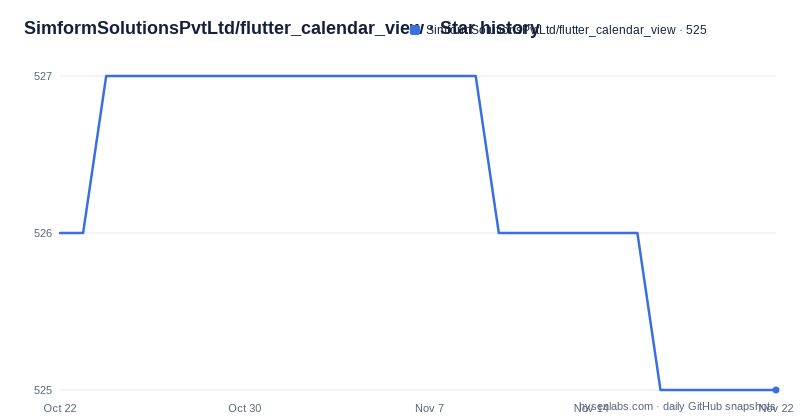
- SimformSolutionsPvtLtd/flutter_calendar_view526 ★ · +0
| Repository | 2026-10-22 | 2026-11-10 |
|---|---|---|
| SimformSolutionsPvtLtd/flutter_calendar_view | 526 | 526 |
0 Stars in the last 19 days, measured from the daily GitHub snapshot. Compare with other projects
Editorial analysis
What the package gives you
calendar_view is a Flutter package that allows you to easily implement all calendar UI and calendar event functionality in your application.
The features list has six entries and the first of them is the shape of the thing. Multiple calendar view options, which is a month view, a day view and a week view. Then highly customisable UI components. Manage events, meaning add, remove and update. Manage reminders, also add, remove and update. Manage full-day events, again add, remove and update. Show working days in the week view and day views. And sync event data between multiple views.
That last one is the feature that decides whether the package is useful to you or merely presentable. A calendar in an application is rarely a single widget. You have a month grid in one place, a week strip in a header, a day agenda in another, and they all show the same events. If each view keeps its own copy, the copies drift, and the user sees a week strip that disagrees with the month grid. Building that synchronisation once is a real saving.
The primary language is Dart, the licence is MIT, the default branch is master, and the homepage is the pub.dev page for the package. The last push was on 2026-08-11 with the project not archived, and the recent releases are 2.0.0 from 2026-03-17, 1.4.0 from 2025-01-07 and 1.3.0 from 2024-11-12.
The package is published on pub.dev as calendar_view, and the repository is one of a family: the README points at other open-source Flutter libraries from the same publisher and at an Awesome Mobile Libraries list, so this is a maintained product line rather than a one-off.
The documentation lives on a separate site at simform-flutter-packages.web.app/calendarView, with implementation details, usage instructions, code examples and advanced features, and the repository holds a doc/ directory with a documentation.md file that the project explicitly invites contributions to.
The version pinning warning, which is the most useful thing in the README
Before the features, the README puts a note that deserves to be read carefully by anyone adding this to a project.
All 2.x.x releases may include breaking changes. To avoid unexpected issues, do not use the caret (^) when depending on any versions of 2.x.x. Instead, pin the exact version.
The example is:
dependencies:
  calendar_view: 2.0.0
So the instruction is to write calendar_view: 2.0.0 rather than calendar_view: ^2.0.0.
This is unusual advice, and it comes from a package that has just made a major version jump. The reason is visible in the release dates. The versions move from 1.3.0 in November 2024 to 1.4.0 in January 2025 and then to 2.0.0 in March 2026, so the 2.x line is where the package is being actively reshaped.
The mechanism is worth understanding, because it explains why the advice matters. A caret constraint lets your package manager take any later 2.x release. If the maintainers keep changing APIs within the major version, that constraint means your build can break on a dependency resolution rather than on a deliberate upgrade. Pinning exact versions means the version you tested is the version you get, and an upgrade becomes a decision you make on purpose.
That is a trade the maintainers are making on your behalf, and it is a defensible one. It is also a signal about what kind of library this is. A calendar UI with view synchronisation and event management has a wide surface, and the API is evidently still finding its shape. The cost of that decision lands on the adopter, because every upgrade has to be checked by hand, and the benefit is that no upgrade happens by surprise.
If you are adding this to a project with a lock file, the practical effect of following the advice is small, since the lock file pins things anyway. The effect matters more in a project that resolves fresh, and in an application with a long-lived codebase where a surprise API change is expensive.
The event model, and what the three manage verbs cover
The README lists add, remove and update operations for events, reminders and full-day events. These feature-list labels do not establish that reminders are independent notifications or that full-day items use a separate data model. Check the API for the version in use and provide persistence and notification delivery where your application requires them.
The event controller exposes methods such as add, remove and update and notifies listeners when its data changes. Views connected to the same controller can reflect those changes; test the wiring and custom event handling in your application.
The source includes recurrence-related methods, while some comments describe recurrence support differently. Consult the current version's API and test the recurrence rules you need rather than assuming complete scheduling support.
The repository, and the example app as the real documentation
The top-level listing is what you would expect for a Flutter package with a documentation site, and one entry is more informative than the rest.
There is lib/ for the package source, test/ for the tests, example/ for a sample application, doc/ for the documentation, readme_assets/ for the images the README embeds, and pubspec.yaml, analysis_options.yaml, CHANGELOG.md, CONTRIBUTING.md, LICENSE and .github/.
The analysis_options.yaml is worth a mention because it is a Dart-specific convention. It holds the lint configuration that the package's own code is checked against, and it means the package is held to the community's static analysis rules rather than a private set.
The example/ directory is the part that matters most, and it is a complete application rather than a snippet. There is an .fvmrc, which pins the Flutter version the example is built against, so a contributor does not silently test against a different SDK. There are platform directories for android, ios, linux, macos, web and windows, but their presence alone does not establish that each platform is currently tested or working.
There is an l10n.yaml, so the example has localisation set up, and there are lib/ and test/ directories inside the example alongside its own pubspec.yaml and analysis_options.yaml, so the example is a proper Dart project rather than a loose folder of screens.
That is the shape to expect from a package that has been through a 2.0 rewrite. The example app is where the three views, the event management and the synchronisation are actually visible, and the documentation site is the written version of the same thing. For a package whose main selling point is a UI, the example is a more reliable guide than the feature list, and the FVM pin tells you the exact toolchain to reproduce it with.
The README also points at the package's issue tracker and its Discussions tab, and says the project is happy to help and encourages community contributions, with a separate invitation to contribute documentation updates specifically through the doc/documentation.md file.
How to evaluate it, and what to check first
There are four things to consider, and the first is the version pinning advice, which should shape how you depend on it.
The maintainers say outright that any 2.x release may contain breaking changes and that you should pin the exact version rather than use a caret. That is unusual for a package, and it means you are opting into manual upgrade management. If your project resolves dependencies fresh on every build, expect to review each release. If you have a lock file, the cost is lower, but you should still read the changelog between versions rather than let a resolution surprise you.
Second, the event model against your requirements. The package covers events, reminders and full-day items across month, day and week views, with add, remove and update for each. The feature list does not describe attendees, invitations or calendar sharing. The source includes recurrence-related methods, so assess the exact release's recurrence behavior and test your requirements rather than inferring support solely from the feature list.
Third, the state synchronisation, since that is the feature that saves you the most work and the one you should verify first. Open the example, change an event in the month grid, and check that the week strip and the day agenda reflect it immediately. If that works, the package has done the hard part. If it does not, the value of the package drops to the rendering work alone.
Fourth, the platform story. The example carries directories for Android, iOS, Linux, macOS, web and Windows, which is a good sign that the widget is not tied to one platform. The package is on pub.dev with a version and download badge, and the publisher maintains a range of other libraries, so there is some continuity around it.
The package provides calendar views and an event controller under MIT; applications still need to validate integration, persistence and any notification requirements, and the maintainers advise pinning 2.x versions. The honest summary is that it is a young 2.x package from a company with a track record of shipping Flutter packages, and the pinning advice is the maintainers telling you so.
Editorial conclusion
Adopt calendar_view if you are building an application that needs a calendar with month, week and day views and you would rather not solve the problem of keeping those views in sync yourself, because that synchronisation is the part of the work most likely to be done badly. Do not expect it to be a settled API, because the maintainers say every 2.x release may contain breaking changes and tell you to pin the exact version rather than use a caret. Before you commit, run the example using its configured Flutter toolchain, test changes across views sharing an event controller, and check recurrence, notifications, persistence, invitations and sharing against the specific version and your application's requirements.
Frequently asked questions
What does the calendar_view Flutter package provide?
The README lists month, day and week views, customizable UI, event, reminder and full-day event management, working-day display and synchronization across views. Check the API and implement any required persistence or operating-system notifications in your application.
Why does the calendar_view README tell me to pin the exact version?
Because all 2.x.x releases may include breaking changes. The README says to avoid the caret when depending on any 2.x.x version and to pin the exact version instead, giving the example of calendar_view: 2.0.0. The 2.x line is where the package is being actively reshaped, so an unpinned dependency could break on a resolution rather than a deliberate upgrade.
How is calendar_view installed?
Add an exact tested version to pubspec.yaml, for example calendar_view: 2.0.0. The maintainers advise pinning 2.x releases because they may contain breaking changes; check pub.dev for available versions.
What is in the calendar_view example project?
A complete application rather than a snippet, with platform directories for android, ios, linux, macos, web and windows, its own lib/ and test/ directories, its own pubspec.yaml and analysis_options.yaml, an l10n.yaml for localisation and an .fvmrc pinning the Flutter version the example is built against.
Where is the calendar_view documentation?
At the documentation site, simform-flutter-packages.web.app/calendarView, which carries implementation details, usage instructions, code examples and advanced features. The repository also holds a doc/ directory with a documentation.md file, and the project specifically invites pull requests that improve that file.
Official sources
Add this badge to your README
If you maintain this project, the badge below links readers to this analysis and shows its maintenance status from the daily GitHub snapshot. Paste the markdown into your README; add ?metric=license or ?metric=stars to the image URL for a different field.

[](https://hysenlabs.com/projects/simformsolutionspvtltd-flutter-calendar-view)Star history chart for your README
[](https://hysenlabs.com/projects/simformsolutionspvtltd-flutter-calendar-view)Was this useful?