ShowcaseView for Interactive Flutter App Tours
Flutter plugin that allows you to showcase your features on flutter application. 👌🔝🎉
At a glance
- What is it?
- ShowcaseView is a Flutter package for highlighting selected widgets through a guided UI sequence. It supports custom tooltips, automatic scrolling, animations, and grouped targets, while most API details remain in separate documentation.
- Who is it for?
- Flutter teams that need configurable in-app feature tours should evaluate ShowcaseView after checking tooltip placement under their real layout constraints and reviewing the example API. Projects requiring persistent labels, automatic user segmentation, or remote control of tours should reject it unless their own code supplies those features.
- Can I use it commercially?
- Yes. MIT is a permissive licence: you can use, modify and sell software built on it, as long as you keep its copyright and licence notices.
- Is it still maintained?
- Yes. The repository last received commits 43 days ago.
- What is it written in?
- Mainly Dart, according to GitHub's language statistics.
Answers come from the project's GitHub data, last synced on October 23, 2026, and from our analysis. They are not legal advice.
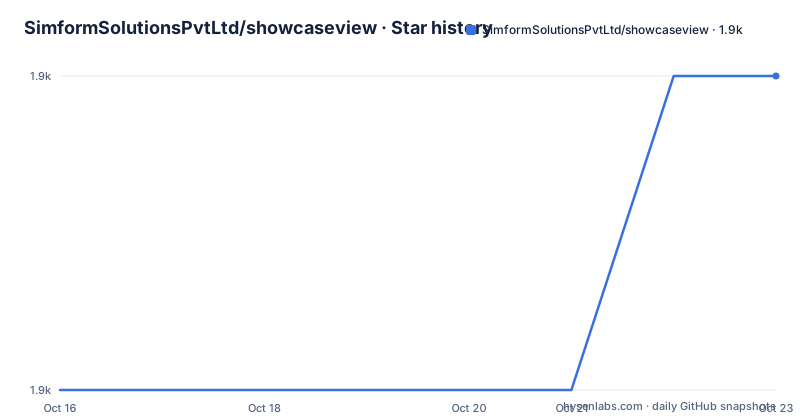
Star history
- SimformSolutionsPvtLtd/showcaseview1,935 ★ · +1
| Repository | 2026-10-16 | 2026-10-23 |
|---|---|---|
| SimformSolutionsPvtLtd/showcaseview | 1.9k | 1.9k |
1 Stars in the last 7 days, measured from the daily GitHub snapshot. Compare with other projects
Editorial analysis
Why Flutter Teams Would Use ShowcaseView
ShowcaseView addresses a presentation problem inside Flutter applications: directing a user's attention toward selected interface elements. A developer can arrange widgets into a sequence, highlight each one, and attach explanatory content to the step. This suits first-run education, feature discovery, and instructions tied directly to controls in a screen.
The package serves Flutter developers, not content authors working outside the application. Its target references are connected to widgets, and its documented behavior includes moving a target into the visible area before presenting it. The repository contains `lib/` for the package and `example/` for a working application with platform folders. The README also provides a web demo, showing that the concept can be presented outside mobile applications, although it does not list browser compatibility.
ShowcaseView does not decide which features a user should learn or infer a person's progress. The application defines the targets, order, wording, and transitions. That makes the package a construction set for in-app tours rather than an autonomous onboarding service. Teams seeking behavior based on account role, previous visits, or remote configuration must supply that logic themselves.
It is also unsuited to permanent explanatory labels beside form fields. Its documented model centers on a temporary sequence of highlighted widgets. Conventional help text, inline validation, or a dedicated help screen remain separate interface patterns.
How Widget Targets and Tooltips Interact
The documented flow starts when an application configures widgets and step content, then initiates the tour. ShowcaseView highlights a selected widget while displaying related tooltip information. Step content can include a title, description, action, and styling, so presentation remains application-defined rather than being inferred from the target.
Automatic scrolling is built into the package. According to the README, ShowcaseView handles scrolling a widget into view. This reduces the need to coordinate a target's position with each tour transition, especially for long settings pages or forms. The exact point at which scrolling finishes and the next tooltip appears is not documented in the README.
The package also supports custom tooltip widgets. Developers can therefore supply their own visual structure instead of accepting one fixed tooltip. Animated entrances and transitions are listed as available, as is targeting several widgets at once. Grouped targets broaden the use case beyond a single spotlight around one control, but the README does not explain grouping order, spacing, or whether one shared tooltip is used.
Several implementation questions remain outside the README. It does not state how the overlay behaves after route changes, whether the package blocks input to uncovered controls, or how repeated widget keys are handled. It also gives no details about text scaling, keyboard avoidance, tooltip edge constraints, or disposal during navigation. An application with complex overlays should answer those questions before accepting the dependency.
Based on the repository layout and README, `example/lib/` is the clearest source for working Dart integration. The README itself does not include constructor names, target registration calls, or start methods, so inventing a minimal code example would misstate the API.
Installing the Package and Beginning an App Tour
The README identifies `showcaseview` as a pub.dev package. Release information lists `5.1.0`, published on 2026-06-17, as the newest release shown. Add the package under `dependencies` in the Flutter application's `pubspec.yaml`, using the README's version placeholder:
dependencies:
 showcaseview: <latest-version>
The README's generic installation example uses `<latest-version>` rather than pinning a release. The README does not show which concrete version should replace the placeholder. Flutter must then resolve and download the dependency through its normal package workflow. The README does not include the relevant command, so this article does not claim a command that the project has not documented.
The next documented source is the example application and the linked package documentation. `example/lib/` should show how the package is wired into a Flutter widget tree, while the documentation site contains usage instructions and advanced configuration. The README does not state that either source includes a minimal one-step tour, so developers should locate the current integration example before writing production code.
A first adoption check should also include the release age and current Flutter setup. ShowcaseView `5.1.0` is the newest listed release, but the README does not declare minimum or maximum Flutter SDK versions. The package configuration alone cannot establish compatibility.
Version 5 Performance Claims and Their Boundaries
The release history contains `5.1.0` from 2026-06-17, `5.0.2` from 2026-04-24, and `5.0.1` from 2025-10-17. The README attributes performance work to version `5.0.0+`, including changes intended to reduce memory use and improve rendering.
The project's README reports memory usage falling from `1.8 MB` to `0.6 MB`, average FPS increasing from `58` to `88 FPS`, and initial render time dropping from `68ms` to `24ms`. It states that these metrics came from internal benchmarking on a mid-tier Android device. They are project-reported results, not measurements on an independent device or within a user's application.
Important context is absent. The README does not identify the exact device, Flutter version, rendering mode, test screen, package configuration, number of steps, or profiling method. It also does not explain whether the memory figures cover only the package or the entire example application. Without that context, the numbers cannot establish predictable gains for another project.
The repository is not archived, and its last push was on 2026-09-10. That is evidence of recent development activity, not proof of SDK compatibility. The README also lacks migration instructions from earlier major versions. Applications upgrading an existing integration should review `CHANGELOG.md` and the linked documentation for API changes before changing the dependency constraint.
Where ShowcaseView Falls Short
The clearest limitation is documentation depth. The README confirms core features and installation through `pubspec.yaml`, but it does not provide a complete Dart example. It also omits lifecycle, accessibility, localization, callback, and failure behavior. For a UI package whose correctness depends on precise placement, that forces an engineer to cross-check the README against `example/lib/` and the external documentation.
Customization can increase this burden. A custom tooltip widget offers direct control over presentation, yet the integration may assume knowledge that the README does not supply. Teams with large text, screen readers, split-screen windows, or dense overlays must confirm how the package measures available space and handles targets obscured by system UI. The feature list does not settle those cases.
Persistence is another boundary. The README does not document storage for completion state, analytics events, server-driven sequences, conditional steps, or automatic restarts. An application that needs those capabilities must implement them around the package. Guessing callback names or storage behavior would create an unreliable integration.
The incorrect-tool case is equally direct. Choose persistent inline help instead when users need a label beside every input. Choose a dedicated instruction screen when a linear tour would remove access to the underlying feature. Choose a hand-built overlay when the host application already owns a strict navigation and input layer and cannot accept another overlay lifecycle.
MIT Terms and the Custom Overlay Alternative
The project uses the MIT License and links its license documentation from the README. A `LICENSE` file is also present at the repository root. The license allows modification and redistribution subject to its conditions, including preservation of the copyright and permission notice. This is a summary rather than legal advice, and distributors should review the actual license text and dependency notices.
The clearest alternative is an overlay built directly in Flutter with `Overlay` or `OverlayEntry`. In that approach, the application registers target widgets, calculates display positions, renders its own dimmed region and tooltip, and decides how input passes through the overlay. It can coordinate directly with existing navigation and design-system code. The application also owns cleanup when routes change or widgets disappear.
That approach has a clear cost. Developers must implement target discovery, scroll coordination, transitions, grouped highlighting, and lifecycle removal themselves. ShowcaseView moves those mechanics into a dependency and exposes documented options for automatic scrolling, custom tooltips, animations, and multiple targets. The decision is therefore between less application code and direct control over the overlay implementation.
A custom overlay is the better fit when strict integration control outweighs package convenience. ShowcaseView is the better fit when its documented interactions fit the application and its external documentation covers the required lifecycle behavior.
Editorial conclusion
Flutter teams that need configurable in-app feature tours should evaluate ShowcaseView after checking tooltip placement under their real layout constraints and reviewing the example API. Projects requiring persistent labels, automatic user segmentation, or remote control of tours should reject it unless their own code supplies those features.
Frequently asked questions
How do I install ShowcaseView in a Flutter project?
Add `showcaseview` under `dependencies` in `pubspec.yaml`. The README uses `<latest-version>` as the version placeholder.
Does ShowcaseView scroll a target widget into view?
Yes. The README says ShowcaseView handles scrolling a widget into view before presenting it.
Can ShowcaseView use a custom tooltip and multiple targets?
Yes. The README lists custom tooltip widgets and options for presenting multiple widgets at once.
Official sources
Add this badge to your README
If you maintain this project, the badge below links readers to this analysis and shows its maintenance status from the daily GitHub snapshot. Paste the markdown into your README; add ?metric=license or ?metric=stars to the image URL for a different field.

[](https://hysenlabs.com/projects/simformsolutionspvtltd-showcaseview)Star history chart for your README
[](https://hysenlabs.com/projects/simformsolutionspvtltd-showcaseview)Was this useful?