boxen for formatted terminal messages
Create boxes in the terminal
At a glance
- What is it?
- boxen turns JavaScript strings into bordered terminal output with configurable dimensions, colors, titles, alignment, and wrapping. It is useful for concise CLI notices, but fixed dimensions and ANSI-styled Unicode borders can make it unsuitable for some terminals.
- Who is it for?
- Engineers building Node.js command-line tools should consider boxen when a compact framed message improves readability, provided its terminal output remains suitable for the target environments. Projects that require machine-readable output, arbitrary plain text, or predictable rendering across limited terminals should avoid decorative boxes.
- Can I use it commercially?
- Yes. MIT is a permissive licence: you can use, modify and sell software built on it, as long as you keep its copyright and licence notices.
- Is it still maintained?
- Yes. The repository last received commits 47 days ago.
- What is it written in?
- Mainly JavaScript, according to GitHub's language statistics.
Answers come from the project's GitHub data, last synced on November 6, 2026, and from our analysis. They are not legal advice.
Star history
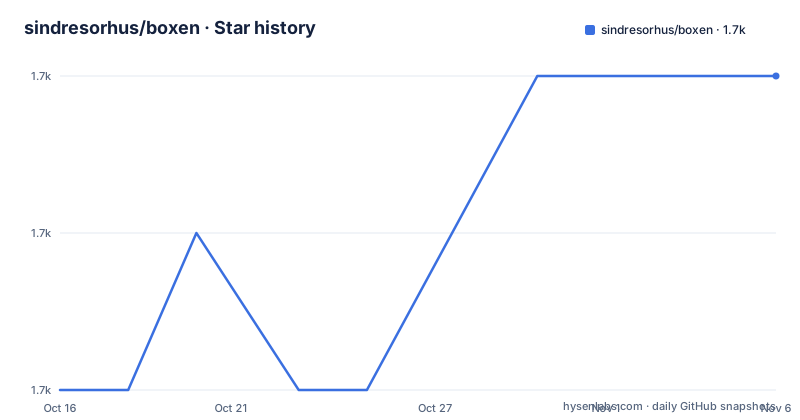
- sindresorhus/boxen1,678 ★ · +2
| Repository | 2026-10-16 | 2026-11-06 |
|---|---|---|
| sindresorhus/boxen | 1.7k | 1.7k |
2 Stars in the last 21 days, measured from the daily GitHub snapshot. Compare with other projects
Editorial analysis
boxen's purpose in Node.js terminal output
boxen solves a narrow presentation problem: adding a visual frame around text printed by a JavaScript program. It is intended for developers producing terminal output from Node.js, especially command-line tools that need to distinguish notices, status messages, or promotional text from ordinary log lines. The package is not a CLI itself and does not parse input. Its public operation is a JavaScript function that receives a string and optional formatting settings, then returns the rendered box for use with `console.log`.
This makes boxen closer to a presentation helper than a terminal UI framework. It handles a single text block rather than forms, prompts, tables, live-updating regions, or interactive components. That narrow scope is useful when the desired result is simply a bounded message such as a package installation warning or a short command result. It also means boxen should not be confused with output serialization. Passing JSON through boxen produces a framed representation intended for people, not a replacement for parsing or structured transport.
The package is ESM based. Its `package.json` sets `"type": "module"`, exposes `./index.js` as the default export, and provides `./index.d.ts` as the type entry. That shape suits modern JavaScript projects that already use `import`. Projects built around CommonJS or older Node.js releases would need to account for the declared engine requirement and ESM configuration before adding it.
How boxen constructs framed output
boxen accepts text as its first argument and an options object as its second. The supplied text becomes the box body, while the options control the frame, spacing, dimensions, colors, title, footer, and alignment. The result is plain JavaScript output intended to be passed to a console method. The README demonstrates that flow with `console.log(boxen('unicorn', {padding: 1}))`.
The library relies on focused terminal-formatting packages. `chalk` handles terminal styling, `cli-boxes` supplies named border shapes, `slice-ansi` slices ANSI-formatted strings, `string-width` measures visible text, `widest-line` finds the width of multiline content, and `wrap-ansi` wraps content. `type-fest` appears as a regular dependency and is also relevant to the package's type surface. Based on `package.json`, those packages form the support layer around layout and terminal string handling rather than leaving all measurement and coloring logic inside the exported function.
Several formatting rules affect the visible result. The default border is `'single'`, while predefined alternatives include `'double'`, `'round'`, `'bold'`, `'singleDouble'`, `'doubleSingle'`, `'classic'`, `'arrow'`, and `'none'`. A caller can also provide an object containing `topLeft`, `topRight`, `bottomLeft`, `bottomRight`, `top`, `bottom`, `left`, and `right`. This makes boxen useful when a preset is not part of the application's intended output, although custom borders still need to fit the terminal's character support.
Padding and margin accept either a number or an object with `top`, `right`, `bottom`, and `left`. With numeric values, the documentation says horizontal padding or margin is three times the vertical value to create a balanced shape. Titles and footers can expand the horizontal frame when needed. `textAlignment` controls body text relative to the widest line, while `titleAlignment` and `footerAlignment` independently control their placement in the upper and lower borders.
Installing boxen and rendering the first message
The README gives `npm install boxen` as the installation command. Before installing it, check the package manifest's declared runtime requirement: `package.json` lists Node.js `>=22`. The repository has no documented application-specific setup or configuration file for this simple function, so installation and import are the relevant setup steps.
Install the package with npm in the project that will print the box:
npm install boxenAfter installation, import the default export from `boxen`. This example adds one level of padding and sends the returned string to `console.log`:
import boxen from 'boxen';

console.log(boxen('unicorn', {padding: 1}));
The README shows that this produces a single-line box containing `unicorn`, with an empty padded line above and below it. The actual border glyphs depend on the terminal's ability to render them, and ANSI color behavior depends on the terminal and runtime environment.
A second useful first exercise is to combine a title with a different border style. This makes the relationship between body text, border configuration, and title expansion visible:
import boxen from 'boxen';

console.log(boxen('unicorns love rainbows', {
	title: 'magical',
	titleAlignment: 'center'
}));
Here, `title` is inserted into the top border and `titleAlignment: 'center'` places it between the left and right border segments. The box expands horizontally if the title does not fit. The README also demonstrates `borderStyle: 'double'` and `margin: 1`, which adds a visual gap around the frame.
Sizing, wrapping, and fullscreen behavior
boxen provides several distinct sizing controls, and choosing among them correctly matters more than changing colors. `width` sets a fixed box width and accepts either a number or numeric string. The README warns that fixed width disables terminal overflow handling. If the terminal is narrower than the requested result, the box can look broken. This setting is best treated as a deliberate layout constraint rather than a universal default.
`maxWidth` allows the box to grow with its content while placing an upper limit on the result. The README shows text wrapping when the content exceeds the maximum. It also records an important exception: a single character wider than the remaining space can still enlarge the box because boxen does not split that character. `maxWidth` has no effect when `width` is set, so applications should not configure both and expect the maximum to win.
`height` sets a fixed height. The documentation warns that content overflowing this height is cropped. This is a real failure mode for status messages whose length can change, because the same code can display complete text in one run and lose lower lines in another.
For terminal-sized layouts, `fullscreen` can fill available screen space. It accepts a boolean or a callback receiving `(width, height)` and returning `[width, height]`. The README's callback example subtracts one from the returned height. That subtraction appears to reserve vertical space for surrounding output, although the package does not define a general layout manager around it. Callers remain responsible for combining a fullscreen box with other terminal content correctly.
`float` can place a smaller box within available screen space using `'left'`, `'center'`, or `'right'`. This affects placement, not the semantic content of the message. These controls are useful for deliberate presentation, but they also increase dependence on terminal dimensions and should be exercised in the same environments where the CLI will run.
Color, title, and footer trade-offs
boxen separates body decoration into `borderColor`, `titleColor`, and `backgroundColor`. The README lists named colors, bright title colors, and hexadecimal values such as `'#ff0000'` where supported. `dimBorder` reduces border opacity, and `borderBackgroundColor` can inherit `backgroundColor` with `'inherit'` or disable the border background with `undefined`. These options let a CLI align the frame with an existing terminal style, but they also add another layer whose appearance can vary across terminals.
Titles and footers are more than captions. A title occupies part of the top border, while a footer occupies part of the bottom border. If either string is wider than the body requires, the box expands. `titleAlignment` and `footerAlignment` each accept `'left'`, `'center'`, or `'right'`, with `'left'` as the documented default. Styling already applied directly to `title` takes precedence over `titleColor`, according to the README.
For logging systems, this design has a tradeoff. A title or footer can make a warning easy to distinguish, but it also changes the rendered structure around the body. Code that later parses logs, captures output for tests, or redirects it to a plain file should not assume that the displayed message remains easy to extract. The package is intended for presentation, and its API does not provide a separate plain-text representation alongside the decorated result.
Maintenance, licensing, and package boundaries
The repository is not archived. Its last push was on 2026-09-21, and the listed releases include v9.0.0 on 2026-09-21, v8.0.1 on 2024-08-05, and v8.0.0 on 2024-07-13. Those facts establish recent repository activity around the current release, but they do not guarantee compatibility with every Node.js application. The manifest's engine requirement remains the clearest adoption constraint: boxen v9.0.0 declares support for Node.js `>=22`.
The package is licensed under MIT. That permits use and modification under the license's conditions, but license compliance and compatibility with a project's distribution model still need to be handled by the adopting team. The manifest marks the package as having no side effects, which is useful when it is imported only for explicit function calls. It also publishes only `index.js` and `index.d.ts` according to the `files` field, so consumers should rely on the documented export rather than undocumented internal paths.
A real alternative is to render the frame manually with a template, for example by concatenating a top line, padded text lines, and a bottom line. That approach avoids boxen's border styles, color helpers, wrapping dependencies, and terminal measurement behavior. Its downside is that the application must implement width calculation, ANSI handling, multiline wrapping, and style selection itself. Another alternative is to emit the message without a frame, which is usually the better choice for logs consumed by machines or terminals with unreliable Unicode support. boxen is most defensible when visual grouping is the goal and its formatting behavior matches the application's output environment.
Editorial conclusion
Engineers building Node.js command-line tools should consider boxen when a compact framed message improves readability, provided its terminal output remains suitable for the target environments. Projects that require machine-readable output, arbitrary plain text, or predictable rendering across limited terminals should avoid decorative boxes. Before adoption, verify Node.js 22 or newer, inspect the selected border styles in the deployment terminal, and test the chosen width, height, and color settings with representative strings.
Frequently asked questions
How do I install boxen?
The README documents installing it with `npm install boxen`. The package manifest requires Node.js `>=22`.
What does boxen do in a Node.js program?
It accepts a string and optional styling or sizing options, then returns a formatted box that can be passed to `console.log`. It is a presentation helper, not a terminal input or application framework.
Can boxen wrap long text?
The `maxWidth` option grows with the content but prevents the box from exceeding the specified maximum, causing suitable content to wrap. A character wider than the available space can still make the box wider because it is not split.
What is the difference between width and maxWidth in boxen?
`width` sets a fixed width and disables terminal overflow handling. `maxWidth` allows the box to grow with content up to the limit. The documentation says `maxWidth` has no effect when `width` is set.
Does boxen support CommonJS?
The repository is configured as an ESM package with `"type": "module"`, and the README examples use `import boxen from 'boxen'`. The manifest also requires Node.js `>=22`.
Official sources
Add this badge to your README
If you maintain this project, the badge below links readers to this analysis and shows its maintenance status from the daily GitHub snapshot. Paste the markdown into your README; add ?metric=license or ?metric=stars to the image URL for a different field.

[](https://hysenlabs.com/projects/sindresorhus-boxen)Star history chart for your README
[](https://hysenlabs.com/projects/sindresorhus-boxen)Was this useful?