modern-normalize: three browsers, one global box-sizing, and a test script that only lints
🐒 Normalize browsers' default style
At a glance
- What is it?
- modern-normalize is a single CSS file that normalizes browser defaults for the latest Chrome, Firefox and Safari, and deliberately drops support for everything older. Two details in the manifest are worth knowing before you adopt it. The npm test script runs stylelint and nothing else, with the browser acceptance suites parked behind a second script, and a release rewrites a version string inside the stylesheet and stages it, so that line is generated.
- Who is it for?
- Use it if you ship only evergreen browsers and want a reset small enough to read in one sitting, and read the file before you ship it. Do not use it if you support older browsers, since its coverage stops at the latest three, and do not treat it as neutral, because the global box-sizing rule is a design decision that will change your own measurements.
- Can I use it commercially?
- Yes. MIT is a permissive licence: you can use, modify and sell software built on it, as long as you keep its copyright and licence notices.
- Is it still maintained?
- Yes. The repository last received commits 58 days ago.
- What is it written in?
- Mainly TypeScript, according to GitHub's language statistics.
Answers come from the project's GitHub data, last synced on November 15, 2026, and from our analysis. They are not legal advice.
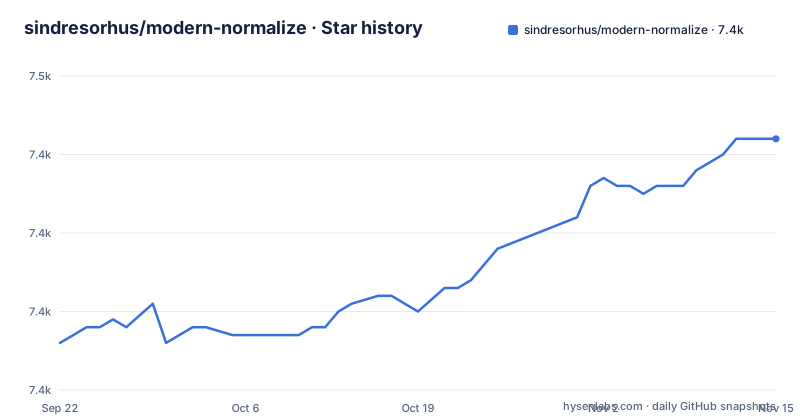
Star history
- sindresorhus/modern-normalize7,442 ★ · +26
| Repository | 2026-09-22 | 2026-11-15 |
|---|---|---|
| sindresorhus/modern-normalize | 7.4k | 7.4k |
26 Stars in the last 54 days, measured from the daily GitHub snapshot. Compare with other projects
Editorial analysis
npm test lints the CSS and never opens a browser
The scripts in the manifest describe how this package is checked, and the arrangement is worth understanding before you trust a green result. The default test script runs stylelint against the stylesheet and stops there. The browser work is a separate script that chains the linter to three acceptance suites, one each for Chrome, Firefox and Safari, each launching a browser through testcafe (headless for Chrome and Firefox) against a directory of tests and serving the package with a local static server. So the difference between the two is not thoroughness, it is scope. If a pipeline runs the default test on this package it will check the syntax of the file and never render it. The project's own claim is that it is fully tested, and that claim is true of the second script rather than the first.
Only the latest three browsers are covered, and that is the entire thesis
The browser support list is short enough to memorise: latest Chrome, latest Firefox, latest Safari. The differences section says the same thing from the other direction, that the file includes only normalizations for those three. Everything else is deliberately absent, and the page is frank about where to look instead: if you have questions about the source, it points at the original normalize.css file and at that project's extended details and known issues. The boldest line on the page is the aspiration, that the goal of this project is to make itself obsolete. Read together, the position is that normalization is a moving target that converges on nothing as browsers agree, and this package tracks the current edge of it. The practical consequence is a hard cutoff. If your audience includes anything older than the current versions of those three browsers, this file will leave you to handle the differences yourself.
A global border-box is a design decision, not a normalization
Three entries in the differences list go beyond making browsers agree. The file sets `box-sizing: border-box` globally, and it improves the consistency of default fonts, and it sets a more readable tab size. Of the three, the box-sizing rule is the one that will change how your own CSS behaves. A strict reset would leave box sizing to you, and setting it globally means any padding or border you add now sits inside the width you declared rather than adding to it. That is usually what you want and occasionally is not, particularly where a layout depends on the old behaviour or where a third party component assumes it. The font consistency work is closer to normalization in spirit, since it exists because browsers disagree about default font stacks, and the tab size is a readability choice with the same character as the box-sizing rule.
The stylesheet carries its own version, and a release overwrites it
There is a script whose only job is to keep a version string inside the CSS in step with the package. It rewrites a version pattern in modern-normalize.css with the value from the package manifest and then stages the file with git. That is a small thing, and it is the kind of detail that saves an argument: the version you see in the stylesheet is the released version, and if you edit that line by hand your change will be overwritten at the next release. It also tells you the file is treated as the product rather than a source artifact. The published package contains exactly one file, modern-normalize.css, and both the main and style fields point at it, with side effects declared as true so bundlers keep it even though nothing is exported.
One file ships, and the Node engine field is a leftover
The manifest is small in a way worth noting. The engine requirement asks for Node 6 or newer. The keywords are the conventional normalize, css, reset, browser and style. Development dependencies tell you how the file is verified rather than how it is consumed: a static file server for the acceptance suites, a file replacement tool for the version script, stylelint with a shared configuration, and the browser test runner. Three stylelint rules are switched off in the configuration, covering duplicate selectors, descending specificity and vendor prefixes, which is a reasonable set of concessions for a file meant to override other people's CSS.
There are no Sass or Less ports, and the page explains why
The FAQ answers one question and the answer is short enough to quote. Asked whether there can be Sass, Less or other ports, the response is that there is absolutely no reason to have separate ports for these, because they are just CSS supersets and can import CSS directly. That is correct, and it has a consequence for a Sass codebase: you import the stylesheet rather than maintaining a copy, which means one fewer thing to keep in step and one more thing your tooling has to resolve through the node_modules path. The related project listed is a set of Sass utilities, which is the shape of the help you get here: the ecosystem around the language, not ports of this file. The distribution options are correspondingly plain:
npm install modern-normalizeThen the file is either imported from a stylesheet, as an `@import` of the path in node_modules, or loaded with a link tag pointing at the same path, and a normal and a minified file can be downloaded directly, with three CDNs listed by name.
Releases came in 2023 and 2024, and the branch was pushed in 2026
The version history explains the file's stability. Version 2.0.0 was published in May 2023, version 3.0.0 in August 2024 and version 3.0.1 in September 2024. The repository is not archived, and the last push on main is dated 2026-09-18, so changes continue without new majors. For a stylesheet that only normalizes current browsers, a long gap between releases is expected rather than worrying, since there is little to change once the browsers agree. The maintenance claim on the differences list is therefore easy to read as a statement about the last push rather than about a release schedule. The tree matches that reading: one stylesheet, a manifest, a lowercase licence file, a test directory, a media directory and the usual configuration files.
Editorial conclusion
Use it if you ship only evergreen browsers and want a reset small enough to read in one sitting, and read the file before you ship it. Do not use it if you support older browsers, since its coverage stops at the latest three, and do not treat it as neutral, because the global box-sizing rule is a design decision that will change your own measurements. Before you add it, diff it against whatever reset you already load, and if your build already normalizes, you may be loading two opinions about the same defaults.
Frequently asked questions
What is CSS normalize?
modern-normalize is a stylesheet that normalizes browsers' default style. It is a smaller, more opinionated alternative to normalize.css: it contains only the normalizations needed by the latest Chrome, Firefox and Safari, and it additionally sets box-sizing to border-box, improves the consistency of default fonts, and sets a more readable tab size. It is MIT licensed and ships as a single CSS file.
What is the purpose of a CSS reset?
A reset makes browsers agree on their defaults so your own styles do not have to fight them. modern-normalize takes the narrow version of that job: it covers only the latest Chrome, Firefox and Safari, and the project states that its own goal is to make itself obsolete. For questions about the source, the page points you at the original normalize.css source and its list of extended details and known issues.
Do you still need CSS reset?
If you support only the latest Chrome, Firefox and Safari, this package is the small version of that job. Be aware that it sets box-sizing to border-box globally, which is a design decision rather than a normalization and will change measurements in your own CSS. Installation is npm install modern-normalize, and the file can also be imported from a stylesheet path or loaded from one of three listed CDNs.
Official sources
Add this badge to your README
If you maintain this project, the badge below links readers to this analysis and shows its maintenance status from the daily GitHub snapshot. Paste the markdown into your README; add ?metric=license or ?metric=stars to the image URL for a different field.

[](https://hysenlabs.com/projects/sindresorhus-modern-normalize)Star history chart for your README
[](https://hysenlabs.com/projects/sindresorhus-modern-normalize)Was this useful?