unifi-mcp exposes UniFi Network, Protect and Access to AI agents over MCP
MCP servers & Graph API for the UniFi suite of applications, Network, Protect, and Access
At a glance
- What is it?
- UniFi MCP is a collection of Model Context Protocol servers for Ubiquiti UniFi controllers, split into one server per application, plus a REST and GraphQL API server for custom code and a Cloud Relay for remote access. The design decision that matters is that the MCP servers stay standard while the API server stays yours to program.
- Who is it for?
- unifi-mcp suits a team that wants an AI assistant to query and change a UniFi deployment through standard MCP tool calls, and the per-product split keeps Network, Protect and Access permissions separable. It does not suit a team that wants one fat agent with unrestricted write access to the controller, because MCP HTTP is unauthenticated and the whole trust story rests on keeping the servers bound to loopback or routing them through Cloud Relay.
- Can I use it commercially?
- Yes. MIT is a permissive licence: you can use, modify and sell software built on it, as long as you keep its copyright and licence notices.
- Is it still maintained?
- Yes. The repository received new commits within the last day.
- What is it written in?
- Mainly Python, according to GitHub's language statistics.
Answers come from the project's GitHub data, last synced on November 7, 2026, and from our analysis. They are not legal advice.
Star history
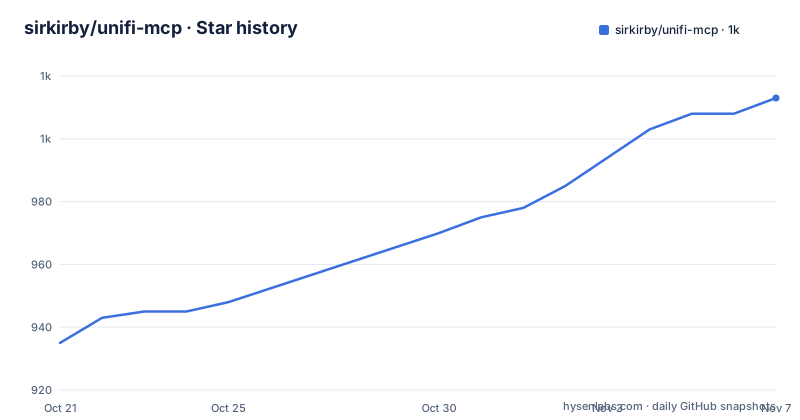
- sirkirby/unifi-mcp1,013 ★ · +78
| Repository | 2026-10-21 | 2026-11-07 |
|---|---|---|
| sirkirby/unifi-mcp | 935 | 1k |
78 Stars in the last 17 days, measured from the daily GitHub snapshot. Compare with other projects
Editorial analysis
One MCP server per UniFi application, not one for the whole controller
The project describes itself as a collection of Model Context Protocol servers that let AI assistants and automation tools interact with Ubiquiti UniFi controllers, and each server targets a specific UniFi application. The README lists three of them with their stability status and their tool counts: Network at Stable with 210 tools, Protect at Stable with 63, and Access at Stable with 37. The split by product is the meaningful design choice here. A UniFi controller hosts several distinct systems with distinct data models and distinct permissions, and putting each behind its own server means a client that only needs to read cameras never has to be granted network administration scope. The tool counts also set expectations honestly, since 210 tools on the Network side is a large surface and that is why the discovery mode matters, which is covered further down.
Standard MCP discovery, with lazy and eager modes
The project keeps the standard MCP path primary, which the README states plainly: capable clients discover currently registered tools with tools/list and invoke them with tools/call. On top of that there are two modes. The default lazy mode keeps initial context small by exposing meta-tools first, so the model does not start with 210 Network tool definitions in its context window. The eager mode registers all selected domain tools directly, which is simpler and costs more context. This is the mechanism that makes a 210 tool server usable with a real assistant, and it is a client decision rather than a server decision, since the same package offers both. The README also describes a selection step before registration, so which domain tools get registered is part of the configuration rather than a fixed list baked into the binary.
MCP HTTP is unauthenticated, so the bind address is the security model
The security posture is stated without ambiguity and it is the part to read before anything else. MCP HTTP is unauthenticated and intended for trusted local clients. HTTP is disabled by default, and when it is enabled the packages bind to loopback. Docker Compose is the exception the README names explicitly: it enables HTTP on the container network and publishes ports 3000 to 3002 on host 127.0.0.1. The configuration table lists the settings that shape this, with UNIFI_MCP_HTTP_ENABLED defaulting to false, UNIFI_MCP_HOST defaulting to 127.0.0.1, and UNIFI_MCP_ENABLE_DNS_REBINDING_PROTECTION defaulting to true to validate Host headers. UNIFI_MCP_ALLOWED_HOSTS holds the complete accepted Host-header list, defaulting to localhost,127.0.0.1. For anything beyond a trusted LAN client the README points to an authenticated TLS proxy or to Cloud Relay, and says to prevent direct access to the backend.
Credentials come from environment variables you load explicitly
The .env.example file is unusually instructive because it documents the negative space. It states that servers do not automatically discover or load .env or config/config.yaml, and it gives the supported alternatives: a trusted file loaded explicitly by the launcher, a custom YAML through CONFIG_PATH pointing at an absolute path, or UNIFI_SETTINGS_FILE pointing at a per-user file with mode 600, with the environment winning over it. For the secret itself there are three options, a plain UNIFI_PASSWORD, a UNIFI_PASSWORD_FILE holding the path, or UNIFI_PASSWORD_COMMAND taking an absolute argv that is not run through a shell. The shared credential lines look like this:
UNIFI_HOST=192.168.1.1
UNIFI_USERNAME=admin
UNIFI_PASSWORD=your-password-here
UNIFI_PORT=443
UNIFI_VERIFY_SSL=false
An API key for selected capabilities can be set with UNIFI_API_KEY, and the file notes that both alternative providers are honoured only from the real process environment, so the launcher must be trusted.
unifi-api-server for code, MCP servers for agents
The README offers a choice of integration and the difference in approach is specific rather than a matter of taste. For an AI assistant or another existing MCP client, you use the Network, Protect or Access MCP server, because that path gives you standard MCP discovery, tool calls, permissions and confirmation flows. For a custom application, automation service, code execution runtime or MCP adapter, you use unifi-api-server, and the reason given is that your code controls call sequencing, data joins, resource limits and approval flow. The API server is an independent HTTP service with typed REST resources, read-only GraphQL queries, SSE streams, scoped API keys and administration, plus a REST action endpoint for supported controller operations. It shares the unifi-core managers with the MCP servers but does not proxy or require them, so the two paths stay independent.
Cloud Relay keeps the local servers off the public internet
Remote access is handled by pairing two Beta components: the Relay Sidecar on your LAN, published as unifi-mcp-relay, and the Worker Gateway, published as unifi-mcp-worker on npm. The Worker provides the authenticated edge MCP endpoint, a Durable Object broker, multi-location routing, a token boundary and a deployment and management CLI. The sidecar is a local MCP HTTP client and forwarder that discovers configured local MCP servers over HTTP and maintains an outbound WebSocket to the Worker. The request path is written out explicitly: MCP client, then Worker gateway, then outbound WebSocket, then Relay sidecar, then local MCP servers over HTTP, and the API server is not in this path. Read-only tools support annotation-based multi-location fan-out, while writes require explicit location targeting. The Worker is deployed with:
npm install -g unifi-mcp-worker && unifi-mcp-worker installPlugins, skills and a workspace built around uv
Distribution happens through plugin marketplaces for Claude Code, Codex and OpenClaw. There is one plugin per server, unifi-network, unifi-protect and unifi-access, each shipping the MCP server, its agent skills and guided setup. A fourth plugin, unifi-intelligence, is different in kind: it provides cross-product investigations that use Network and Protect together with every claim cited, and Incident Investigation runs locally while Security Patrol and Visitor Audit need the Cloud worker, and it requires the Network and Protect plugins. Underneath, the repository is a uv workspace. pyproject.toml names the project unifi-mcp with requires-python >=3.13, and the workspace members are apps/* and packages/* with the worker excluded because it is a Node project. The Makefile exposes the workflow, with make sync, make build, make check, make test and make ci as the top level commands.
Licence, release velocity and where the risk sits
The licence field on the repository says MIT, and the README carries the matching badge. The release list shows that the packages move independently and quickly, with unifi-network-mcp at v0.39.0 and v0.38.6 both published on 2026-10-18 and unifi-core at v0.4.76 the same day. The last push was on 2026-10-20 and the repository is not archived. Two risks come with that pace. The first is the beta status of the Relay, the Worker and the API server, which the README marks as Beta against the three Stable MCP servers, so you are mixing maturity levels in one deployment. The second is that an agent with write access to a controller can change VLANs and port states, which is why the repository ships PRIVACY.md, SECURITY.md and SUPPORT.md and why the confirmation flows in the MCP path exist at all.
Editorial conclusion
unifi-mcp suits a team that wants an AI assistant to query and change a UniFi deployment through standard MCP tool calls, and the per-product split keeps Network, Protect and Access permissions separable. It does not suit a team that wants one fat agent with unrestricted write access to the controller, because MCP HTTP is unauthenticated and the whole trust story rests on keeping the servers bound to loopback or routing them through Cloud Relay. Before you expose any of it, decide whether your client is local or remote, read the transport security model in SECURITY.md, and set the credentials through the documented environment variables rather than letting a launcher pick them up implicitly.
Frequently asked questions
What does unifi-mcp actually expose?
It is a collection of Model Context Protocol servers for Ubiquiti UniFi controllers, with one server per application: Network with 210 tools, Protect with 63 and Access with 37, each marked Stable in the server table.
Is the MCP HTTP transport on unifi-mcp authenticated?
No. MCP HTTP is unauthenticated and intended for trusted local clients. HTTP is disabled by default, packages bind to loopback when it is enabled, and the documentation points to an authenticated TLS proxy or Cloud Relay for remote access.
How do I configure the UniFi controller credentials for unifi-mcp?
Set UNIFI_HOST, UNIFI_USERNAME, UNIFI_PASSWORD or one of the credential alternatives, plus UNIFI_PORT and UNIFI_VERIFY_SSL. The .env.example file notes that servers do not automatically load .env or config/config.yaml, so the file must be loaded explicitly by the launcher or pointed at with CONFIG_PATH.
Should I use the MCP servers or unifi-api-server?
Use the MCP servers for an AI assistant or an existing MCP client, because they give standard MCP discovery, tool calls, permissions and confirmation flows. Use unifi-api-server for a custom application or automation service, where your own code controls call sequencing, data joins, resource limits and approval flow.
How does Cloud Relay reach my local UniFi MCP servers?
A Cloudflare-hosted Worker gateway accepts remote requests and forwards them over an outbound WebSocket to the Relay sidecar on your LAN, which then calls the local MCP servers over HTTP. The API server is not part of that path.
Official sources
Add this badge to your README
If you maintain this project, the badge below links readers to this analysis and shows its maintenance status from the daily GitHub snapshot. Paste the markdown into your README; add ?metric=license or ?metric=stars to the image URL for a different field.

[](https://hysenlabs.com/projects/sirkirby-unifi-mcp)Star history chart for your README
[](https://hysenlabs.com/projects/sirkirby-unifi-mcp)Was this useful?