Notchi puts Claude Code and Codex on a grass island in the MacBook notch
notch app for claude code & codex
At a glance
- What is it?
- Notchi is a Swift app that draws Claude Code and Codex session state inside the MacBook camera notch, one sprite per session, with prompt sentiment read through an optional API key. It stays close to the host machine and keeps its scope tight, but two rough edges show up immediately: Codex hooks still need terminal approval after the automatic first launch, and the download button points at a pinned build.
- Who is it for?
- Adopt Notchi if you run Claude Code or Codex from a notched MacBook and want session state visible without leaving the terminal; hooks, a local socket and a five-state sprite machine are the right shape for that job. Pass on it if you have a desktop Mac, a machine without a notch, or a policy against prompt text reaching Anthropic or OpenAI, and weigh the key before pasting one.
- Can I use it commercially?
- Yes, with conditions. GPL-3.0 is a copyleft licence: if you distribute software that includes it, you must release that software's source code under the same licence. Running it internally without distributing it does not trigger that obligation.
- Is it still maintained?
- Yes. The repository last received commits 34 days ago.
- What is it written in?
- Mainly Swift, according to GitHub's language statistics.
Answers come from the project's GitHub data, last synced on November 7, 2026, and from our analysis. They are not legal advice.
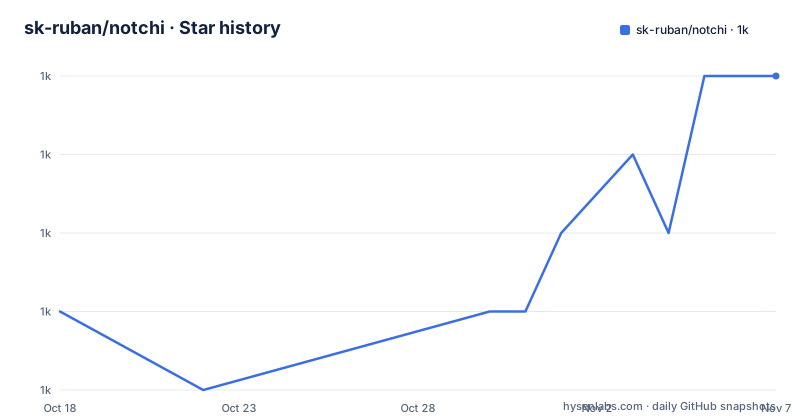
Star history
- sk-ruban/notchi1,046 ★ · +3
| Repository | 2026-10-18 | 2026-11-07 |
|---|---|---|
| sk-ruban/notchi | 1k | 1k |
3 Stars in the last 20 days, measured from the daily GitHub snapshot. Compare with other projects
Editorial analysis
A MacBook notch that mirrors Claude Code and Codex sessions
Notchi is a small Swift application for people who spend the day inside Claude Code or Codex and want to see what those agents are doing without switching windows. It lives in the camera notch of a MacBook, and every running session gets its own mascot standing on a grass island inside that notch, drawn from either the Claude or the Codex sprite family. Several sessions can run at once and each keeps a separate sprite, so a long refactor next to a quick question stays readable at a glance. The pixel work is credited to Aseprite.
What the app reacts to is an event stream rather than a poll. Thinking, working, permission requests, compaction, errors and completions each produce a visible change, and clicking the notch opens a panel holding a live activity feed, session information and usage stats. Getting that far takes macOS 15.0 or later, a MacBook with a notch, and at least one of the two agents already installed. The panel follows your system language across English, 日本語, 简体中文 / 繁體中文, 한국어 and Tiếng Việt.
Shell script hooks, a Unix socket and five sprite states
The event path is deliberately short. Notchi registers shell script hooks with both agents when it launches, and when an agent emits something the hook hands a JSON payload to a Unix socket on the same machine. The app parses those payloads and a state machine picks the animation to show.
Claude Code / Codex --> Hooks (shell scripts) --> Unix Socket --> Event Parser --> State Machine --> Animated SpritesTwo lists sit inside that pipeline and they do not line up. Six event kinds are named, thinking, working, permission requests, compaction, errors and completions, while the state machine names five animations: `idle, working, sleeping, compacting, waiting`. Errors and completions have no animation of their own, so a run that ended cleanly and a run that died hard look alike until you click the notch and read the feed. Permission requests map onto `waiting`, which is the one state a user can act on.
Sentiment analysis rides the same path but leaves the machine, going to Anthropic or OpenAI once a key is configured.
First launch writes hooks, Codex still demands terminal approval
No package manager command appears anywhere in the README. There is no brew cask and no Swift Package Manager snippet, so the documented route is the DMG the download badge points at. Download it, open it, drag Notchi to Applications, launch it, and the app installs Claude Code and Codex hooks on first launch for whichever of the two it finds.
Then the Codex path stops being automatic. If Codex shows Needs Approval, open Settings, then Agent Hooks, then Codex, click Open in Terminal and approve three hooks:
/hooksOnly after that approval does a new Codex chat start sending anything, and Claude Code has no matching step at all. That gap between automatic hook installation on launch and three hooks you must approve by hand in a terminal is the first surprise, and the requirement to start a new chat means events from the session you already had open stay invisible. A macOS keychain prompt belongs to the same flow: the README ties it to API usage stats and tells you to click Always Allow so it does not return.
The Settings API key buys five mascot emotions
Sentiment analysis is opt-in and gated behind a key you paste yourself. Click the notch to expand, open Settings, paste an Anthropic or OpenAI API key, and the mascot starts reading the tone of your prompts and picking one of five labels: happy, elated, sad, neutral or sob, drawn from the same sprite set as everything else.
Two consequences sit inside that one setting. First, analysing prompt sentiment through Anthropic or OpenAI hands prompt text to whichever provider holds the key, which is a different privacy posture from the shell script writing to a local socket that the rest of the architecture relies on. Second, without a key the widget still animates on tool use, permission prompts and compaction, so the mascot is not dead, only emotionally flat.
No per-request cost, rate limit or batching detail is given for those API calls, and nothing describes a switch for turning analysis off again after a key is saved.
Thirty days of cost and token history, per provider or combined
Clicking the notch reveals session time and a usage quota, and clicking the usage bar opens a dashboard with a cost chart and quota bars. Daily cost and token usage are kept across the last 30 days, and the README states they can be read per provider or combined across both, which matters when Claude Code and Codex sit side by side on the same machine.
Those figures depend on the keychain access asked for at first launch, which is why Always Allow is the button to press and a prompt that keeps reappearing is worth fixing rather than dismissing.
What the dashboard cannot do is reach past the window. No export, CSV, API endpoint or configurable retention period appears anywhere in the documentation, so 30 days is the entire record, and a month of heavy agent use has to be read off the chart before it disappears. The screenshots in the repository back the flow up: `assets/usage-dashboard.png`, `assets/keychain-popup.png` and `assets/emotion-settings.png` show the three states a first-time user meets.
Sound effects mute themselves while the terminal is focused
Events can play sounds and you can import your own. The rule deciding when they play is the awkward part: the sound is muted automatically while the terminal is focused. Claude Code and Codex are terminal programs, so the widget goes quiet in the exact window where you are running the agent and becomes audible once you switch to another application. Whether that counts as considerate or useless depends entirely on how you arrange the two windows.
Multiple concurrent sessions are supported and each gets its own mascot, but no documented control maps a specific sprite back to a specific terminal window or working directory. With three sessions open you get three sprites and one combined feed, and there is no per-session filter in the panel.
The download button is frozen on one DMG build number
Step one of the install says to download the latest DMG, and the badge behind that sentence is a fixed link ending in `v1.2.7` with the file `Notchi-1.2.7.dmg`. Follow the README literally and you get that build no matter what has shipped since, which is a mismatch between the wording and the target. Every past build sits on the project's download page, so checking which number is current before dragging is manual work.
Auto-updates run through Sparkle once the app is installed, which limits how long a pinned link matters to anyone who keeps the app open. Signing and notarization both ride on the maintainer's Apple Developer account, and the README asks for sponsorship to cover exactly that cost, so one account carries the whole update path.
The last push is stamped 2026-09-19, three seconds after the `v1.2.7` entry, which puts the tip of the default branch and the pinned build on the same tree. The two builds before it, `v1.2.6` on 2026-09-06 and `v1.2.5` on 2026-09-01, landed days apart, so short gaps between versions are the norm here.
Two Windows ports live in separate repositories
Anyone on Windows has community builds rather than anything published from this repository: `notchi-for-windows` by AptatoX, described as a port, and `pixel-companion` by Emi-Dz, described as a desktop companion inspired by Notchi. Neither comes from the maintainer, the macOS 15.0 or later requirement does not apply to them, and the documentation does not say whether either consumes the same JSON payloads from the same hook scripts. Design lineage runs through Claude Island and Readout, both credited as inspiration rather than as dependencies, with Readout named as the influence behind notchi.app.
Notchi is GPL-3.0-only, so a fork, a patched build or a redistribution carries the same terms onward, and anyone embedding this hook and socket design in a closed application inherits that obligation.
The top level of the repository is small:
.github/
.gitignore
CONTRIBUTING.md
LICENSE
README.md
assets/
docs/
notchi/
scripts/
website/
Pull requests are directed to `CONTRIBUTING.md`, the app's own code sits under `notchi/`, and the tree also carries a `scripts/` directory whose contents the README never describes.
Editorial conclusion
Adopt Notchi if you run Claude Code or Codex from a notched MacBook and want session state visible without leaving the terminal; hooks, a local socket and a five-state sprite machine are the right shape for that job. Pass on it if you have a desktop Mac, a machine without a notch, or a policy against prompt text reaching Anthropic or OpenAI, and weigh the key before pasting one. Verify first that all three Codex hooks are approved and that a new chat is started, otherwise the panel stays empty while the app looks installed correctly.
Frequently asked questions
What does Notchi need to run on my Mac?
macOS 15.0 or later, a MacBook with a notch, and Claude Code or Codex already installed. The README gives a DMG to drag into Applications and no package manager command.
Does Notchi work without an API key?
The mascot still reacts to tool use, permission requests, compaction, errors and completions without a key. Sentiment analysis of prompts needs an Anthropic or OpenAI API key pasted under Settings.
How do I approve the Codex hooks?
Open Settings, then Agent Hooks, then Codex, click Open in Terminal, enter `/hooks` and approve the three Notchi hooks. Start a new Codex chat and send a message afterwards, which is the step the install notes require after approval.
Is there a Windows version of Notchi?
Two community builds exist, `notchi-for-windows` and `pixel-companion`, each in its own repository and each credited to a different author. Notchi itself targets macOS 15.0 or later on a notched MacBook.
How long does Notchi keep cost and token history?
Daily cost and token usage are tracked across the last 30 days, per provider or combined. No export, API or configurable retention window appears in the README.
Official sources
Add this badge to your README
If you maintain this project, the badge below links readers to this analysis and shows its maintenance status from the daily GitHub snapshot. Paste the markdown into your README; add ?metric=license or ?metric=stars to the image URL for a different field.

[](https://hysenlabs.com/projects/sk-ruban-notchi)Star history chart for your README
[](https://hysenlabs.com/projects/sk-ruban-notchi)Was this useful?