One hotkey, three platforms, and a release tag holding two version numbers
The world's smartest system-wide grammar assistant; a better version of the Apple Intelligence Writing Tools. Works on Windows, Linux, & macOS, with the free Gemini API, local LLMs, & more.
At a glance
- What is it?
- theJayTea's WritingTools puts an LLM behind one system-wide hotkey on Windows, Linux and macOS, and the three platforms arrive as three different things: a portable zip, a source build, and a separate native Swift port.
- Who is it for?
- This suits someone who already keeps a local model server running and wants one shortcut in front of it, and it suits the person who will accept sending a selected paragraph to the Gemini API. Before installing it on Windows, extract the zip into a folder you control rather than Program Files, because that same folder will hold the API key.
- Can I use it commercially?
- Yes, with conditions. GPL-3.0 is a copyleft licence: if you distribute software that includes it, you must release that software's source code under the same licence. Running it internally without distributing it does not trigger that obligation.
- Is it still maintained?
- Yes. The repository last received commits 88 days ago.
- What is it written in?
- Mainly Swift, according to GitHub's language statistics.
Answers come from the project's GitHub data, last synced on November 15, 2026, and from our analysis. They are not legal advice.
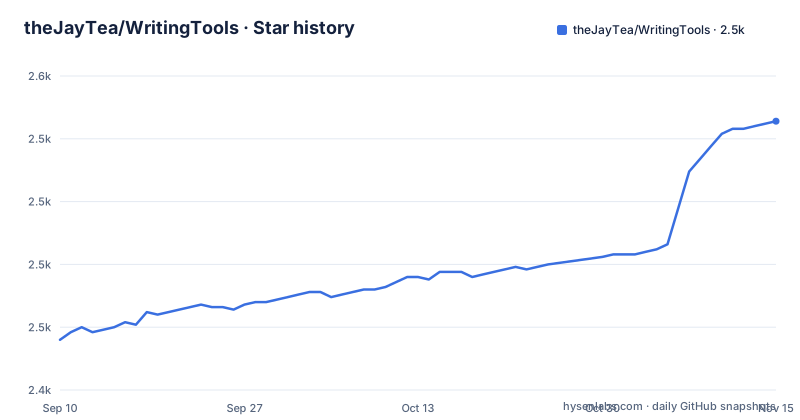
Star history
- theJayTea/WritingTools2,532 ★ · +87
| Repository | 2026-09-10 | 2026-11-15 |
|---|---|---|
| theJayTea/WritingTools | 2.4k | 2.5k |
87 Stars in the last 66 days, measured from the daily GitHub snapshot. Compare with other projects
Editorial analysis
One hotkey, six presets, and a free text field
The entire interface is a system-wide hotkey, `ctrl+space`, and the hotkey can be reassigned in Settings. With text selected, the menu offers Proofread, Rewrite, Friendly, Professional, and Concise, or you type an instruction into the field labeled `Describe your change...`, whose examples in the project file are 'add comments to this code', 'make it title case', and 'translate to French'. The result replaces the selection in the application that had focus, and `ctrl+z` in that application reverts it. The clipboard is never used, so pasting your original text back is not the recovery path. Two entries in that same list are both numbered 3: the first is a placeholder about adding your own buttons, and the entry after it describes opening a chat with the model when the hotkey is pressed with nothing selected. The numbering says three capabilities and the list holds four, which is a small thing, but it is the same file that tells you the rest.
The app never reads the page, it takes your selection
Summarization runs through the same hotkey. You select text in a webpage, document, or email, press it, then choose Summary, Key Points, or Table. The popup renders Markdown, and you can keep asking the model about the summary in the same window. Nothing is fetched on your behalf. For a YouTube video the instruction is to select the transcript from the video's description, which means a person copies it out first, by hand. There is no page reader, no URL field, and no fetching step in what the project documents, so the size of a summary is bounded by how much text you managed to select before pressing the hotkey, and that selection always comes from whichever application currently holds focus. On a long document that means select all, invoke, wait, read.
The config folder is the folder you unzipped the app into
Writing Tools ships as a portable app. On Windows you download `Writing.Tools.zip` from the Releases page, extract it wherever you like, the recommendation being `Documents` or `App Data/Local`, and run `Writing Tools.exe`. Its config files are created and edited in the same folder as the executable, which is where settings and the API key live. Extract into a protected location such as Program Files and the first launch has to run as administrator so the process can write them. Starting on boot is off by default and gets enabled from the tray icon at the bottom right of the taskbar. The price of that layout is that the program, its settings, and its credentials share one directory with no per-user data path, so whoever can write to that folder can put a different executable next to your key.
No logging is claimed while the shortest route runs through Google's API
The project states that your API key and config files stay on your device, with no logging, diagnostic collection, tracking, or ads, and that the app acts only on your command. It also states that a chat history is deleted when you close the window. Those are claims about storage and behavior, not about the trip your text takes. The setup with the least work is the free Gemini API and Gemini 2.0, and on that route the selected text goes to Google before any rewrite comes back, because the edit happens on the model side. Text staying on the machine is a property of the local option, where the project says local LLMs keep your data on your device and work without the internet. Local models need one of Ollama, llama.cpp, KoboldCPP, TabbyAPI, or vLLM running first, while cloud services such as ChatGPT or Mistral AI reach the same window through an OpenAI-API-compatible interface, which is one adapter standing in for five different server shapes.
Windows v9 and macOS v6.1 share a single tag name
The release tags are pairs: `Win_v9+mac_OS_v6.1`, then `Win_v8+mac_OS_v6.1`, then `Win_v8+mac_OS_v6.0`. The two halves move on their own schedules and are welded into one name, so Windows has reached 9 while macOS stands at 6.1, and a 6.0 half in a tag tells you which side actually moved. The Windows install step just asks for the latest `Writing.Tools.zip` from Releases, without saying how to tell which half of the tag an archive belongs to. The newest listed release is dated 2026-05-10 and the last recorded push is 2026-08-19, so roughly three months of commits sit past the newest tag. The recorded primary language is Swift, which describes the Mac half only: the Windows and Linux programs live under `Windows_and_Linux/`, and the native Mac app under `macOS/`, built and maintained by a different contributor.
Linux ships no archive and its notes stop at the word disable
Linux is marked work in progress and has no download step. The instruction is a link to a separate document in the repository, `README's Linked Content/To Run Writing Tools Directly from the Source Code.md`, so a Linux user builds from source while a Windows user takes a zip. On Wayland the file lists two caveats: it works on XWayland applications, and a second bullet opens with 'and it works if you disable Wayland'. That file ends inside the sentence, so the remaining Wayland cases and the steps for turning it off are not in it, leaving the reader with the word disable and nothing after. Local models carry the same kind of limit, since the Ollama instructions are written for Windows and Linux v7 onwards, so an older build has no documented route to a local model.
The superlatives arrive without measurements
The opening calls this the world's smartest and most intelligent system-wide grammar assistant, claims its translations beat Google Translate, puts CPU use at about 0% even while working, describes it as the only way to reach Apple's Writing Tools on an Intel Mac or in the EU, and sets Apple's 3B parameter model against Gemini 2.0 Flash at roughly 30B. The same file records a top 10 trending AI program ranking from October 2024 and coverage in more than 30 publications, which resolves to a document called `Media Coverage.md`. None of it is substantiated inside the repository: there is no benchmark table, no measurement script, no stated methodology, and no test directory at the top level. The CPU number comes with no machine, no workload, and no conditions. The claim about Apple's model is a statement about software on another platform, made in a file that ships its own binaries.
Editorial conclusion
This suits someone who already keeps a local model server running and wants one shortcut in front of it, and it suits the person who will accept sending a selected paragraph to the Gemini API. Before installing it on Windows, extract the zip into a folder you control rather than Program Files, because that same folder will hold the API key. On Linux you are building from source and following a document that stops mid sentence. Treat the ranking claims as marketing until you find a measurement, and check the macOS port separately from the Windows one, since the two ship under one tag name.
Frequently asked questions
What does WritingTools do with the text I select in another app?
It replaces the selection in place with the version the model returned, and `ctrl+z` in that same application reverts it. The clipboard is not used at any point in that path.
Does WritingTools work under Wayland on Linux?
On Linux it works well on x11. The Wayland notes say it works on XWayland applications, and a second bullet starts with 'and it works if you disable Wayland', where that file ends, so no further cases are given.
Where does WritingTools keep its API key on Windows?
Config files are created in the same folder as `Writing Tools.exe`, so the key sits wherever the zip was extracted to. A protected location such as Program Files means the first launch has to run as administrator.
Can WritingTools use a model that never sees my text?
Through Ollama, llama.cpp, KoboldCPP, TabbyAPI, or vLLM running on your own machine, with the Ollama instructions written for Windows and Linux v7 onwards. Cloud services such as ChatGPT or Mistral AI arrive through the OpenAI-API-compatible interface.
Does WritingTools keep my chat history?
A chat opened with nothing selected is deleted when you close the window. The project states no logging, diagnostics, tracking, or ads, while the shortest setup sends the selected text to the free Gemini API.
Which platforms does thejaytea/WritingTools hand you a build for?
Windows gets a zip from the Releases page, Linux is marked work in progress and is run from source, and macOS is a separate native Swift port in its own top-level directory, credited to Arya Mirsepasi.
Official sources
Add this badge to your README
If you maintain this project, the badge below links readers to this analysis and shows its maintenance status from the daily GitHub snapshot. Paste the markdown into your README; add ?metric=license or ?metric=stars to the image URL for a different field.

[](https://hysenlabs.com/projects/thejaytea-writingtools)Star history chart for your README
[](https://hysenlabs.com/projects/thejaytea-writingtools)Was this useful?