DL-Hub: 339 PyTorch lessons held to one implementation contract
50 notes on large language models. This repo contains hands-on projects in machine learning, deep learning, computer vision, NLP, large language models, and web scraping.
At a glance
- What is it?
- A Chinese-first PyTorch practice library covering eight tracks, with a naming discipline that separates a scaled implementation from a delegated baseline and a verification level from a capability claim. The zoo totals do not add up on the page, and the real-data plan is labelled as defined but not executed.
- Who is it for?
- DL-Hub fits a learner who wants runnable PyTorch code per topic with a uniform entry point, seed handling and output layout, and who values being told which claims are verified. It does not fit someone looking for paper-faithful reproductions, because the project itself says a registered ID is an addressable build configuration rather than a reproduced paper.
- Can I use it commercially?
- Yes. MIT is a permissive licence: you can use, modify and sell software built on it, as long as you keep its copyright and licence notices.
- Is it still maintained?
- Yes. The repository last received commits 77 days ago.
- What is it written in?
- Mainly Python, according to GitHub's language statistics.
Answers come from the project's GitHub data, last synced on November 15, 2026, and from our analysis. They are not legal advice.
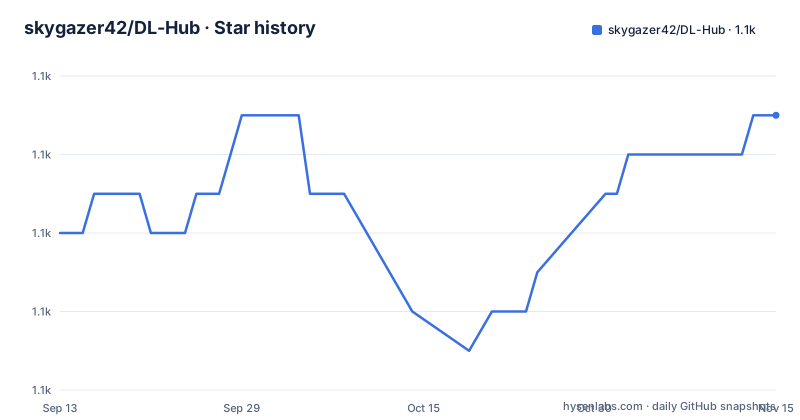
Star history
- skygazer42/DL-Hub1,121 ★ · +3
| Repository | 2026-09-13 | 2026-11-15 |
|---|---|---|
| skygazer42/DL-Hub | 1.1k | 1.1k |
3 Stars in the last 63 days, measured from the daily GitHub snapshot. Compare with other projects
Editorial analysis
A registered ID is not a paper reproduction
The organising idea is that a lesson is a chain: problem definition, data, model mechanism, training and evaluation, run artifacts, audit evidence. And the repository keeps three dimensions strictly separate so that names cannot overstate what the code does.
The first dimension is implementation scale and fidelity. A compact label marks a scaled-down implementation that keeps the key mechanisms, and baseline-alias is used when a paper name only delegates to a public baseline rather than reimplementing it. The second is data source, where synthetic means only that the data or annotations are programmatically generated, and the note is explicit that this label is no longer used to name a model capability. The third is verification scope, where contract, smoke, targeted test and benchmark each prove a different strength of conclusion.
The Model Zoo note repeats the point in the other direction: a registered ID means an addressable build configuration, not an equal number of independent paper reproductions, and it does not automatically mean the paper's mechanisms are complete.
This is a stronger honesty contract than most teaching repositories publish. It also shifts the burden onto the reader, because you have to look up the label on each lesson to know what class of claim you are looking at.
Seven zoo rows are printed, and the total covers 123 modules
The lesson counts do reconcile. Foundations has 2, Vision 89, NLP 49, GNN 11, Point Cloud 36, Generative 51, LLM 43 and Multimodal 58, which sums to exactly the 339 lessons claimed in the header.
The zoo table does not reconcile on the page. It prints seven rows: Vision Zoo with 791 registered IDs across 220 modules, NLP Zoo with 814, Point Cloud Zoo with 64, VLM Zoo with 210 IDs in 70 registered groups, GAN Zoo with 44 registered groups, Diffusion Zoo with 32 groups and Federated Zoo with 76 policy groups. The totals row then reports 8,611 registered IDs, 232 audited source entries, 1,870 source-inferred baseline-alias and zero unclassified wrappers, across 123 zoo modules.
So the printed rows are a sample of a much larger set: the visible IDs add up to well under half of the stated total, and the difference is explained by 123 modules against the seven shown. There is also a unit mismatch worth noticing, since some rows count IDs and others count registered groups.
One line immediately below the totals begins with a current source count of 1,970 and then stops, so the number it qualifies is not readable. A reader comparing 1,870 against 1,970 should treat the difference as unresolved rather than guess at it.
The MNIST real-data plan is defined and not executed
The benchmark documentation page is where the repository is most candid, and the disclosure is easy to miss because it sits inside a long sentence.
That page covers the data and benchmark tiering for all 339 lessons, the historical full-run evidence, and a real-data execution plan for the seven MNIST lessons. The plan is explicitly marked as defined but not yet executed. In other words, the intended path to validating those lessons on genuine MNIST data is written down and has not been run.
That distinction matters more than it sounds. Everything else in the quick start runs on fake or synthetic data by design, so the difference between a lesson that has been exercised on real data and one that has not is exactly the difference the label exists to expose. A reader who wants to cite a result from this repository has to check which of the two they are looking at.
The contract document is the companion piece, holding the full rules, the upgrade path and the maintenance commands, with the claim that renaming a directory is not relabelling: a lesson has to connect real task input, loss, metrics and output, and Model Zoo IDs are not described as an equivalent number of paper reproductions.
Every lesson has an offline path, and two of them run in a minute
The quick start is designed so that nothing has to be downloaded. Lessons whose topic needs real data accept a fake dataset flag, and the rest default to built-in synthetic data.
git clone https://github.com/skygazer42/DL-Hub.git
cd DL-Hub
python -m pip install -e ".[vision]"

python scripts/smoke_check.py

python -m tracks.vision.lesson_01_mnist_lenet.train \
  --dataset fake --epochs 1 \
  --max-train-batches 2 --max-eval-batches 2

python scripts/run_lesson.py --list
The smoke script is a curated environment check covering all eight tracks, and run_lesson.py lists every runnable lesson. Between them they answer the two questions a new learner has, which is whether the machine works and what exists.
The CLI is uniform by design. Every training entrypoint accepts a seed, a device and a run name, with epochs, batch size and truncation limits varying per task, and a describe flag on run_lesson.py prints the exact flags for one lesson rather than making you read the source. Device selection covers cpu, cuda, mps and auto, so Apple Silicon is a supported target even though no track extra installs anything extra for it.
Output goes to a fixed convention of outputs/<track>/<lesson>/<run>/, with model.py and data.py organised per lesson shape and the conventions written down separately.
Four requirements files, one source of truth
pyproject.toml is the declared source of truth, and requirements.txt says so in its own comment before doing anything but installing the project editable. Two more requirements files sit beside it for development, docs and the vision track, so there are four files where one would do and a note telling you which one wins.
The base install is one dependency, numpy at 1.24 or newer. Everything else arrives through extras, and the extras are uneven in a way that matters. The vision extra adds torchvision and timm, the generative extra adds torchvision, and the torch, foundations, nlp, gnn, pointcloud, llm and multimodal extras each add torch and nothing else. Those are aliases for the same dependency rather than distinct track requirements, which is a reasonable simplification but means the track name carries no extra information about what a track needs.
Python 3.10 or newer is required, and tomli is listed conditionally for versions below 3.11. The project classifies itself as Alpha and as intended for education, which matches a repository whose headline number is lessons rather than a package version.
The development extra is where the tooling fan-out shows: ruff, black and isort are all present, so three separate formatting and linting tools run over the same tree, alongside pytest, pytest-cov and pre-commit.
The Makefile promises targets it does not show
The developer entry point is a Makefile whose help text lists more commands than the visible recipes define, which is a documentation gap rather than a design choice.
The help text advertises verify for fast repository checks including offline Zoo imports, lesson-entrypoints to run all 339 lesson help entrypoints in about four to seven minutes, stats, evidence, zoo-integrity, check for repository checks plus the full pytest suite, smoke for a curated offline lesson suite, docs for a strict MkDocs build, package, package-smoke to validate wheel and sdist in isolated temporary virtual environments, and release-check.
The recipes that are visible are test, coverage, lint, format, contract, lesson-entrypoints, stats, zoo-integrity, fidelity and the start of narrative, after which the file stops. The phony list also names doctor, verify, evidence and release-check, so the targets are declared even though their bodies are not in the visible portion.
What the visible recipes show is a consistent one-command-per-check pattern, where every check is a script run in check mode: lesson contracts, lesson entrypoints, project statistics, zoo integrity, model fidelity. That is a maintainable arrangement, since each script owns its own assertion and the Makefile only dispatches.
Formatting runs isort, then black, then ruff with fix over a target list that includes dlhub, tracks, ml_algorithms, optimization, tests, scripts and the repository's own GitHub scripts.
The README's own statistics are generated and checked
The header numbers are not typed by hand. The badges sit inside HTML comment markers for generated statistics, as does the track overview table, and there is a make target that runs the generator in check mode. If the counts drift, a repository check fails rather than the README quietly lying.
That is worth noting because those counts are the project's headline: 339 lessons, 8,611 registered IDs in the Model Zoo, 232 audited zoo sources and 31 NumPy machine learning algorithms. Generated and verified is a stronger position than asserted, even when the underlying counts are as loose as the zoo totals discussed earlier.
The repository is bilingual in practice rather than in translation. The README is written in Chinese with an English section heading, and the audience it addresses is a Chinese-speaking learner working through Chinese documentation, with a documentation site built by MkDocs and a Chinese filename for the large-model notes directory.
The tree is organised by responsibility: tracks/ holds the lessons, dlhub/ the reusable library behind them, ml_algorithms/ the 31 NumPy implementations, optimization/ the optimisers, scripts/ the checkers, tests/, docs/, resources/ and assets/, with a Makefile, a security policy and a pre-commit configuration at the root.
Release state is minimal: MIT licensed, default branch main, no GitHub releases, and a last commit dated 2026-08-30.
Editorial conclusion
DL-Hub fits a learner who wants runnable PyTorch code per topic with a uniform entry point, seed handling and output layout, and who values being told which claims are verified. It does not fit someone looking for paper-faithful reproductions, because the project itself says a registered ID is an addressable build configuration rather than a reproduced paper. Verify four things before you plan around its numbers. Read the contract's three dimensions before the lesson list, since compact, baseline-alias, synthetic and contract versus smoke versus benchmark decide what any individual lesson proves. Do not treat the zoo totals as a reproduction count: the seven printed rows account for a fraction of the stated total across 123 modules, and the README states directly that registered IDs do not imply complete paper mechanisms. Treat the benchmark page accordingly, since the real-data execution plan for the MNIST lessons is marked as defined and not yet run. And pick your path deliberately, because the Weekend Sprint is six lessons while the Full Curriculum is 339. The project is MIT licensed on the default branch main with no GitHub releases, and the last commit is dated 2026-08-30.
Frequently asked questions
What does DL-Hub teach?
It is a PyTorch practice library organised into eight tracks with 339 lessons: Foundations 2, Vision 89, NLP 49, GNN 11, Point Cloud 36, Generative 51, LLM 43 and Multimodal 58. Alongside the lessons sit 31 NumPy machine learning algorithms, an optimisation directory, and a Model Zoo of registered build configurations.
Do I need to download datasets to follow DL-Hub lessons?
No. Lessons whose topic needs real data accept a fake dataset flag, and the rest default to built-in synthetic data. The first lesson in the quick start runs as python -m tracks.vision.lesson_01_mnist_lenet.train with the fake dataset flag, one epoch and two batches per split.
How does DL-Hub decide what a lesson proves?
Through an implementation contract that separates three dimensions: implementation scale, where compact keeps key mechanisms and baseline-alias delegates to a public baseline; data source, where synthetic means only programmatically generated data; and verification scope, where contract, smoke, targeted test and benchmark prove different strengths. A registered Model Zoo ID is an addressable build configuration, not a paper reproduction.
What CLI flags do DL-Hub lessons share?
Every training entrypoint accepts a seed, a device and a run name, with epochs, batch size, learning rate, dataset choice and train or eval batch limits provided per task. python scripts/run_lesson.py --list shows runnable lessons and the describe flag prints the exact flags for one, with output written to outputs/<track>/<lesson>/<run>/.
How do I install DL-Hub for a single track?
Clone the repository and run an editable install with the track extra, for example python -m pip install -e ".[vision]". The base install pulls only numpy, the vision extra adds torchvision and timm, and most other track extras add torch alone. requirements.txt is a compatibility entrypoint that installs the project editable.
Official sources
Add this badge to your README
If you maintain this project, the badge below links readers to this analysis and shows its maintenance status from the daily GitHub snapshot. Paste the markdown into your README; add ?metric=license or ?metric=stars to the image URL for a different field.

[](https://hysenlabs.com/projects/skygazer42-dl-hub)Star history chart for your README
[](https://hysenlabs.com/projects/skygazer42-dl-hub)Was this useful?