leetcode-cli: six commands against a leetcode.com account
A cli tool to enjoy leetcode!
At a glance
- What is it?
- A JavaScript CLI that logs into leetcode.com, generates a stub file, runs a test case and submits from the terminal. The published package stopped at 2.6.2 in 2019 while master moved on in March 2026.
- Who is it for?
- leetcode-cli fits someone who already has a leetcode.com account and wants the question text, a stub file and a submit step without leaving the terminal, and it is a narrow but honest tool for that job. Two things to check before installing: whether the Node 10 based binaries or the Node 4 and newer npm path fits your machine, and what the diff between the 2.6.2 tag and master actually changes.
- Can I use it commercially?
- Yes. MIT is a permissive licence: you can use, modify and sell software built on it, as long as you keep its copyright and licence notices.
- Is it still maintained?
- Activity is slowing. The repository last received commits 8 months ago.
- What is it written in?
- Mainly JavaScript, according to GitHub's language statistics.
Answers come from the project's GitHub data, last synced on November 15, 2026, and from our analysis. They are not legal advice.
Star history
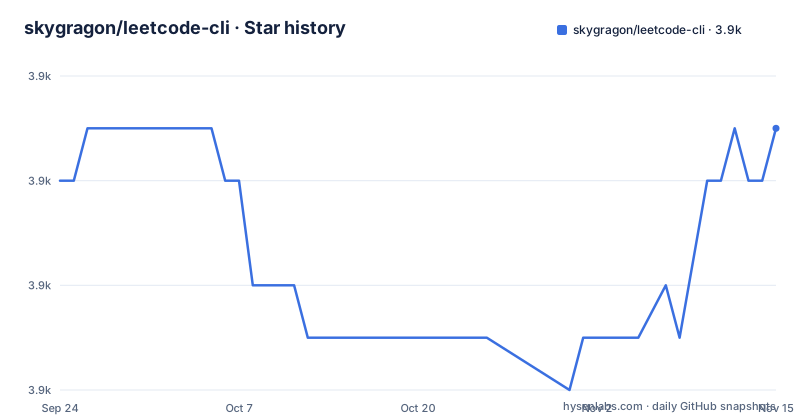
- skygragon/leetcode-cli3,873 ★ · +1
| Repository | 2026-09-24 | 2026-11-15 |
|---|---|---|
| skygragon/leetcode-cli | 3.9k | 3.9k |
1 Stars in the last 52 days, measured from the daily GitHub snapshot. Compare with other projects
Editorial analysis
The quick start is six commands and one of them creates the session
The quick start hands you a six-line session and never leaves it: read the built-in help, log in, list, pick a question, test a local file, submit it. Nothing in that flow needs a config file, an environment variable or a token, because the account is the only input and `leetcode user -l` is the command that takes it. The `show` step is where flags appear, with `-g` and `-l cpp` in the example generating a starting file in a chosen language. The `test` step takes a local path plus a `-t` argument holding the test case, and the submit step takes the same local path with nothing added. Caching questions for offline work, colour themes, downloading past submissions and reading a submission history all hang off commands documented away from this file.
leetcode help
leetcode user -l
leetcode list
leetcode show 1 -g -l cpp
leetcode test ./two-sum.cpp -t '[3,2,4]\n7'
leetcode submit ./two-sum.cpp
Those two flags are worth reading twice, because they are the only syntax the project shows for anything.
The test suite intercepts HTTP rather than calling leetcode.com
The npm test script runs three things in sequence: eslint over lib/ and test/, then mocha over test and test/plugins under nyc coverage, then an lcov report. The dependency that matters is nock, pinned at 10.0.2 in devDependencies, which exists to answer HTTP requests inside the test process instead of letting them escape. That is the right way to test a tool whose entire value depends on somebody else's website. It is also the reason a green suite tells you nothing about whether that website still looks the way the parser expects. The parsers lean on cheerio and he for markup and request for transport, so a change in leetcode.com layout becomes a runtime failure for a user and an invisible one for the tests.
The packaged binaries target Node 10 while the package asks for Node 4
Two halves of this project disagree about the runtime. The engines field asks for Node 4 or newer, which is the floor for an npm install. The pkg block then builds single-file executables for three targets, node10-linux-x64, node10-macos-x64 and node10-win-x64, each embedding its own copy of the JavaScript from lib/. Somebody who downloads a binary runs a Node 10 runtime no matter what is installed on the machine, while somebody installing from npm runs whatever Node they already have. The build matrix is fixed at linux, macOS and Windows on x64, so an arm64 machine is not covered by it and has to take the npm route.
The Dockerfile installs at build time and enters as root
The image is nine lines and does one unusual thing: it installs dependencies during the build, tars the entire working directory into /leetcode-cli.tar.gz, deletes the source tree, and points its entrypoint at bin/entrypoint copied to the root of the filesystem. The base is `node:alpine` with no version tag, so two builds a month apart can begin from different base images. The final stage sets the working directory to /root, declares /root as a volume, and never drops privileges, so whatever the entrypoint runs holds root inside the container. That is fine for a throwaway puzzle solver and wrong for a long-lived service that mounts anything from the host.
Dependencies are exact pins, so the tree only reproduces while the registry keeps them
Every runtime dependency is an exact version rather than a range: cheerio at 0.20.0, request at 2.88.0, mkdirp at 0.5.1, nconf at 0.10.0, prompt at 1.0.0, ansi-styles at 3.2.1, underscore at 1.9.1, wordwrap at 1.0.0, he at 1.2.0. moment is the single entry written as a range, at ^2.20.1, and that inconsistency is the pattern to watch. Exact pins make an install reproducible on paper and brittle in practice, because the whole tree depends on those specific numbers still resolving. No lockfile appears in the top-level entry list either, so a fresh install re-derives the resolution rather than replaying a recorded one.
Colours, icons and templates are assets that must exist on disk
The pkg configuration does two jobs at once. It lists lib/ under scripts, meaning the source compiled into the executable, and it lists colors, icons and templates under assets, meaning directories that have to exist on disk at runtime for the program to render anything. A packaged build is therefore not one self-describing file: it writes those three directories out and reads them back afterwards. The repository mirrors the same layout, with colors/, icons/, templates/ and lib/ beside bin/, and a .lc-completion.bash file that gives you tab completion if your shell is bash. Extensions live somewhere else entirely, in the separate skygragon/leetcode-cli-plugins repository that the feature list points at.
The published version stopped in 2019 while master kept moving
Three releases are on record: 2.6.0 on 24 November 2018, 2.6.1 on 3 December 2018 and 2.6.2 on 29 September 2019, and the version field in package.json still reads 2.6.2. The last push to master is dated 4 March 2026, so the branch is not frozen, yet nothing has gone out under a new number in that window. The gap between those two dates is where the risk sits. Installing from npm gives you code that predates the commits on master, and the only record of what those commits changed is the diff itself. Read that diff before treating the branch as the safer option.
Editorial conclusion
leetcode-cli fits someone who already has a leetcode.com account and wants the question text, a stub file and a submit step without leaving the terminal, and it is a narrow but honest tool for that job. Two things to check before installing: whether the Node 10 based binaries or the Node 4 and newer npm path fits your machine, and what the diff between the 2.6.2 tag and master actually changes. The last published release is dated 29 September 2019, and the last push to master is dated 4 March 2026.
Frequently asked questions
how to use leetcode cli
The quick start is six commands: leetcode help, leetcode user -l, leetcode list, leetcode show 1 -g -l cpp, leetcode test ./two-sum.cpp -t '[3,2,4]\n7' and leetcode submit ./two-sum.cpp. The first reads the built-in help and the second logs in.
is there a leetcode cli
Yes. leetcode-cli is a JavaScript npm package installing a leetcode command, and it also ships single-file executables for linux, macOS and Windows on x64 plus a Docker image. The last published version is 2.6.2 from 29 September 2019.
Which Node runtimes do the leetcode-cli binaries embed?
The pkg build targets name node10-linux-x64, node10-macos-x64 and node10-win-x64, so a packaged binary carries a Node 10 runtime. The npm install path is looser: the engines field only asks for Node 4 or newer.
Does the leetcode-cli test suite reach leetcode.com?
Not in the automated run. nock is a dev dependency and exists to intercept HTTP requests, and the test script runs eslint followed by mocha over test and test/plugins, so a green suite does not tell you whether the live site still matches the parsers.
Can leetcode-cli use one account from more than one machine?
The feature list names an auto login mode, described as auto login among multiple agents with a single account, and links a dedicated advanced page for it. The quick start only shows the plain login, leetcode user -l.
Official sources
Add this badge to your README
If you maintain this project, the badge below links readers to this analysis and shows its maintenance status from the daily GitHub snapshot. Paste the markdown into your README; add ?metric=license or ?metric=stars to the image URL for a different field.

[](https://hysenlabs.com/projects/skygragon-leetcode-cli)Star history chart for your README
[](https://hysenlabs.com/projects/skygragon-leetcode-cli)Was this useful?