tiny-llm: a four week course that rebuilds Qwen3 inference by hand
learn LLM inference system on Apple Silicon for systems engineers: build a tiny vLLM + Qwen
At a glance
- What is it?
- tiny-llm is a course, not a library: it walks a systems engineer from matrix multiplication to a working serving stack with continuous batching, paged KV and a coding agent, on Apple silicon, using MLX as the correctness oracle. Its real constraint is pedagogical, since every operator you are taught must be implemented in Python, C++ or Metal rather than called.
- Who is it for?
- tiny-llm fits a systems engineer who already knows PyTorch and wants to see where time and memory actually go in a serving loop, and who is prepared to write an operator three times before trusting a library call. It does not fit anyone without Apple silicon, since the whole runtime is MLX and Metal, or anyone who needs a production serving stack, since this is graded coursework with a roadmap that is still partly open.
- Can I use it commercially?
- Yes. Apache-2.0 is a permissive licence: you can use, modify and sell software built on it, as long as you keep its copyright and licence notices.
- Is it still maintained?
- Yes. The repository last received commits 3 days ago.
- What is it written in?
- Mainly Python, according to GitHub's language statistics.
Answers come from the project's GitHub data, last synced on November 14, 2026, and from our analysis. They are not legal advice.
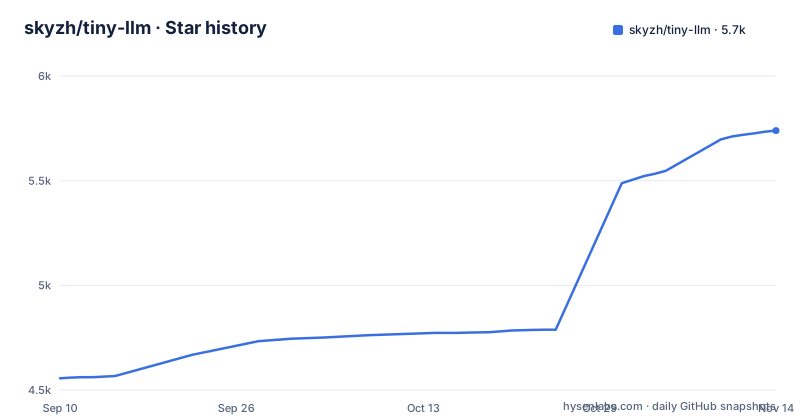
Star history
- skyzh/tiny-llm5,739 ★ · +1,183
| Repository | 2026-09-10 | 2026-11-14 |
|---|---|---|
| skyzh/tiny-llm | 4.6k | 5.7k |
1,183 Stars in the last 65 days, measured from the daily GitHub snapshot. Compare with other projects
Editorial analysis
You write the operator, MLX only checks it
The rule that defines the course is a prohibition. It is built on MLX arrays and the MLX extension runtime without using high level neural network layers, and when a chapter teaches an operator your solution implements that operator in Python, C++ or Metal rather than calling the corresponding optimised MLX operation. MLX stays in the project as the correctness oracle and the performance baseline.
That has two consequences. Passing the tests is achievable without being fast, because correctness is judged against MLX while speed is judged against it separately. And the comparison is always against a tuned library kernel on Apple hardware, which is a high bar to clear in Python.
The extension boundary is pinned rather than incidental: `nanobind==3.1.0` is an exact dependency, and the build scripts are wired to two separate directories:
build-ext.cmd = "python build.py"
build-ext.working_dir = "src/extensions"
build-ext-ref.cmd = "python build.py"
build-ext-ref.working_dir = "src/extensions_ref"
The learner tree and the reference tree are built separately, which is how the same operator can exist twice without one overwriting the other.
Named checkpoints, not chapters, are the unit of progress
Week 2 is where the shape of the course becomes clearest, because progress is measured in named checkpoints rather than in finished chapters. Day 1 adds `kv-cache` and a request bounded `capacity-cache`. Day 2 keeps W4 projection weights packed through the `quantized-matvec` checkpoint, which is the exercise that stops you from unpacking 4-bit weights on every matvec. Day 3 adds SIMD matrix prefill at `simd-matmul`. Day 4 adds cumulative `rmsnorm`, `rope` and `swiglu` checkpoints, and Day 5 adds `tiled-prefill` and runs the completed `selected` model.
The naming matters for a reader deciding whether to attempt this. A partial solution has a name and a definition of done, so you can find out how far you got rather than guessing from a diff.
Week 1 has no checkpoints because it is the baseline: attention, RoPE, grouped-query attention, RMSNorm, the MLP, sampling and the autoregressive loop, all built directly from `mlx.core` array operations. Load the model and generate responses complete the sequence before any optimisation starts.
Paged KV replaces rebuilding dense history
Week 3 turns the single request path into a serving system, and the stated goal is specific: make paged KV the canonical serving layout, and teach decode attention and FlashAttention to read pages directly, so the scheduler does not rebuild dense history on every step.
That is the whole lesson in one clause. The naive serving loop copies the entire KV history into a contiguous buffer per token, which turns per-step cost into a function of sequence length. Paged storage plus page-reading kernels makes the per-step cost proportional to what the step actually touches. Continuous batching and chunked admission come first, because they are what create the ragged batch shapes the page layout has to tolerate.
Two chapters are marked optional and both are recognisable: mixture of experts at 3.6 and speculative decoding at 3.7. Optional means the serving path is complete without them, so a reader who only needs continuous batching, chunked prefill and paged attention can stop at 3.5.
Week 4 is an agent loop with receipts, not inference tuning
The last week changes subject. It starts with a bounded, validated agent loop, then connects it to a small workspace, and it publishes one reviewed checkpoint at a time. Days 1 through 9 are available to learners, and the day descriptions read as a state machine rather than a model.
Day 3 can send file contents to the model, modify files after approval and run one exact configured command, with an explicit instruction to use a disposable workspace without secrets. Day 4 checkpoints a complete tool observation boundary and then restores a fresh model without replaying the completed edit or command. Day 5 compacts older completed effects in the model visible transcript while the exact receipts keep the full action, result and changed artifacts. Day 6 appends one visible operator instruction to a complete observation checkpoint and resumes fresh. Day 7 evaluates a completed run from declared final, file, result and receipt facts without grading hidden reasoning or exact transcript shape. Day 8 reuses one real tokenizer and KV checkpoint for two differently steered, effect isolated continuations and makes one explicit passing selection. Day 9 stores oversized tool result bytes outside the prompt and retrieves one byte range on request.
For a systems engineer the transferable parts are the checkpoint and resume boundary, the receipt pattern and the decision to evaluate observable outcomes instead of grading reasoning.
The roadmap separates done from reviewed
Progress is tracked in a table with four columns: Code, Test, Doc, and an Audit column that is described as Chi's personal editorial pass over the learner facing chapters, independent of code, test and doc readiness. Reading that column split is the fastest way to misjudge the course.
Week 1 is complete in all four columns. The five week 2 chapters have their documentation done while code, tests and audit are still in progress, which matches the week 2 narrative: the checkpoints are specified and written up, not finished. Every week 3 and week 4 chapter, including the two optional ones, shows code, tests and docs done with the audit column still open.
So there are two different questions. Is the content there? For weeks 1 to 4, mostly yes. Has a person read it end to end and signed it off? Only week 1. That distinction matters if you are choosing a course to follow and expect every published chapter to be proofread, because the table says otherwise.
Reference solutions and the reference tests are in the repo
The repository ships both halves of the exercise. The `tiny_llm` package is where students implement the work, and `tiny_llm_ref` contains the reference solution used by the tests and by the benchmark appendix. The top level tree also carries `tests/`, `tests_refsol/`, `benches/`, `benchmark_results/` and the capstone entry points `agent.py`, `batch-main.py` and `week4-capstone.py`.
The verification commands are three lines, and the order matters:
pdm install -v
pdm run check-installation
pdm run test-refsol -- -- -k week_1
`pdm run check-installation` is the one to run before anything else, since it tells you whether your machine can run the course at all. Then `test-refsol` with `-k week_1` filters the reference suite to one week, which is the pattern to follow as you move through the weeks.
The presence of a working answer changes the character of the exercise. There is no way to be stuck for want of an example, which also means the interesting part is the gap between your version and the reference one.
Apple silicon is a requirement, not a preference
The hardware choice is stated as a reason rather than a preference. Apple silicon provides a practical local environment with one shared memory space and direct access to Metal kernels, and the stated benefit is that students can inspect the complete path on one machine instead of depending on an expensive CUDA GPU setup.
One shared memory space is the part that changes what you can measure. CPU and GPU address the same buffer without a copy, so a kernel launch shows its real cost instead of a transfer artefact, and the course can talk about memory traffic and kernel occupancy against numbers you can trust.
The model is Qwen3-4B, chosen because it is large enough to expose real weight bandwidth, attention and cache costs but small enough to iterate on locally. Its grouped-query attention, QK normalization, BF16 activations and 4-bit weights keep the exercises close to current serving work.
The consequence is that the course targets Apple silicon rather than an NVIDIA machine.
The manifest excludes Python 3.13 and pulls in PyTorch
The packaging is narrow in one direction and wide in another:
[project]
name = "tiny-llm-course"
version = "0.1.0"
requires-python = ">=3.10, <3.13"
Python 3.10 through 3.12 only, so a machine with 3.13 installed cannot install the course. The build backend is `pdm.backend`, and `pdm.lock` at the top level is what `pdm install -v` resolves.
The dependency list is wider than an MLX course would suggest:
"mlx>=0.32.4",
"torch>=2.6.0",
"torchtune>=0.6.1",
"torchao>=0.10.0",
"mlx-lm>=0.31.3",
Torch, torchtune and torchao sit next to the MLX packages. There is also an admitted oddity: `setuptools>=62` carries a comment saying it should not usually appear in a project dependency list and is there to simplify setup.
Per week loaders come from the same manifest, which is how the same model runs at different optimisation levels:
main-week1.cmd = "python main.py --loader week1"
main-week2.cmd = "python main.py --loader week2"
main-week3.cmd = "python main.py --loader week3"
Editorial conclusion
tiny-llm fits a systems engineer who already knows PyTorch and wants to see where time and memory actually go in a serving loop, and who is prepared to write an operator three times before trusting a library call. It does not fit anyone without Apple silicon, since the whole runtime is MLX and Metal, or anyone who needs a production serving stack, since this is graded coursework with a roadmap that is still partly open. Verify two things first: that your Python is 3.10 to 3.12, since the manifest excludes 3.13, and that you are willing to implement kernels instead of calling them, because passing the tests is not the same as being fast.
Frequently asked questions
How do I build a mini LLM with tiny-llm?
Week 1 builds a Qwen3 model directly from `mlx.core` array operations: attention, RoPE, grouped-query attention, RMSNorm, the MLP, sampling and the autoregressive loop. Week 3 then turns it into a mini vLLM with continuous batching, chunked prefill and a paged KV cache.
Do I need an NVIDIA GPU to take the tiny-llm course?
No. It is built on MLX arrays and the MLX extension runtime, and the reason given is that Apple silicon offers one shared memory space with direct access to Metal kernels, so the whole path can be inspected on one machine instead of an expensive CUDA setup.
Which Python versions does tiny-llm support?
`requires-python` is `>=3.10, <3.13`, so Python 3.13 and newer cannot install the course package.
Are the exercise solutions included in the tiny-llm repository?
Yes. `tiny_llm_ref` holds the reference solution used by the tests and the benchmark appendix, while `tiny_llm` is where you implement the exercises. `pdm run test-refsol -- -- -k week_1` runs the reference tests for one week.
Is the whole tiny-llm course finished?
Not quite. In the roadmap table week 1 is complete across code, tests, docs and audit, the week 2 chapters have docs done with code, tests and audit still in progress, and weeks 3 and 4 have code, tests and docs with the audit column open. Week 4 publishes one reviewed day at a time, with days 1 through 9 available.
What does the tiny-llm Week 4 agent actually do?
It runs a bounded, validated agent loop against a small workspace: inspect files, apply approved edits, run one exact configured command, keep effect receipts, checkpoint and resume without replaying completed work, compact the transcript, pause for operator steering, and evaluate observable outcomes. Day 3 says to use a disposable workspace without secrets.
Official sources
Where developers are discussing it
Posts on Hacker News, dev.to and Lobsters that link to this repository, found by our scan of those communities. 1 in the last 30 days; newest first.
- Learn LLM inference system on Apple SiliconHacker News · Oct 30, 2026 · 2 points · 1 comments
Add this badge to your README
If you maintain this project, the badge below links readers to this analysis and shows its maintenance status from the daily GitHub snapshot. Paste the markdown into your README; add ?metric=license or ?metric=stars to the image URL for a different field.

[](https://hysenlabs.com/projects/skyzh-tiny-llm)Star history chart for your README
[](https://hysenlabs.com/projects/skyzh-tiny-llm)Was this useful?