mini-project-in-cpp: six student programs whose detail lives on a blog
Open source code for Mini Project in C++ on
At a glance
- What is it?
- The repository is a directory of six beginner C++ projects, student database, Hang Man, school fee enquiry, supermarket billing, bus reservation and employee management, with no build files and no license. Every explanation of how they work points off GitHub to codeincodeblock.com.
- Who is it for?
- Take this repository when you want a short list of small C++ programs to read through and a blog to consult while you do it, and you are content to compile each file by hand. Do not treat it as a maintained library, a course, or a codebase to build on: there is no build file, no dependency list, no license and no tagged release, and the default branch has not been pushed since January 16, 2021.
- Can I use it commercially?
- Not without permission. GitHub finds no licence file in the repository, and without a licence all rights are reserved by default: you may read the code but not reuse it. Check the README, or ask the authors, before using it.
- Is it still maintained?
- Probably not. The repository last received commits 70 months ago, on January 16, 2021.
- What is it written in?
- Mainly C++, according to GitHub's language statistics.
Answers come from the project's GitHub data, last synced on October 22, 2026, and from our analysis. They are not legal advice.
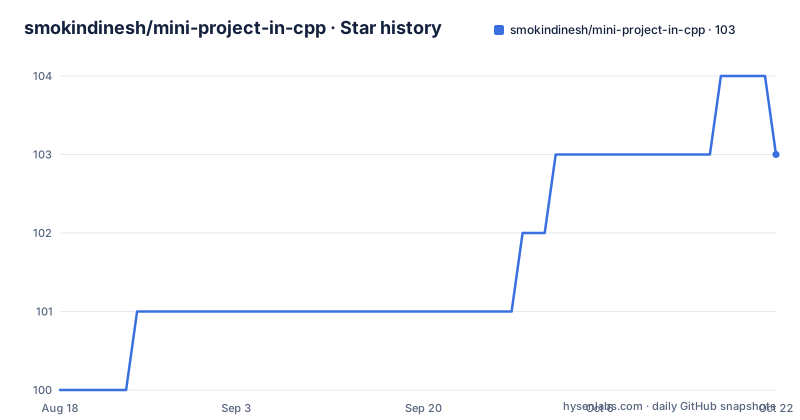
Star history
- smokindinesh/mini-project-in-cpp103 ★ · +3
| Repository | 2026-08-18 | 2026-10-22 |
|---|---|---|
| smokindinesh/mini-project-in-cpp | 100 | 103 |
3 Stars in the last 65 days, measured from the daily GitHub snapshot. Compare with other projects
Editorial analysis
Six directories, three in camelCase and three all lowercase
The repository root holds a README and six directories, and each directory is named after one of the projects the README lists. The mapping is close but not exact, and the naming is inconsistent in a way that tells you the tree grew one project at a time. `studentdatabase/`, `hangman/` and `employeemanagement/` are written in one lowercase run, while `busReservation/`, `schoolFeeEnquiry/` and `superMarketBilling/` use capitals inside the name. The article titles do not match the folder names character for character either: a folder called `superMarketBilling/` stands for the SuperMarket Billing System, and `employeemanagement/` stands for the Employee's Management System. If you are looking for one project by name, you have to map the two lists against each other yourself.
The detail sits on codeincodeblock.com, linked two different ways
The README is two sentences long and both of them point away from GitHub. The About section says the detail of all projects is in http://codeincodeblock.com/, while the six article links underneath all use the longer form with the www prefix, such as http://www.codeincodeblock.com/2012/01/mini-project-student-database-system-in.html. So the repository is an index, not the documentation: what a project actually does, and how it is put together, is written up on that blog. The six links are the only per-project information GitHub holds, and none of them comes back to the repository, so the two sides have to be visited separately to get the full picture.
The article paths record 2012, and one of them says C
The dates in the link paths are the clearest signal about the age of the material. Three of the six articles sit under 2012/01, covering the student database system, the Hang Man game and the school fee enquiry management system. The bus reservation system follows under 2012/06 and the employees management system under 2012/08. The slugs are not consistent with each other either: four begin with mini-project, while the bus reservation article begins with c-project-bus-reservation-system-in. The sharpest oddity is the Hang Man entry, whose path ends in mini-project-hang-man-in-c-source-code.html even though this repository is described as C++. Read that page before you assume the game in `hangman/` is written in the language you expect.
No build file, no dependency list and no license in the tree
What the root does not contain matters as much as what it does. There is no Makefile and no CMakeLists.txt, so nothing tells a compiler which files to build, in what order, or against which standard. There is no requirements file, no package manifest and no submodule, which is consistent with a collection of self-contained console programs rather than one application with dependencies. There is no LICENSE file at the root either, and no license is identified for the repository, so the terms for copying these sources into your own coursework are not stated anywhere in the tree. Opening a directory and reading it is the only route to any of those answers.
The pitch is two sentences written for beginners
The About section says the projects are written in C++ for begineer, with the misspelling left in, and sends the reader to the blog for detail. The repository description field is a single unfinished clause: Open source code for Mini Project in C++ on. Between them, they set expectations narrowly. The intended reader is someone at the start of a C++ course who wants a working program to take apart, not someone looking for a library, a framework or a design to imitate. The stated audience and the plain structure line up, which is also why the absence of tests, of comments describing the architecture and of any explanation of the code inside each directory is a fair trade for that reader.
The master branch was last pushed on January 16, 2021
Two facts bound how much you should expect from the repository over time. There are no GitHub releases, so there is no tagged version to install and no changelog to read; you take whatever is on the default branch. That branch is named master, and its most recent push is dated January 16, 2021. The repository is not marked as archived, so the code is still there to clone, but nothing in the record suggests that anything has been revised since that date, and the blog articles it points to were written in 2012. The practical consequence is that a compiler or standard library you install now is a much newer thing than the code was written against, and the files may need small adjustments before they run.
Nothing in the tree says which project to open first
The README gives an ordered list, but no guidance about difficulty, dependencies or length, and it names no file inside any of the six directories. That makes the choice yours: a billing system and a bus reservation system both suggest file handling and menus, a student database suggests records, and Hang Man suggests string handling and a word list. None of that is written down anywhere, so you would be picking by folder name and opening the directory to see. The blog is where the per-project write-ups live, and the paths carry the year of each one, which tells you how far back the thinking goes but nothing about how the code is structured today.
Editorial conclusion
Take this repository when you want a short list of small C++ programs to read through and a blog to consult while you do it, and you are content to compile each file by hand. Do not treat it as a maintained library, a course, or a codebase to build on: there is no build file, no dependency list, no license and no tagged release, and the default branch has not been pushed since January 16, 2021. Before you build anything on it, open one directory and read its sources, confirm which C++ standard the code expects, and check the licensing yourself, because nothing in the tree settles either question.
Frequently asked questions
What are good mini project ideas?
This repository collects six of them in C++: a student database system, Hang Man, a school fee enquiry management system, a SuperMarket Billing System, a bus reservation system and an Employee's Management System, each in its own directory at the root.
What are some good OOP micro projects for C++?
The repository is described as mini projects written in C++ for beginners, and it holds the six programs named above. Nothing in the text says whether any of them are built around classes or other object-oriented techniques, so open the sources before you rely on that.
Where do I find the detail for smokindinesh's C++ mini projects?
Off GitHub. The About section sends you to http://codeincodeblock.com/ and the six article links use the www form of that address, one per project, so the explanations live on the blog rather than in the repository.
How do I compile the programs in mini-project-in-cpp?
The repository names no build command and the root holds no Makefile or CMakeLists.txt, so the files have to be compiled by hand. No C++ standard is stated either, and no file name is given for any of the six directories.
Can I reuse the code from mini-project-in-cpp?
Nothing in the tree settles that. There is no LICENSE file at the root and no license is identified for the repository, and the README says nothing about reuse terms, so you have to work out the licensing yourself.
Official sources
Add this badge to your README
If you maintain this project, the badge below links readers to this analysis and shows its maintenance status from the daily GitHub snapshot. Paste the markdown into your README; add ?metric=license or ?metric=stars to the image URL for a different field.

[](https://hysenlabs.com/projects/smokindinesh-mini-project-in-cpp)Star history chart for your README
[](https://hysenlabs.com/projects/smokindinesh-mini-project-in-cpp)