face_recognition: A Thin Python Wrapper Around dlib for Face Matching
The world's simplest facial recognition api for Python and the command line.
At a glance
- What is it?
- face_recognition packages dlib's deep learning face model into a small Python API and two command line tools. It trades flexibility for simplicity and its latest GitHub release dates from 2018.
- Who is it for?
- Adopt face_recognition if you need a quick, scriptable face detector or recognizer in Python on Linux or macOS, and you accept that the latest tagged release dates from 2018. Do not adopt it for production systems requiring ongoing maintenance, Windows support, or modern accuracy improvements.
- Can I use it commercially?
- Yes. MIT is a permissive licence: you can use, modify and sell software built on it, as long as you keep its copyright and licence notices.
- Is it still maintained?
- Yes. The repository last received commits 142 days ago.
- What is it written in?
- Mainly Python, according to GitHub's language statistics.
Answers come from the project's GitHub data, last synced on November 14, 2026, and from our analysis. They are not legal advice.
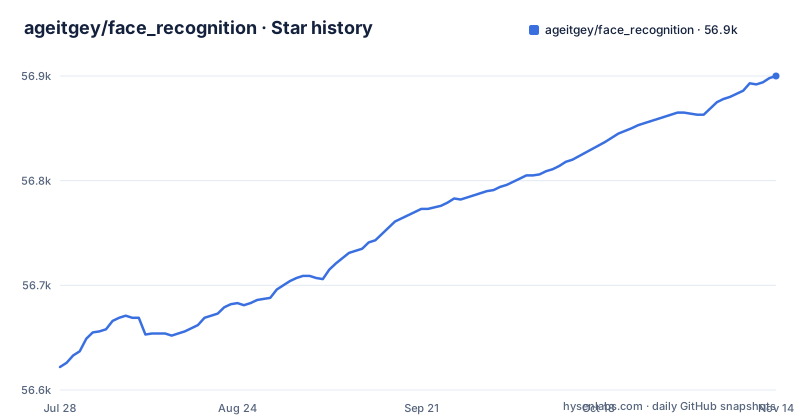
Star history
- ageitgey/face_recognition56,900 ★ · +278
| Repository | 2026-07-28 | 2026-11-14 |
|---|---|---|
| ageitgey/face_recognition | 56.6k | 56.9k |
278 Stars in the last 109 days, measured from the daily GitHub snapshot. Compare with other projects
Editorial analysis
What This Library Actually Solves
face_recognition solves a narrow problem: giving a Python developer a working face detector and recognizer without writing any deep learning code. The README positions it as "the world's simplest facial recognition api," and the examples bear that out. You load an image, call face_locations, and you get bounding boxes. You call face_encodings, compare_faces, and you get a boolean match. The intended user is someone who wants face recognition as a utility, not a researcher building models. The library also ships a command line tool, face_recognition, that maps a folder of known faces against unknown images and prints CSV-style results. That makes it usable in shell scripts and cron jobs without writing a line of Python. The problem it solves is real, but the solution is deliberately shallow: it wraps dlib and exposes a small subset of dlib's capabilities.
The Mechanism: dlib's Model Behind a Thin API
Under the hood, face_recognition is a wrapper around dlib's deep learning face recognition model. The README states that dlib's model achieves 99.38% accuracy on the Labeled Faces in the Wild benchmark. The Python API exposes three core functions: face_locations for detection, face_landmarks for facial feature points, and face_encodings plus compare_faces for identification. The data flow is straightforward. You load an image with load_image_file, which returns a numpy array. face_encodings runs the dlib model and returns a 128-dimensional vector per face. compare_faces takes a list of known encodings and an unknown encoding, then returns a list of booleans. The comparison uses a distance threshold, which the user can adjust via the --tolerance parameter in the CLI. This design means the model is fixed; there is no training step in the library. You do not fine-tune the model on your own data. You only supply known encodings at runtime.
Getting It Running: Installation and First Commands
Installation requires Python 3.3+ or 2.7, and macOS or Linux. Windows is not officially supported. The README instructs you to install dlib with Python bindings first, then cmake, then run pip3 install face_recognition. On FreeBSD, you can use pkg install graphics/py-face_recognition. For a Raspberry Pi or Jetson Nano, the README points to external guides. After installation, you get two CLI programs. The face_detection command prints one line per detected face with top, right, bottom, left pixel coordinates. For example, the README shows output like examples/image1.jpg,65,215,169,112. The face_recognition command takes a folder of known people (one image per person, named after the person) and a folder of unknown images. It prints lines like /unknown_pictures/unknown.jpg,Barack Obama. The --tolerance flag adjusts how strict the matching is. A lower tolerance value reduces false positives when people look similar. This is the entire operational surface: two commands and a handful of Python functions.
The 2018 Time Capsule: Maintenance and Upgrade Cost
The repository's last push was June 25, 2026, but the latest release, v1.2.2, is from April 2, 2018. That means the latest tagged release is more than eight years old. The README's claims about accuracy and installation still hold, but they refer to a model and dependencies from a different era. dlib itself has evolved, and Python versions have moved far beyond 3.3. The upgrade cost is not about upgrading face_recognition; it is about the risk of dependency rot. If you install this on a modern Python version, you may hit compatibility issues with dlib or numpy. The README's installation instructions for dlib from source may not work cleanly on current distros. The MIT license is permissive, so you can fork and patch, but you would be maintaining a fork. For a production system, this is a serious consideration: the latest tagged release is from 2018. The library works as documented, but only if your environment matches the 2018 assumptions.
Where It Fails: Limitations and Wrong Use Cases
The most obvious limitation is platform support. Windows is not officially supported, despite user-contributed guides. The README says "Windows not officially supported, but might work." For any team standardized on Windows, this is a blocker. Another limitation is the fixed model. You cannot retrain or adapt the recognition to a specific domain, such as recognizing only your employees or handling unusual lighting. The library also assumes one face per known image; the CLI's folder-based matching expects filenames to identify people, which breaks if you have multiple faces per image or need to match against a database. For large-scale face search, this approach of comparing against a list of encodings is O(n) per query, which does not scale. The README's example shows comparing one encoding against one known encoding. Real deployments with thousands of known faces would need a vector database, which this library does not provide. Finally, the accuracy claim of 99.38% on LFW is for the dlib model, not for any arbitrary photo set. Real-world accuracy will be lower with varied poses, occlusions, or low resolution.
A Real Alternative: DeepFace or OpenCV DNN
face_recognition hides the model behind a simple API, so you cannot swap models. If you need a quick script on a Linux or macOS machine, face_recognition works.
The Command Line Tools: Useful but Limited
The CLI tools are a genuine strength, but they have sharp edges. The face_recognition command expects a folder of known people, with filenames as labels. The README shows output that includes the full path and a name, comma-separated. This is easy to parse in a shell pipeline. The default output shown in the README is a name or unknown_person per face, with no distance value. The face_detection tool outputs pixel coordinates, which is handy for cropping or drawing boxes. For batch processing of a folder, these tools are adequate. For anything more nuanced, you are back to writing Python.
Who Should Adopt It and What to Verify First
This library is a reasonable choice for prototyping, academic experiments, or internal tools where the 2018 model is acceptable and the environment is Linux or macOS. It is not the right choice for a commercial product that needs ongoing support, Windows compatibility, or the ability to upgrade models. Before adopting, verify three things. First, confirm that dlib installs from source on your exact OS and Python version; the README's gist may be outdated. Second, test the accuracy on your own dataset, not just the LFW benchmark, because your images will differ. Third, check whether the lack of updates violates any dependency review policies in your organization. The MIT license means you can legally fork and modify, but that is a maintenance burden. If you are starting a new project today, you are better off picking a maintained library, even if it means writing a few more lines of code. face_recognition is a snapshot of 2018 that still works for simple tasks, but it is not a foundation for future work.
Editorial conclusion
Adopt face_recognition if you need a quick, scriptable face detector or recognizer in Python on Linux or macOS, and you accept that the latest tagged release dates from 2018. Do not adopt it for production systems requiring ongoing maintenance, Windows support, or modern accuracy improvements. Before adopting, verify that dlib installs cleanly in your target environment, confirm the model's 99.38% LFW accuracy is sufficient for your use case, and check that the unmaintained status does not conflict with your security or dependency policies.
Frequently asked questions
how to install face_recognition in python
You must install dlib with Python bindings first, then cmake, then run pip3 install face_recognition. The stated requirements are Python 3.3 or later or Python 2.7, on macOS or Linux, since the recognition work happens inside dlib rather than in this package.
how to use face_recognition
From Python you can call face_locations to find faces, face_landmarks to get eyes, nose, mouth, and chin positions, face_encodings to produce a comparison vector, and compare_faces to match them. Installing the package also gives you the face_recognition and face_detection commands, plus Dockerfile and Dockerfile.gpu for container builds.
How to find a person by photo with face_recognition?
Put one image per known person in a folder, with filenames naming who appears, put the images to identify in a second folder, then run face_recognition with both paths. It prints one comma-separated line per face, and a face that matched nobody in the known folder is reported as unknown_person.
Official sources
Add this badge to your README
If you maintain this project, the badge below links readers to this analysis and shows its maintenance status from the daily GitHub snapshot. Paste the markdown into your README; add ?metric=license or ?metric=stars to the image URL for a different field.

[](https://hysenlabs.com/projects/ageitgey-face-recognition)Star history chart for your README
[](https://hysenlabs.com/projects/ageitgey-face-recognition)Was this useful?