Silero Models: two dependencies, three install routes, and two licence files
Silero Models: pre-trained text-to-speech models made embarrassingly simple
At a glance
- What is it?
- An end-to-end text-to-speech model family covering dozens of languages, installed through PyTorch Hub or pip with the same code underneath. The V5 Turkic and Caucasian lines carry no stress support, and the repository ships two separate licence files.
- Who is it for?
- Adopt Silero if you need speech synthesis that runs on CPU without a hosted service, since requirements.txt lists just two dependencies and the models load with one call. Pick your line by language and accept the feature set you get: the V5 Turkic and V5 Caucasian families are broad but carry no stress support, so if stress or homograph disambiguation matters to you, that is the question to ask before choosing a voice.
- Can I use it commercially?
- Check first. The repository uses a licence we do not classify automatically, so read its LICENSE file before any commercial use.
- Is it still maintained?
- Yes. The repository last received commits 31 days ago.
- What is it written in?
- Mainly Jupyter Notebook, according to GitHub's language statistics.
Answers come from the project's GitHub data, last synced on November 15, 2026, and from our analysis. They are not legal advice.
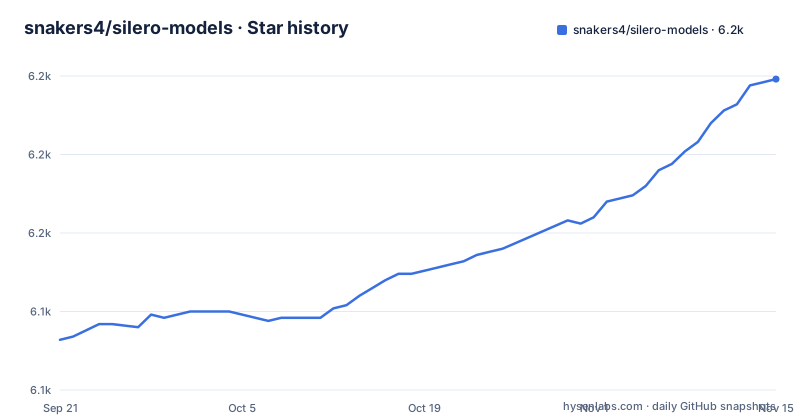
Star history
- snakers4/silero-models6,199 ★ · +83
| Repository | 2026-09-21 | 2026-11-15 |
|---|---|---|
| snakers4/silero-models | 6.1k | 6.2k |
83 Stars in the last 55 days, measured from the daily GitHub snapshot. Compare with other projects
Editorial analysis
Two dependencies, and three install routes that are really the same code
The stated runtime is as short as it gets. requirements.txt contains exactly two entries:
omegaconf
torch
omegaconf and torch. Nothing else, no audio library, no tokenizer, no ONNX runtime, no separate inference package. The v5.5 release, titled Add numpy to pip-requirements, shows the pip package also requires numpy.
Against that, the README says you can basically use the models in three flavours. Via PyTorch Hub, which is torch.hub.load. Via pip, which is pip install silero followed by from silero import silero_tts. Or via caching the required models and utils manually and modifying if necessary.
The second half of that list is the important detail: PyTorch Hub and the pip package are based on the same code. So the two routes are not different implementations with different tradeoffs, they are the same implementation reached through two different import lines. Every torch.hub.load example can be used with the pip package, and the conversion is one line. The pip form of the canonical example is:
from silero import silero_tts
model, example_text = silero_tts(language='ru',
                                 speaker='v5_ru')
audio = model.apply_tts(text=example_text)
Which means the choice between them is about how you want the model to arrive, not about what you can do once it has. If you already resolve models through torch.hub, use torch.hub. If you would rather have it as an ordinary dependency in your environment, take the pip package and change the import.
The third route is the one with a real difference, because it is the only one that does not involve a network fetch at load time. Caching the models and utils manually lets you inspect them and modify them, which is what you want if you are debugging an output or tuning something, and it is also what you need for any deployment where the machine has no outbound access.
The packaging metadata is minimal to match. pyproject.toml declares the project with authors listed as Silero Team, points the repository field at the GitHub URL, and uses setuptools as the build backend with setuptools>=42 and wheel as the only build requirements, despite the file opening with a tool.poetry table.
Models download on first use, so offline operation is something you arrange in advance
Models are downloaded on demand both by pip and PyTorch Hub. If you need caching, do it manually or via invoking a necessary model once, and it will be downloaded to a cache folder. The README points at the PyTorch Hub documentation for more detail on that mechanism.
That is a one-line sentence carrying a deployment decision. Neither supported route bundles weights, so the first call in a fresh environment performs a network fetch. For a laptop or a notebook that is invisible. For a container image, a CI runner, an air-gapped machine or anything behind an egress policy, it means the process cannot start until it has reached the model host at least once.
The two ways out are both named. Cache it yourself, which is the manual route and the one that also lets you modify what is cached. Or invoke the model once in an environment that has network access, so the cache directory is populated, and then ship that populated cache with the image. The second is the pragmatic approach for containerised deployment and it is worth doing explicitly rather than discovering at deploy time.
The wording is careful in a way that matters. Do it manually or via invoking a necessary model once. Invoking the model is what populates the cache, which means the cache is keyed by the specific model you asked for. If your code path can request several models, warming one does not warm the others, and you will find out which ones on first run in the environment that cannot fetch.
The model registry itself is a file rather than an API. All of the provided models are listed in models.yml, and any metadata and newer versions will be added there. That makes models.yml the place to look for what exists and what changed, and it means you can read the current catalogue without running anything.
The last thing to know before deploying is what the call actually returns. The pip example shows two values coming back from silero_tts, a model and an example text, and then a separate call, apply_tts, that turns text into audio. So the model object is the thing you keep, and synthesis is a method on it rather than a separate pipeline you have to wire up.
The Turkic and Caucasian lines carry no stress support, while the project advertises stress handling
The criteria at the top of the README list six properties the models aim for: fully end-to-end, a large library of voices, natural-sounding speech, one-line usage that is minimal and portable, impressive speed on CPU and GPU, and, specifically for the Russian language, automated stress and homographs.
Read that last clause carefully against the model tables, because the tables do not carry it forward. Both the V5 Turkic section and the V5 Caucasian section open with the same three bullet points, and the first one is the same in both: this model does not support stress at all.
So the project's headline stress capability is scoped to Russian, and the two broadest language families in the catalogue have none. That is not an inconsistency so much as a scope statement, but it is the first thing to check if you are picking a language other than Russian, because a voice that ignores stress will mispronounce homographs, and for several of the languages in these tables that is a routine occurrence rather than an edge case.
The other two bullets are identical across both sections too, and they are the positive constraints. Both support SSML, with the SSML wiki linked from both. And both support the 8000, 24000 and 48000 sampling rates, which is three output rates covering telephony, standard audio and high fidelity.
The SSML support is worth a note in its own right. SSML is the markup for prosody, and the fact that it is listed per model family rather than globally means it is a per-model capability you can rely on for these two lines. If your application needs to control pause, rate or emphasis rather than only choose a voice, that capability is documented per family and you can check it before you build the feature.
The catalogue also has V5 CIS Base Models and V5 CIS Ext Models listed as their own sections, alongside the Turkic and Caucasian lines and older V4 and V3 entries. Multiple parallel lines in one repository is a normal thing for a model project to carry, and models.yml is where the authoritative list lives.
Choosing a voice takes a model id, a language code and an index, and the tables are the interface
Each model family in the README is presented as a table with the same four columns: the model ID, the speakers, the language and a link to a Colab notebook. The V5 Turkic table is a good example of the pattern, and the shape of it is the thing to understand.
The model ID is constant within a family. Every row of the Turkic table reads v5_turkic, and every row of the Caucasian table reads v5_caucasian. So the ID selects the family, not the voice.
The language is a short code with the name in brackets. chv for Chuvash, crh for Crimean Tatar, gag for Gagauz, kaa for Karakalpak, kir for Kyrgyz, kjh for Khakas, sah for Yakut, sty for Siberian Tatar, tat for Tatar, tgk for Tajik, tuk for Turkmen, tyv for Tuvan, uzb for Uzbek, xal for Kalmyk. The Caucasian table follows the same convention with abq for Abaza, ady for Adygea, agx for Aghul, ava for Avar, and che for Chechen among the visible rows.
The speakers are that language code, an underscore, and an index. tat_0 is one Tatar voice, ady_3 is a fourth Adygean voice. Which means picking a voice is a three-part decision: which family handles your language, which language code it uses, and which index within that language you want. Nothing in the identifier tells you which voice that is; only the table does.
The number of voices per language is not uniform, and that is worth noting before you design around a particular voice. In the Turkic table, kir, kjh, sty, tat, tgk, tyv and uzb each have a single speaker with index 0, chv and kaa have two, and crh, gag, sah, tuk and xal have three. In the Caucasian table the spread is wider still, with che showing five and ady showing four. A language with one voice gives your users no choice, so if voice variety is part of your product, check the count for your specific language rather than assuming the family's maximum applies.
Every row also links to the same Colab notebook per family, which is the runnable version of that table. So the table is not documentation about the code, it is a transcription of what the notebook does, and the notebook is the thing you can actually execute.
Two licence files and a licence field that says nothing, with a release dedicated to the change
The repository has both LICENSE and LICENSE_CIS at its root, alongside CODE_OF_CONDUCT.md. Two licence files for one project is not a mistake, it is a split, and it almost certainly corresponds to the CIS model lines that the README lists as their own sections.
What makes this worth reading closely is the release history behind it. The three most recent releases are v5.6, titled SAPI5 for Windows Release, dated 2026-06-04; v5.5, titled Add numpy to pip-requirements, dated 2026-02-03; and v5.4, titled Change pip-package license, dated 2026-01-30.
A release whose entire title is Change pip-package license means the licensing of the distributed package changed about four months before the latest release. Whatever you concluded about the licence from an older copy of this project may be out of date, and the two files at the root are the current state rather than a historical artifact.
On top of that, the recorded licence field for the repository is NOASSERTION, which is the marker used when a licence could not be classified. So automated tooling reading the metadata learns nothing at all, and the authoritative statements are the two files in the tree plus whatever they point at.
If you are using these models commercially, that is the resolution order. Read LICENSE for the general terms, read LICENSE_CIS before you ship any of the CIS model lines, and treat the pip package's licence as something to re-check at the version you actually pin rather than at the version you last read about. The v5.6 title, SAPI5 for Windows Release, is a separate reminder that this project also ships a Windows speech API interface, which is a distribution channel with its own licensing surface.
The other thing the repository listing tells you is that this is a notebook-shaped project. The primary language is recorded as Jupyter Notebook, and the root contains examples.ipynb, examples_denoise.ipynb, examples_te.ipynb, examples_tts.ipynb, examples_tts_cis.ipynb, examples_tts_turkic_caucasian.ipynb and v5_cis_base_jit.ipynb, plus colab_utils.py as the shared helper. Those notebook names also tell you the scope is wider than text-to-speech: there are denoising examples (examples_denoise.ipynb) alongside the synthesis ones.
Editorial conclusion
Adopt Silero if you need speech synthesis that runs on CPU without a hosted service, since requirements.txt lists just two dependencies and the models load with one call. Pick your line by language and accept the feature set you get: the V5 Turkic and V5 Caucasian families are broad but carry no stress support, so if stress or homograph disambiguation matters to you, that is the question to ask before choosing a voice. Resolve the licensing before you ship anything commercial, because the repository has two licence files and the recorded licence field says NOASSERTION, and one of the three most recent releases exists specifically to change the pip package licence. And if you need offline operation, pre-cache the models deliberately, because both supported install routes fetch on first use and neither bundles weights.
Frequently asked questions
How do I install and run Silero Models for text to speech?
Pick one of three routes. Via PyTorch Hub with torch.hub.load, via pip with pip install silero followed by from silero import silero_tts, or by caching the models and utils manually. PyTorch Hub and the pip package are the same code underneath, so the conversion is one import line. The pip form loads a model and an example text in one call, then synthesises with a method on the model object: model, example_text = silero_tts(language='ru', speaker='v5_ru') followed by audio = model.apply_tts(text=example_text).
What dependencies does Silero Models need?
Two, according to requirements.txt: omegaconf and torch. The pyproject.toml build requirements are setuptools>=42 and wheel, with setuptools as the build backend. The v5.5 release, titled Add numpy to pip-requirements, shows the pip package also requires numpy.
Which languages and voices are available, and can I run it offline?
All models are listed in models.yml at the repository root, and each family is broken out as a table with a model ID, a speaker list, a language code and a link to a runnable Colab notebook. A voice is identified by language code plus index, such as tat_0 for Tatar or ady_3 for a fourth Adygean voice, and the number of voices per language is not uniform. For offline use, both install routes download models on first use, so you must either cache the models and utils manually or invoke the needed model once in a networked environment to populate the cache folder before deploying.
Official sources
Add this badge to your README
If you maintain this project, the badge below links readers to this analysis and shows its maintenance status from the daily GitHub snapshot. Paste the markdown into your README; add ?metric=license or ?metric=stars to the image URL for a different field.

[](https://hysenlabs.com/projects/snakers4-silero-models)Star history chart for your README
[](https://hysenlabs.com/projects/snakers4-silero-models)Was this useful?