niri-flake: Nix packages and modules for the niri compositor
Nix-native configuration for niri
At a glance
- What is it?
- niri-flake is a Nix flake that packages the niri scrollable-tiling Wayland compositor and provides NixOS and home-manager modules that validate a niri configuration at build time. It tracks upstream niri closely, publishes its own binary cache, and leaves home-manager configurations outside its automated checks.
- Who is it for?
- Adopt niri-flake when you already live in Nix and want niri packaged with a configuration that is checked against the compositor version you actually run, and use the nixpkgs package instead when you want no third party cache and can accept slower updates.
- Can I use it commercially?
- Yes. MIT is a permissive licence: you can use, modify and sell software built on it, as long as you keep its copyright and licence notices.
- Is it still maintained?
- Yes. The repository received new commits within the last day.
- What is it written in?
- Mainly Nix, according to GitHub's language statistics.
Answers come from the project's GitHub data, last synced on November 7, 2026, and from our analysis. They are not legal advice.
Star history
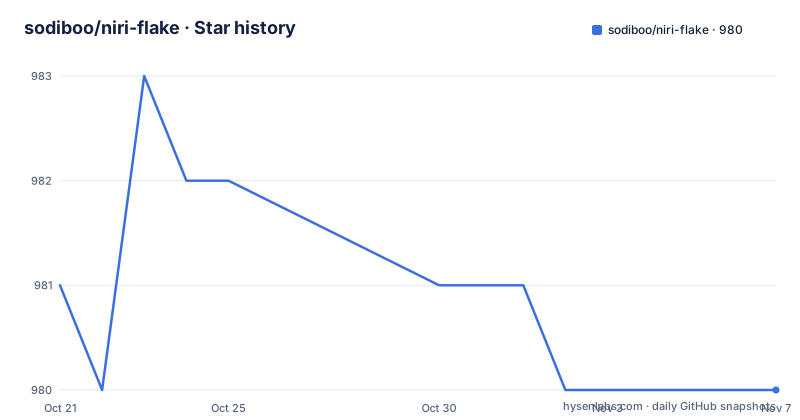
- sodiboo/niri-flake980 ★ · -1
| Repository | 2026-10-21 | 2026-11-07 |
|---|---|---|
| sodiboo/niri-flake | 981 | 980 |
-1 Stars in the last 17 days, measured from the daily GitHub snapshot. Compare with other projects
Editorial analysis
A flake that packages niri and validates your config at build time
niri-flake is a Nix flake containing packages for niri, a scrollable-tiling Wayland compositor, plus NixOS and home-manager modules for installing the components of a working Wayland environment. The modules exist so the configuration can be managed declaratively and validated at build time, and the stated purpose of that validation is to keep the config schema in sync with the installed version of niri.
That last point is the actual reason to use this flake rather than writing a niri configuration by hand. A compositor's configuration format changes as the compositor evolves, and a plain config file only fails when niri reads it at login. Here, a wrong option name is a build failure, which is a much better place to find out.
The two most important outputs are named in the README: overlays.niri and nixosModules.niri. The overlay is what makes the flake's own niri packages visible in nixpkgs, and the NixOS module is the entry point for system wide installation. A home-manager module is provided as well, and it can be used standalone.
The audience is people who already use Nix and who want niri as part of a declarative system rather than a package installed on top of one. The project also links the author's own configuration as a reference, which is the fastest way to see how the modules fit together in practice.
Running niri from the flake without installing anything
The README opens with a way to try the project immediately, and it is worth reading as the recommended first step because it requires no system changes.
The binary cache is added first:
cachix use niriThen niri is run straight from the flake:
nix run github:sodiboo/niri-flakeThat should bring up the compositor from the flake's stable output. To try the bleeding edge version instead, the same command targets a different flake output:
nix run github:sodiboo/niri-flake#niri-unstableThe two-step sequence matters because the first command redirects nix to a remote cache, and the second then fetches a prebuilt binary rather than compiling niri locally. That works on any system with nix installed, not only NixOS.
For NixOS users the README describes a slightly different order, and the reason is mechanical rather than stylistic. You add the niri.nixosModules.niri module and do not enable niri yet, rebuild once so that the cache configuration takes effect, and only then enable niri. The rebuild exists so the substituted binary is fetched from the cache on the build that installs the package. If you would rather not have the cache wired in at all, niri-flake.cache.enable = false prevents it.
An alternative exists for people who do not want a third party cache at all: setting programs.niri.package = pkgs.niri uses the package from nixpkgs, which the README notes will receive updates more slowly.
niri-unstable is a flake term, not an upstream one
The naming here confuses people, and the README explains it directly. Niri has no inherent unstable versioning scheme in the way Rust or NixOS does, and the term is specific to this flake. niri-unstable is simply the latest commit to the niri main branch, and the README notes it is equivalent to niri-git on the AUR.
The flake keeps that channel current with automated pull requests rather than asking users to override an input. The README gives two reasons for doing it this way. The first is that hooks can regenerate documentation, at minimum stamping the niri version into it, and also enumerating the available actions parsed from the source into docs.md. The second is that the updated lockfile can be checked, so a niri update that breaks something is caught before it reaches users.
Two further benefits follow from the same mechanism. Because the build job has to succeed before the pull request merges, the latest niri builds are already in the author's binary cache, so users do not build locally. And because nixpkgs is updated at the same time, the modules can be checked against the current nixpkgs.
The repository uses automated pull requests extensively, so the pull request list is mostly noise. To see only human contributions, the README points at a filter that excludes pull requests labelled automated. That single label explains most of the activity in the repository history.
The binary cache is one person's infrastructure on x86_64-linux
The cache is hosted at niri.cachix.org and contains builds of niri-stable and niri-unstable for nixos-unstable and nixos-25.05. Only x86_64-linux builds are published, and the reason given is that GitHub Actions does not support other platforms and the author does not want to rely on qemu emulation.
The README is unusually direct about the trust model. The cache is managed by the author, and by using it you are trusting them not to serve malicious software. It is entirely optional.
That framing is the right one for a cache, since a binary cache is by definition a source of trusted artefacts. It is worth being clear about what you are trusting, though. A cache serves binaries keyed by content hash, so the security property comes from the hash matching what Nix expects, and the trust question is about who controls the build inputs that produced the artefact and who operates the hosting.
Two practical consequences follow. A user on aarch64-linux or another architecture gets no cache hits and has to build niri locally, which is a long compile. And the cache is keyed to particular nixpkgs channels, so a user on a different channel or an unstable nixpkgs revision may find no matching artefact either.
If the convenience of a cache matters but the trust does not sit well, the README points at pkgs.niri from nixpkgs as the slower but independent alternative.
Overlays, modules and switching to the unstable package
Both the NixOS module and the home-manager module let you choose which niri build you run, through the programs.niri.package option. The README shows how that looks with the overlay applied and the unstable derivation selected:
{pkgs, ...}: {
  nixpkgs.overlays = [ inputs.niri.overlays.niri ];
  programs.niri.package = pkgs.niri-unstable;
}
The same option works with the nixpkgs package instead, if you prefer the slower moving one, by assigning pkgs.niri.
There is a subtlety in the home-manager module. Its config option can also set the package, but doing so does not install niri by itself. What it sets is the package version used for build-time validation, which is the part that matters: the validation runs against the same niri version you will actually run, so the schema check stays meaningful.
That is the design idea in one sentence. The module treats the niri binary as an input to the configuration, and it validates the configuration against that binary rather than against a hardcoded copy of the format.
The repository layout supports the same story. There are separate files for the KDL library (kdl.nix), the settings schema (settings.nix), the generated documentation (generate-docs.nix and generate-html-docs.nix), and shell.nix for a development shell. The docs.md file at the root is the main documentation, and the README says so explicitly.
programs.niri.settings versus programs.niri.config, and the version caveat
The preferred way to configure niri is programs.niri.settings, which comes from niri.homeModules.config and is imported automatically when home-manager is used as a NixOS module. The example in the README is a single output scale setting:
{
  programs.niri.settings = {
    outputs."eDP-1".scale = 2.0;
  };
}
Every option under programs.niri.settings is documented in docs.md, which means the schema is generated rather than hand written, and that is what makes build-time validation possible.
If you need to bypass the schema, programs.niri.config takes over. It accepts structured KDL built with the library at inputs.niri.lib.kdl:
{
  programs.niri.config = with inputs.niri.lib.kdl; [
    (node "output" "eDP-1" [
      (leaf "scale" 2.0)
    ])
  ];
}
It also accepts a plain string:
{
  programs.niri.config = ''
    output "eDP-1" {
      scale 2.0
    }
  '';
}
Setting programs.niri.config = null prevents the module from generating a config file at all, and by default the module writes a config file derived from programs.niri.settings when that is not null. There is also programs.niri.finalConfig, always a string or null, which is the file that will end up in your config directory, useful when debugging.
The caveat is in the README's own note. programs.niri.settings is not guaranteed to be compatible with niri versions other than the two the flake provides, which in practice means no guarantee of compatibility with the nixpkgs package at all times. The README qualifies this: you are unlikely to hit a problem unless you run a niri version two or more releases behind. programs.niri.config, being version agnostic, still provides build-time validation.
Stylix integration has one hard prerequisite
The flake ships a Stylix module, and the constraint on using it is stated before anything else: you must never set programs.niri.config. The reason is that programs.niri.config overrides everything that comes from programs.niri.settings, and Stylix places its theming configuration in programs.niri.settings.
So the rule is simple but easy to trip over. If you are theming niri with Stylix, the configuration path is programs.niri.settings only, and the schema validation still applies, which is the better outcome anyway.
For NixOS and home-manager installations of Stylix, the README describes the wiring without spelling out the full module expression in the visible text, so the module names and the exact option path need to be read from the rest of the file or from docs.md.
The repository also contains a default-config.kdl.nix file, which is the fallback configuration used when you do not supply one of your own. That is a small but useful detail for a compositor, since a missing configuration file and an empty one are not the same thing in a KDL based setup.
Docs are generated from the flake, and home-manager configs are not tested
Documentation in this project is a build output rather than a hand edited file, and the justfile shows the machinery. Formatting runs nixfmt over the Nix files found by fd. The check target formats and then runs nix flake check, with a nicer variant that uses nom if it is installed. Generating the docs needs a deeper call stack than the default, and the justfile works around that by raising the limit:
NIX_CONFIG="max-call-depth = 20000" nix eval --quiet --quiet --raw .#lib.internal.docs-markdown | sponge docs.mdThe same pattern produces the HTML documentation, and a watch target rebuilds the docs whenever a Nix file changes. The makefile in the repository root is the older entry point for the same jobs.
The significant limitation is in the automated pull request section. There is no home-manager input to the flake, because the author considered it unnecessary for checks alone, and configurations that involve home-manager are therefore not automatically tested at this time. That is a real gap for anyone running the home-manager module, since the module that most users of a personal compositor setup would install is the one with no automated coverage.
The other documented gaps are narrower. The binary cache is x86_64-linux only, and the flake tracks nixpkgs as well as niri, so lockfile churn arrives frequently through automated pull requests. The last push to main was on 2026-10-20 and there are no GitHub releases, so there is no tag to pin.
Editorial conclusion
Adopt niri-flake when you already live in Nix and want niri packaged with a configuration that is checked against the compositor version you actually run, and use the nixpkgs package instead when you want no third party cache and can accept slower updates. Verify three things first: that you are on x86_64-linux if you plan to use niri.cachix.org, since the cache covers only that platform, that the niri version behind your pinned lockfile matches the settings you wrote, because programs.niri.settings is not guaranteed compatible with other niri versions, and that you have not set programs.niri.config if you want Stylix to work, since it overrides everything. The last push to main was on 2026-10-20 and the repository publishes no GitHub releases, so track the flake through its lockfile rather than a tag.
Frequently asked questions
How do I try niri-flake without installing it?
Add the binary cache with cachix use niri, then run nix run github:sodiboo/niri-flake. For the latest upstream commit instead of the stable output, use nix run github:sodiboo/niri-flake#niri-unstable.
What is the difference between niri-stable and niri-unstable?
The term unstable is specific to this flake, because niri has no inherent unstable versioning scheme. niri-unstable is simply the latest commit to the niri main branch, equivalent to niri-git on the AUR, and it is kept current through automated pull requests.
Does niri-flake provide a binary cache?
Yes, niri.cachix.org hosts builds of niri-stable and niri-unstable for nixos-unstable and nixos-25.05, but only for x86_64-linux. Using it is optional, and you can set niri-flake.cache.enable = false or use the nixpkgs package pkgs.niri instead.
How do I configure niri declaratively with niri-flake?
Use programs.niri.settings, whose options are documented in docs.md and validated at build time against the niri version you selected with programs.niri.package. You can bypass the schema with programs.niri.config, which accepts structured KDL or a plain string, but then Stylix theming no longer applies.
Which platforms does niri-flake support?
The published binary cache covers x86_64-linux only, because the build infrastructure does not support other platforms. The modules themselves are not limited to one architecture, but a user on another architecture builds niri locally.
Official sources
Add this badge to your README
If you maintain this project, the badge below links readers to this analysis and shows its maintenance status from the daily GitHub snapshot. Paste the markdown into your README; add ?metric=license or ?metric=stars to the image URL for a different field.

[](https://hysenlabs.com/projects/sodiboo-niri-flake)Star history chart for your README
[](https://hysenlabs.com/projects/sodiboo-niri-flake)Was this useful?