SourceGit: a Git GUI that ships command wrappers, not its own Git
Windows/macOS/Linux GUI client for GIT users
At a glance
- What is it?
- A C# desktop client for Windows, macOS, and Linux that drives the Git binary on your machine, so its real limits are the Git version you have, the credential helper you install, and where each platform lets it write data.
- Who is it for?
- SourceGit suits a developer who wants the everyday Git operations in a desktop window and is willing to keep a real Git installation underneath, plus a credential helper, since neither is bundled. Skip it if you need signed macOS packages from the project itself, a tested Linux platform other than Debian 12, or portable mode outside Windows packages and Linux AppImages.
- Can I use it commercially?
- Yes. MIT is a permissive licence: you can use, modify and sell software built on it, as long as you keep its copyright and licence notices.
- Is it still maintained?
- Yes. The repository last received commits 6 days ago.
- What is it written in?
- Mainly C#, according to GitHub's language statistics.
Answers come from the project's GitHub data, last synced on November 14, 2026, and from our analysis. They are not legal advice.
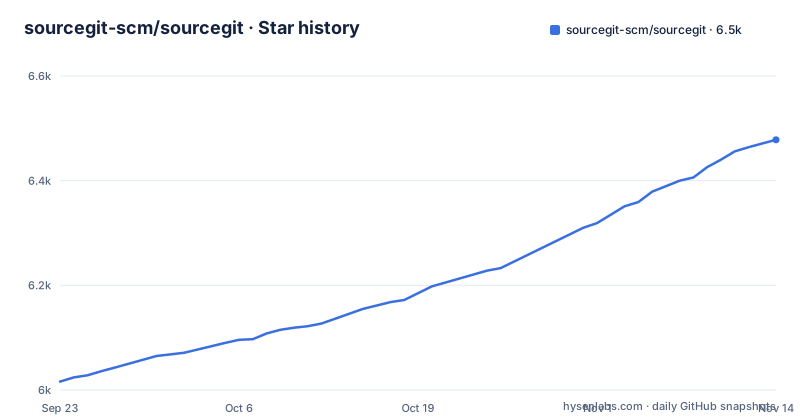
Star history
- sourcegit-scm/sourcegit6,478 ★ · +462
| Repository | 2026-09-23 | 2026-11-14 |
|---|---|---|
| sourcegit-scm/sourcegit | 6k | 6.5k |
462 Stars in the last 52 days, measured from the daily GitHub snapshot. Compare with other projects
Editorial analysis
Portable mode works on two package formats and fails silently elsewhere
SourceGit writes user settings, downloaded avatars, and crash logs into one folder it creates at startup, and the path differs by platform. A `data` folder placed next to the `SourceGit` executable overrides that choice and redirects all three into itself, a mode the README calls Portable-Mode. The catch is stated in the same tip: it only works with Windows packages and Linux AppImages. A macOS `.app` bundle will not read it, and neither will a Linux `deb` or `rpm` install, so the folder sits there unused while the app writes to the platform location instead.
The tip also points at a main menu entry, `Open Data Storage Directory`, which is the practical way to find wherever the app decided to put things. Understanding where the state lives matters more here than in most tools, because that state carries preferences and crash logs rather than a repository you could re-clone.
Settings, avatars, and crash logs land in three different paths
The storage layout is not one directory on every system, and the split is not even uniform. On Windows everything sits under `%APPDATA%\SourceGit`. On Linux the app splits state across two roots: `${XDG_CONFIG_HOME}/SourceGit` holds `preference.json`, while `${XDG_CACHE_HOME}/SourceGit` holds avatars and logs. On macOS the whole set lives under `~/Library/Application Support/SourceGit`.
That macOS path has one extra role that the other platforms do not have. You can write a `PATH` env file there by running `echo $PATH > ~/Library/Application\ Support/SourceGit/PATH`, which lets you hand the app a `PATH` it would not otherwise see. The consequence of the Linux split is that clearing your cache directory loses avatars and crash logs but leaves preferences intact, which is a different recovery than the one Windows and macOS give you.
Git 2.25.1 is the floor, and git-flow stopped shipping with Git for Windows
The tool has no embedded Git. You install Git yourself at 2.25.1 or newer, and SourceGit drives that binary through the command line, which is also why the feature list is written as a list of Git operations: clone, fetch, pull, push, merge, rebase, reset, revert, cherry-pick, amend, reword, squash, interactive rebase, branches, remotes, tags, stashes, submodules, worktrees, archive, diff, save as patch and apply, file histories, blame, and revision and branch diffs. Image diff offers side by side, swipe, and blend views.
The version floor matters most for GitFlow. `git-flow` is no longer shipped with Git for Windows since 2.51.1, so the GitFlow entry in the app has nothing to call on a current Windows install. The documented workaround is to download git-flow-next, unzip it and rename it to `git-flow`, then copy it to `$GIT_INSTALL_DIR/cmd` or add its path to your `PATH`.
Windows rejects MSYS Git, and every macOS package on the release page is unsigned
Two platform notes carry real consequences. On Windows, MSYS Git is not supported and the instruction is to use official Git for Windows, so a machine that only has an MSYS Git toolchain cannot run this client until a second Git is installed. The Windows package itself installs cleanly through scoop after adding the extras bucket.
scoop bucket add extras
scoop install sourcegit
On macOS the packages published on the release page are all unsigned, which is why a manual install requires clearing the quarantine attribute yourself:
sudo xattr -cr /Applications/SourceGit.appThe alternative is the signed package from a separate distribution repository, which needs no such command. Homebrew installs it as a cask.
Linux packages come from community repositories, and Debian 12 is the only tested platform
`deb` and `rpm` repositories are hosted on Codeberg by a community contributor, and AppImage builds live on an AppImage hub. The README carries a warning that narrows all of this: Linux is only tested on Debian 12, on both X11 and Wayland. That is a statement about the tested configuration, not a statement about where the packages install.
The AOSC OS entry is the one place where architecture support is spelled out. In addition to AMD64 and ARM64, LoongArch and RISC-V builds exist, and the RISC-V support is marked untested. Installation there is a single `sudo oma install sourcegit`.
sudo oma install sourcegitFor the rpm route on Fedora the repository file is fetched and then patched, because the published file carries a `gpgcheck=1` line that gets rewritten to `gpgcheck=0` before `dnf` is pointed at it.
Credential storage is never bundled, on any platform
SourceGit does not ship a credential helper, and the per platform notes say so twice. macOS users are told to make sure git-credential-manager is installed on the machine. Linux users are told the same for git-credential-manager, with git-credential-libsecret named as the alternative. Without one of those present, the GUI can still run commands that do not touch a remote, but anything that authenticates over HTTPS has nothing to delegate to.
This is the same class of dependency as Git itself: the app supplies the window, the Git binary supplies the operations, and a helper from the wider Git ecosystem supplies stored credentials. It also means the install order matters. Git first, then the helper, then SourceGit, otherwise the first remote operation is where the gap shows up.
The highlights also state that SSH access with each remote is supported.
Every action leaves a command log, which is the feature that makes it debuggable
Because nothing is reimplemented, the app offers Git command logs. The same log is what tells you which command a button mapped to when a merge, a rebase, or a reset behaves differently than you expected. That is the trade this design makes: less control over the internals in exchange for being able to see exactly what was run.
The rest of the highlights follow the same logic of wrapping rather than replacing. Search commits, bisect, Git LFS, stashes, submodules, worktrees, issue links, and workspace support are all Git capabilities surfaced through a menu. Custom Action exists so you can bind a command of your own, and Create PR covers GitHub, Gitlab, Gitea, Gitee, and Bitbucket.
Two additions sit outside Git proper. Commit messages can be generated with AI, and there is a built in conventional commit message helper, which suggests the project expects release tooling that parses those messages on the other end.
What this client will not do for you
Four gaps are stated rather than implied.
First, it is a front end: no Git, no credential helper, and on current Windows no git-flow binary. Second, the macOS builds on the release page are unsigned, so a signature check in your pipeline will fail without switching to the separate signed distribution. Third, Linux is tested only on Debian 12, and the RISC-V build is marked untested, so other distributions are running on the packaging community's work rather than the project's. Fourth, portable mode is limited to Windows packages and Linux AppImages.
The repository layout backs the last point. There is no homepage field set, and the tree is a Visual Studio solution (`SourceGit.slnx`) with `src/`, `build/`, `depends/`, and `tools/` alongside `global.json`, `VERSION`, `TRANSLATION.md`, and `translate_helper.py`. Translations are tracked in the tree, which matches the list of fourteen languages the highlights advertise, including English, Deutsch,简体中文, 日本語, 한국어, and Tamil.
Editorial conclusion
SourceGit suits a developer who wants the everyday Git operations in a desktop window and is willing to keep a real Git installation underneath, plus a credential helper, since neither is bundled. Skip it if you need signed macOS packages from the project itself, a tested Linux platform other than Debian 12, or portable mode outside Windows packages and Linux AppImages. Before installing, check your Git version is 2.25.1 or newer, install git-credential-manager or libsecret on macOS and Linux, and confirm your distribution matches one of the published repository formats.
Frequently asked questions
Is SourceGit free?
Yes. It is published under the MIT license and the highlights list Opensource/Free alongside cross platform support. There is no paid tier described, and the Windows, macOS, and Linux packages are all reachable from the same project.
How do you install SourceGit on Windows?
Use official Git for Windows, since MSYS Git is not supported, then install the client with scoop by adding the extras bucket and installing the package. Pre-built binaries are also published on the Releases page, and MSYS Git installations cannot be used by this client.
Is SourceGit a good Git GUI on Linux?
It is available for Linux through community hosted deb and rpm repositories, an AppImage hub, and `sudo oma install sourcegit` on AOSC OS, where AMD64, ARM64, LoongArch, and RISC-V builds exist. The stated caveat is that Linux is only tested on Debian 12, on both X11 and Wayland, and RISC-V support is marked untested. git-credential-manager or git-credential-libsecret has to be installed separately.
What does SourceGit need before it can talk to a remote?
Git 2.25.1 or newer installed on the machine, plus a credential helper: git-credential-manager on macOS, and git-credential-manager or git-credential-libsecret on Linux. The highlights also list SSH access with each remote.
How does SourceGit compare with SourceTree?
SourceGit is MIT licensed, drives the Git binary on your machine at 2.25.1 or newer, keeps a Git command log of what it ran, and covers clone through push, rebase, bisect, LFS, worktrees, submodules, and creating pull requests on GitHub, Gitlab, Gitea, Gitee, and Bitbucket.
Official sources
Add this badge to your README
If you maintain this project, the badge below links readers to this analysis and shows its maintenance status from the daily GitHub snapshot. Paste the markdown into your README; add ?metric=license or ?metric=stars to the image URL for a different field.

[](https://hysenlabs.com/projects/sourcegit-scm-sourcegit)Star history chart for your README
[](https://hysenlabs.com/projects/sourcegit-scm-sourcegit)Was this useful?