ML.NET: training and consuming models inside a .NET process
ML.NET is an open source and cross-platform machine learning framework for .NET.
At a glance
- What is it?
- ML.NET is Microsoft's MIT-licensed machine learning framework for C# and F# developers who want to train and score models without leaving the .NET toolchain. The core judgement: it is a good fit when the model has to ship inside an existing .NET application, and a poor fit when you need the breadth of the Python ecosystem.
- Who is it for?
- Adopt ML.NET if your model has to be trained or scored inside a .NET application and you want a single toolchain for build, test and deployment. Do not adopt it if your team already works in Python and the model can be served over HTTP, because you would be trading a mature ecosystem for in-process convenience.
- Can I use it commercially?
- Yes. MIT is a permissive licence: you can use, modify and sell software built on it, as long as you keep its copyright and licence notices.
- Is it still maintained?
- Yes. The repository last received commits 1 day ago.
- What is it written in?
- Mainly C#, according to GitHub's language statistics.
Answers come from the project's GitHub data, last synced on November 13, 2026, and from our analysis. They are not legal advice.
Star history
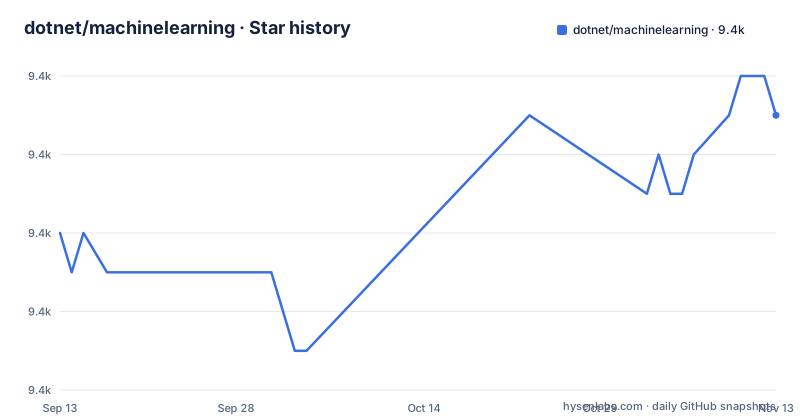
- dotnet/machinelearning9,361 ★ · +3
| Repository | 2026-09-13 | 2026-11-13 |
|---|---|---|
| dotnet/machinelearning | 9.4k | 9.4k |
3 Stars in the last 61 days, measured from the daily GitHub snapshot. Compare with other projects
Editorial analysis
The problem ML.NET solves is toolchain, not algorithms
The README frames the audience directly: developers who want to build, train, deploy and consume custom models in .NET applications "without requiring prior expertise in developing machine learning models or experience with other programming languages like Python or R". That sentence is the whole pitch. The hard part of shipping a model in a .NET shop is rarely the algorithm. It is the boundary between a Python training script and a C# service, and everything that crosses it: serialized formats, version skew between the training environment and the runtime, a second dependency manager, a second CI pipeline. ML.NET removes that boundary by keeping training and inference in the same process and the same language. The scenario list in the README is deliberately ordinary: classification, forecasting, anomaly detection. These are the tasks that show up in line-of-business software, not research. If your problem is a tabular classifier that has to run inside an ASP.NET service or a desktop app, the framework is aimed at you. If your problem is a research question, it is not.
Data loading, transforms and trainers in one pipeline
The README describes the mechanism at a high level: the framework "provides data loading from files and databases, enables data transformations, and includes many ML algorithms". That maps to a pipeline model. You load data into an IDataView, apply a sequence of transforms, append a trainer, and fit the result. The fitted model is then used to score new rows, either in the same process or after being saved and reloaded. The important architectural consequence is that the transform chain is part of the saved artifact, so the same featurization that ran during training runs during scoring. That removes a common class of production bug where a preprocessing step is reimplemented by hand at serving time and drifts from the training version. The README does not enumerate the trainers or the transform catalogue, so the exact coverage has to be checked in the API reference it links. What the repository does state is that TensorFlow and ONNX models can be consumed within ML.NET, which means an existing model trained elsewhere can be wrapped and scored through the same surface rather than forcing a rewrite. That interop is the escape hatch when a needed architecture is not implemented natively.
Installing it is one command, and the runtime matrix is the real constraint
The README gives the install step plainly. From the .NET Core CLI: dotnet add package Microsoft.ML. Alternatively, the package can be added from Visual Studio's NuGet package manager or via Paket. The main Microsoft.ML package targets .NET Standard 2.0, while some optional packages target newer frameworks. There is also a daily build feed on Azure DevOps for anyone who needs unreleased bits. The constraint that matters is the platform matrix. The README says ML.NET runs on Windows, Linux and macOS using .NET, or Windows using .NET Framework, and also on ARM64, Apple silicon and Blazor WebAssembly, but with "some limitations" documented in docs/project-docs/platform-limitations.md. Two specifics are given: 64-bit is supported everywhere, while 32-bit is supported on Windows except for TensorFlow and LightGBM functionality. If you are targeting a 32-bit Windows process and your pipeline depends on either of those, the framework is not available to you on that target. Read the limitations file before you design around the package, not after.
Blazor WebAssembly and ARM64 support come with caveats you should read first
The README lists Blazor WebAssembly and Apple silicon among supported targets, which is unusual for a machine learning framework and worth pausing on. Running training in a browser sandbox is not the same as running it on a server, and the README itself points to a limitations document rather than claiming parity. The honest reading is that these are supported targets with documented restrictions, not equivalent ones. For a browser deployment the practical question is what portion of the pipeline actually executes client-side and what the payload size looks like once the runtime is included. The README does not answer that. Treat the platform list as a set of leads to verify against docs/project-docs/platform-limitations.md rather than as a compatibility guarantee. The same caution applies to ARM64: supported is a statement about the runtime, not about every native dependency a given trainer might pull in.
Contributor builds are a separate, heavier path
There are two distinct ways to get ML.NET, and conflating them causes wasted time. Consumers install the NuGet package and never touch the repository. Contributors follow docs/project-docs/developer-guide.md to build from source. For everyone else this section is irrelevant, which is the point: the framework is designed so that the common case is a package reference and nothing more. The heavy path exists for people changing the framework, and it is priced accordingly.
Where ML.NET is the wrong choice
The clearest failure mode is ecosystem mismatch. If your data scientists work in Python and the model needs to be retrained frequently by them, ML.NET puts the training step in a language they do not use. The TensorFlow and ONNX interop in the README covers consumption of models trained elsewhere, but it does not make the training loop collaborative across two languages. A second limitation is the platform matrix itself. A 32-bit Windows process loses TensorFlow and LightGBM, and the Blazor WebAssembly and ARM64 targets carry limitations the README declines to enumerate. A third is depth. The README says the framework "includes many ML algorithms" without listing them. If your work depends on a specific recent architecture, the framework may only reach it through an imported ONNX or TensorFlow graph, at which point you have the interop overhead without the native integration. None of these are defects. They are the boundary of what an in-process .NET framework can reasonably cover.
The alternative is a Python training stack with a served model
The realistic alternative is to train in scikit-learn, PyTorch or TensorFlow in Python and expose the result as a service, or export it to ONNX and score it from a thin .NET client. The difference in approach is where the boundary sits. ML.NET keeps training and scoring in one process and one language, which removes serialization and version-skew problems but ties you to the framework's algorithm coverage and platform matrix. The Python route gives you the widest algorithm coverage and the largest body of examples, at the cost of a second runtime, a network hop at inference time, and two dependency graphs to keep in step. The ONNX middle path is worth naming because ML.NET supports it: train anywhere, export the graph, consume it through ML.NET. That gets you Python's training ecosystem with in-process scoring in C#, and it is often the right answer when native ML.NET trainers do not cover the model you need. The trade is that you lose the transform pipeline's automatic consistency guarantee, since preprocessing now lives on the Python side.
Licence, release cadence and what to check before adopting
The repository is MIT licensed, which permits commercial use, modification and redistribution provided the copyright notice and permission notice are retained. That is a permissive licence with few obligations, but it is not legal advice and the terms should be read in full if your organisation has specific requirements. On cadence, the recent releases are v5.0.0 in November 2025, a v6.0.0-preview1 in March 2026 and a v5.0.1 patch in October 2026, with the repository last pushed in November 2026. A preview release in the sequence means the project is still moving, and a preview is not the version to pin production on unless you are prepared to track it. The maintenance cost for a consumer is close to the cost of the .NET runtime itself: a package reference, a periodic version bump, and revalidation of the saved model if a trainer's behaviour changes between major versions. Before adopting, verify two things that the README does not settle: that your target platform appears in docs/project-docs/platform-limitations.md without a restriction that affects your pipeline, and that the specific trainer you need is present rather than reachable only through ONNX or TensorFlow import.
Editorial conclusion
Adopt ML.NET if your model has to be trained or scored inside a .NET application and you want a single toolchain for build, test and deployment. Do not adopt it if your team already works in Python and the model can be served over HTTP, because you would be trading a mature ecosystem for in-process convenience. Before committing, read docs/project-docs/platform-limitations.md and confirm your target runtime appears there without a restriction that affects you, then check whether the specific trainer you need exists in the Microsoft.ML package or only in a separate one.
Frequently asked questions
how to use machine learning model
In ML.NET a model is built by chaining transformers and a trainer, then produced by calling Fit on the pipeline with loaded data. The sample loads a text file into a TextLoader, appends a text featurizer and a binary classification FastTree trainer, and calls Fit on the resulting pipeline.
machine learning install
ML.NET installs as a NuGet package named Microsoft.ML, added with dotnet add package Microsoft.ML from the .NET CLI, or from Visual Studio's NuGet package manager or via Paket. The main Microsoft.ML package targets .NET Standard 2.0.
Does ML.NET support ARM64 and Blazor WebAssembly?
ML.NET runs on ARM64, on Apple silicon, and in Blazor WebAssembly, and the project page links a limitations document for those targets. 64-bit is supported on all platforms, while 32-bit is supported on Windows except for TensorFlow and LightGBM related functionality.
How often does ML.NET ship a major release?
Major releases ship once a year with the major .NET releases, starting with ML.NET 1.7 in November 2021 alongside .NET 6 and then 2.0 with .NET 7. Release branches are serviced with bug fixes or minor features on the same cadence as .NET servicing.
Official sources
Add this badge to your README
If you maintain this project, the badge below links readers to this analysis and shows its maintenance status from the daily GitHub snapshot. Paste the markdown into your README; add ?metric=license or ?metric=stars to the image URL for a different field.

[](https://hysenlabs.com/projects/dotnet-machinelearning)Star history chart for your README
[](https://hysenlabs.com/projects/dotnet-machinelearning)Was this useful?