Connexion: an OpenAPI spec becomes your routing layer
Connexion is a modern Python web framework that makes spec-first and api-first development easy.
At a glance
- What is it?
- Connexion reads an OpenAPI or Swagger specification and registers routes from it, so operationId is what connects your view function to the API and there are no route decorators to write. It ships as a standalone app, as Flask, or as middleware around an app you already have, and it maintains both a 3.x and a 2.x release line.
- Who is it for?
- Use Connexion when the specification already exists or is meant to be the contract, when several teams consume your API, and when you want request validation and authentication to be read off the spec instead of repeated in decorators.
- Can I use it commercially?
- Yes. Apache-2.0 is a permissive licence: you can use, modify and sell software built on it, as long as you keep its copyright and licence notices.
- Is it still maintained?
- Yes. The repository last received commits 7 days ago.
- What is it written in?
- Mainly Python, according to GitHub's language statistics.
Answers come from the project's GitHub data, last synced on November 22, 2026, and from our analysis. They are not legal advice.
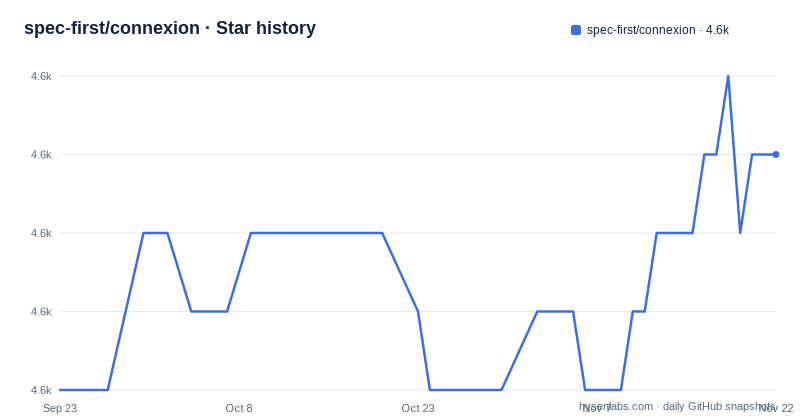
Star history
- spec-first/connexion4,615 ★ · +3
| Repository | 2026-09-23 | 2026-11-22 |
|---|---|---|
| spec-first/connexion | 4.6k | 4.6k |
3 Stars in the last 60 days, measured from the daily GitHub snapshot. Compare with other projects
Editorial analysis
operationId is the only link between the spec and your function
Connexion's routing is not configured in Python. You describe the API in an OpenAPI or Swagger specification, and the operation in that specification is linked to your view function through the `operationId`.
The smallest example shows both halves. The Python file defines a function and adds the spec:
   def post_greeting(name: str, greeting: str):  # Paramaeters are automatically unpacked
       return f"{greeting} {name}", 200          # Responses are automatically serialized

   app.add_api("openapi.yaml")
The specification names the same function with `operationId: run.post_greeting`, declares `name` as a required path parameter and `greeting` as a required query parameter, and describes a 200 response of type string.
Three things follow from that pairing. There are no route decorators, which is why automatic route registration is listed as the first feature. Parameters arrive as Python arguments, so there is no request object to unpack. And a returned tuple becomes a status code and a serialized body, so you return ordinary Python objects.
The cost of that convenience is that the `operationId` string is load-bearing. A mismatch between the id in the spec and the function's module path is a routing failure, not a typo someone catches later.
Validation and auth are read off the spec, not off decorators
The feature list is organised around what the specification gives you rather than what you configure.
Request and response validation covers headers, parameters and body, and it happens because the spec says so. Parameter parsing and injection means the values arrive ready to use. Response serialization means the return value is converted according to the declared schema. Authentication is described as split from your application logic, which is the practical difference between a security scheme in a spec and a login view you write and route yourself.
Pluggability is listed as covering all dimensions, and the examples directory backs that up with directories named `apikey`, `basicauth`, `jwt`, `oauth2` and `oauth2_local_tokeninfo` alongside `methodresolver`, `restyresolver`, `splitspecs`, `enforcedefaults`, `reverseproxy`, `frameworks`, `sqlalchemy`, `helloworld` and `helloworld_async`.
Two of those names describe extension points rather than features. The resolver examples are for changing how an operation maps to code, and `splitspecs` is for a specification split across files, which is what a large API tends to need.
None of this removes the need to think about the spec. It moves the thinking to a document, which is the trade the project is proposing.
Three app classes, and FlaskApp exists for the 2.x migration
Connexion can be a standalone application or middleware around something you already run, and the standalone case has two implementations.
`AsyncApp` is described as a lightweight application with native asynchronous support, and the README tells you to use it if you are starting a new project and have no specific reason to pick another option:
    from connexion import AsyncApp

    app = AsyncApp(__name__)
`FlaskApp` leverages the Flask framework, which is useful if you are migrating from connexion 2.X or you want the Flask ecosystem:
    from connexion import FlaskApp

    app = FlaskApp(__name__)
`ConnexionMiddleware` wraps any existing ASGI or WSGI application, for when the application is already written in another framework and you want to add what Connexion provides:
    from asgi_framework import App
    from connexion import ConnexionMiddleware

    app = App(__name__)
    app = ConnexionMiddleware(app)
Read together, those three are a migration path as much as a set of options. The middleware is what lets you adopt the framework without rewriting the application you have.
app.run() is for development, uvicorn and gunicorn are for production
Running the application is where the extras matter, because the development shortcut is not available in a bare install.
Optional dependencies are published as extras. `swagger-ui` enables the Swagger UI console, `uvicorn` enables running the application with `app.run()` for development instead of using an external ASGI server, and `flask` enables the `FlaskApp`:
    $ pip install connexion[swagger-ui]
    $ pip install connexion[swagger-ui,uvicorn]
With the `uvicorn` extra you get `app.run()`, and the README is explicit that this is only recommended for development. In production you run an ASGI server, and if your app lives in a module called `run.py`:
$ uvicorn run:appor with gunicorn:
$ gunicorn -k uvicorn.workers.UvicornWorker run:appThat gunicorn invocation is the detail to remember: the worker class is UvicornWorker, so gunicorn is not serving WSGI here, it is supervising an async server.
connexion run openapi.yaml is the CLI, and the console is try-it-out
Connexion also helps you write and test the specification before the application exists, through a command line interface that can test and mock it:
connexion run openapi.yamlThe Swagger UI console is one of the seven listed features, described as carrying live documentation and a try it out capability, which is what makes the specification usable by someone who is not running your application. It is behind the `swagger-ui` extra, so a minimal install does not include it.
For a full changelog the README points at the GitHub releases page rather than keeping one in the repository, and the tree carries a `docs/` directory with `.readthedocs.yaml` for building the documentation you read at connexion.readthedocs.io.
Poetry packaging, Python 3.9 to 3.14, and two live release lines
The packaging tells you about the project's age and its support promises.
`pyproject.toml` uses a PEP 621 `[project]` table, with `name = "connexion"`, `license = "Apache-2.0"`, `requires-python = ">=3.10"` and a dependency list including `asgiref`, `httpx`, `inflection`, `jsonschema`, `Jinja2` and `python-multipart`. The classifier list runs from Python 3.10 through 3.15 and includes `Typing :: Typed`, so the package claims type information.
Two details are easy to misread. The `version` field in the manifest reads `3.0.dev0`, which is the development placeholder on the main branch rather than the version you would install, so the release tags are the thing to read. And the five named authors plus two maintainers, with affiliations that include ml6.eu, Zalando and others, are the continuity story behind the project rather than a single-maintainer situation.
The release history shows two lines alive at once. Version 3.3.0 and 2.15.1 were both published on 2025-10-13, with 2.15.1rc1 hours earlier the same day. The last push to the repository was on 2026-11-02, so the work continues on top of those tags.
The 3.x changes are documented on a dedicated page linked from the README, which is the first place to look if you are coming from a 2.x installation.
The argument is documentation that cannot drift
The case for the framework is made in terms of teams rather than lines of code.
With Connexion you write the spec first, and Connexion calls your Python code, handling the mapping from the specification to the code. The stated incentive is that developers can understand what the API does before a single line of code is written.
If multiple teams depend on your APIs, you can send them the documentation of your API, and that is what guarantees your API follows the specification you wrote.
The comparison drawn is with frameworks that generate a specification after the code exists, and the criticism is specific rather than ideological: specifications generated from code often end up lacking details, and they mix your documentation with the implementation logic of your application.
That second point is the one to weigh. Code-generated specs are not wrong, they are coupled to the code, and the coupling is what Connexion is arguing against. If you already have a good spec and a good codebase, the case for rewriting is weaker than the case for keeping both.
Editorial conclusion
Use Connexion when the specification already exists or is meant to be the contract, when several teams consume your API, and when you want request validation and authentication to be read off the spec instead of repeated in decorators. Do not use it to generate a specification from code you have already written, since the whole design runs the other way, and do not assume a 2.x install is the same product, because the 2.x line is still being released alongside 3.x, with 3.3.0 and 2.15.1 both published on 2025-10-13. Before you commit, check three things: which `operationId` each operation maps to, since that string is the only link between the spec and your function; whether you take the `uvicorn` extra, because `app.run()` is documented as development only; and which app class you want, because `FlaskApp` exists mainly for 2.x migrations and Flask ecosystem access while `AsyncApp` is the default for new work.
Frequently asked questions
How do I install Connexion?
With pip: `pip install connexion`. Optional features come as extras, so `pip install connexion[swagger-ui]` adds the Swagger UI console, `[uvicorn]` adds `app.run()` for development, and `[flask]` enables `FlaskApp`. They can be combined, for example `pip install connexion[swagger-ui,uvicorn]`.
How do I run a Connexion application in production?
With an ASGI server. If your app is in a module called `run.py`, run `uvicorn run:app`, or with gunicorn, `gunicorn -k uvicorn.workers.UvicornWorker run:app`. The `app.run()` method requires the `uvicorn` extra and is only recommended for development.
What is the difference between AsyncApp, FlaskApp and ConnexionMiddleware?
`AsyncApp` is a lightweight standalone application with native asynchronous support and is the recommended choice for a new project. `FlaskApp` builds on Flask and is useful when migrating from connexion 2.X or when you want the Flask ecosystem. `ConnexionMiddleware` wraps any existing ASGI or WSGI application written with another framework.
How does Connexion map a spec operation to Python code?
Through the `operationId`. An operation described in the specification is linked to your view function by that identifier, so `operationId: run.post_greeting` resolves to `def post_greeting(name: str, greeting: str)`, with the declared path and query parameters unpacked automatically and the returned value serialized automatically.
Which authentication schemes does Connexion support?
Authentication is handled separately from your application logic and comes from the specification. The examples directory ships working examples for API keys, basic auth, JWT and OAuth2, including a local tokeninfo variant, which are the schemes the project demonstrates rather than an exhaustive list of what a specification may declare.
Official sources
Add this badge to your README
If you maintain this project, the badge below links readers to this analysis and shows its maintenance status from the daily GitHub snapshot. Paste the markdown into your README; add ?metric=license or ?metric=stars to the image URL for a different field.

[](https://hysenlabs.com/projects/spec-first-connexion)Star history chart for your README
[](https://hysenlabs.com/projects/spec-first-connexion)Was this useful?