mcp-sequentialthinking-tools says outright that it does not choose tools, which its own description denies
🧠 An adaptation of the MCP Sequential Thinking Server to guide tool usage. This server provides recommendations for which MCP tools would be most effective at each stage.
At a glance
- What is it?
- Three tools: record a reasoning step, read the history back, clear it. The interesting part is the candour. The README states the server neither discovers your other tools nor picks them for the model, that validation is a name-existence check on a list the caller supplies, and that the injection filtering is defensive rather than a guarantee. The repository description on the project page says the opposite of the first point.
- Who is it for?
- Use it when you want reasoning you can inspect afterwards, and expect it to be a log rather than a planner. Read the two limits in the README before wiring it in.
- Can I use it commercially?
- Yes. MIT is a permissive licence: you can use, modify and sell software built on it, as long as you keep its copyright and licence notices.
- Is it still maintained?
- Yes. The repository last received commits 1 day ago.
- What is it written in?
- Mainly TypeScript, according to GitHub's language statistics.
Answers come from the project's GitHub data, last synced on November 15, 2026, and from our analysis. They are not legal advice.
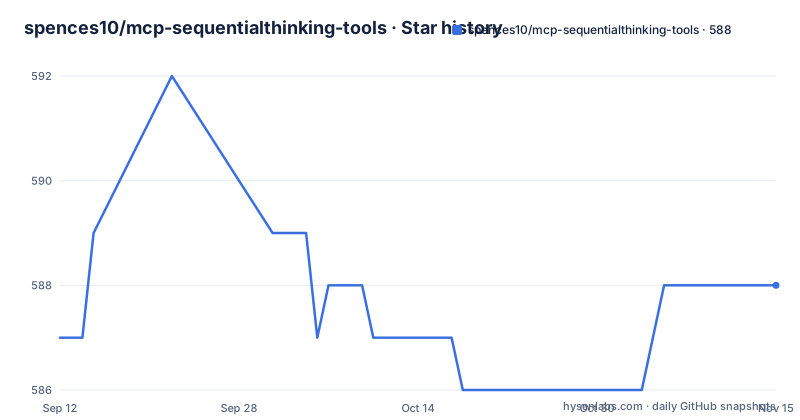
Star history
- spences10/mcp-sequentialthinking-tools588 ★ · +1
| Repository | 2026-09-12 | 2026-11-15 |
|---|---|---|
| spences10/mcp-sequentialthinking-tools | 587 | 588 |
1 Stars in the last 64 days, measured from the daily GitHub snapshot. Compare with other projects
Editorial analysis
The project description promises recommendations the README refuses
Start with the contradiction, because it is the one thing a reader will get wrong from a search result. The repository description says the server provides recommendations for which MCP tools would be most effective at each stage. The README says the opposite in bold: it does not discover your other tools and it does not choose tools for the model. What it actually does, if you supply both a list of the tools you have and a list the model recommends, is check that every recommended name appears in your list, and store the step. That is a referential integrity check, not a recommendation engine. The README is the accurate document, and it is admirably direct about the gap. The description is the one that will sell you the wrong thing, and it is the one search engines index.
The step count is self-reported and silently corrected
The record tool takes four required parameters: the thought text, the current step number, an estimate of the total number of steps, and whether another step is needed. That estimate is the interesting one, because it is the model grading its own homework and the server quietly repairs it. If the model reports a step number higher than the total it declared, the total is raised automatically to match. So the number you see is never an error, which is convenient and also means the field carries no information about planning quality: a model that wildly underestimates is indistinguishable from one that estimates correctly. Three optional parameters cover the branching case, marking a step as a revision of an earlier one, and branching from a specific earlier step under a branch identifier.
One unknown tool name discards the whole thought
When a recommended tool name is not present in the list you supplied, the call returns an error flag and the thought is not stored at all. That is a strict choice and worth understanding, because the failure is wider than the field that caused it. Your reasoning text, the step number, the branch information, the remaining-step list: all of it is discarded because one string in a nested array did not resolve. There is no partial save, no warning-and-continue, and no way to recover the text afterwards, since the store was never written to. For a scratchpad whose purpose is to survive the length of a task, losing a paragraph of reasoning to a typo in a tool name is a rough edge, and the sensible mitigation is to pass the tool list you are certain about.
The two tool parameters use different shapes and a different field name
The available-tools parameter accepts either plain strings or objects carrying a name and a description, so a caller can send whichever is convenient. The recommended-tools parameter is described only as model-authored recommendations to validate and store, and the worked example shows objects with four fields: a tool name, a confidence value, a rationale, and a priority. So there are three shapes in play across two parameters, and the key in the example is a tool name rather than the plain name used on the other side. That is a small thing until you write a client against it, at which point it becomes the difference between a matching set operation working and silently matching nothing, which the strict validation would then report as an unknown tool rather than as a schema mistake.
History lives in the process and dies with it
Reading the history back takes a session identifier defaulting to a single bucket, an optional branch filter, and a limit that defaults to fifty records and tops out at five hundred. Clearing takes a session identifier or a flag to clear every bucket. There is no file path, no database, and no third tool for deleting or amending one record. The only configuration is an environment variable capping history size per session, defaulting to a thousand records. Taken together that defines the tool's real character: it is a per-process ring of recent steps for one agent run, not a durable journal. Nothing in the README claims otherwise, but the word history in the feature list invites the assumption that it persists, and if you need it to survive a restart you have to copy it out yourself.
The security posture redacts the scratchpad you came to read
The server treats thought text, tool descriptions, rationales, and remaining-step text as untrusted input, scans them for prompt-injection-like patterns, redacts what matches before storing or returning, and attaches a security warning naming which fields were hit. Then it says the thing that matters: this is defensive filtering, not a guarantee that arbitrary adversarial text is safe, and you should not put secrets in thoughts or tool descriptions. The design is defensible, since a scratchpad that echoes its contents back into a prompt is a genuine re-injection path. The cost is that the tool whose purpose is inspection may redact the text you wanted to inspect, and since most of that text is written by the same model that will read it back, the filter is largely guarding against the agent itself.
Four script names, two behaviours, and a build that runs twice
The development commands are four lines, and the toolchain behind them is a single tool: install, test, build, and check, with a build-and-test-and-format-and-lint orchestrator underneath.
pnpm install
pnpm test
pnpm build
pnpm check
The manifest is where the redundancy shows. The check script and the lint script are the same invocation, and the format script and the lint-fix script are the same invocation with a flag added, so four public names cover two behaviours. Publishing compounds it: the prepublish hook runs the build, and the release script runs the build again before publishing, so a release builds the bundle twice with nothing between them. Dependency ranges are loose for a package at version zero point one: four runtime dependencies on caret ranges, two of them below one, plus a workspace file and a dependency-update configuration in a single-package repository.
The install path is an auto-approved download and a hand-rolled transport
The documented client configuration launches the server through the package runner with an auto-approve flag, which means the client fetches and executes whatever is published under that name at the moment it starts, with no prompt. That is the standard shape for this kind of server and it is worth knowing about before you paste it into a client that already holds credentials. The transport is the other unusual detail: the server uses a third-party toolkit and also includes its own small standard I/O transport that accepts both the length-prefixed framing the protocol specifies and the newline-delimited JSON that older tooling used. Two wire formats in one parser is a compatibility shim someone had to write, and it is a parsing surface maintained inside a package whose entire job is storing strings you will read later.
Editorial conclusion
Use it when you want reasoning you can inspect afterwards, and expect it to be a log rather than a planner. Read the two limits in the README before wiring it in. History lives in the process, so it disappears when the server restarts, which makes it a scratchpad for a single run rather than an audit trail. And the recommended-tools feature checks names, not choices, so a model recommending the wrong tool passes validation exactly as happily as one recommending the right one.
Frequently asked questions
What does sequential thinking (MCP) do?
In this server, it records reasoning steps as a scratchpad with history, branching, and revision metadata. It explicitly does not discover your other tools and does not choose tools for the model. If you pass both an available-tool list and a model-authored recommendation list, it checks that the recommended names exist and stores the step, calling that validation rather than selection.
How many tools should an MCP server have?
This one exposes three: one that records a single reasoning step, one that returns stored steps for a session with an optional branch filter and a limit, and one that clears one session or all of them. There is no tool to delete or edit an individual step.
What are some examples of MCP tools?
From this server: recording a thought with its step number, a self-reported total, and a flag for whether another step follows, optionally branching from an earlier step or marking itself as a revision; reading a session's history with a branch filter and a capped limit; and clearing one session or every session.
How do I install mcp-sequentialthinking-tools?
Add it to your client's server configuration, launching the package runner with an auto-approve flag and the package name, optionally setting a history-size environment variable which defaults to a thousand records per session. The published package requires Node 22 or newer and exposes a single executable.
Is mcp-sequentialthinking-tools safe from prompt injection?
The project does not claim that it is. Thought text, tool descriptions, rationales, and remaining-step text are treated as untrusted, scanned, and redacted before storage or retrieval, with a warning naming which fields matched. The README states this is defensive filtering rather than a guarantee, and advises against putting secrets in thoughts or tool descriptions.
Official sources
Add this badge to your README
If you maintain this project, the badge below links readers to this analysis and shows its maintenance status from the daily GitHub snapshot. Paste the markdown into your README; add ?metric=license or ?metric=stars to the image URL for a different field.

[](https://hysenlabs.com/projects/spences10-mcp-sequentialthinking-tools)Star history chart for your README
[](https://hysenlabs.com/projects/spences10-mcp-sequentialthinking-tools)Was this useful?