Spring Petclinic Microservices: a startup-order puzzle of Config, Eureka and Gateway around a Vue.js frontend and a Spring AI chatbot
Distributed version of Spring Petclinic built with Spring Cloud
At a glance
- What is it?
- spring-petclinic/spring-petclinic-microservices splits the classic Spring PetClinic sample into separate Spring Boot services on Spring Cloud. This review covers the required startup order, the Docker and Podman build commands, the Compose health checks, the chaos-monkey script and the GenAI service.
- Who is it for?
- Use this repository to study how a Spring Cloud system fits together: Config Server, Eureka, Gateway, Resilience4j, Zipkin, Prometheus and a Spring AI service in one runnable example. Do not treat it as a production template or a quick start, because it needs Docker with extra memory, a Config and Discovery startup order, and an OpenAI or Azure key for the chatbot.
- Can I use it commercially?
- Yes. Apache-2.0 is a permissive licence: you can use, modify and sell software built on it, as long as you keep its copyright and licence notices.
- Is it still maintained?
- Yes. The repository last received commits 1 day ago.
- What is it written in?
- Mainly Java, according to GitHub's language statistics.
Answers come from the project's GitHub data, last synced on November 25, 2026, and from our analysis. They are not legal advice.
Star history
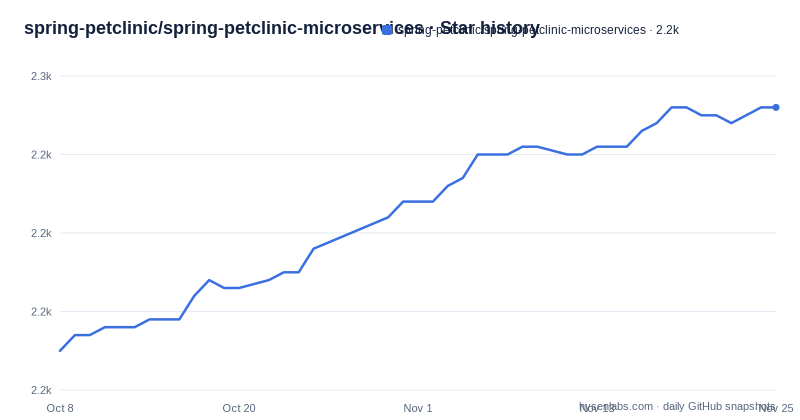
- spring-petclinic/spring-petclinic-microservices2,246 ★ · +31
| Repository | 2026-10-08 | 2026-11-25 |
|---|---|---|
| spring-petclinic/spring-petclinic-microservices | 2.2k | 2.2k |
31 Stars in the last 48 days, measured from the daily GitHub snapshot. Compare with other projects
Editorial analysis
Seven services and a Vue.js gateway replace one Petclinic application
The project splits the classic Spring PetClinic sample application into microservices, with a Vue.js frontend and a Spring AI powered chatbot. Four business services sit behind it: the Customers Service manages customer data, the Vets Service handles information about veterinarians, the Visits Service manages pet visit records, and the GenAI Service provides the chatbot interface. Three infrastructure pieces complete the set: the API Gateway routes client requests to the appropriate services, the Config Server handles centralized configuration management for all services, and the Discovery Server is an Eureka-based service registry.
Services communicate via REST APIs. The technology list is long and each item has a directory or container behind it: Spring Boot, Spring Cloud Gateway, Spring Cloud Circuit Breaker with Resilience4j, Spring Cloud Config, Micrometer Tracing with Zipkin, Prometheus and Grafana for monitoring, Spring Boot Admin, Chaos Monkey for Spring Boot, and Eureka from the Spring Cloud Netflix stack. The repository root has one folder per service, such as spring-petclinic-customers-service and spring-petclinic-genai-service, plus spring-petclinic-admin-server, spring-petclinic-api-gateway, spring-petclinic-config-server and spring-petclinic-discovery-server.
The README also links a presentation of the Spring Framework version of Petclinic and a blog post introducing the Microservices version, which is written in French. Both are the places to go if you want the background on the original application before reading how it was cut apart. After startup, the Petclinic pages are served at http://localhost:8080/, which is the Vue.js frontend behind the gateway, so one browser tab is enough to confirm the whole chain from gateway to services is working.
Config and Discovery must be running before Customers, Vets, Visits and the API start
Every microservice is a Spring Boot application and can be started locally from an IDE or with the ../mvnw spring-boot:run command. The order matters. Supporting services, meaning the Config Server and the Discovery Server, must be started before any other application: Customers, Vets, Visits and API. Starting the tracing server, admin server, Grafana and Prometheus is optional.
Once everything is up, the services answer at fixed places. Discovery Server is at http://localhost:8761, Config Server at http://localhost:8888, and the Vue.js frontend through the API Gateway at http://localhost:8080. Customers, Vets, Visits and GenAI take a random port, which you read from the Eureka dashboard. Zipkin is at http://localhost:9411/zipkin/, Spring Boot Admin at http://localhost:9090, Grafana at http://localhost:3030 and Prometheus at http://localhost:9091.
If you want the Config Server to read configuration from your own local Git repository, activate the native Spring profile and set the GIT_REPO environment variable:
-Dspring.profiles.active=native -DGIT_REPO=/projects/spring-petclinic-microservices-configDocker images are built with a Maven profile, and the default target is linux/amd64
To start the whole infrastructure in containers, you first build images with the buildDocker profile. This requires Docker or Docker Desktop to be installed and running.
./mvnw clean install -P buildDockerPodman works too, if Podman or Podman Desktop is installed and running:
./mvnw clean install -PbuildDocker -Dcontainer.executable=podmanBy default the Docker OCI image is built for a linux/amd64 platform. For other architectures you change it with the -Dcontainer.platform Maven argument. The documented example targets an Apple M2:
./mvnw clean install -P buildDocker -Dcontainer.platform="linux/arm64"The consequence of the default is that an arm64 machine building without that flag gets amd64 images, which then need emulation to run. Once images are ready, you start them with a single command, docker compose up or podman-compose up. The main branch uses Eclipse Temurin with Java 17 as the Docker base image.
Compose orders containers with healthchecks, and the Gateway still times out at first
docker-compose.yml coordinates startup with the service_healthy condition of the depends_on expression and the healthcheck of each service container. The config-server container exposes port 8888 and is polled every 5 seconds with up to 10 retries. The discovery-server on port 8761 depends on config-server being healthy. Customers on 8081, visits on 8082 and vets on 8083 each wait for both config-server and discovery-server. Every service container carries a 512M memory limit.
Even so, after starting services, it takes a while for the API Gateway to be in sync with the service registry, so initial Spring Cloud Gateway timeouts are expected, not a fault. You can track availability on the Eureka dashboard at http://localhost:8761. The project also warns that under macOS or Windows the Docker VM needs enough memory to run the microservices. The default settings are usually not enough and make docker-compose up painfully slow. Raise the VM memory before you judge the project's speed. With seven or more containers each capped at 512M, plus any monitoring containers you add, the total adds up quickly, and a small VM will start swapping before the Gateway ever settles. If the Gateway returns timeouts for more than a short while, open the Eureka dashboard first and check whether the Customers, Vets and Visits services have registered, since a service that never registers is a different problem from a Gateway that has not caught up yet.
run_all.sh is the fallback when docker-compose misbehaves, and it carries the chaos switch
If running the system with docker-compose gives you trouble, the repository offers ./scripts/run_all.sh. It starts the infrastructure services via docker compose and launches all the Java applications through the standard nohup java -jar command. Logs land under ${ROOT}/target/nameoftheapp.log, so look there when a single service fails to come up.
By default the applications start without the chaos-monkey profile. The optional flag turns it on so you can interact with Spring Boot Chaos Monkey:
./scripts/run_all.sh --chaos-monkeyThe helper script ./scripts/chaos/call_chaos.sh enables assaults, and a separate README under scripts/chaos explains its use. To stop everything started by run_all.sh, use ./scripts/stop_all.sh, which halts the Java applications and the docker-compose infrastructure containers together. Note that nohup processes outlive your terminal, so skipping stop_all.sh leaves services bound to their ports.
The GenAI service needs an OpenAI or Azure OpenAI account before the chatbot answers
Spring Petclinic integrates a chatbot that lets you interact with the application in natural language. The example questions include listing the owners that come to the clinic, asking whether any vets specialize in surgery, checking for an owner named Betty, finding which owners have dogs, adding a dog named Moopsie for Betty, and creating a new owner.
The spring-petclinic-genai-service microservice currently supports OpenAI as the default LLM provider, or Azure's OpenAI. By default the spring-ai-starter-model-openai dependency is enabled. To switch, change it to spring-ai-starter-model-azure-openai in the pom.xml. You then need an OpenAI API key or an Azure OpenAI resource, and the remaining steps in the README are cut off in the copy available here, so read them in the repository before you start the service. The limit to keep in mind is plain: with no provider credentials the rest of the system runs, but the chatbot has nothing to call.
Releases stopped at v3.4.1 in December 2024, while pushes continue into 2026
The repository has three recent releases. v3.4.1 is titled New GenAI service on Spring Cloud 2024.0 and dates from 2024-12-28. v3.2.0 covers Spring Boot 3.2.0 and Spring Cloud 2023.0.0 on 2023-12-29, and v3.0.9 covers Spring Boot 3.0.9 and Spring Cloud 2022.0.4 on 2023-12-16. No newer GitHub release is listed.
The repository is not archived and the last push was on 2026-10-23, so work on the main branch has gone on after the last tag. If you need a fixed, matching set of versions, a tagged release is the safer starting point, and main is where the Java 17 Temurin base image and the newest scripts live. The license is Apache-2.0, and the architecture is a teaching sample whose value is the wiring between services, not the veterinary domain. A CONTRIBUTING.md and a .devcontainer folder exist for people who want to work on it.
Editorial conclusion
Use this repository to study how a Spring Cloud system fits together: Config Server, Eureka, Gateway, Resilience4j, Zipkin, Prometheus and a Spring AI service in one runnable example. Do not treat it as a production template or a quick start, because it needs Docker with extra memory, a Config and Discovery startup order, and an OpenAI or Azure key for the chatbot. Before running it, confirm your Docker VM memory and your CPU architecture, and decide whether you want the GenAI service at all.
Frequently asked questions
How do microservices communicate in Spring Boot?
In this project each microservice communicates via REST APIs. The API Gateway routes client requests to the appropriate services, and the Eureka-based Discovery Server acts as the service registry.
How can I create microservices projects using Spring Boot?
This repository is a worked example. Every microservice is a Spring Boot application that can be started from an IDE or with the ../mvnw spring-boot:run command, after the Config and Discovery servers are running.
What are microservices?
In this project the classic Spring PetClinic is split into Customers, Vets, Visits and GenAI services, plus an API Gateway, Config Server and Discovery Server. Each service has its own specific role.
Official sources
Add this badge to your README
If you maintain this project, the badge below links readers to this analysis and shows its maintenance status from the daily GitHub snapshot. Paste the markdown into your README; add ?metric=license or ?metric=stars to the image URL for a different field.

[](https://hysenlabs.com/projects/spring-petclinic-spring-petclinic-microservices)Star history chart for your README
[](https://hysenlabs.com/projects/spring-petclinic-spring-petclinic-microservices)Was this useful?