Spring Integration: setup, messaging patterns, and module choices
Spring Integration provides an extension of the Spring programming model to support the well-known Enterprise Integration Patterns (EIP)
At a glance
- What is it?
- Spring Integration extends the Spring programming model with messaging flows, Enterprise Integration Patterns, and adapters for external systems. It suits Java applications that need composed, testable integrations, but its module set and Java requirements add setup and upgrade work.
- Who is it for?
- Application teams already using Spring should consider Spring Integration when the design needs reusable messaging components, channel adapters, or gateways. Teams seeking a lightweight in-process library without Spring's application context or a large adapter catalog should first verify that dependency cost and module selection match their system.
- Can I use it commercially?
- Yes. Apache-2.0 is a permissive licence: you can use, modify and sell software built on it, as long as you keep its copyright and licence notices.
- Is it still maintained?
- Yes. The repository last received commits 1 day ago.
- What is it written in?
- Mainly Java, according to GitHub's language statistics.
Answers come from the project's GitHub data, last synced on November 6, 2026, and from our analysis. They are not legal advice.
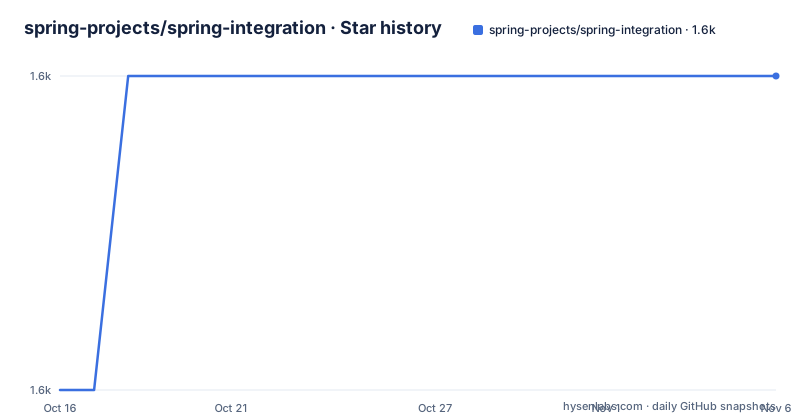
Star history
- spring-projects/spring-integration1,630 ★ · +1
| Repository | 2026-10-16 | 2026-11-06 |
|---|---|---|
| spring-projects/spring-integration | 1.6k | 1.6k |
1 Stars in the last 21 days, measured from the daily GitHub snapshot. Compare with other projects
Editorial analysis
Why Spring Integration adds messaging to Spring
Spring Integration addresses the coordination of components inside a Spring-based Java application and connections between that application and external systems. Its stated purpose is to support Enterprise Integration Patterns while preserving separation of concerns. This makes it relevant to applications that need to move messages through several processing steps without placing knowledge of every neighboring component inside each business class.
The Spring programming model already encourages interfaces and dependency injection for POJOs. Spring Integration changes how those POJOs are connected: rather than requiring each component to know its collaborators directly, the framework assembles them through a messaging paradigm. Individual components can remain focused on their own processing while the application-level flow determines how messages travel between them.
This approach is especially relevant to microservices, although the repository topics do not limit the framework to that architecture. It is also used for lightweight messaging within one Spring application. The important distinction is that Spring Integration is not simply a client library for a particular broker or protocol. It supplies a framework and a vocabulary for composing integration behavior, then delegates communication with particular systems through optional modules.
Channels, adapters, gateways, and flow composition
The central architectural idea is composition of fine-grained, reusable components. These components can be assembled into flows, and those flows can themselves be modularized or reused at a higher level. The README does not provide a complete message-flow example, but it does establish the division between the programming components and the messaging connections around them.
Channel adapters cover one-way integration. Depending on the direction of the connection, an adapter sends messages to an external system or receives messages from it. Gateways address request and reply exchanges and can operate in inbound or outbound roles. This distinction gives an integrator two different shapes of external-system interaction instead of forcing every protocol connection into a one-way abstraction.
Spring Integration also provides adapters as a higher-level abstraction over Spring support for remoting, messaging, and scheduling. That layering is a practical trade-off. Application code can work with a common integration model instead of handling each transport mechanism directly, but users must choose the appropriate module and understand how that module maps the external system onto Spring Integration channels and gateways. The abstraction does not eliminate protocol-specific configuration.
Adding core and selecting an integration module
A Spring Boot application that already manages dependencies through its Gradle build does not need to add the core dependency manually. Spring Integration declares that `spring-integration-core` is pulled transitively when a target protocol channel adapter is included. If the application uses core facilities directly, the documented Maven coordinates are `org.springframework.integration:spring-integration-core`.
Protocol support is divided into modules. Apache Kafka support, for example, is provided by `org.springframework.integration:spring-integration-kafka`. The repository layout contains many more focused modules, including `spring-integration-amqp`, `spring-integration-file`, `spring-integration-jdbc`, `spring-integration-mongodb`, `spring-integration-redis`, `spring-integration-r2dbc`, and `spring-integration-rsocket`. The existence of `spring-integration-rsocket` confirms RSocket support, while the `spring-integration-test` and `spring-integration-test-support` directories separate test-related functionality.
This catalog allows an application to avoid carrying every integration implementation by default. It also makes dependency selection a design task. A team should identify the actual systems and execution models it needs before choosing modules. The README gives explicit coordinates for core and Kafka, but it does not publish a complete dependency matrix for every module in the excerpt.
Enabling Spring Integration in a Java configuration
Applications that use annotations or the Java DSL must enable Spring Integration in the application context. The documented minimum configuration uses `@Configuration` and `@EnableIntegration` together. This step is separate from selecting a protocol module: module dependencies provide integration implementations, while enabling the framework registers the required Spring Integration configuration support.
The following class is the complete first configuration shown by the README. The reader should place it in the application's scanned configuration package, then let the application context load it. The class does not define a channel, endpoint, adapter, or gateway, so it does not establish what traffic the application handles after startup.
@EnableIntegration
@Configuration
public class ExampleConfiguration {

}
That boundary matters. `@EnableIntegration` confirms that the application is using the framework, but it does not demonstrate an end-to-end integration. A first real message flow still needs components and connections appropriate to the source and destination systems. The README points to the published reference documentation, source documentation, API reference, and Spring guides for those details.
Building the repository and its longer test suite
The project uses the Gradle wrapper and documents both a standard test task and a broader integration test task. The latter includes tests annotated with `@LongRunningIntegrationTest`, so it takes considerably longer. Results are written below each module's `build/reports/tests` directory as HTML.
The following commands check out the repository and run `clean test`:
git clone git://github.com/spring-projects/spring-integration.git
cd spring-integration
./gradlew clean test
The repository also documents a more extensive test invocation:
./gradlew clean testAllBy default, a failing test can stop the build after the current module or modules finish. Adding `--continue` allows the build to continue through failures, which can produce a broader diagnostic report at the cost of continuing work after an unsuccessful module. The README does not document a rollback procedure or a supported way to select individual integration tests, so those behaviors should not be assumed.
Building from source requires Java SE 17 or higher at runtime, and the README specifically states that a Java 17 compiler is required to build the project. That requirement applies to contributors and maintainers working from the repository. It should not be confused with the broader set of runtime requirements for applications that consume published artifacts, which the README does not spell out.
Publishing locally, generating docs, and importing the build
Developers who need locally installed JARs have a documented Gradle task that builds the project and publishes artifacts to the local Maven cache. API Javadoc, Antora reference documentation, and distribution archives each have separate tasks and documented output locations. This separation keeps a normal local publication operation distinct from API documentation or packaging work.
The local Maven publication command is:
./gradlew build publishToMavenLocalThe README places API Javadoc output in `build/api`, reference documentation in `build/site`, and complete distribution archives in `build/distributions`. Eclipse or Spring Tool Suite users can import the project as an existing Gradle project when BuildShip is installed. Without BuildShip, the documented `./gradlew eclipse` command generates Eclipse metadata before importing the projects from the repository root. IntelliJ IDEA users are instructed to open `build.gradle` from the root directory.
These contributor workflows imply a meaningful upgrade cost. Moving to a new project version can require attention to Java compiler compatibility, module behavior, configuration APIs, and regression tests. The listed recent releases include `v7.2.0-M2`, `v7.2.0-M1`, and `v7.1.1`, so users may need to distinguish milestone releases from the maintenance release shown in that list.
Spring support versus a protocol-specific implementation
The most relevant alternative described by the README is direct use of Spring Framework's existing support for remoting, messaging, and scheduling. Spring Integration deliberately adds a higher-level adapter and gateway abstraction over those facilities. Direct Spring support is therefore the lower-abstraction choice: it keeps application code closer to the transport mechanisms themselves and avoids adopting the full Enterprise Integration Patterns model when that model is unnecessary.
Spring Integration is more appropriate when the application benefits from named messaging relationships, composed reusable components, one-way channel adapters, or request and reply gateways. It also provides a consistent home for many target systems in one project rather than requiring each integration to be designed independently. For a small application with one direct remote call and no reusable flow, that consistency may add more configuration than the problem requires.
The framework is licensed under Apache-2.0. The repository does not present special licensing conditions beyond that license designation, and it also contains a `commercial-settings.gradle` file whose content is not included here. No legal interpretation of that file can be made from the available repository metadata. The last push was on 2026-10-16, but maintenance frequency beyond that recorded push cannot be inferred.
Editorial conclusion
Application teams already using Spring should consider Spring Integration when the design needs reusable messaging components, channel adapters, or gateways. Teams seeking a lightweight in-process library without Spring's application context or a large adapter catalog should first verify that dependency cost and module selection match their system.
Frequently asked questions
What is Spring Integration used for?
It extends Spring's programming model with messaging flows, Enterprise Integration Patterns, channel adapters, and gateways. It is intended for lightweight messaging inside Spring applications and integration with external systems.
How do I enable Spring Integration in a Java application?
Add `@EnableIntegration` to a class annotated with `@Configuration`, as shown in the README. The application context must have access to the relevant Spring Integration dependency.
Which Java version is required to build Spring Integration?
The README says Spring Integration runs with Java SE 17 or higher, while building the project requires a Java 17 compiler.
Which Spring Integration module supports Apache Kafka?
The documented Kafka module is `spring-integration-kafka`, with the Maven coordinates `org.springframework.integration:spring-integration-kafka`. The README says this support is sufficient as the stated example for Apache Kafka.
How do I run the complete Spring Integration test suite?
The README documents `./gradlew clean testAll` for the more thorough test run. It includes tests annotated with `@LongRunningIntegrationTest` and takes longer than the standard `test` task.
Official sources
Add this badge to your README
If you maintain this project, the badge below links readers to this analysis and shows its maintenance status from the daily GitHub snapshot. Paste the markdown into your README; add ?metric=license or ?metric=stars to the image URL for a different field.

[](https://hysenlabs.com/projects/spring-projects-spring-integration)Star history chart for your README
[](https://hysenlabs.com/projects/spring-projects-spring-integration)Was this useful?