Apache Groovy: A JVM Language That Bridges Dynamic Scripting and Static Checking
Apache Groovy: A powerful multi-faceted programming language for the JVM platform.
At a glance
- What is it?
- Apache Groovy is a multi-paradigm language for the JVM that mixes dynamic typing with optional static compilation. This review covers its core mechanisms, build process, and where it fits.
- Who is it for?
- Adopt Groovy if you need a JVM language that handles both quick scripting and larger codebases with optional static type checking, and if you can accept its extra build complexity. Do not adopt it if you require a purely static language with Java-level tooling or if you cannot manage a separate build toolchain.
- Can I use it commercially?
- Yes. Apache-2.0 is a permissive licence: you can use, modify and sell software built on it, as long as you keep its copyright and licence notices.
- Is it still maintained?
- Yes. The repository last received commits 1 day ago.
- What is it written in?
- Mainly Java, according to GitHub's language statistics.
Answers come from the project's GitHub data, last synced on November 13, 2026, and from our analysis. They are not legal advice.
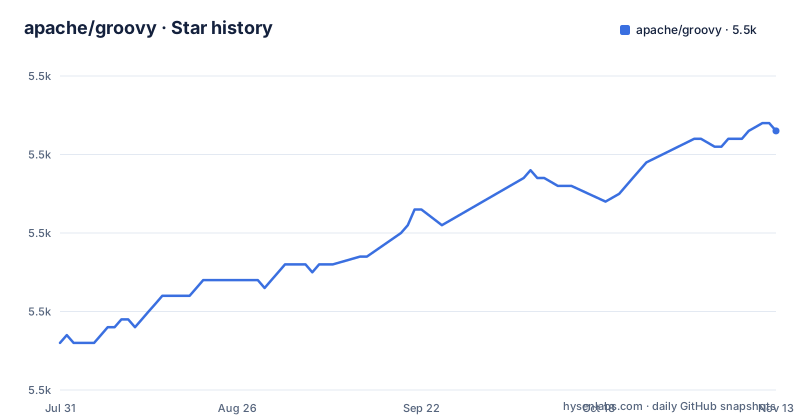
Star history
- apache/groovy5,483 ★ · +27
| Repository | 2026-07-31 | 2026-11-13 |
|---|---|---|
| apache/groovy | 5.5k | 5.5k |
27 Stars in the last 105 days, measured from the daily GitHub snapshot. Compare with other projects
Editorial analysis
What Groovy Actually Solves
Groovy addresses a specific tension on the JVM: Java is verbose and static, which is fine for large systems but slow for scripting, prototyping, or writing domain-specific languages. Groovy offers a syntax that is familiar to Java developers but with dynamic features like optional typing and duck typing. The README states it supports 'a spectrum of programming styles' from dynamic to static. That spectrum is the core value. If you write build scripts, test harnesses, or internal tools that need to talk to Java libraries, Groovy lets you do that with less ceremony. It is not a replacement for Java in every context. It is a language that sits between Java and a scripting language, and it aims to let you choose the level of strictness per project or even per class.
The Dual Typing Mechanism
Groovy's defining feature is that it does not force you to pick dynamic or static. You can write code with untyped variables and method calls that resolve at runtime, which is typical of dynamic languages. Or you can apply static compilation and static type checking. The README says the static type checker is 'extensible' and offers levels 'similar to or greater than Java'. That means you can start a script with dynamic dispatch and then, as it grows, add type annotations and static compilation to catch errors earlier. The mechanism is not a single switch. It is a set of annotations and compiler hooks that let you enforce checking on parts of your code. This is a real advantage over languages that are only one or the other. But it also means you have to understand when to use which mode.
Integration with Java: The Promise and the Catch
Groovy runs on the JVM and claims to integrate smoothly with any Java class or library. That is a strong promise, and it is plausible because Groovy compiles to JVM bytecode. You can call Java methods from Groovy and vice versa. The README highlights scripting support, DSL authoring, runtime and compile-time meta-programming, and functional programming as immediate capabilities. The catch is that integration is not automatic in every case. Dynamic dispatch can behave differently from Java's static resolution, especially around method overloading and generics. Any engineer who has mixed dynamic and static code knows these caveats exist. You should test your specific Java calls, especially if you rely on overloaded methods or generic type inference.
Getting the Source and Building: A Two-Path Process
You do not need the source to use Groovy, but if you want to build it yourself, the repository describes two ways. You can clone the Git repository from GitHub or the Apache gitbox. That path gives you the full source and a Gradle wrapper, so you can build directly. The other path is to download the source distribution, which does not include the wrapper. In that case you must bootstrap Gradle first. The README gives a specific command: `gradle -p bootstrap`. After that, you use `gradlew` (or `./gradlew` on Unix) for all subsequent builds. The required Gradle version is stored in the `gradle_version` property in `gradle.properties`. The bootstrap step exists because the source distribution cannot assume a specific Gradle version. This is a real friction point. If you are used to a project that just has a wrapper checked in, the source distribution will feel awkward. Cloning the repo avoids that, so that is the simpler path for most developers.
Build Requirements and JDK Versions
To build Groovy from source, you need JDK 17 or newer. The README states this explicitly. The build compiles with whichever JDK runs `gradlew`. That means if you want to target a different bytecode level or run tests on a different JDK, you have to consult `CONTRIBUTING.md` for the specific instructions. The README does not spell out those instructions, so you will need to read that file. The build command is `gradlew clean dist`. This requirement is a limitation if you are still on Java 11 or earlier. You cannot build the latest Groovy from source with an older JDK. For users who only consume Groovy as a dependency, this does not matter. For contributors or those who need a custom build, it is a hard constraint. The README also mentions that each Groovy version is built with a specific Gradle version, so you cannot just use any Gradle you have installed.
Where Groovy Is the Wrong Tool
Groovy is not the right choice if you need a purely static language with Java's tooling guarantees. The optional static checking is powerful, but it is not the default. If your team is not disciplined about adding type annotations and static compilation, you will get dynamic behavior that can hide errors until runtime. That is a genuine failure mode. Another case where Groovy is wrong is when you need a minimal runtime. Groovy brings a significant library and runtime overhead compared to plain Java. If your project is a small microservice and you care about startup time or memory, Groovy's dynamic features may not be worth the cost. The extra layer of dynamic dispatch and meta-programming is not free. The documentation claims it 'greatly increase[s] developer productivity', but that is a subjective claim, and productivity gains can be offset by debugging time when dynamic code misbehaves.
Alternatives: Kotlin and JShell
The most direct alternative is Kotlin. Kotlin also runs on the JVM and offers a more modern syntax than Java, with null safety and extension functions. The key difference is that Kotlin is statically typed by default. There is no dynamic mode. That means you get compile-time safety but you lose the flexibility of Groovy's dynamic dispatch and runtime meta-programming. If you need to write a quick script that manipulates Java objects without declaring types, Kotlin is more verbose. For DSL authoring, Groovy's dynamic nature is a better fit because you can define methods that are not known at compile time. Another alternative is JShell, the Java REPL. It is not a language but a tool for scripting Java snippets. It is dynamic in the sense that you can type code and run it, but it has no meta-programming or DSL support. JShell is useful for testing Java code, but it does not offer Groovy's syntax sugar or static checking options. So the choice depends on whether you want static safety (Kotlin) or dynamic flexibility (Groovy) or a quick Java scratchpad (JShell).
Licence and Maintenance Costs
Groovy is licensed under Apache-2.0, which is permissive and allows commercial use, modification, and distribution, with the requirement to preserve the license notice. That is a low legal friction for adoption. The project is hosted under the Apache Software Foundation, which suggests a governance structure that is not tied to a single vendor. The README shows build badges, and the last push to the repository was on 2026-11-02. The repository has no published GitHub releases. That is a gap. You should check the download page and the GitHub repository for recent activity before relying on it for a long-term project. The build pins a specific Gradle version in gradle.properties, and the gradlew command downloads that version automatically. The source distribution bootstrap step adds another layer of tooling you must maintain if you build from source. For most users, consuming Groovy as a dependency is simpler, but you still need to track version compatibility with your Java version and build system.
Editorial conclusion
Adopt Groovy if you need a JVM language that handles both quick scripting and larger codebases with optional static type checking, and if you can accept its extra build complexity. Do not adopt it if you require a purely static language with Java-level tooling or if you cannot manage a separate build toolchain. Before committing, verify the exact Gradle version in gradle.properties and test your Java libraries for compatibility with Groovy's dynamic dispatch.
Frequently asked questions
How do you use Groovy from the apache/groovy project?
Groovy runs on the JVM and integrates with any Java class or library. It supports optional typing and duck typing, static compilation and static type checking through an extensible static type checker, plus scripting support, Domain-Specific Language authoring, runtime and compile-time meta-programming, and functional programming.
How do you install Groovy for the apache/groovy project?
Distribution links are on the project's download page, and Maven, Gradle and Ivy dependency declaration snippets are published on the specific files of a particular module rather than in one place. To build the source yourself, clone the repository, or unpack the source distribution and run gradle -p bootstrap first.
How do you install Groovy on Windows for apache/groovy?
Distribution links are on the project's download page. The repository ships gradlew.bat next to gradlew, the documentation only says to use ./gradlew on Unix-like systems, and the wrapper downloads the correct Gradle version on its own, so a build needs a JDK 17 or later and the wrapper.
Official sources
Add this badge to your README
If you maintain this project, the badge below links readers to this analysis and shows its maintenance status from the daily GitHub snapshot. Paste the markdown into your README; add ?metric=license or ?metric=stars to the image URL for a different field.

[](https://hysenlabs.com/projects/apache-groovy)Star history chart for your README
[](https://hysenlabs.com/projects/apache-groovy)Was this useful?