Valet: keychain sandboxes built from an identifier and an accessibility value
Valet lets you securely store data in the iOS, tvOS, watchOS, or macOS Keychain without knowing a thing about how the Keychain works. It’s easy. We promise.
At a glance
- What is it?
- Square's Valet wraps the iOS, tvOS, watchOS and macOS Keychain in a sandbox determined by the type, identifier, accessibility value and initializer you pass. Its three documented install snippets pin 5.0.0 while the newest release is 5.1.1, and changing an accessibility value after you have stored data needs an explicit migration.
- Who is it for?
- Use Valet when you are writing an Apple platform app that needs per-feature keychain namespaces, a choice of when data becomes readable, and a migration path when that choice changes. Prefer the Swift Package Manager route, whose version range reaches 5.1.1, over the CocoaPods line as written, which stops inside the 5.0 series.
- Can I use it commercially?
- Yes. Apache-2.0 is a permissive licence: you can use, modify and sell software built on it, as long as you keep its copyright and licence notices.
- Is it still maintained?
- Yes. The repository last received commits 3 days ago.
- What is it written in?
- Mainly Swift, according to GitHub's language statistics.
Answers come from the project's GitHub data, last synced on November 14, 2026, and from our analysis. They are not legal advice.
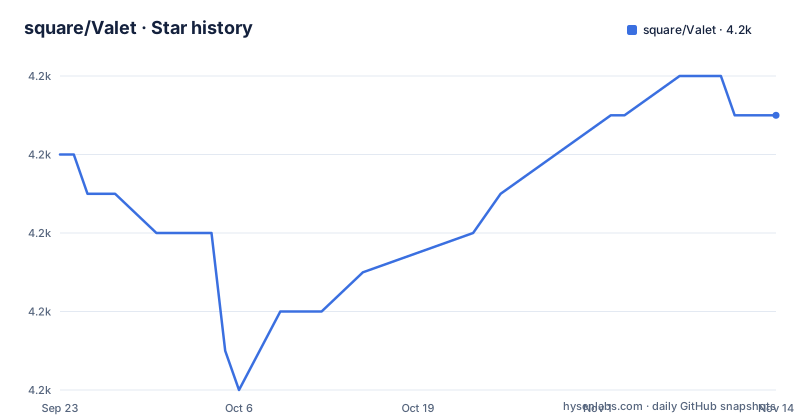
Star history
- square/Valet4,173 ★ · +1
| Repository | 2026-09-23 | 2026-11-14 |
|---|---|---|
| square/Valet | 4.2k | 4.2k |
1 Stars in the last 52 days, measured from the daily GitHub snapshot. Compare with other projects
Editorial analysis
The CocoaPods line cannot reach the newest release
Three package managers are documented, and each writes a different version constraint.
dependencies: [
    .package(url: "https://github.com/Square/Valet", from: "5.0.0"),
],pod 'Valet', '~> 5.0.0'github "Square/Valet"The Swift Package Manager constraint is a lower bound, so it admits the whole 5.x line and therefore the current release. The CocoaPods constraint is not a lower bound. Written with three version components, it admits 5.0.x and nothing above it, so a project that copies that line stays on the oldest supported series while the releases move on. Carthage names no version at all and resolves whatever tag exists.
So the same library arrives in three different versions depending on the package manager, and the documentation does not say so. That is the first thing to fix in your own integration: pick one route, then check which version it actually resolved.
Carthage and submodules both end with a drag into Xcode
The Swift Package Manager and CocoaPods routes end at your manifest. The other two end with manual work in Xcode.
With Carthage you run `carthage` to build the framework, then drag the built Valet.framework into your project. With a submodule you check the source out yourself and add the Xcode project as a build dependency.
git submodule add [email protected]:Square/Valet.gitThat instruction uses an SSH URL, so it needs a key registered with the host before it works, and it puts a full copy of the source into your repository. Neither route tracks a version for you, so a tag has to be chosen and revisited deliberately.
The repository supports all of these at once. It carries Package.swift and Valet.podspec side by side for the two manifest routes, plus Valet.xcodeproj/ for the two manual ones. It also keeps a Gemfile and a Gemfile.lock for the Ruby tooling CocoaPods needs, which is why a Swift library repository has Ruby dependency files at its root.
The sandbox is a tuple of four choices
Creating a Valet takes two things: an identifier, which the Swift API wraps in an `Identifier` class precisely to enforce that it is not empty, and an accessibility value from an enum.
let myValet = Valet.valet(with: Identifier(nonEmpty: "Druidia")!, accessibility: .whenUnlocked)Those two arguments are not the whole key. The type, the identifier, the accessibility value and which initializer you used are combined into the sandbox, which is why two Valets created with the same values can read each other's data and every other combination cannot. A Valet with a different accessibility value is not the same store even when the identifier matches.
One piece of advice in the documentation is worth keeping: do not put your application name or bundle identifier into the identifier. Choose a name that describes the kind of data, so the sandbox stays readable when you come back to it later, and so two features in the same app cannot accidentally land in the same namespace.
Changing accessibility after you store data loses it without a migration
The accessibility value is part of the sandbox identity, so changing it moves you to a different store rather than loosening the rules on the old one. The library does not silently carry data across, because that would break the isolation guarantee it exists to provide.
The migration call is explicit, and its second argument decides whether the old copies are deleted.
let myOldValet = Valet.valet(withExplicitlySet: Identifier(nonEmpty: "Druidia")!, accessibility: .whenUnlocked)
let myNewValet = Valet.valet(withExplicitlySet: Identifier(nonEmpty: "Druidia")!, accessibility: .afterFirstUnlock)
try? myNewValet.migrateObjects(from: myOldValet, removeOnCompletion: true)
Note the `try?`. It discards the error, so a failed migration leaves you with an empty new store and no signal, which is the failure mode to guard against if you care about the data. Choose accessibility values from what your app does when locked: if it never runs in the background, the documentation points at `.whenUnlocked` and `.whenUnlockedThisDeviceOnly`, using the strictest value that still lets the app work.
A readable macOS identifier gives up the isolation guarantee
On macOS, apps signed with a developer ID can set an identifier that users will see, for example when they inspect the keychain. A second initializer exists for exactly that case.
let myValet = Valet.valet(withExplicitlySet: Identifier(nonEmpty: "Druidia")!, accessibility: .whenUnlocked)The documentation wraps this one in its strongest warning, and the reason is mechanical rather than cosmetic. Explicitly setting the identifier is what makes the name visible, and it also bypasses the project's guarantee that one Valet type cannot reach another type's key and value pairs. The recommended mitigation is to keep every explicitly set identifier globally unique, which is a discipline you have to maintain yourself.
The visible-name behaviour is tracked as an open issue in the repository, so treat the readable identifier as a macOS convenience with a security caveat attached, not as the default choice. The two initializers differ only in this respect, and the migration example above uses the explicit one, so an app can end up depending on it more than it intended.
Shared secrets need both an initializer and an entitlement
Sharing between apps of the same developer is a third constructor, and it requires configuration outside the code as well.
let mySharedValet = Valet.sharedGroupValet(with: SharedGroupIdentifier(appIDPrefix: "AppID12345", nonEmptyGroup: "Druidia")!, accessibility: .whenUnlocked)The prefix is your App ID prefix, and the group name has to appear in the app's entitlements as a value for keychain-access-groups, written as AppID12345.Druidia or with the build setting form $(AppIdentifierPrefix)Druidia. Without that entitlement the shared Valet has no store to talk to, and the failure appears as an empty store rather than as a setup error.
The second point is easier to miss. The shared Valet and the plain one are different sandboxes, so `myValet` and `mySharedValet` cannot read or modify each other's values even when both use the identifier Druidia. Sharing across your own apps and sharing between features inside one app are two separate mechanisms with two separate namespaces.
Four test host apps live at the repository root
The project supports four platforms, and the repository shows the cost of that in its own layout. Alongside Sources/, Tests/ and Valet.xcodeproj/ there is a test host app per platform: Valet iOS Test Host App/, Valet macOS Test Host App/, Valet tvOS Test Host App/, and two more for watchOS, because that platform needs an extension target and a watch app target as well as the app itself.
The touch path has its own target, ValetTouchIDTest/, which is the part of the suite that covers the biometric cases the accessibility value interacts with.
Two housekeeping files round out the picture. codecov.yml is there for coverage reporting, and BUG-BOUNTY.md and Contributing.md sit next to it as the governance files. The dead link checker is configured in pyproject.toml with a single exclusion for cocoapods.org, so the repository keeps three toolchains alive at once: Swift for the code, Ruby for the pod tooling and Python for the documentation checks.
Editorial conclusion
Use Valet when you are writing an Apple platform app that needs per-feature keychain namespaces, a choice of when data becomes readable, and a migration path when that choice changes. Prefer the Swift Package Manager route, whose version range reaches 5.1.1, over the CocoaPods line as written, which stops inside the 5.0 series. Before you ship, decide your accessibility values from what your app actually does in the background, keep identifiers distinct per feature and out of the app name, and treat the human-readable identifier on macOS as a deliberate exception rather than a default. If you only need one shared secret across your own apps, the shared group initializer plus the keychain-access-groups entitlement is the route, and it is a different sandbox from the one your single app uses.
Frequently asked questions
Which Apple platforms does Valet support?
iOS, tvOS, watchOS and macOS. The repository carries a separate Xcode test host app for each of those four platforms, including an extension and a watch app for watchOS.
How do I change a Valet's accessibility value after storing data?
You create a second Valet with the new accessibility value and call migrateObjects on it, passing the old one and removeOnCompletion: true. Skipping that step loses access to the stored pairs, because accessibility is part of what defines the sandbox.
Can two of my apps share secrets with Valet?
Yes, through the sharedGroupValet initializer, but the group name must also appear in each app's keychain-access-groups entitlement using your App ID prefix. That shared Valet is a different sandbox from the one a single app uses, so the two cannot read each other's values.
What is the latest release of Valet?
5.1.1, released September 9, 2026, the same day as the most recent push to the repository. It follows 5.1.0 from February 20, 2026 and 5.0.1 from February 17, 2026, while the install snippets still name 5.0.0.
Should I give a Valet a human-readable identifier on macOS?
Only deliberately. The withExplicitlySet initializer makes the identifier visible to users, and the documentation warns that it bypasses the guarantee that one Valet type cannot access another type's pairs. Keep explicitly set identifiers globally unique.
Which accessibility value should a Valet use?
The strictest one that still lets your app function. For an app that does not run in the background the documentation points at .whenUnlocked or .whenUnlockedThisDeviceOnly, and .afterFirstUnlock is the example used when something needs to read after the first unlock of a boot.
Official sources
Add this badge to your README
If you maintain this project, the badge below links readers to this analysis and shows its maintenance status from the daily GitHub snapshot. Paste the markdown into your README; add ?metric=license or ?metric=stars to the image URL for a different field.

[](https://hysenlabs.com/projects/square-valet)Star history chart for your README
[](https://hysenlabs.com/projects/square-valet)Was this useful?