StarPie 1.8 makes the installer the only thing that talks to the network
StarPie - a modern mouse-wheel gesture system for Windows.
At a glance
- What is it?
- A native C# radial menu for Windows 10 and 11, currently shipping as 1.8.0 betas, where the release notes are one version behind the README, the download section is an empty frame, and the plugin system is designed around a zero-network-startup rule it then makes one exception to.
- Who is it for?
- This is a well-built native utility for one operating system, and its most interesting decisions are about restraint rather than reach. No browser engine, no network on startup, a plugin host that unloads assemblies, and a documented exception to the no-network rule that is narrow enough to check.
- Can I use it commercially?
- Yes. MIT is a permissive licence: you can use, modify and sell software built on it, as long as you keep its copyright and licence notices.
- Is it still maintained?
- Yes. The repository last received commits 3 days ago.
- What is it written in?
- Mainly C#, according to GitHub's language statistics.
Answers come from the project's GitHub data, last synced on November 15, 2026, and from our analysis. They are not legal advice.
Star history
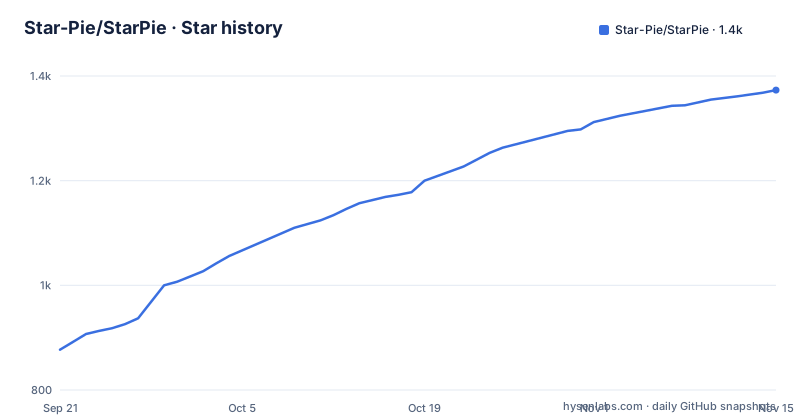
- Star-Pie/StarPie1,373 ★ · +496
| Repository | 2026-09-21 | 2026-11-15 |
|---|---|---|
| Star-Pie/StarPie | 877 | 1.4k |
496 Stars in the last 55 days, measured from the daily GitHub snapshot. Compare with other projects
Editorial analysis
The three latest tags are 1.8.0 betas and the README documents 1.6.8
The release history runs on a calendar-week version scheme, which is why the numbers look the way they do. The three most recent tags are v1.8.0-beta.3 on 2026-09-25, v1.8.0-beta.4 on 2026-09-28 and v1.8.0-beta.5 on 2026-10-02. The default branch received its last commit on 2026-10-02, and the repository is not archived.
The README is a version behind. The headline feature section is titled as the v1.6.8 overview, the demonstration video is labelled as the v1.6.8 release, and several individual features carry the version they arrived in: outer-escape cancel dates from v1.6.5, and screen-edge overflow protection with X and Y safety margins dates from v1.6.8. Nothing in the visible document describes what 1.8.0 changes beyond the plugin section, which does say 1.8.0 plus.
That makes the changelog the only place the gap is documented. A reader arriving at the repository sees a mature 1.6.8 feature tour and a release list that is three betas past it.
Two READMEs are published, the Chinese original and an English version, and seven of the sixteen feature sections describe changes attributed to specific earlier versions. That pattern of dating individual features is useful and also makes the stale header easy to miss.
The download section the quick start points at is an empty frame
The README carries eight section anchors in its navigation strip, one of which is the quick start. That anchor is where a reader goes to find the binary, and in the visible document the section is not there. The navigation links onward to the features, the visuals, the languages, the local build, the development story and the changelog, skipping straight past the one section that would say how to get the thing.
The install instructions that do exist are for building from source, with a local build section and a tests directory linked from the badge row at the top. No command line for obtaining a release appears anywhere in the text available here, and this is not a repository where that is normal to omit, since it has an installer directory, an assets directory and a per-app configuration directory at the root.
The header badges point somewhere you should look at before downloading. The release badge links to a releases page under the account SoftBlack42, while the repository itself sits under Star-Pie. Those are different accounts, and the difference is explained nowhere in the visible text.
So the practical path is the releases page in the header, and the sensible precaution is to confirm which account published the build you are about to run with elevated rights.
The hook is a global mouse hook, and the menu is drawn by WPF
StarPie is native C# on WPF, with no browser engine bundled, and the idle memory target is stated as roughly 15 to 30 MB in typical idle scenarios. Response comes from the Win32 low-level mouse hook, `WH_MOUSE_LL`, and the design goal is that this does not disturb an ordinary right-click.
The behaviour that goal produces is described precisely. Holding the right button and sliding past a configured threshold raises the wheel; sliding toward a sector and releasing fires that sector's action. A plain right-click still opens the native context menu. The trigger can be the right button, the middle button, a side button, a single key or a modifier combination, and the raise can be threshold-based or press-and-hold.
Low-level mouse hooks are the mechanism behind a lot of Windows input software, and they are also the reason this class of tool needs the escape hatches the settings page provides. Holding Ctrl, Shift or Alt bypasses the wheel entirely. Full-screen exclusive applications and games pass the native right-click through. A process blacklist exists. And while recording a hotkey the tool temporarily takes exclusive control of global hotkeys, so that a combination like Win+D or Alt+Tab is not fired by Windows while it is being captured.
That last one is the correct behaviour and worth crediting, since the alternative is a settings screen that triggers the very shortcuts you are trying to bind.
Action types include running commands and simulating input, and the list is a table
The action taxonomy is given as a table rather than prose, which makes the attack surface easy to read. Eight categories: hotkeys, which can be recorded or assembled and support Pause and Break with exclusive capture; launch program, for an executable, a shortcut or a file, with arguments and a choice of normal privilege; open URL, routed to the system default, Chrome, Edge, Firefox or a browser you name; open folder, covering local paths and virtual shell directories such as Desktop and Downloads; run command, supporting CMD, PowerShell, WSL and a hidden-terminal mode; screen OCR over a selected region; window management; and system control for lock screen, volume, media, task view and virtual desktops.
Three of those are worth pausing on. Launching a program with arguments at normal privilege is arbitrary code execution by another name. Run command covers three shells plus a hidden mode. And the OCR path can call a custom HTTP service, which means selected screen content can leave the machine if that option is configured.
Against that, two details reduce the risk. Window switching binds to the Nth visible taskbar window using one snapshot for the icon, the title and the activation target, so the thing you click is the thing that activates. Tiling offers left-right, top-bottom, master-detail, grid, single window, horizontal and vertical stack, Columns, BSP and Auto Grid layouts, with cycling, restore of previous positions, optional inclusion of minimised windows, and a custom process exclusion list.
Icons are decoupled from actions, so any action can carry a built-in vector icon, a program icon or an imported image.
Screen OCR has three back ends and only one of them is offline
Select a region and the tool runs text recognition on it. Three back ends are offered: the Windows offline engine through `Windows.Media.Ocr`, which needs no network at all; an AI vision interface; and a custom HTTP OCR service you configure yourself.
The offline engine is the one that matters for anyone who does not want selected screen content leaving the machine, and it is the native Windows 10 and 11 component, which means its accuracy follows whatever language packs the operating system has installed. That dependency is acknowledged rather than hidden: there is a language pack environment diagnostic and a configuration panel for it, which is the right response to a feature whose quality varies by machine.
The results handling is described in the order you would hit the problems. Output can be copied automatically or shown in a result window, lines can be merged, and there is specific handling for the spaces Japanese, Chinese and Korean OCR engines insert between characters, plus a browser search action on the result.
The third back end is the one to think about. A custom HTTP OCR endpoint receives whatever you select on screen, and the project does not describe what happens to that data beyond the call itself.
Per-app profiles pick the wheel by foreground window, and fall back to global
Profiles are the feature that makes the tool usable across a workday rather than merely impressive. You can define a separate wheel configuration per foreground application, with Chrome, VS Code, Photoshop and SolidWorks given as examples, and StarPie matches the active program automatically. When no profile matches, it falls back to the global configuration.
Profiles can be created, copied, deleted and renamed in one action, which is what makes them reusable across workflows rather than a one-off setting.
The matching key is the foreground process, so the profile boundary is the application window and nothing finer. That is a deliberate simplification and it has an edge: an application with several very different modes, such as a browser with a terminal-like tab or an editor with a plugin panel, gets one wheel for all of them.
The editing surface for actions is described as a two-column workspace, a focused editing card next to a live wheel canvas, with a compact list view retained for scanning many actions at once. The canvas supports zoom, pan, reset, click-to-select and drag-to-reposition, so reordering sectors happens on a picture of the wheel rather than in a dropdown.
A running-window capture tool lets you pick a window or process from the desktop directly instead of hunting for an executable path, and an application selector aggregates installed programs with name search and filtering.
The plugin host is built to unload assemblies, and official plugins live in a submodule
The plugin architecture is .NET in-process DLLs. A plugin references a separate `StarPie.Plugin.Abstractions` contract assembly and registers contributions such as actions through `Initialize`. The host wraps each plugin in its own instance and manages scanning, loading, lazy activation, call leases, exception isolation, asynchronous deactivation and assembly unloading.
That list is a design statement. Exception isolation means one plugin's failure does not take down the input pipeline, and assembly unloading means a plugin can be deactivated and its code released rather than pinned for the life of the process.
The host repository does not carry the plugins. Official plugin source, packaging and release are maintained in a separate repository, StarPie-Official-Plugins, and `external/StarPie-Official-Plugins/` in the main tree is a git submodule checkout of it, which is why a `.gitmodules` file sits at the root. The main repository does not reference, build or ship official plugin DLLs, and the development entry point, current API, architecture notes and sample project are collected in `plugin/README.md`.
The action execution path is described as a complete loop covering registration, configuration, parameter validation and Sequential or Background scheduling. Interactive events and wheel structure have extensible entry points, and the stated plan is to extend those without duplicating the plugin lifecycle code.
Zero network on startup, with one deliberate exception
Version 1.8.0 adds a privacy rule and then carves out an exception to it, and both halves are spelled out.
The rule is that the release package carries no plugin DLLs, and that startup and background running make zero automatic network requests. Related to it, contributor cards use an offline roster by default and do not reach out at launch; the network is touched only when you manually refresh or check for updates. Online updates can pick a channel, a proxy source or a custom proxy, and specific versions can be ignored. Logs are written asynchronously through a background queue, and the log directory and today's log can be opened straight from settings.
The exception is a one-time informed-consent dialog. On your first interactive opening of the settings window, and only when the launch is neither silent nor a self-check and the plugin system is enabled, the host shows a dialog listing five core official plugins, `folder`, `weburl`, `launch`, `system` and `shelltool`, together with the official repository they come from and the permissions they need: `Process` to start processes and `InputSimulation` to simulate keystrokes.
Before you press the one-click install button the host makes no network request at all, no catalog fetch and no package download. After you press it, only missing items are downloaded; installed ones are skipped, not overwritten, not upgraded, and a disabled plugin stays disabled.
Declaring that two of the five need process creation and keystroke simulation, in a dialog shown once, is a more honest onboarding flow than most software of this kind manages.
Editorial conclusion
This is a well-built native utility for one operating system, and its most interesting decisions are about restraint rather than reach. No browser engine, no network on startup, a plugin host that unloads assemblies, and a documented exception to the no-network rule that is narrow enough to check. Two things to verify before installing. The version you get is a 1.8.0 beta, not the stable 1.6.8 the feature overview describes, so read the changelog for the gap between them. And check where the binary comes from, since the download section in the README is an empty frame and the release links in the header point at a different account name than the repository. Everything the tool can do to your machine, including starting processes and simulating keystrokes, is declared up front, which is more than most utilities of this kind offer.
Frequently asked questions
What is StarPie and which platforms does it run on?
It is a radial pie menu for Windows 10 and 11, written in native C# on WPF with no browser engine bundled. Idle memory is targeted at roughly 15 to 30 MB, and input is captured through the Win32 low-level mouse hook WH_MOUSE_LL.
How do I download and install StarPie?
The download section the README navigation points at is an empty frame in the visible document, and no release command is given. The release badge in the header links to a releases page under the account SoftBlack42, while the repository itself is under Star-Pie, so confirm which account published the build before running it.
What is the current StarPie version, and is it stable?
The three most recent tags are all 1.8.0 betas: beta.3 on 2026-09-25, beta.4 on 2026-09-28 and beta.5 on 2026-10-02. The README feature overview is still labelled as the v1.6.8 version, and the changelog is where the difference is recorded.
What can StarPie do to my system when it runs?
Its action types include launching programs with arguments, running CMD, PowerShell or WSL commands including a hidden-terminal mode, sending keystrokes through an InputSimulation permission, and calling a custom HTTP OCR service on a selected screen region. It also installs a low-level mouse hook, and passes the native right-click through in full-screen applications and games.
Does StarPie send anything over the network when it starts?
The stated design is zero automatic network requests at startup and during background running, with contributor cards using an offline roster by default. Version 1.8.0 adds a single exception: a one-time consent dialog on your first interactive opening of settings, which lists five official plugins and the permissions they need, and only downloads anything after you press the install button.
How do StarPie plugins work and where do official plugins live?
Plugins are in-process .NET DLLs that reference the StarPie.Plugin.Abstractions contract and register contributions such as actions through Initialize, with the host managing loading, lazy activation, exception isolation and assembly unloading. Official plugin source and releases are maintained in a separate StarPie-Official-Plugins repository, checked out here as a git submodule under external/.
Official sources
Add this badge to your README
If you maintain this project, the badge below links readers to this analysis and shows its maintenance status from the daily GitHub snapshot. Paste the markdown into your README; add ?metric=license or ?metric=stars to the image URL for a different field.

[](https://hysenlabs.com/projects/star-pie-starpie)Star history chart for your README
[](https://hysenlabs.com/projects/star-pie-starpie)Was this useful?