Rawon 4.7.0: Installing and Operating a Discord Music Bot
A simple powerful Discord music (multi-)bot built to fulfill your production desires. Easy to use, with no coding required.
At a glance
- What is it?
- Rawon is a TypeScript Discord music bot for server operators who need multiple bot applications, several audio sources, and container-based deployment. Its optional Google cookie workflow and Discord-specific requirements add operational complexity.
- Who is it for?
- Rawon fits operators who already manage Discord applications, voice permissions, persistent volumes, and external media credentials. It is a poor fit for users seeking an unrestricted commercial service or a deployment with no Google authentication maintenance.
- Can I use it commercially?
- Check first. The repository uses a licence we do not classify automatically, so read its LICENSE file before any commercial use.
- Is it still maintained?
- Yes. The repository last received commits 1 day ago.
- What is it written in?
- Mainly TypeScript, according to GitHub's language statistics.
Answers come from the project's GitHub data, last synced on November 7, 2026, and from our analysis. They are not legal advice.
Star history
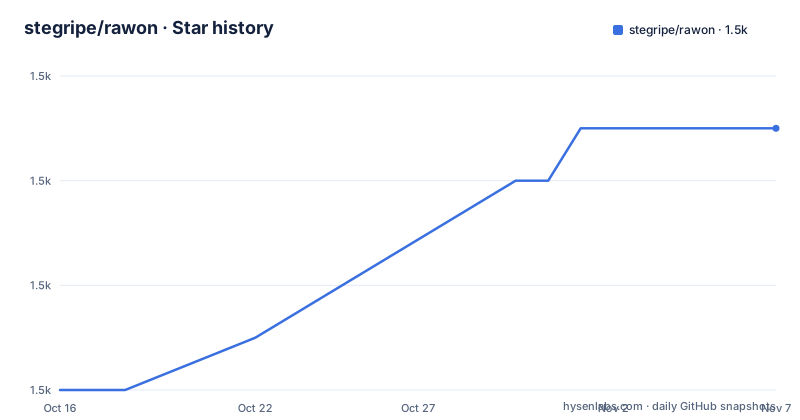
- stegripe/rawon1,533 ★ · +5
| Repository | 2026-10-16 | 2026-11-07 |
|---|---|---|
| stegripe/rawon | 1.5k | 1.5k |
5 Stars in the last 22 days, measured from the daily GitHub snapshot. Compare with other projects
Editorial analysis
Rawon's Role in Multi-Bot Discord Music Operations
Rawon addresses a specific server administration problem: playing music in Discord voice channels while distributing that work across multiple bot applications. It is aimed at operators who can create Discord applications, assign voice permissions, configure environment variables, and maintain a long-running Node.js or Docker service. The README says users do not need to write code, but installation still requires operational work such as preparing `.env`, managing credentials, and preserving state.
The project supports YouTube Music, Spotify, SoundCloud, and direct files. Spotify is not available from configuration alone, because `.env.example` requires `SPOTIFY_CLIENT_ID` and `SPOTIFY_CLIENT_SECRET`. A Discord token is always required. Rawon also has a dedicated request channel, persistent player settings, optional audio caching, and a built-in Google login flow for managing cookies through Puppeteer. These features target community servers rather than a generic command-line media player.
Rawon's multi-bot mode is enabled by changing the value shape of `DISCORD_TOKEN`. One token produces single-bot mode. Multiple comma-separated tokens automatically enable multi-bot mode. The first token represents the primary bot for general commands, while each bot can handle music commands according to the voice channel occupied by the user. The documentation also says that another available bot can take over if the primary bot is not present in a server. Every bot still requires a separate Discord application, so this is application-level distribution, not one token controlling several official identities.
Rawon's TypeScript Service and Persistent Cache Layout
The repository identifies Rawon 4.7.0 as a TypeScript project built on the Sapphire framework and `discord.js`. The package uses ES modules, and its build script first runs Biome, removes the existing `dist` directory, and then compiles `src` with SWC. The resulting `dist` directory is the production code location. The root `index.js` launches the application, while source code, translations, and the bundled `yt-dlp` utility are copied into the container image.
Audio handling depends on `@discordjs/voice`, `opusscript`, and `ffmpeg-static`. The standard setup also lists FFmpeg as a prerequisite, while the Docker image installs FFmpeg directly. This split matters for deployment: a Node.js host must provide the system tools itself, whereas the published image contains them.
State is concentrated under `/app/cache` in Docker. According to the README, that location contains the `yt-dlp` binary, `data.*` database files, cached audio when enabled, and the cookie and browser profile data created by Google login. Request channels and player state therefore depend on persistent storage. Omitting the named Docker volume would leave the container with a disposable cache during replacement.
The container exposes port 3000 and maps `DEVTOOLS_PORT`, whose documented default is `3000`, to the host. This is a Chrome DevTools remote debugging proxy used by `!login start` from a remote machine. It is not the Discord music stream itself. Rawon also relies on Chromium and Puppeteer in the image for the login workflow, adding a browser runtime to a music bot deployment.
Installing Rawon 4.7.0 with Node.js
The documented standard setup requires Node.js `22.12.0` or higher, FFmpeg, pnpm, and a populated `.env`. The package metadata declares the same Node.js minimum. After cloning or downloading the repository, copy `.env.example` to `.env` and set at least `DISCORD_TOKEN`. Install dependencies from the repository root.
The following command reads the versions locked for Rawon 4.7.0.
pnpm installCompile and lint the source before the first launch.
pnpm run buildStart the bot with environment loading provided by `dotenv/config`. Logs are passed through `pino-pretty`.
pnpm startAfter the bot is online, the optional request-channel command creates a dedicated route for music requests. Replace the example channel with a channel in the target server.
!requestchannel #music-requestsA successful server-side setup should result in an online Rawon instance and logs produced by the configured Pino logger. The README does not document a health endpoint or a command for checking every connection, so operators should not treat the published DevTools port as general application health monitoring.
Running Rawon with Docker Compose and a Persistent Volume
Docker is the recommended installation path because the image includes Node.js, FFmpeg, Chromium, fonts, and the bot build. Before startup, create `.env` from `.env.example`. The Compose file also expects `dev.env`, so either create that file from `dev.env.example` or remove the `dev.env` entry from `env_file`.
The documented service definition publishes the remote debugging port and attaches a persistent cache volume.
services:
  rawon:
    image: ghcr.io/stegripe/rawon:latest
    container_name: rawon-bot
    restart: unless-stopped
    env_file:
      - .env
      - dev.env
    ports:
      - "${DEVTOOLS_PORT:-3000}:${DEVTOOLS_PORT:-3000}"
    volumes:
      - rawon:/app/cache

volumes:
  rawon:
Start the service in the background.
docker compose up -dFollow the container logs to inspect startup messages.
docker logs -f rawon-botThe repository Dockerfile builds with Node.js 24 Alpine and uses `[email protected]` during image construction. It installs Chromium and sets `PUPPETEER_SKIP_CHROMIUM_DOWNLOAD=true`, indicating that the container uses the system browser. The published image includes production dependencies after pruning and starts `index.js` through `/app/entrypoint.sh`. The Compose file also declares a 512 MB memory limit through its deployment resource section, although whether a Docker runtime applies that declaration can depend on deployment mode.
Google Cookie Login and Cloud Bot Detection
Rawon documents a specific failure encountered on AWS, GCP, Azure, Railway, and similar hosts: YouTube may respond with "Sign in to confirm you're not a bot." Its response is a Puppeteer-based Google login flow that stores cookies and a browser profile in the cache. This is an explicit workaround for a media-hosting access issue, not a general requirement for joining voice channels.
The documented commands start, inspect, and remove the browser login state.
!login start
!login status
!login logout
`!login logout` wipes cookies and profile data, while `!login status` checks the stored login and cookie state. For remote Docker deployments, `DEVTOOLS_PORT` must permit the Chrome DevTools remote debugging proxy used by `!login start`. The repository publishes that port in Compose and documents 3000 as its default.
This workflow creates several operational responsibilities. Operators must protect `.env`, the cache volume, Google session material, and the exposed debugging port. They must also maintain Chromium and the browser profile. The README points to `docs/COOKIES_SETUP.md` for the cookie process, but the README does not describe access control for the DevTools endpoint. Exposing it broadly would therefore go beyond the documented setup without establishing its security boundary.
The feature is optional in the sense that the core playback bot starts without Google login. It becomes relevant when a hosting provider's IP is rejected by the media source. Users who never receive that error have not received a reason to introduce browser state.
Rawon Configuration Boundaries and Upgrade Work
Configuration is divided between two environment files and a database-backed setup command. `.env.example` contains essential values such as Discord tokens, Spotify credentials, `MAIN_PREFIX`, `MAIN_SERVER`, locale, and activity text. `dev.env.example` contains optional developer settings such as sharding, DevTools, debugging, and prefix or slash toggles. Bot-specific presentation and behavior, including embed color, default volume, selection type, and audio caching, are managed through the developer-only `setup` command and persisted in the database. `setup view` lists the available settings.
This split creates a migration check for upgrades. Environment files remain operator-managed, while setup values live in `/app/cache`. A volume replacement can therefore restore the process but lose request channels, player state, configuration choices, login state, and cached media. Conversely, copying an old database into a newer release may introduce compatibility questions that the README does not answer. It does not document automatic rollback or migration procedures.
Release history provides evidence of continued change. Releases 4.6.8, 4.6.9, and 4.7.0 were published on 2026-07-05, 2026-08-19, and 2026-09-21. The last push was on 2026-10-16. The repository is not archived. These facts support current activity, but they do not remove upgrade review: operators must compare environment keys, database state, and Docker volume contents between the deployed version and 4.7.0.
The package metadata and README identify the license as `CC-BY-NC-ND-4.0`, while repository classification calls it a custom license and directs readers to `LICENSE`. Because this is not conventional software license guidance, users must inspect the actual `LICENSE` file before redistribution or commercial operation. The noncommercial restriction is especially relevant for a bot offered as part of a hosted service.
Rawon Versus a Minimal Discord.js Music Service
A minimal service built directly with `discord.js` and `@discordjs/voice` takes a narrower approach. It would contain only the Discord gateway client, voice-channel connection, queue logic, and source handlers required by its operator. That alternative can avoid a large browser-oriented login workflow, multiple environment files, and database-backed presentation settings. It also places media extraction and caching decisions directly in the service owner rather than relying on Rawon's included `yt-dlp` and Google session process.
Rawon is more complete at the level of bot operation. Its documentation already covers a request channel, several supported sources, multiple Discord applications, persistent settings, setup commands, Docker packaging, and remote cookie management. Choosing a custom Discord.js service exchanges documented installation and deployment paths for code ownership and direct control of updates. Rawon is the more suitable option when its included commands and container layout match an existing server administration process. A custom service is more appropriate when minimal dependencies, a specific source policy, or fully controlled state management matter more than the packaged feature set.
Neither approach, as described here, removes Discord application permissions, persistent credential handling, or host policy constraints. Rawon's distinctive trade-off is that its more capable runtime also includes Chromium, Puppeteer-managed session state, and a DevTools endpoint for a problem that may not occur on every hosting provider.
Editorial conclusion
Rawon fits operators who already manage Discord applications, voice permissions, persistent volumes, and external media credentials. It is a poor fit for users seeking an unrestricted commercial service or a deployment with no Google authentication maintenance. Verify the CC BY-NC-ND 4.0 terms, test the exact `DISCORD_TOKEN` and `DEVTOOLS_PORT` configuration, and confirm that `/app/cache` persists before deploying version 4.7.0.
Frequently asked questions
What are the prerequisites for installing Rawon?
Rawon requires Node.js version `22.12.0` or higher and FFmpeg for a standard Node.js installation. The Docker image includes FFmpeg, so Docker users do not need to install it manually.
How do I enable Rawon multi-bot mode?
Set `DISCORD_TOKEN` to multiple comma-separated Discord bot tokens. Each bot must belong to its own Discord application, and the first token becomes the primary bot for general commands.
What does Rawon store in the Docker cache volume?
The `/app/cache` volume stores the `yt-dlp` binary, `data.*` settings including request channels and player state, optional cached audio, and Google login cookies and browser profile data.
Which music sources does Rawon support?
The README lists YouTube Music, Spotify, SoundCloud, and direct files. Spotify support requires `SPOTIFY_CLIENT_ID` and `SPOTIFY_CLIENT_SECRET` in `.env`.
What should I check after configuring the Rawon Docker service?
Confirm that `/app/cache` is mounted as a persistent volume, inspect `docker logs -f rawon-bot`, and use `!login status` when checking a Google cookie session. The README also documents `!login start` and `!login logout` for that session.
Official sources
Add this badge to your README
If you maintain this project, the badge below links readers to this analysis and shows its maintenance status from the daily GitHub snapshot. Paste the markdown into your README; add ?metric=license or ?metric=stars to the image URL for a different field.

[](https://hysenlabs.com/projects/stegripe-rawon)Star history chart for your README
[](https://hysenlabs.com/projects/stegripe-rawon)Was this useful?