RepoBar: a macOS 15 menu bar app that caches GitHub status in SQLite and falls back to archive snapshots
Show status of GitHub Repos right in your menu bar and terminal: CI, Issues, Pull Requests, Latest Release.
At a glance
- What is it?
- RepoBar is a native macOS menu bar app and bundled repobar CLI for maintainers who watch many GitHub repositories. This piece covers its two sign-in routes, the cache-first design, local checkout syncing and the platform requirements that rule some people out.
- Who is it for?
- Install RepoBar if you maintain many GitHub repositories on a Mac running macOS 15 or newer and want CI, issue and pull request pressure in one menu. Skip it on older macOS, Windows or Linux, or if you cannot install a GitHub App on your organization and do not want to manage a Personal Access Token.
- Can I use it commercially?
- Yes. MIT is a permissive licence: you can use, modify and sell software built on it, as long as you keep its copyright and licence notices.
- Is it still maintained?
- Yes. The repository last received commits 5 days ago.
- What is it written in?
- Mainly Swift, according to GitHub's language statistics.
Answers come from the project's GitHub data, last synced on November 25, 2026, and from our analysis. They are not legal advice.
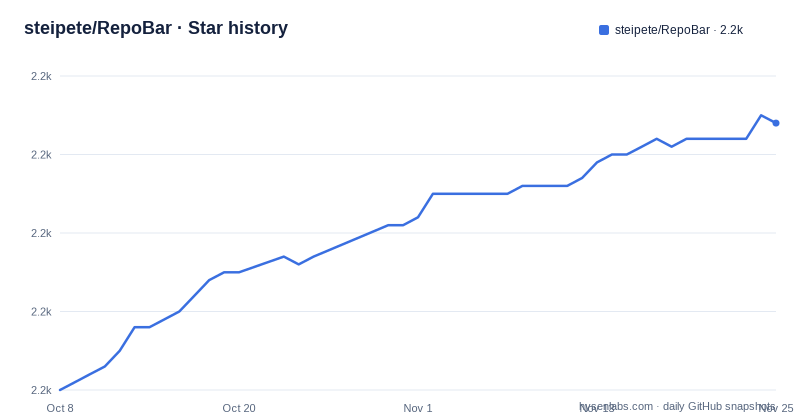
Star history
- steipete/RepoBar2,234 ★ · +34
| Repository | 2026-10-08 | 2026-11-25 |
|---|---|---|
| steipete/RepoBar | 2.2k | 2.2k |
34 Stars in the last 48 days, measured from the daily GitHub snapshot. Compare with other projects
Editorial analysis
One menu replaces tab sprawl, but only on macOS 15 or newer
RepoBar is a native macOS menu bar app for maintainers who track many GitHub repositories. It keeps issue and pull request counts, CI, releases, activity, rate limits and local checkout state in one menu. The icon is a traffic light, and the project's tagline is GitHub without the tab sprawl.
The install is one Homebrew command:
brew install --cask repobarRepoBar requires macOS 15 or newer. A signed app archive is also available from the latest GitHub release, which suits machines where you avoid Homebrew. There is no Windows or Linux build in the README.
The main menu shows issue and pull request pressure, stars, forks, recent activity, CI state, releases and contribution heatmaps. Filters narrow the list to pinned repositories, local checkouts or repositories with active work. Under Preferences, General, Display you can pick Light, Dark or System Default, and choose a Repository heatmap submenu so activity shows inside each repository menu.
Sign-in goes through a GitHub App, and private organizations need it installed
RepoBar supports GitHub.com and GitHub Enterprise. GitHub.com login uses a GitHub App user token, so access is limited by two things at once: the signed-in user, and the repositories where the RepoBar GitHub App is installed.
That has a direct consequence for organizations. Install the App on an organization to expose its private repositories. Skip that step and the organization's private repositories simply do not appear, even though your account can open them in a browser.
There is an escape hatch. A Personal Access Token with repository and organization read access is available for SAML SSO or for repositories outside that installation boundary. GitHub Enterprise uses its configured HTTPS host and OAuth settings.
Release builds store credentials in the macOS Keychain. Debug builds use file-backed storage to avoid Keychain prompts, so a build you compile yourself keeps its token in a file. The project documents the exact behaviour in docs/auth-storage.md.
The menu opens from a SQLite cache and refreshes in the background
RepoBar opens from its persistent SQLite cache first and refreshes GitHub data in the background. The menu appears at once with what it last knew, then updates. If you are offline, you still see the last sample.
The GitHub API Status menu shows REST and GraphQL quotas, endpoint cooldowns and the age of cached samples. That last item is what tells you how stale a number is, which matters because a cache-first app can show a CI result from before your last push.
For rate-limited or unavailable GitHub, there is an archive route. Git-backed GitHub archive snapshots can seed the cache. RepoBar owns the imported database and archive configuration, and it does not modify the source archive. The design is written up in docs/cache.md.
There is also an optional clipboard reference monitor. It recognizes GitHub URLs, issue and pull request references, commit hashes and workflow-run URLs, checks the cache first, and does a live lookup only when needed.
Local checkouts are matched to repositories, and auto-sync only fast-forwards clean ones
Choose a projects folder under Preferences, Advanced, Local Projects, and RepoBar matches GitHub repositories with the checkouts it finds. For each match the submenu reports the branch, upstream, dirty files, ahead and behind state, and worktrees. You can open a checkout in Finder or a terminal.
The sync rule is narrow by design. Optional auto-sync runs only for clean, non-detached repositories that can fast-forward, and RepoBar can fast-forward clean repositories without discarding local changes. A repository with uncommitted files or a detached HEAD is left alone.
The practical limit: if you want RepoBar to pull a branch that has diverged from upstream, it will not. Rebase or merge by hand.
Sandbox access, scanning, matching, caching and sync rules are documented in docs/reposync.md. Local checkout status is optional, and the README says the GitHub.com setup is complete after sign-in and choosing repositories.
The repobar CLI prints plain tables or JSON from the same data
RepoBar bundles a repobar command line tool for automation and diagnostics. Install it from Preferences, Advanced, CLI, then choose --plain for terminal tables or --json for structured output:
repobar repos --sort prs --plain
repobar rate-limits --plain
repobar cache status --json
The first command lists repositories sorted by pull requests. The second prints rate limits and the third reports cache status as JSON, handy in a script that checks whether the cache is fresh before calling GitHub yourself.
The CLI also reaches settings: repobar settings set color-scheme light|dark|system changes the appearance, taking effect on the next app launch. The CLI reference in docs/cli.md covers authentication, repositories, local Git actions, caches, archives, settings and output formats.
The repository holds a second command line layer in TypeScript: package.json defines ghql and ghrest scripts run with tsx, which look like developer tools for querying GitHub and are separate from the shipped Swift CLI.
Building it takes Xcode 26, Swift 6.2, Node 22.13 and pnpm 11
Development needs macOS, Xcode 26 with Swift 6.2, Node.js 22.13 or newer and pnpm 11. The commands are:
pnpm install
pnpm build
pnpm check
In package.json, check chains format, lint, test and test:tooling, so one command gates a change. The project layout, local app workflow and focused test commands live in AGENTS.md.
The CI story is detailed. CI and release jobs use the Apple silicon xcode-27 runner with its default Xcode 27 toolchain, CI uses Node.js 26, and it builds both macOS and iOS targets. Release verification smoke-tests both CLI architectures, using Rosetta for Intel. The supported application versions remain macOS 15 and iOS 26.
An iOS target exists in the repository, in RepoBariOS, but the README gives no iOS install steps. The tree also contains an appcast.xml, the file Sparkle-style updaters read, and a docs/release.md that describes the release process.
Versions 0.10.1 to 0.10.3 landed within four days
Recent tags are v0.10.1 on 2026-10-16, v0.10.2 on 2026-10-18 and v0.10.3 on 2026-10-20. Three patch releases in four days show a fast pace, and a 0.x version means behaviour may change between them. The repository was last pushed on 2026-10-25 and is not archived. The license is MIT.
The root holds CHANGELOG.md, VISION.md and docs/spec.md, the original product specification, so there is written intent to read before you contribute. The repository's own name for itself on the project homepage is repo.bar.
For teams, the install story is the thing to test. Homebrew gives you updates through brew. The app archive gives you a signed build to deploy by other means. In both cases you will want to sign in on a test account first, because the GitHub App permission model decides which repositories ever show up in the menu.
Editorial conclusion
Install RepoBar if you maintain many GitHub repositories on a Mac running macOS 15 or newer and want CI, issue and pull request pressure in one menu. Skip it on older macOS, Windows or Linux, or if you cannot install a GitHub App on your organization and do not want to manage a Personal Access Token. Before relying on it for private organization repositories, check whether the RepoBar GitHub App is installed there.
Frequently asked questions
Is GitHub a repo, and how does RepoBar treat it?
GitHub hosts repositories, and RepoBar reads them from GitHub.com or GitHub Enterprise. It shows each one's issues, pull requests, CI runs, releases and activity in a menu bar menu.
What does repo mean in programming, as RepoBar uses it?
Here a repo is a GitHub repository you track, optionally matched to a local checkout so RepoBar can show its branch, dirty files and ahead or behind state.
What is the repo structure of RepoBar?
The top level holds Sources, Tests, Scripts, docs, Config, GraphQL and RepoBariOS, with Package.swift for the Swift build and package.json for pnpm tooling. AGENTS.md describes the project layout.
Official sources
Add this badge to your README
If you maintain this project, the badge below links readers to this analysis and shows its maintenance status from the daily GitHub snapshot. Paste the markdown into your README; add ?metric=license or ?metric=stars to the image URL for a different field.

[](https://hysenlabs.com/projects/steipete-repobar)Star history chart for your README
[](https://hysenlabs.com/projects/steipete-repobar)Was this useful?