Dorso's headline blur rides a private API, and its commands live in /tmp
A macOS app that blurs your screen when you slouch.
At a glance
- What is it?
- Dorso is a small Swift menu bar app that blurs the screen when it decides you are slouching, using either the camera through Apple's Vision framework or AirPods motion sensors. The blur itself defaults to a private CoreGraphics API with a public fallback behind a toggle, and the whole app can be driven by writing three words into a file in /tmp.
- Who is it for?
- Dorso is a plausible fit if you want a posture reminder with no account, no cloud and no subscription, and if you are willing to keep a private API in your menu bar. Two things decide it.
- Can I use it commercially?
- Yes. MIT is a permissive licence: you can use, modify and sell software built on it, as long as you keep its copyright and licence notices.
- Is it still maintained?
- Yes. The repository last received commits 16 days ago.
- What is it written in?
- Mainly Swift, according to GitHub's language statistics.
Answers come from the project's GitHub data, last synced on November 15, 2026, and from our analysis. They are not legal advice.
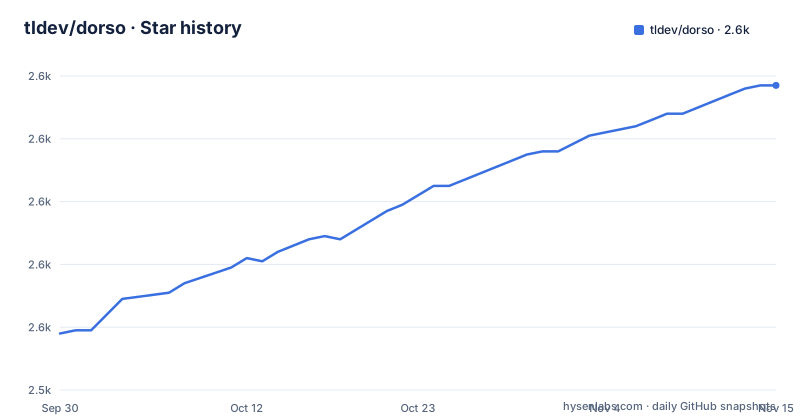
Star history
- tldev/dorso2,637 ★ · +79
| Repository | 2026-09-30 | 2026-11-15 |
|---|---|---|
| tldev/dorso | 2.6k | 2.6k |
79 Stars in the last 46 days, measured from the daily GitHub snapshot. Compare with other projects
Editorial analysis
The blur itself runs on a private CoreGraphics API by default
The reminder mechanic and the implementation of that mechanic are separate, and only one of them is public. The screen blur uses a private CoreGraphics API by default, described as efficient and system level, and the acknowledgments credit that choice directly. When the blur does not appear on a given system, a settings toggle called Compatibility Mode switches the implementation to `NSVisualEffectView`, a public AppKit view. The documentation frames that toggle as something to try if the blur is missing, which is the honest description of what it is: a fallback for when the default path stops working. No macOS version is named as safe for the private API, and no release is tied to a specific system release. A private interface is one Apple can change or withdraw in any update, so on this app the operating system is a hidden dependency, and the update feed and the blur path can move independently of each other.
The entire command interface is three words in a shared temp file
External control is done by writing to a fixed path, not by a socket, a URL scheme or an AppleScript dictionary. The supported commands are:
capture
blur <0-64>
quit
`capture` takes a photo and analyzes the pose, `blur <0-64>` sets the blur level by hand, and `quit` exits the application. Commands go into `/tmp/dorso-command` and responses appear in `/tmp/dorso-response`. Both names are fixed and predictable, and no authentication, token or caller check is described for either file, so anything running on the machine as any user can queue a command or read the response. The manual blur override matters most here: it lets a script set any blur level in the range the app itself uses, independently of what posture detection thinks. That is a reasonable feature for a tool you drive from a shell, and it is also the reason to think twice about what else runs on that desktop.
The privacy promise and the capture command need reading together
The privacy section is unambiguous: all video data is processed locally, no images or data are ever sent to external servers, and the camera feed is used solely for posture detection and is never stored or transmitted. The feature list adds that no account is required, with no signup, no cloud and no tracking. Then there is the `capture` command in the table above, whose description is taking a photo and analyzing pose. Those two statements can both be true only if the photo never leaves the process, and the documentation does not say where it lands in the meantime, whether the analysis result written to `/tmp/dorso-response` contains anything derived from the image, or how long anything survives in a temporary directory. The repository carries a `PRIVACY.md` alongside the README, and that is the place to look before running the capture command on a machine with anything sensitive in frame.
AirPods mode needs a newer system than the app, and a camera it never uses
The stated system requirements are macOS 13.0 Ventura or later, a camera that is built in or external, and about 10MB of disk space. The AirPods path contradicts both halves. It requires macOS 14.0 and later, which is a newer floor than the app's own minimum, and it is described as working with no camera access at all, reading head motion instead. So the camera in the requirements list is only needed for camera mode, and on macOS 13 the AirPods route is closed even though the app runs. Known limitations restates the split: camera mode needs a working camera with adequate lighting and a clear view of the upper body or face, and AirPods mode needs macOS 14 plus Pro, Max or third generation and later AirPods. AirPods mode also pauses itself when the AirPods are removed from your ears, which is a behaviour camera mode has no equivalent for.
Three tags in one hour, then five weeks of commits with no release
The release history is compressed into a single afternoon. v1.14.2 is dated 2026-07-19 at 15:47:45 UTC, v1.15.0 at 16:32:07 the same day, and v1.15.1 at 16:46:28, so three tags landed inside one hour and the patch release came last. The most recent push to the default branch is dated 2026-08-25, which leaves the published build roughly five weeks behind the newest commit in the tree. For a project whose main risk is that a system update changes a private interface underneath it, that gap is the period where an operating system change and an application change can drift apart, and nothing in the repository signals which system versions the current tag was tested against. The root also carries `CHANGELOG.md` and an `appcast.xml`, which is the update feed a Sparkle based build would poll, so there are two independent ways a new version reaches a machine.
Four ways to install it, and one build path with no app bundle
Installation is offered through Homebrew, a manual download, and whatever the App Store badge at the top resolves to, which points at a listing named posturr-posture-monitor rather than at Dorso by name. The manual route takes the latest `Dorso-vX.X.X.dmg` or zip from the releases page and states that the app is signed and notarized, so no Gatekeeper override is needed. The script build path is three commands:
git clone https://github.com/tldev/dorso.git
cd dorso
./build.sh
and it produces `build/Dorso.app`, with an optional release archive behind `./build.sh --release`. The manual compile is a different shape entirely:
swiftc -O \
    -framework AppKit \
    -framework AVFoundation \
    -framework Vision \
    -framework CoreImage \
    -o Dorso \
    Sources/*.swift
That produces a plain executable called `Dorso` with no bundle, no Info.plist and no signing step, while the app's permissions prompts and its private blur call both live in bundle identity. The `Sources/` listing that would explain the file split stops partway through the DisplayManager entry's comment, so the rest of the layout is not spelled out.
Slouch detection reduces to head height against a baseline you set
What the app measures is narrower than the word posture suggests. Camera mode uses the Vision framework to find body pose landmarks, tracking nose and head position, and when a full body is not visible it falls back to face position alone. Posture analysis then measures vertical head position against a calibrated baseline, which Recalibrate resets on demand while you sit up straight. The two knobs are Sensitivity, five levels from Low to Very High, and a Dead Zone, five levels from None to Very Large, which sets the tolerance before the blur starts. AirPods mode drops even further, tracking the pitch angle of the head and nothing else. That reduction explains the tips in the documentation. Positioning the camera at eye level, keeping a consistent distance and keeping your shoulders in frame are not advice about comfort, they are the conditions under which a single vertical offset from your own baseline means the same thing twice.
Editorial conclusion
Dorso is a plausible fit if you want a posture reminder with no account, no cloud and no subscription, and if you are willing to keep a private API in your menu bar. Two things decide it. First, the detection is a comparison against a baseline you set yourself, so it only means something while your desk, chair and camera stay where you calibrated them. Second, the blur that makes the app work at all depends on an undocumented system API, which is exactly why compatibility mode exists and why an operating system update can change the behaviour without any release note from the project. Verify which mode your system actually uses before trusting it, check what you are willing to write into a shared temporary directory, and remember that the AirPods path needs a newer macOS than the app's own minimum.
Frequently asked questions
Does Dorso need a camera to work?
Camera mode needs camera access, adequate lighting and a clear view of your upper body or face. AirPods mode needs no camera access at all, but it requires macOS 14 or later and AirPods Pro, Max or third generation and later. The system requirements list a camera even though one of the two modes does not use one.
Why does the screen blur not appear on my Mac?
The blur uses a private CoreGraphics API by default. Enabling Compatibility Mode in settings switches it to NSVisualEffectView instead, which is the documented step when the blur does not show up on your system.
What macOS version does Dorso require?
The app needs macOS 13.0 Ventura or later and Xcode Command Line Tools if you build it from source. AirPods motion tracking needs macOS 14 or later, plus the Motion and Fitness Activity permission, and camera mode needs camera permission.
Can Dorso be controlled from a script?
Yes, through a file based interface. Write capture, blur with a level from 0 to 64, or quit into /tmp/dorso-command, and responses appear in /tmp/dorso-response.
Does Dorso send any data to a server?
No account is required and there is no cloud component. Video data is processed locally, no images or data are sent to external servers, and the camera feed is never stored or transmitted.
Official sources
Add this badge to your README
If you maintain this project, the badge below links readers to this analysis and shows its maintenance status from the daily GitHub snapshot. Paste the markdown into your README; add ?metric=license or ?metric=stars to the image URL for a different field.

[](https://hysenlabs.com/projects/tldev-dorso)Star history chart for your README
[](https://hysenlabs.com/projects/tldev-dorso)Was this useful?