Stoplight Prism: mock from a spec URL, proxy a live API, and mind the basePath 404
Turn any OpenAPI2/3 and Postman Collection file into an API server with mocking, transformations and validations.
At a glance
- What is it?
- Prism is a set of TypeScript packages that fake an API from an OpenAPI or Postman Collection document, or sit in front of a real one and check the traffic against the contract. The sharp edges are the basePath rule, the Docker bind address, and a roadmap that still has persistence unchecked.
- Who is it for?
- Prism earns its place in a CI job, where the validation proxy catches contract drift before a consumer does, or as a front end for a spec you have not built yet. It does not earn a place as a stateful sandbox, since mock data resets and recording is still unchecked on the roadmap.
- Can I use it commercially?
- Yes. Apache-2.0 is a permissive licence: you can use, modify and sell software built on it, as long as you keep its copyright and licence notices.
- Is it still maintained?
- Yes. The repository last received commits 3 days ago.
- What is it written in?
- Mainly TypeScript, according to GitHub's language statistics.
Answers come from the project's GitHub data, last synced on November 22, 2026, and from our analysis. They are not legal advice.
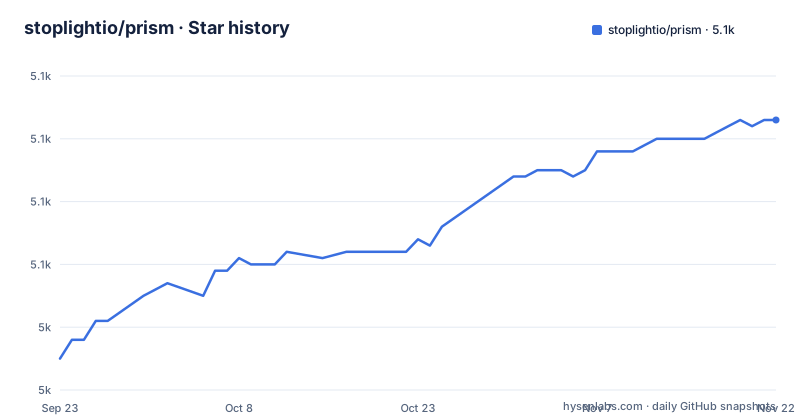
Star history
- stoplightio/prism5,073 ★ · +38
| Repository | 2026-09-23 | 2026-11-22 |
|---|---|---|
| stoplightio/prism | 5k | 5.1k |
38 Stars in the last 60 days, measured from the daily GitHub snapshot. Compare with other projects
Editorial analysis
Hosted or self-hosted changes who owns the mock and who owns the bill
Prism arrives in two shapes. Stoplight runs hosted mock servers so a consumer can experiment with an API without backend code, reached through the Stoplight Platform, a collaborative API design platform, or Stoplight Studio, a free visual OpenAPI designer that ships with mocking already wired in. Both hosted paths are described as powered by Prism, so the behavior you evaluate in the browser is the behavior of the open-source server underneath. Self-hosted Prism is the same thing as an HTTP server you start from the command line, providing mocking, request validation and content negotiation, usable as a standalone tool or dropped into continuous integration. The choice is not only about convenience. Hosted means the spec you paste lives in someone else's account, while self-hosted means the process, its port and its log output are yours. Specification coverage is the same story either way: OpenAPI v3.1, OpenAPI v3.0, OpenAPI v2.0, formerly Swagger, and Postman Collections.
npm install -g @stoplight/prism-cli, and the NodeJS floor that has a carve-out
The self-hosted install is one command:
npm install -g @stoplight/prism-cliThe stated requirement is NodeJS >= 18.20.1, with a narrower rule attached to the 18.x line: >= 18.16 is required there, tracked as issue 2305. That split matters for anyone on a long-lived enterprise image, because a machine on Node 18.20.0 is above 18.16 and below 18.20.1 at the same time, and the two rules disagree about it. A second version signal is worth knowing before you read the docs. The usage notes refer to Open Source Prism 3.x as the current version and point 2.x users at a separate `2.x` branch, while the published tags are further along: v5.16.0 on 17 July 2026, v5.15.11 on 3 June 2026 and v5.15.10 on 20 April 2026. The repository is not archived and its last push landed on 31 October 2026, so work continues, but the prose in the readme is older than the release train.
prism mock reads a spec URL, prism proxy forwards to a live host
The two verbs do opposite jobs. `prism mock` takes a specification document and serves a fake implementation of it, so you can see how the API behaves before the backend exists, and it accepts a URL directly:
prism mock https://raw.githack.com/OAI/OpenAPI-Specification/master/examples/v3.0/petstore-expanded.yaml`prism proxy` takes a specification plus a target and funnels real HTTP traffic through itself, checking for discrepancies between what the implementation returns and what the document says:
prism proxy examples/petstore.oas2.yaml https://petstore.swagger.io/v2The first reads a document and invents responses. The second needs a reachable upstream, so a proxy run inherits the upstream's availability, authentication and latency, and a failure in the mock run tells you nothing about the real service. In the repository the sample documents sit in `examples/`, including `examples/petstore.oas2.yaml`, `examples/petstore.oas3.yaml` and an `examples/callbacks/` directory, so the proxy example reads its document from a local file, though it still forwards traffic to https://petstore.swagger.io/v2.
A basePath prefix turns every route into a 404, by design
OpenAPI v2.0 had `basePath`, the prefix applied to every URL after the host and before the query string, and Prism v2.x honored it. OpenAPI v3.0 folded that concept into `server.url`, and Prism v3 does the same: an OAS2 `host + basePath` pair is treated as the equivalent of an OAS3 `server.url`, so it is not required in the URL. The example given is exact. With a base path of `api/v1` and a path defined as `hello`, a request to `http://localhost:4010/hello` works and `http://localhost:4010/api/v1/hello` fails. Both halves are intentional, since the reverse choice confused a different set of users. The remedy is also given: read the default output of the CLI, which prints the URLs it is serving. Any client under test that is configured with an explicit base path will need that path removed, and a 404 wall usually means the prefix is still in the client.
Inside a container the mock binds to 127.0.0.1 and nothing else
Prism uses localhost by default, which usually means 127.0.0.1, and that address is not reachable from outside the container. The documented fix is to run the mock command with `-h 0.0.0.0`. This is the failure that looks like a broken image rather than a broken config: the container starts, the log line appears, and every request from the host times out or refuses to connect. Note that exposing a mock on all interfaces is a decision about who can reach your test data, not just a networking tweak.
Mock data resets each run because persistence is still an open roadmap box
The roadmap has content negotiation, security validation and the validation proxy checked off, and two entries still unchecked: Recording or Learning Mode, described as creating an OpenAPI document from HTTP traffic, and Data Persistence, described as allowing Prism to act like a sandbox. Read those two together and the boundary is clear. A mock server here generates responses from your document and holds no state between runs, so a resource you create through the mock is gone after a restart, and there is no flow that watches real traffic and writes a specification back out. The build confirms the approach: the packages it credits include `ajv` for schema work, `json-schema-faker` and `faker` for values, and `openapi-sampler` for pulling examples out of a document. Values are synthesized from the schema, so tests that assert on exact response bodies should read the schema, not the bytes a run happened to produce.
Four workspace packages, and a binary build for people who avoid global npm
The repository is a lerna monorepo with npm workspaces over `packages/*`, and the four published names are `@stoplight/prism-core`, `@stoplight/prism-http`, `@stoplight/prism-http-server` and `@stoplight/prism-cli`. Releases are cut with `lerna version`, and the root version field stays at `0.0.0`, so the meaningful version lives in each package and in `version.txt`. If you would rather not install globally, `build.binary` packages the CLI into one file with `@yao-pkg/pkg`, writing to `./cli-binaries/prism-cli` with a raised heap of 4096. The Dockerfile shows the production path in three stages on `node:24`: a compiler stage that runs `npm ci && npm run build`, a dependencies stage that runs `npm ci --omit=dev` and then prunes unused modules with `node-prune`, skipped entirely when the architecture is aarch64, and a final `node:24-alpine` stage that installs `tini` for signal handling. Development wiring is visible too, with husky on `prepare` and eslint 10 across the package sources.
Editorial conclusion
Prism earns its place in a CI job, where the validation proxy catches contract drift before a consumer does, or as a front end for a spec you have not built yet. It does not earn a place as a stateful sandbox, since mock data resets and recording is still unchecked on the roadmap. Before you wire it in, confirm the spec version you hold is handled, check the CLI output for the URLs it actually serves so a basePath prefix does not turn every request into a 404, and remember that a container without `-h 0.0.0.0` is unreachable from outside.
Frequently asked questions
How can I use prism?
Install the CLI with `npm install -g @stoplight/prism-cli` on NodeJS 18.20.1 or newer, then run `prism mock <spec>` to serve a fake API from an OpenAPI or Postman Collection document, or `prism proxy <spec> <upstream>` to check real traffic against the same document.
What is prism software used for?
Prism is a set of packages for API mocking and contract testing with OpenAPI v2 and OpenAPI v3.x. It runs as a mock server generated from a specification document, or as a validation proxy that checks an existing implementation against it, and it handles OpenAPI v3.1, v3.0, v2.0 and Postman Collections.
Is prism free to use?
Self-hosted Prism is an open-source HTTP server run from the command line, licensed Apache-2.0 and installed from npm. Stoplight also offers hosted mock servers through the Stoplight Platform and Stoplight Studio, which are separate from the self-hosted server you run yourself.
Official sources
Add this badge to your README
If you maintain this project, the badge below links readers to this analysis and shows its maintenance status from the daily GitHub snapshot. Paste the markdown into your README; add ?metric=license or ?metric=stars to the image URL for a different field.

[](https://hysenlabs.com/projects/stoplightio-prism)Star history chart for your README
[](https://hysenlabs.com/projects/stoplightio-prism)Was this useful?