CADCraft: native Rust drafting with DXF, DWG and agent control
CADCraft: computer-aided design and drafting — an open-source, clean-room AutoCAD-style app in pure Rust
At a glance
- What is it?
- CADCraft is an early-development, open-source CAD application for drafters who want an AutoCAD-style interface without an account or subscription. It offers native Rust builds, browser support through WebAssembly, file-format compatibility and MCP access, but its unfinished status is the main adoption constraint.
- Who is it for?
- CADCraft fits evaluators, Rust developers and teams that want to inspect or automate an open CAD engine through commands, JSON, MCP or DXF. It is a poor match for production users who require proven AutoCAD compatibility across their complete drawing workflow.
- Can I use it commercially?
- Yes. Apache-2.0 is a permissive licence: you can use, modify and sell software built on it, as long as you keep its copyright and licence notices.
- Is it still maintained?
- Yes. The repository received new commits within the last day.
- What is it written in?
- Mainly Rust, according to GitHub's language statistics.
Answers come from the project's GitHub data, last synced on October 23, 2026, and from our analysis. They are not legal advice.
Star history
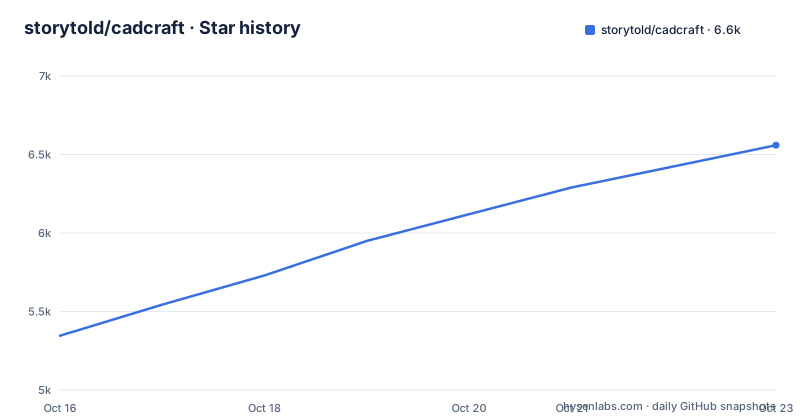
- storytold/cadcraft6,559 ★ · +1,213
| Repository | 2026-10-16 | 2026-10-23 |
|---|---|---|
| storytold/cadcraft | 5.3k | 6.6k |
1,213 Stars in the last 7 days, measured from the daily GitHub snapshot. Compare with other projects
Editorial analysis
The drafting problem CADCraft addresses
CADCraft targets people who already understand the AutoCAD workflow and want that interaction model in an open-source application. Its command line, object snaps, layers, associative dimensions, hatches, blocks and DXF support are not incidental features in the README. They form the central case for adoption: a user can issue familiar drafting commands, work with existing drawing files and inspect the resulting geometry without switching to a hosted account or subscription model.
The project describes itself as a clean-room reimplementation of Autodesk AutoCAD written in pure Rust. That makes it useful to evaluate as an independent CAD implementation, not merely as a viewer or library for converting drawings. CADCraft also presents commands as a consistent control surface. The README says that agents can type at the same command line used by a person, call commands with JSON, inspect the drawing, render it and use MCP. This makes the application relevant both to interactive drafters and to developers experimenting with programmatic drafting.
Its intended scope is broad. CADCraft documents model space, paper-space layouts, viewports, annotations, plotting to PDF, SVG and PNG export, and several CAD file formats. That breadth is useful, but it should not be confused with completion. The README labels CADCraft as being in early, fast development, so every claimed capability still needs to be matched against the project's own ROADMAP.md before an organization depends on it.
How CADCraft's drawing and control paths connect
The repository layout shows a Rust workspace split into focused crates for geometry, DXF, DWG, colour, document state, constraints, fonts, rendering, input and output, the drafting engine, egui integration and MCP. The workspace also includes application packages and an `xtask` member. This separation gives the project a conventional compiler-checked architecture rather than concentrating CAD behavior in one interface package.
The interactive path is built around commands. The README lists entities such as `LINE`, `PLINE`, `CIRCLE`, `ARC`, `RECTANG`, `POLYGON`, `ELLIPSE`, `SPLINE`, `TEXT` and `MTEXT`. Modification commands operate on those entities, while precision tools include endpoint, midpoint, center, node, intersection, perpendicular, tangent and nearest snaps. Polar tracking, ortho and grid snap provide coordinate and alignment controls around the same entity model.
The automation path reuses this command layer rather than presenting a separate scripting language. According to the README, a caller can provide a command as JSON through MCP or a JSON control channel and can use the CLI. It can also inspect and render the drawing after issuing commands. The exact MCP transport, request schema and CLI syntax are not included in the README, so an integration should not be designed by guessing command names, message fields or startup options.
File handling is handled by separate `cadcraft-dxf` and `cadcraft-dwg` crates. The README states that DXF is read and written natively in ASCII and binary formats from R12 through 2018, while DWG R13 through 2018 uses the open-source `acadrust` library. Rendering is handled by `cadcraft-render`, using components including `tiny-skia`, `lyon_tessellation`, `skrifa` and HarfBuzz-derived text shaping through `harfrust`. This describes the architecture, not a claim about rendering performance.
Getting CADCraft and creating the first line
The README does not provide terminal installation steps. It directs users to the CADCraft downloads page at `https://getartcraft.com/apps/cadcraft` and separately states that native builds exist for macOS, Windows, Linux and FreeBSD, with a WebAssembly build for browsers. Because the download filenames, package names and build commands are not documented, they should not be invented here.
After obtaining the relevant build, the README's first drafting exercise is short. It says to type `L`, click two points, type `@5<45`, and press Enter. The command-line portion is reproduced below without the two mouse clicks because a text block cannot reproduce them. A first-time user should type `L` in CADCraft, click the start and second points in the drawing area, then enter the relative polar distance shown here. The expected result is a line completed at five units along a 45-degree direction, subject to the current drawing constraints and units.
@5<45The same README also documents command keywords as clickable prompts, AutoComplete and Enter, space or right-click repetition. It supports coordinate forms such as `@dx,dy`, `@d<a` and `#x,y`, as well as `.scr`-style scripts. These mechanisms make the manual exercise a reasonable first check, but they do not constitute a scripted end-to-end example. The README does not show the complete JSON envelope, MCP handshake, CLI invocation or file-loading command needed for an automated first run.
DXF, DWG and Rust workspace trade-offs
File compatibility is one of CADCraft's clearest reasons for evaluation. Native DXF handling covers ASCII and binary files from R12 through 2018, while DWG support covers R13 through 2018 through `acadrust`. CADCraft can also export SVG and PNG. The included `examples/apartment.dxf` gives users a concrete document with walls, windows, door swings, furniture, room labels, a table, a multileader and dimensions, so it is more useful than an empty test canvas when checking entity and annotation handling.
The clean-room and pure-Rust positioning also matters for code inspection and agent integration. The UI uses `egui`, and the README explicitly excludes Electron and a web view for native builds. The browser option is instead a WebAssembly build. This creates two deployment models with different operating characteristics: native applications and browser-hosted execution. The README does not describe filesystem access, local persistence, browser restrictions or feature parity between those builds, so those boundaries require direct inspection.
Source builds carry their own cost. `Cargo.toml` declares Rust edition 2024 and requires Rust 1.90. The workspace contains numerous internal crates and also depends on `craft-ui` through a pinned Git revision. A source build therefore involves the full workspace dependency graph rather than a single crate. `Cargo.lock` is present, which records dependency resolution, but the README does not publish reproducible native build commands or platform packaging instructions.
Early-development limits and AutoCAD differences
The clearest limitation is stated by the project itself: CADCraft is in early, fast development. Its feature table is extensive, yet the README does not call it AutoCAD-complete. `ROADMAP.md` is named as the place for parity numbers, but those figures and any remaining gaps are not included in the repository description available to readers. Users should therefore treat the listed commands as capabilities to verify, not as proof of full workflow compatibility.
There are also undocumented operational boundaries. The README does not specify undo semantics for every command, crash recovery behavior, migration policy between releases, collaborative editing, file repair, driver requirements, rendering limits or exact browser support. It does not provide an install tutorial for source builds. It also does not publish the request format needed to connect an external agent through MCP. These omissions matter because CAD work depends on predictable file handling and repeatable geometry, not just access to a long command list.
Autodesk AutoCAD is the real alternative in the sense that CADCraft explicitly targets its familiar workflow. The practical difference is licensing and implementation: CADCraft is offered under `MIT OR Apache-2.0`, uses a Rust workspace and egui, and is described as a clean-room implementation. AutoCAD is the established product whose AutoCAD-style habits the README references. Existing users should not assume that similar command names guarantee identical edge-case behavior, especially while CADCraft labels itself early development and refers readers to its parity roadmap.
Maintenance signals and license implications
The repository is not archived, and its last push was on 2026-10-16. Releases include v0.7.0 on 2026-10-14, v0.6.2 on 2026-10-12 and v0.5.0 on 2026-10-11. These dates show recent code and release activity, but the README's early-development label remains the better guide to readiness. A new release can change coverage quickly, so upgrade planning should treat the current release's own compatibility documentation as decisive.
The repository contains `LICENSE-MIT`, `LICENSE-APACHE`, `NOTICE`, `ATTRIBUTION.md` and an `AGENTS.md`. The workspace and README identify the project as `MIT OR Apache-2.0`. That dual-license structure gives adopters a choice between the two stated licenses, subject to their own compliance review. This is not legal advice. Files from Autodesk or from libraries such as `acadrust` may carry separate terms, and the project documentation does not reproduce all third-party license texts.
Upgrade cost is most credible for source consumers because the architecture is split across many Rust crates. Changes to the document model, renderer, file-format crates, egui adapter or MCP crate can cross package boundaries. Consumers who integrate with CADCraft should also account for the pinned Git dependency on `craft-ui`. Binary-only users face a smaller code-maintenance burden, but the README does not describe release notes, migration notes or a long-term support policy well enough to promise predictable upgrade effort.
Editorial conclusion
CADCraft fits evaluators, Rust developers and teams that want to inspect or automate an open CAD engine through commands, JSON, MCP or DXF. It is a poor match for production users who require proven AutoCAD compatibility across their complete drawing workflow. Before adoption, inspect ROADMAP.md for the stated parity figures, open a representative DXF or DWG in the current release, and verify that every required command and export path behaves as needed in version 0.7.0.
Frequently asked questions
Does CADCraft run on Windows, macOS, Linux, FreeBSD and in a browser?
The README states that CADCraft runs natively on macOS, Windows, Linux and FreeBSD, and that a WebAssembly build runs in the browser. It does not document whether every feature is identical across those targets.
Which drawing file formats can CADCraft open and save?
CADCraft reads and writes ASCII and binary DXF from R12 through 2018. It opens and saves DWG from R13 through 2018 through the open-source `acadrust` library, and it can export SVG and PNG.
Can an agent control CADCraft through MCP or JSON?
The README says agents can issue commands through MCP or a JSON control channel, inspect the drawing and render it. It does not include the request schema or MCP connection procedure needed to build such an integration.
Official sources
Add this badge to your README
If you maintain this project, the badge below links readers to this analysis and shows its maintenance status from the daily GitHub snapshot. Paste the markdown into your README; add ?metric=license or ?metric=stars to the image URL for a different field.

[](https://hysenlabs.com/projects/storytold-cadcraft)Star history chart for your README
[](https://hysenlabs.com/projects/storytold-cadcraft)Was this useful?