SoundCraft Pure Rust Audio Workstation Review
An open-source, clean-room reimplementation of Avid Pro Tools in pure Rust
At a glance
- What is it?
- SoundCraft is a pre-alpha digital audio workstation written in pure Rust for macOS, Windows, Linux, FreeBSD, and the browser. It offers a broad production workflow, but installation and upgrade procedures remain undocumented in the README.
- Who is it for?
- SoundCraft fits developers, educators, and audio engineers who need an inspectable Rust workstation and can accept pre-alpha software. It does not fit users who require stable production releases, documented installers, predictable upgrades, or proven session migration.
- Can I use it commercially?
- Yes. Apache-2.0 is a permissive licence: you can use, modify and sell software built on it, as long as you keep its copyright and licence notices.
- Is it still maintained?
- Yes. The repository received new commits within the last day.
- What is it written in?
- Mainly Rust, according to GitHub's language statistics.
Answers come from the project's GitHub data, last synced on October 23, 2026, and from our analysis. They are not legal advice.
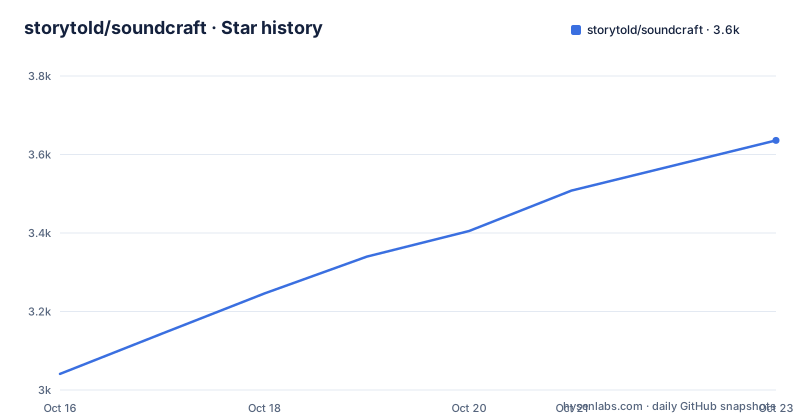
Star history
- storytold/soundcraft3,636 ★ · +595
| Repository | 2026-10-16 | 2026-10-23 |
|---|---|---|
| storytold/soundcraft | 3k | 3.6k |
595 Stars in the last 7 days, measured from the daily GitHub snapshot. Compare with other projects
Editorial analysis
What SoundCraft Aims to Replace
SoundCraft addresses the need for an open digital audio workstation that follows a familiar multitrack production workflow. Its likely users include recording engineers, mixing engineers, musicians, software developers, and teams that want to automate audio operations from the command line or through an AI agent. The project describes itself as a clean-room reimplementation of Avid Pro Tools. It is not presented as a compatibility layer for Pro Tools sessions or a replacement binary for that application.
The intended workflow includes an Edit window for arranging audio and MIDI, a Mix window for balancing and routing, automation, recording, bouncing, plugin hosting, video, notation, and immersive audio. SoundCraft is not limited to a single editor or a browser utility. The README says signed builds are available for macOS, Windows, Linux, FreeBSD, and through WebAssembly in the browser.
Its open-source, pure-Rust basis is the main engineering distinction. The repository separates concerns into crates for time, audio I/O, MIDI, video, DSP, plugin hosts, session modeling, mixing, playback, automation, and the `egui` user interface. That structure makes the implementation available for inspection and gives contributors identifiable subsystems to work on. It does not establish production stability. The README explicitly labels the project pre-alpha, which is the primary qualification for adoption.
Edit and Mix Windows for Pro Tools Users
SoundCraft organizes the application around two central workspaces. The Edit window contains tracks, waveforms, MIDI, rulers, markers, and transport controls. The Mix window contains channel strips, inserts, sends, I/O, pan controls, faders, meters, and plugin editors. This division follows the conceptual split between arranging material and balancing a session, which should appeal to engineers accustomed to established professional audio applications.
The README lists Shuffle, Slip, Spot, and Grid edit modes. It also lists Smart, Selector, Grabber, Trim, Pencil, Zoom, and Scrubber tools. Editing operations include cut, copy, paste, duplicate, repeat, shift, insert silence, separation, healing, consolidation, silence stripping, fades, crossfades, clip gain, edit groups, playlists with comping lanes, and undo. These are concrete interaction requirements rather than a general promise to edit audio.
Mixing includes pre and post sends, busses, aux inputs, master faders, VCA masters, routing folders, solo modes, mute and solo groups, phase inversion, trim, clip effects, and automatic plugin delay compensation. The README also describes solo-in-place with implicit solo and meters with peak hold. Plugin state is saved in the session. The README does not document session compatibility, migration behavior, or recovery procedures, so those points require direct verification.
MIDI Editing, Notation, and Automation
SoundCraft treats MIDI as a first-class part of the workstation. Instrument tracks can use built-in synthesizers. The MIDI editor provides a piano roll, velocity lane, step input, quantization, transposition, and Standard MIDI File import and export. A Score Editor displays MIDI in standard notation, supports MusicXML export for notation programs, and can produce printable engraved scores. This gives the project a path from programmed or recorded MIDI into both playback and notation workflows.
Automation covers volume, pan, mute, sends, and plugin parameters. The README lists breakpoint automation and the Write, Touch, and Latch modes, with automation represented in the session interface. It also documents memory locations and a large counter window. The README does not explain automation update intervals, playhead handling, or conflict resolution, so those implementation details should not be inferred from the feature list.
The MIDI feature set is broad for a pre-alpha project. It includes built-in synthesis, file exchange, score display, and MusicXML export. However, the README does not identify all included instruments, compatibility expectations for imported MIDI files, or whether notation output has documented limitations. Users whose workflow depends on a particular MIDI device, notation exchange application, or file variant should inspect those behaviors before depending on them.
Plugin, Video, and Immersive Audio Scope
The plugin model covers CLAP, VST3, and Audio Units. SoundCraft supports their own editors, saves plugin state in the session, and creates plugin instances off the audio thread. Keeping instance creation away from the audio thread is an explicit real-time design requirement. The README does not provide compatibility lists, supported plugin versions, crash recovery, or offline installation guidance, so users must assess plugins individually.
Video support includes a picture track with thumbnails, a Video window that follows the playhead, timecode burn-in, and sync offset. The README states that H.264, ProRes, and Motion JPEG are decoded in pure Rust. It also documents a Renderer window for surround and immersive projects, including main and bus formats from stereo through 9.1.6, Ambisonics, object and bed routing, a surround panner, and live speaker levels.
This range of features is unusually broad for a pre-alpha workstation. It also makes compatibility claims harder to assess because plugin, codec, speaker, operating-system, and package interactions differ by deployment target. SoundCraft documents H.264, ProRes, and Motion JPEG, but it does not state whether every codec works in every native and WebAssembly build. Browser deployments also need scrutiny when a workflow depends on third-party native plugin formats.
Cargo Workspace Architecture and Build Requirements
The repository presents SoundCraft as a Cargo workspace rather than a single executable file. The root `Cargo.toml` declares version `0.7.0`, edition `2024`, and Rust `1.90` as the minimum workspace version. Its default members include `crates/*`, `apps/*`, and `xtask`. Internal path dependencies include `soundcraft-audio-io`, `soundcraft-midi`, `soundcraft-video`, `soundcraft-dsp`, the CLAP, VST3, and Audio Unit hosts, `soundcraft-model`, `soundcraft-mix`, `soundcraft-engine`, `soundcraft-playback`, `soundcraft-automation`, and `soundcraft-ui-egui`.
This structure separates session data, processing, playback, automation, and interface code. Contributors can inspect a specific subsystem without treating the desktop application as one monolithic program. Workspace dependencies also cover serialization, audio formats, FFT processing, ZIP session bundles, and `cpal`. The repository includes `.cargo/`, `apps/`, `crates/`, `packaging/`, and `xtask/`, showing that packaging and release tooling are part of the project structure.
The README does not provide an installation command or a complete local build sequence. It directs readers to the SoundCraft page on `getartcraft.com` and lists signed downloads for supported platforms. Because no executable name or reproducible build flags appear in the README excerpt, no command is invented here. A contributor should inspect `Cargo.toml`, `packaging/`, and the application documentation, then confirm the target-specific dependencies before attempting a build.
Scripting Claims and Verification Boundaries
SoundCraft says that every action can be scripted from the command line or by an AI agent. This is a notable design goal for a workstation because it treats automation as part of the product rather than as an optional external tool. The README does not expose the executable name, command syntax, action list, agent protocol, or a working example in the documented section shown here.
That omission matters. Scripting can support repeatable renders, batch edits, session generation, and controlled testing, but the README does not state whether automation operates through a stable CLI, an embedded scripting runtime, or another interface. It also does not document permissions, error reporting, confirmation prompts, or whether an agent can perform destructive session changes. Engineers evaluating automation should verify the public interface rather than infer one from the repository's internal crates.
The workspace separates `soundcraft-model`, `soundcraft-engine`, `soundcraft-mix`, `soundcraft-automation`, and `soundcraft-playback`, which provides identifiable components for such work. Those crates do not automatically constitute public APIs. Before adopting SoundCraft for an automated pipeline, verify command stability, session serialization, failure behavior, plugin availability, and support for the target operating system or browser environment.
SoundCraft Limitations and the Conventional Alternative
The clearest limitation is project status. The README labels SoundCraft pre-alpha, so the feature breadth should not be treated as evidence of stable delivery. The README also omits universal installation commands, upgrade guidance, compatibility matrices, plugin troubleshooting, session migration rules, and rollback instructions. An engineer cannot determine from the documented text whether a current build can replace a production Pro Tools installation.
Audio hosting adds another constraint. CLAP, VST3, and Audio Units support is documented, but platform behavior differs because each plugin ecosystem belongs to a different operating-system context. The README does not state whether every plugin format is present in every distribution, or whether plugin editors behave the same in native and browser builds. Audio I/O and device behavior are equally important in a workstation, but the README does not publish device compatibility guidance.
A conventional proprietary workstation integrated with existing hardware is the real alternative. SoundCraft differs by providing a pure-Rust, open-source workspace with separate DSP, session, playback, automation, video, and UI crates, plus a stated browser target and command-line or agent scripting goal. That approach favors source inspection and engineering experimentation. The SoundCraft README does not provide enough release or compatibility documentation to claim equivalent production maturity.
SoundCraft Licensing, Releases, and Upgrade Cost
The root `Cargo.toml` declares the license as `MIT OR Apache-2.0`. The README badge states the same dual-license expression. The repository includes `LICENSE-APACHE`, `LICENSE-MIT`, `NOTICE`, and `ATTRIBUTION.md`. Users and contributors should read those files and confirm how the terms apply to a particular distribution or component. This is a project-level licensing check, not legal advice.
The repository is not archived. Its last push was on 2026-10-16. Recent releases include SoundCraft v0.7.0 on 2026-10-14, v0.6.1 on 2026-10-12, and v0.5.0 on 2026-10-11. Those dates document recent repository activity, but they do not change the README's pre-alpha designation. The workspace version is `0.7.0`, which matches the newest listed release.
The README does not document whether sessions created by one release open correctly in another, whether plugin state migrates, or how to reverse a failed upgrade. The modular crate layout may make changes easier to inspect, but it does not prove that upgrades have a low operational cost. Anyone testing an upgrade should begin with copied session data, use a signed package from `getartcraft.com`, and check release notes before modifying an only copy of a session.
Editorial conclusion
SoundCraft fits developers, educators, and audio engineers who need an inspectable Rust workstation and can accept pre-alpha software. It does not fit users who require stable production releases, documented installers, predictable upgrades, or proven session migration. Verify the available platform package, plugin compatibility, project status, and session compatibility before moving active work into SoundCraft.
Frequently asked questions
What platforms does SoundCraft support?
The README lists signed builds for macOS, Windows, Linux, and FreeBSD, plus a WebAssembly build for the browser. It describes macOS as universal and Windows as x64, x86, and Arm.
Is SoundCraft ready for production audio work?
The README labels SoundCraft pre-alpha. It documents a broad feature set, but it does not define a production-readiness target or stability guarantee.
Which plugin formats can SoundCraft host?
SoundCraft supports CLAP, VST3, and Audio Units. The README says plugin editors are supported and plugin state is saved in sessions, but it does not publish a compatibility matrix.
Official sources
Add this badge to your README
If you maintain this project, the badge below links readers to this analysis and shows its maintenance status from the daily GitHub snapshot. Paste the markdown into your README; add ?metric=license or ?metric=stars to the image URL for a different field.

[](https://hysenlabs.com/projects/storytold-soundcraft)Star history chart for your README
[](https://hysenlabs.com/projects/storytold-soundcraft)Was this useful?