DesignCraft for Rust-Based Page Layout and Publishing
DesignCraft: An open-source page and layout design editor written by scratch in pure Rust
At a glance
- What is it?
- DesignCraft is a pure Rust page-layout editor for designers who want an InDesign-style desktop and WebAssembly workflow. It adds native document automation through JSON and MCP, but its README does not provide a complete browser deployment or installer guide.
- Who is it for?
- DesignCraft fits designers and developers who need reproducible page layouts, scriptable editing, IDML exchange, or PDF and EPUB export without a subscription service. It is a weaker fit for users who require documented installer packages, a complete browser deployment path, or evidence of Adobe InDesign feature parity.
- Can I use it commercially?
- Yes. Apache-2.0 is a permissive licence: you can use, modify and sell software built on it, as long as you keep its copyright and licence notices.
- Is it still maintained?
- Yes. The repository received new commits within the last day.
- What is it written in?
- Mainly Rust, according to GitHub's language statistics.
Answers come from the project's GitHub data, last synced on October 23, 2026, and from our analysis. They are not legal advice.
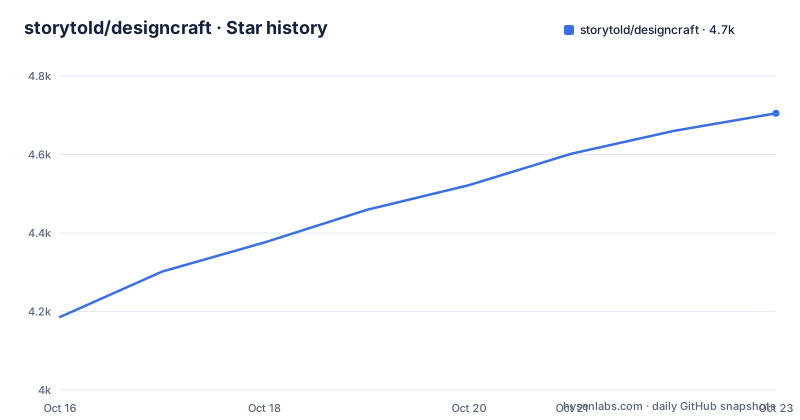
Star history
- storytold/designcraft4,705 ★ · +519
| Repository | 2026-10-16 | 2026-10-23 |
|---|---|---|
| storytold/designcraft | 4.2k | 4.7k |
519 Stars in the last 7 days, measured from the daily GitHub snapshot. Compare with other projects
Editorial analysis
DesignCraft's target workflow and clean-room scope
DesignCraft addresses page layout and publishing rather than image editing or general-purpose web design. Its users include people who already understand print-style page construction, including spreads, parent pages, frames, threaded stories, paragraph styles, character styles, swatches, text wrapping, columns, and rules. The README positions the project as a clean-room reimplementation of the Adobe InDesign workflow. It is therefore aimed at designers who want an open-source publishing editor, as well as developers who need to automate document creation.
The project also targets agents that can drive a layout system. Its documented native format, IDML import and export, editable PowerPoint export, and outputs to PNG, PDF, EPUB, PDF/X-4, and PDF/A-2b make it relevant to automated publishing pipelines. According to the README, menu items, tool gestures, panel controls, and dialogs can be controlled through a JSON control channel and an MCP server.
The scope is broad. DesignCraft combines page composition, typography, document interchange, export, desktop UI, WebAssembly support, and automation in one Rust codebase. The workspace also contains specialized crates for documents, composition, rendering, PDF, IDML, EPUB, PowerPoint, MCP, and the egui interface. The application is still centered on page layout. It is not documented as a general website builder, an image editor, or a hosted collaborative publishing service.
Rust document architecture and rendering data flow
The repository layout separates document state, text composition, rendering, interchange, and interface code. `designcraft-doc` represents document state, while `designcraft-compose` handles text composition. Rendering is separated into `designcraft-render`, with PDF, IDML, EPUB, PowerPoint, image, and text-import crates handling output or interchange concerns. `designcraft-engine` coordinates engine behavior, and `designcraft-ui-egui` supplies the user interface layer. The main application is under `apps/designcraft`, while the CLI is under `apps/designcraft-cli`.
The README describes copy-on-write documents and O(1) undo snapshots. That design suggests edits can replace logical document state while sharing unchanged data between revisions. It is relevant to interactive editing because a revision does not need to duplicate every unchanged object. The documentation also mentions cached composition, so paragraph layout can be reused when the document state does not require recomposition. These are architecture descriptions from the README, not independent performance measurements.
Rendering is described as multithreaded and SIMD-based through `vello_cpu`. Text uses a Knuth-Plass paragraph composer as well as a single-line composer. The project includes dictionary hyphenation based on the public-domain Moby word list and trained patterns, justification methods for words, letters, and glyphs, keeps, optical margin alignment, columns, baseline grids, tabs, rules, and shading. The README states that line breaks are identical on screen and in PDF, which is the central consistency goal for a print-oriented layout engine.
The sample document is generated from `crates/engine/src/sample.rs`. Its magazine pages demonstrate threaded three-column text, wrapped pull quotes, parent-page folios, full-bleed graphics, named colors, and a CMYK process swatch. That sample exercises several layout mechanisms in one document instead of showing isolated interface elements.
Source installation and opening the sample magazine
The README documents a source workflow rather than a universal installer command. It states that the egui frontend requires Rust 1.95 or newer, including the shared `craft-ui` components. From the repository root, the first command starts the desktop application at the start screen.
cargo run --release -p designcraftFor a functional check, open the bundled sample magazine.
cargo run --release -p designcraft -- --sampleThe README also gives the menu path `File → New → Sample Document`. The sample is the documented way to observe page composition without first creating a document manually.
The CLI can render every sample page to PNG, which provides a headless first check. The output directory in the documented command is `out/`.
cargo run --release -p designcraft-cli -- run --sample --all-pages out/The CLI exposes command discovery and script help. These commands are useful when evaluating automation before writing an integration.
cargo run --release -p designcraft-cli -- commands
cargo run --release -p designcraft-cli -- script --help
The README says the application runs in the browser via WebAssembly, and `cargo xtask ci` includes `wasm` among its checks. The README does not give a complete browser build command, hosting command, or persistence model, so these source commands should not be treated as a complete web deployment guide.
Automation through JSON control, MCP, and the CLI
DesignCraft's automation surface is a central part of its design. The documented control-channel launch adds the `--control` option and uses port `7979`.
cargo run --release -p designcraft -- --sample --control 7979The README points to `docs/control-protocol.md` and `docs/mcp.md` for protocol details. It states that the JSON control channel can drive every menu item, tool gesture, panel control, and dialog. The MCP server provides a documented path for Claude and other agents to issue layout and editing operations.
This architecture can fit local build systems that need repeatable document transformations. The README excerpt does not define a complete message schema, authentication model, deployment recipe, or production concurrency policy. A developer should therefore inspect the protocol documents before treating the port and launch option as a production service definition.
The CLI provides a separate headless route. Its `run` command handles sample rendering, while `commands` lists available operations and `script --help` documents command script syntax. Having both CLI and JSON control paths gives local users and automated agents two interfaces, but it also means the command model must remain consistent across them.
Export formats and documented compatibility limits
DesignCraft's export coverage is broad. The README lists PNG, PDF, PDF/X-4, PDF/A-2b, EPUB, and editable PowerPoint output, plus IDML import and export. These formats address different publishing stages. PNG and PDF represent page output, PDF/X and PDF/A target print workflows, EPUB supports reflowable publications, PowerPoint supports editable presentation exchange, and IDML connects with existing publishing workflows.
The README does not enumerate unsupported InDesign features or explain how complex third-party IDML files behave. The clean-room implementation and familiar interface should not be read as proof of complete feature parity. The sample magazine demonstrates layout mechanisms, but it does not establish compatibility with arbitrary production files.
The browser path also has a documentation gap. The project states that it runs in a browser via WebAssembly and that one Rust codebase serves desktop and web. It does not specify a browser build command, hosting target, storage policy, or document persistence behavior. Organizations requiring a documented self-hosted web service need to verify those points in the repository before selecting it.
The license is declared as `MIT OR Apache-2.0` in `Cargo.toml` and the README badge. `LICENSE-MIT`, `LICENSE-APACHE`, and `NOTICE` are present at the repository root. The README states that DesignCraft has no subscription, licence server, or telemetry. That removes one service dependency, but it does not remove the work of building, packaging, hosting, or upgrading the software.
InDesign workflow versus an open Rust implementation
The closest documented alternative is Adobe InDesign, because DesignCraft explicitly recreates that workflow. The difference is architectural and licensing-related. InDesign is the established product whose layout concepts, panels, menus, frames, and threaded stories DesignCraft targets. DesignCraft instead implements the editor and supporting engine in Rust, ships open-source components, and documents native JSON and MCP control paths.
For a designer who needs InDesign's established feature set, arbitrary complex-document compatibility, or a mature production workflow, InDesign remains the more conservative choice. For a Rust developer who needs editable layout generation, local automation, or an agent-facing document interface, DesignCraft offers a different route. Its value is that page composition can be treated as a Rust application with explicit document, composition, rendering, and control layers.
DesignCraft is built as one Rust codebase for desktop and WebAssembly, while the README does not describe a hosted DesignCraft service. That makes source-level control plausible, but an adopter may need to handle compilation, packaging, fonts, external Git dependencies, and browser hosting. The sample document is therefore a more concrete evaluation target than an untested production migration.
Maintenance cadence and upgrade work
The repository is not archived. Its last push was on 2026-10-16, and recent releases include v0.8.0 on 2026-10-14, v0.7.1 on 2026-10-12, and v0.6.0 on 2026-10-11. These dates show recent release activity, but the README does not state a long-term maintenance policy or compatibility guarantee.
Upgrade work is tied to Rust toolchain changes, document-format evolution, and external dependencies. The workspace declares Rust 1.95 or newer and edition 2024. `Cargo.toml` also pins `craft-pdf` and `craft-print` to Git revisions from `craft-libs`, so a new checkout needs network access and compatible Git dependency resolution. The repository includes `Cargo.lock`, `xtask`, packaging directories, CI configuration, and Rust formatting and lint files. The README does not give an upgrade procedure for existing documents.
The maintenance judgment is therefore limited. DesignCraft has recent repository activity and recent releases, while support boundaries, migration notes, and production release guarantees are not documented.
Editorial conclusion
DesignCraft fits designers and developers who need reproducible page layouts, scriptable editing, IDML exchange, or PDF and EPUB export without a subscription service. It is a weaker fit for users who require documented installer packages, a complete browser deployment path, or evidence of Adobe InDesign feature parity. Before adopting it, verify Rust 1.95 availability, the external Git dependencies pinned in `Cargo.toml`, the completeness of the intended import and export formats, and the platform-specific build path. The most concrete first evaluation is a source-based build that opens the bundled sample magazine.
Frequently asked questions
How do I install DesignCraft?
The README documents source execution with Rust 1.95 or newer. Use `cargo run --release -p designcraft` for the desktop application or add `--sample` to open the bundled magazine.
Can DesignCraft run in a browser?
The README says DesignCraft runs in the browser via WebAssembly and uses one Rust codebase for desktop and web. It does not provide a complete browser build or deployment command.
Can an agent control DesignCraft?
Yes. The project documents a JSON control channel and an MCP server for driving menus, tools, panels, and dialogs. The related documentation is `docs/control-protocol.md` and `docs/mcp.md`.
Which formats can DesignCraft export?
The README lists PNG, PDF, PDF/X-4, PDF/A-2b, EPUB, and editable PowerPoint export. It also lists IDML import and export.
Does DesignCraft require a subscription or licence server?
The README states that DesignCraft has no subscription, licence server, or telemetry. The repository declares `MIT OR Apache-2.0` and includes `LICENSE-MIT` and `LICENSE-APACHE`.
Official sources
Add this badge to your README
If you maintain this project, the badge below links readers to this analysis and shows its maintenance status from the daily GitHub snapshot. Paste the markdown into your README; add ?metric=license or ?metric=stars to the image URL for a different field.

[](https://hysenlabs.com/projects/storytold-designcraft)Star history chart for your README
[](https://hysenlabs.com/projects/storytold-designcraft)Was this useful?