Trunk: bundling a Rust WASM app from one HTML file
Build, bundle & ship your Rust WASM application to the web.
At a glance
- What is it?
- Trunk turns a Rust WebAssembly crate into a served web app, taking asset references straight out of an index HTML file. The build pipeline is optional-config and opinionated, which makes it fast to adopt and hard to escape when a project outgrows it.
- Who is it for?
- Adopt Trunk when a Rust crate compiled to wasm32 is the whole frontend and the team wants one command that builds, bundles and serves it. Skip it if the frontend already has its own bundler, or if you need a build pipeline Trunk does not model.
- Can I use it commercially?
- Yes. Apache-2.0 is a permissive licence: you can use, modify and sell software built on it, as long as you keep its copyright and licence notices.
- Is it still maintained?
- Yes. The repository last received commits 4 days ago.
- What is it written in?
- Mainly Rust, according to GitHub's language statistics.
Answers come from the project's GitHub data, last synced on November 22, 2026, and from our analysis. They are not legal advice.
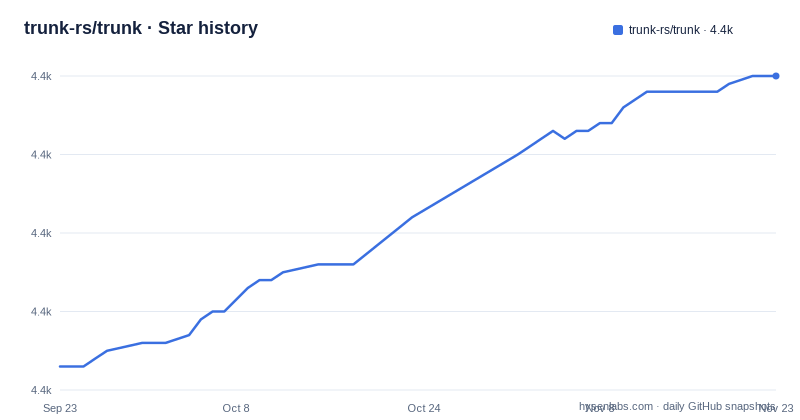
Star history
- trunk-rs/trunk4,430 ★ · +37
| Repository | 2026-09-23 | 2026-11-22 |
|---|---|---|
| trunk-rs/trunk | 4.4k | 4.4k |
37 Stars in the last 60 days, measured from the daily GitHub snapshot. Compare with other projects
Editorial analysis
The index HTML file is the build graph, not a template
Trunk does not ask you to describe your assets in a JavaScript entry file. It parses a source HTML document and reads the element references in it, then resolves them to real files. That one decision determines what Trunk is good at and where it breaks. A layout that references a stylesheet, a script module and a handful of images needs no build configuration at all, because the HTML already says what it wants. A layout assembled at runtime by a JavaScript framework has no such statement, and Trunk has nothing to read. The README calls this a "simple, optional-config pattern for building & bundling WASM, JS snippets & other assets (images, css, scss) via a source HTML file". The optional part covers configuration, not the HTML: that file is mandatory. For teams coming from webpack or Vite this is the mental switch that decides whether the tool fits.
The dev server and the file watcher share one build loop
Two features sit on the same foundation: a built-in HTTP server for development and a watcher that rebuilds on change. Trunk depends on the notify and notify-debouncer-full crates, which is where the change detection comes from, and on axum with its ws feature for both HTTP and WebSocket handling. That pairing matters for a specific reason. A WASM app that opens a WebSocket to its own backend during development needs the proxy and the server in the same process, because the app is served from one origin and the backend from another. Trunk gives you both, and the README also lists support for HTTP and WebSocket proxies as a first-class feature rather than something you bolt on. The cost is that the watcher is opinionated about what a change is, and a project that regenerates assets through its own build steps has to fit inside that loop.
Six ways to install the same binary, with different costs
The fastest route installs a pre-compiled binary and finishes before your first dependency builds.
cargo binstall trunkIf you do not have cargo-binstall, the README also lists Homebrew and nix packages:
brew install trunknix-shell -p trunkTo compile Trunk yourself and pin the dependency graph that Cargo.lock already records, add --locked:
cargo install trunk --lockedEach entry buys something different. A released binary from the repository's releases page costs you nothing to build. The remaining two cargo install lines compile from the most recent git commit or from your local checkout, and each trades build time for a specific need. The local checkout line is the one that matters when you are testing a Trunk change against your own application.
Pinning behaviour to a crate version costs you a full rebuild
The git install line is not a small variant of the crates.io one. It resolves and compiles Trunk from the most recent commit on the default branch, main, which means your build toolchain now tracks a moving target on every install. The crates.io line adds --locked, which pins the dependency graph recorded in Cargo.lock. For a tool that sits between you and the browser on every build, that difference shows up the first time an unreleased Trunk change breaks a pipeline. Note also what Cargo.toml requires: rust-version 1.96.1 and edition 2024, so an older stable toolchain cannot build Trunk from source at all, whichever cargo install line you use.
WASM threads and reverse proxies are examples, not first-class support
The examples directory is the closest thing to a specification. It holds cdylib, wasm_threads, webworker and its gloo and module variants, behind-reverse-proxy, proxy, hooks, initializer, no-rust, cargo-manifest, node-module, seed, target-path, yaml-config, vanilla, leptos, yew, yew-tailwindcss and yew-tls. Reading that list tells you what the maintainers actually run: Rust framework integrations, web workers, threaded wasm, proxies and configuration formats. It also tells you what is untested by omission. Two entries stand out for anyone evaluating. examples/no-rust and examples/node-module exist, so Trunk can wrap output that never passed through cargo, but that is a demonstration rather than a described workflow. examples/behind-reverse-proxy is a fixture, and the README documents no production deployment path at all, no static host guidance and no cache-header advice.
Dual licensing is the one place the docs and the manifest read differently
The README states that trunk is licensed under the terms of the MIT License or the Apache License 2.0, at your choosing. Cargo.toml agrees, declaring license = "MIT/Apache-2.0". Repository metadata sometimes reports Apache-2.0 alone, and the two LICENSE files at the repository root, LICENSE-MIT and LICENSE-APACHE, are the authoritative text. Nothing turns on the difference for most adopters, since both choices are permissive, but a compliance checklist that names only one license will need correcting. The more useful detail for planning is the release state: the manifest version is 0.22.1, and the recent tags run v0.22.1, v0.22.0 and v0.22.0-rc.3, so the 0.22 line has moved past its release candidates, and the last push was on 2026-11-02.
Where wasm-bindgen and a JavaScript bundler take over
The nearest alternative is not another Rust bundler. It is the JavaScript toolchain you probably already have, pointed at the wasm-bindgen output. The difference in approach is direct: Trunk reads your HTML and drives cargo, the watcher and the dev server itself, so your dependency graph comes from Cargo.toml and the file layout. A JavaScript bundler reads JavaScript, treats the .wasm file as an imported asset, and leaves HTML mostly alone. That inversion decides who owns CSS preprocessors, code splitting, asset hashing and minification, because a bundler with its own plugins will fight Trunk for control of the pipeline. If your frontend is already a JavaScript project with a build step, adding Trunk means running two bundlers over the same assets. If your frontend is a single Rust crate and a static index HTML, that fight does not exist.
Editorial conclusion
Adopt Trunk when a Rust crate compiled to wasm32 is the whole frontend and the team wants one command that builds, bundles and serves it. Skip it if the frontend already has its own bundler, or if you need a build pipeline Trunk does not model. Before committing, run trunk on the smallest example in the examples directory and confirm that the asset graph in your own index HTML resolves the way your project expects, because that file, not the Rust build, is what Trunk is really parsing.
Frequently asked questions
What does Trunk need before it will build a Rust WASM app?
A source HTML file that references the app's assets, and a Rust crate that compiles to WebAssembly. Trunk reads the asset references out of that HTML rather than from a separate build configuration.
How do I install Trunk without compiling it myself?
Download a released binary from the repository's releases page, or use a package manager. The README also lists cargo binstall trunk, brew install trunk and nix-shell -p trunk as alternatives, with the cargo install lines reserved for building from source.
Does Trunk ship a development server with proxies?
Yes. A built-in server is part of the tool, and the README states it also supports HTTP and WebSocket proxies, which is how a WASM client reaches a backend on another origin during development.
Can Trunk handle a frontend that is built by a JavaScript bundler?
The repository ships an examples/node-module and an examples/no-rust, so it can process output that cargo did not produce. The README does not describe a supported workflow for handing an existing JavaScript build to Trunk, so treat those directories as demonstrations rather than a documented integration.
Official sources
Add this badge to your README
If you maintain this project, the badge below links readers to this analysis and shows its maintenance status from the daily GitHub snapshot. Paste the markdown into your README; add ?metric=license or ?metric=stars to the image URL for a different field.

[](https://hysenlabs.com/projects/trunk-rs-trunk)Star history chart for your README
[](https://hysenlabs.com/projects/trunk-rs-trunk)Was this useful?