Stride: three release streams, a CLI front door, and a Visual Studio 2026 build
Stride (formerly Xenko), a free and open-source cross-platform C# game engine.
At a glance
- What is it?
- Stride, formerly Xenko, is a C# game engine with an editor called Game Studio, and the repository now leads with a command line tool rather than the editor: install the CLI, install an engine version, generate a project from a template, run it. The engine itself still builds through Visual Studio 2026 with two workloads, and the releases come from three separate streams with three separate version numbers.
- Who is it for?
- Stride offers a C# game engine, editor and command-line tooling, with separately versioned engine, launcher and CLI releases. The README documents a Visual Studio 2026 source-build path and points to command-line alternatives; check the current prerequisites for the exact platform and revision.
- Can I use it commercially?
- Yes. MIT is a permissive licence: you can use, modify and sell software built on it, as long as you keep its copyright and licence notices.
- Is it still maintained?
- Yes. The repository received new commits within the last day.
- What is it written in?
- Mainly C#, according to GitHub's language statistics.
Answers come from the project's GitHub data, last synced on November 14, 2026, and from our analysis. They are not legal advice.
Star history
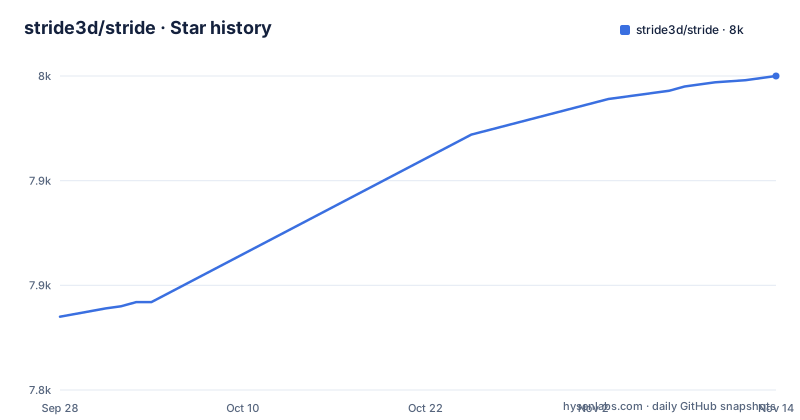
- stride3d/stride7,950 ★ · +115
| Repository | 2026-09-28 | 2026-11-14 |
|---|---|---|
| stride3d/stride | 7.8k | 8k |
115 Stars in the last 47 days, measured from the daily GitHub snapshot. Compare with other projects
Editorial analysis
Engine, launcher and CLI have separate releases
The published releases are not one product. They are three streams that move independently:
- `releases/4.4.1`, titled Stride 4.4.1 - `launcher/6.0.7`, titled Stride Launcher 6.0.7 - `cli/1.0.4`, titled Stride CLI 1.0.4
The launcher and the CLI were published within seconds of each other on 2026-10-14, the Stride 4.4.1 release followed on 2026-10-17, and the last push to master was on 2026-10-25.
So there is no single version to quote, and `latest` means different things for the editor, the samples and the command line tool. Anyone writing a build script that assumes `Stride.GameStudio` and `Stride.Cli` share a version is going to be wrong at some point, quietly.
The launcher and the CLI carry version numbers separate from the engine release.
The README now leads with the CLI, not the editor
The command line section comes before the build instructions, and it is the shortest path to a running project. The tool is a .NET global tool:
dotnet tool install -g Stride.Cli

stride sdk install                   # install the latest Stride engine
stride new fps -n MyShooter          # template: game, fps, platformer2d, topdownrpg, vrsandbox, ...
cd MyShooter && dotnet run --project MyShooter.Windows

stride studio                        # open Game Studio, the visual editor
The four commands cover the whole lifecycle. `stride sdk install` fetches an engine version, `stride new` generates a project from a template, `dotnet run` starts it, and `stride studio` opens the visual editor on it.
Two details make it usable as a real tool rather than a demo. Running `stride new` with no template lists what is available, so the template catalogue is discoverable from the CLI. And `stride sdk` manages installed versions with `list`, `install`, `uninstall` and `update`, which is what lets a machine hold two engines at once. `stride upgrade` moves an existing project to a newer engine.
The same templates are also dotnet new templates
If your workflow is already built on `dotnet new`, the project does not ask you to switch. The same templates are available through standard .NET templating:
dotnet new install Stride.Templates.Games
dotnet new stride-game -n MyGame
cd MyGame && dotnet run --project MyGame.Windows
So there are two supported front doors to the same content, and they produce projects with the same shape: a solution with per-platform projects such as `MyGame.Windows`, which is what the `dotnet run --project` argument selects.
The templates directory README is where the catalogue lives, and the README summarises it as genre starters, 18 feature demos and tutorials. Genre starters are the `game`, `fps`, `platformer2d`, `topdownrpg` and `vrsandbox` names from the CLI example, with the last of those aimed squarely at the VR side of the engine.
The same directory also documents a local development workflow for the templates themselves.
Engine builds need Visual Studio 2026 with two workloads and LFS on
The prerequisites are short and firm. First, the latest Git, with a specific warning: the Windows installer includes Git LFS by default, and you must make sure it stays enabled. GitExtensions is offered as a UI client if you prefer one.
Second, Visual Studio 2026, where the Community edition is free, with two workloads:
- .NET desktop development, which bundles the .NET 10 SDK - Desktop development with C++
Those are the README's prerequisites for its Visual Studio source-build path. Game projects and other build workflows may have different requirements; the build guide also documents command-line builds without the Visual Studio IDE.
The details live in `docs/build/README.md` rather than in the README, and the README says what is in there: specific MSVC toolset versions, optional iOS, Android, ARM64 and VSIX components, command line builds without Visual Studio, and troubleshooting. So a machine without Visual Studio has a documented command-line path, but the supported path is Windows with Visual Studio.
Stride.slnx and a project folder numbered 60-Editor
The build itself is three steps:
1. `git clone https://github.com/stride3d/stride.git` 2. Open `Stride.slnx` in Visual Studio 2026 3. Build the `Stride.GameStudio` project, the default startup project in the `60-Editor` folder, or run it directly from the toolbar
Two things in that list are worth pausing on. The solution file is a `.slnx`, the XML-based solution format. Visual Studio 2022 also supports this format in recent versions, but opening a solution does not guarantee that its SDK and toolset requirements are met; follow the project's build guide. And the default startup project sits in a folder named with a numeric prefix, `60-Editor`, which tells you the sources are ordered and that the editor is not the first thing you see.
The repository layout follows that same logic. `sources/` holds the engine code, `samples/` holds the sample projects with their own solution and their own `nuget.config`, `deps/` holds external dependencies, `tests/` the tests, `bin/` the output, and `global.json` and `nuget.config` pin the SDK and the package sources.
Five workflows decide whether a change can ship
The build status table lists five workflows rather than one, and each covers a different risk.
Windows and Linux Vulkan/OpenGL are the two runtime builds, which means the renderer is exercised on both graphics stacks rather than one. iOS is separate, so the mobile target is not covered by the desktop runs. Then the tests split in two: Tests (Simple) and Tests (Game/WARP), where WARP is the Windows Advanced Rasterization Platform, which is how the game tests get a GPU without a display.
That split is a good description of how this project decides whether a change is safe. A rendering change has to pass on two backends, a platform change has to pass on iOS, and some game tests use the WARP software rasterizer. That does not establish that they run on every CI machine; check each workflow's operating system and dependencies.
The contributing section points at `.github/CONTRIBUTING.md` for how to ask questions, report bugs and submit pull requests, and it mentions good first issues plus funded tasks and bug bounties, which is how a project of this size keeps a contributor funnel open.
Translation runs through Crowdin, and the toolkit is a separate project
A few root files describe what is around the code rather than inside it.
`crowdin.yml` is the translation configuration, so the engine's user-facing strings are handled through Crowdin. `BACKERS.md` records financial backing, `THIRD-PARTY-NOTICES.md` the third party components, `.github/CODE_OF_CONDUCT.md` the conduct rules, and `.all-contributorsrc` the contributor list that appears in the README.
The documentation is deliberately spread out, and the README walks the map: the engine repository itself, the website with its features, blog, community, download and sponsor pages, and the Stride Docs site.
So the engine and the website each have their own contribution guide. If you are picking where to help, that is the map.
Editorial conclusion
Stride offers a C# game engine, editor and command-line tooling, with separately versioned engine, launcher and CLI releases. The README documents a Visual Studio 2026 source-build path and points to command-line alternatives; check the current prerequisites for the exact platform and revision. Pin the components you use independently, verify Git LFS and the required toolchains, and test a template before committing to a workflow.
Frequently asked questions
How do I install the Stride CLI and start a project?
Install the tool with `dotnet tool install -g Stride.Cli`, then run `stride sdk install` to get the latest engine, `stride new fps -n MyShooter` to generate a project from a template, `cd MyShooter && dotnet run --project MyShooter.Windows` to run it, and `stride studio` to open the Game Studio editor. Running `stride new` with no template lists what is available.
What do I need to build the Stride engine from source?
The latest Git with Git LFS still enabled, since the Windows installer includes it by default, and Visual Studio 2026 with two workloads: .NET desktop development, which bundles the .NET 10 SDK, and Desktop development with C++. Then clone the repository, open Stride.slnx and build the Stride.GameStudio project in the 60-Editor folder. docs/build/README.md covers specific MSVC versions, optional iOS, Android and ARM64 components, and command line builds without Visual Studio.
Can I create a Stride project without opening the editor?
Yes. The CLI creates projects from templates named game, fps, platformer2d, topdownrpg, vrsandbox and others, and the same templates are available through `dotnet new install Stride.Templates.Games` followed by `dotnet new stride-game -n MyGame`. The templates README documents the full catalogue of genre starters, 18 feature demos and tutorials.
Official sources
Add this badge to your README
If you maintain this project, the badge below links readers to this analysis and shows its maintenance status from the daily GitHub snapshot. Paste the markdown into your README; add ?metric=license or ?metric=stars to the image URL for a different field.

[](https://hysenlabs.com/projects/stride3d-stride)Star history chart for your README
[](https://hysenlabs.com/projects/stride3d-stride)Was this useful?