The Stripe AI repository documents five ways to install and zero API calls
One-stop shop for building AI-powered products and businesses with Stripe.
At a glance
- What is it?
- stripe/ai is Stripe's container for its agent and LLM integrations: two SDKs, a hosted MCP endpoint, and the same plugin repackaged for four coding harnesses. The front page is entirely installation instructions. It never shows a call into either SDK, and the harness manifest for Gemini sits in the tree with no documented way to install it.
- Who is it for?
- Useful as a pointer to the real documentation rather than as a reference. Anyone picking this up should treat docs.stripe.com/agents as the actual specification, since nothing here describes the SDK surface.
- Can I use it commercially?
- Yes. MIT is a permissive licence: you can use, modify and sell software built on it, as long as you keep its copyright and licence notices.
- Is it still maintained?
- Yes. The repository last received commits 1 day ago.
- What is it written in?
- Mainly TypeScript, according to GitHub's language statistics.
Answers come from the project's GitHub data, last synced on November 14, 2026, and from our analysis. They are not legal advice.
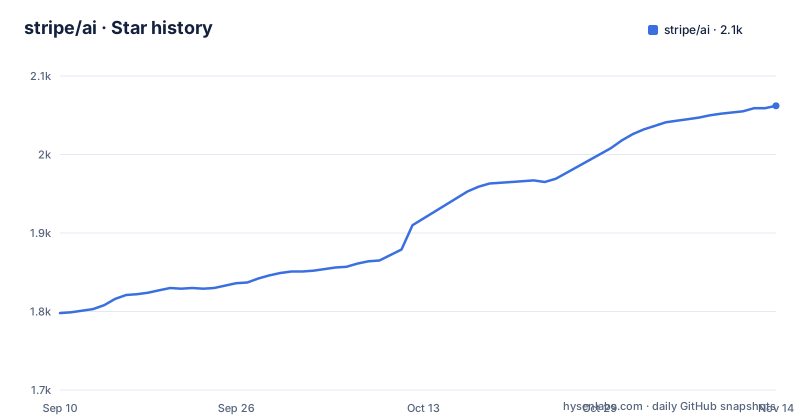
Star history
- stripe/ai2,062 ★ · +264
| Repository | 2026-09-10 | 2026-11-14 |
|---|---|---|
| stripe/ai | 1.8k | 2.1k |
264 Stars in the last 65 days, measured from the daily GitHub snapshot. Compare with other projects
Editorial analysis
Two SDKs are listed and not one line of code is shown
The repository describes itself as a collection of SDKs for integrating Stripe billing with models and agent frameworks, and names two of them. One targets Vercel's ai library and the @ai-sdk packages. The other, a token meter, works against the native SDKs from OpenAI, Anthropic and Google, and is described as having no framework dependencies at all.
Neither one is demonstrated. There is no import statement, no function name, no option and no error message anywhere on the front page. Every code block on it is an installation command.
That is a notable choice for a repository whose entire purpose is to be the integration point between a payments company and a model provider. A reader who has never met Stripe's agent tooling leaves this page knowing that two packages exist and how to install a plugin, and nothing about how either one bills a token or what happens when a call fails.
Everything else on the page points outward. There is a remote MCP server with its own documentation link, a skills collection hosted on a documentation site, and per-harness plugin directories in the repository tree, so the interesting surface area is all somewhere other than here.
The same plugin installs five different ways
The front page gives one command per harness, and none of them resemble each other:
claude plugin install stripe@claude-plugins-officialcodex plugin add stripe@openai-curatedgrok plugin install stripe --trustnpx skills add https://docs.stripe.comPlus a fifth that is not a shell command at all, covered separately below.
Two things stand out in the four that are. The marketplace namespace differs per harness, so the Claude Code route resolves through one curated channel and the Codex route through a different one, and neither is Stripe's own domain. And the Grok route carries a flag that has to be present for the command to do anything, which is a deliberate pre-approval rather than an accident of syntax.
The manual route is the odd one out in a different way. It installs skills, not a plugin, and it points at a documentation host rather than the repository, even though the repository contains a skills directory of its own. That directory is where the plugin formats are assembled, while the manual route serves something generated from the documentation. Whether the two carry identical content is not stated.
A slash command is filed as a shell command
One of the five install instructions cannot work the way it is presented:
/add-plugin stripeIt sits inside a fenced block marked as a shell script, directly between two blocks that genuinely are shell scripts. Pasting it into a terminal produces a file-not-found error, because the leading slash and the lack of an executable name make it an editor command rather than a program.
That block is the Cursor route, and unlike the others it is meant to be typed inside the editor rather than run in a shell, which is normal for that harness. The defect is the fence, not the command. A reader scanning the page for something to copy will hit three copyable blocks in a row and then one that fails.
The same section then points at a separate marketplace listing for Cursor as an alternative route, so there are two ways in for that harness and only one of them is shown as a command. That harness is also the only one of the four whose install is not a plugin CLI at all.
One installer requires a trust flag before it will proceed
The Grok Build route is:
grok plugin install stripe --trustThe flag is not optional in the documented form. A plugin installer that refuses to run without being told to trust the plugin is asking the operator to accept something up front, before reading what it contains.
For a Stripe plugin that is a defensible ask. It is the party that holds payment infrastructure credentials and is asking an agent to write billing code on your behalf, so treating its content as untrusted by default is the correct default. The flag makes the decision explicit rather than implied, which is the right shape for it.
It is also the only install route in the set with no further qualification. The Claude Code and Codex routes delegate trust to their marketplaces by naming a curated namespace, and the manual route is a documentation URL. The Grok route is the one that asks you to assert trust directly, and it is worth reading the plugin before passing that flag rather than after.
Manual install reads skills from the docs host, not the repository
The manual route is a single command:
npx skills add https://docs.stripe.comThe argument is a documentation site. So the skills this route installs are derived from Stripe's published documentation rather than read out of the repository, which is a reasonable architecture for keeping agent instructions aligned with current best practices, and also means the repository's own skills directory is not what you get.
That directory is nonetheless in the tree, alongside scripts, tests, tools and a benchmarks directory. Which of those the manual route draws on is not stated, and neither is how the two are kept in sync.
The update story is where the two channels visibly diverge. Manually installed skills do not auto-update, and there is a separate command for that:
npx skills update -yThe marketplace plugin routes are described in the opposite terms, as including additional agent tools and updating automatically. So the same Stripe guidance reaches your agent by two routes with two different update guarantees, and nothing on the page tells you which one you ended up with.
Five plugin formats in the tree, four documented on the page
The repository root carries a directory per harness plugin format: one for Claude, one for Codex, one for Cursor, one for Grok, and a versus code directory. A Gemini extension sits alongside them as a single manifest file rather than a directory.
So the same plugin is assembled five ways, and the front page documents four of them. Gemini is the omission. There is an extension manifest in the tree and no install command anywhere on the page, no heading for it, and no marketplace namespace named for it in any of the other four routes.
The tree also holds a benchmarks directory and a tests directory, neither of which is mentioned. For a repository that packages agent instructions, a benchmarks directory raises an obvious question that nothing on the page answers: measured against what, and producing what.
There is also a general route for clients implementing a newer plugin standard. That section is candid that installation methods currently vary by client, and it directs you to the repository itself by git URL with a subdirectory under providers, so for that standard you install from source rather than from any marketplace.
Token metering ships in a coupled and an uncoupled shape
The two SDKs exist because the model ecosystem is split, and the split shows in how the packages are built.
The first is scoped to Vercel's ai library and the @ai-sdk packages, so it inherits whatever those abstractions do about streaming, tool calls and provider routing. If your application is already written against them, that is the path with the least glue.
The second is a token meter described as integrating billing with the native SDKs from OpenAI, Anthropic and Google, with no framework dependencies. It sits beside whatever your code already does rather than asking you to change it.
Two packages for one capability is not redundancy, it is a deliberate accommodation of two very different integration styles. But it does mean the front page is describing two surfaces with two different mental models and showing neither, so the choice between them has to be made from documentation elsewhere.
The wider set follows the same pattern. A hosted MCP endpoint for agents that speak that protocol, a collection of skills, and a plugin per harness. Stripe has covered a lot of entry points. What is missing everywhere is the part where you find out what any of them does.
The MCP endpoint is Stripe-hosted and reached over OAuth
Alongside the SDKs there is a single remote endpoint:
https://mcp.stripe.comIt is a server Stripe hosts, and access is described as secure client access via OAuth. That is a meaningful choice. An agent that needs to read billing state does not run a local process holding your credentials and does not read them at all; it authenticates to a hosted service and the service decides what that session can do.
The same section points at documentation for building autonomous agents on top of that connection, which means the intended shape is an agent that acts without a human in the loop, talking to a payments company's live data through an OAuth grant.
Two smaller notes about the surface. Three separate hosts are involved here, the documentation site, the MCP endpoint, and this repository, and the repository itself carries no releases at all. The last push is dated 2026-10-02, so the code is being worked on, but there is no tag to install and nothing versioned on this side. The versioned artifacts are the npm packages, which move independently of anything visible here.
Editorial conclusion
Useful as a pointer to the real documentation rather than as a reference. Anyone picking this up should treat docs.stripe.com/agents as the actual specification, since nothing here describes the SDK surface. Two things are worth verifying yourself: which install route your harness supports, given four different plugin formats and two external standards, and whether the manual skills route, which reads from the documentation host rather than the repository, gives you the same content the marketplace plugins carry.
Frequently asked questions
what is stripe ai
It is Stripe's repository for building AI products on top of its billing infrastructure. It contains two SDKs, one for Vercel's ai and the @ai-sdk libraries and one token meter for the native OpenAI, Anthropic and Google SDKs, a remote Model Context Protocol endpoint for agents, and agent skills and plugins for several coding harnesses.
How do I install the official Stripe plugin for Claude Code?
Run claude plugin install stripe@claude-plugins-official in your project. The Codex route is codex plugin add stripe@openai-curated, so each harness resolves the same plugin through its own curated marketplace namespace rather than a Stripe-hosted one.
Do manually installed Stripe agent skills update on their own?
No. Manually installed skills are documented as not auto-updating, and you refresh them by running npx skills update -y. The marketplace plugin routes are described the other way around, as including additional agent tools and updating automatically.
Does the stripe/ai repository publish any releases?
No. The repository has no GitHub releases, so there is no tag to pin. The last push is dated 2026-10-02. The versioned artifacts are the npm packages, which carry their own versions independently of anything published here.
Official sources
Where developers are discussing it
Posts on Hacker News, dev.to and Lobsters that link to this repository, found by our scan of those communities. 1 in the last 30 days; newest first.
- Why is the Stripe Codex plugin inserting itself into unrelated procurement tasksHacker News · Oct 30, 2026 · 1 points · 0 comments
Add this badge to your README
If you maintain this project, the badge below links readers to this analysis and shows its maintenance status from the daily GitHub snapshot. Paste the markdown into your README; add ?metric=license or ?metric=stars to the image URL for a different field.

[](https://hysenlabs.com/projects/stripe-ai)Star history chart for your README
[](https://hysenlabs.com/projects/stripe-ai)Was this useful?