stripe-react-native: Stripe's React Native payments SDK
React Native library for Stripe.
At a glance
- What is it?
- The Stripe React Native SDK gives an app a native payment sheet, Apple Pay, Google Pay, saved cards and automatic 3D Secure, and it keeps card data away from your server so the integration stays PCI compliant. It also imposes a lot on the host app, from the new architecture requirement to a Material Components theme on Android, and it draws a hard line between physical goods, which it handles, and digital goods, which you must sell through the app store.
- Who is it for?
- stripe-react-native fits a React Native app selling physical goods or services consumed outside the app, where you want a native payment sheet, saved payment methods and a card number that never touches your server.
- Can I use it commercially?
- Yes. MIT is a permissive licence: you can use, modify and sell software built on it, as long as you keep its copyright and licence notices.
- Is it still maintained?
- Yes. The repository last received commits 1 day ago.
- What is it written in?
- Mainly TypeScript, according to GitHub's language statistics.
Answers come from the project's GitHub data, last synced on November 6, 2026, and from our analysis. They are not legal advice.
Star history
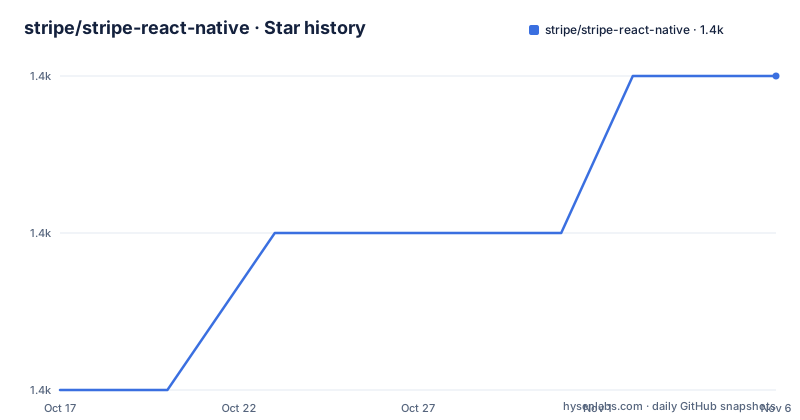
- stripe/stripe-react-native1,431 ★ · +2
| Repository | 2026-10-17 | 2026-11-06 |
|---|---|---|
| stripe/stripe-react-native | 1.4k | 1.4k |
2 Stars in the last 20 days, measured from the daily GitHub snapshot. Compare with other projects
Editorial analysis
What it does, and the one rule that decides whether you can use it
The Stripe React Native SDK allows you to build payment experiences in your native Android and iOS apps using React Native, and it provides customizable UI screens and elements that can be used out of the box to collect your users' payment details.
The recommended usage section is the part to read first, because it can end the evaluation immediately. If you are selling digital products or services within your app, for example subscriptions, in-game currencies, game levels, access to premium content, or unlocking a full version, you must use the app store's in-app purchase APIs, and the README links Apple's and Google's guidelines on the point. For all other scenarios you can use this SDK to process payments via Stripe.
That is a hard boundary rather than a recommendation, and it is the one every mobile payments integration has to get right. Selling a coffee is fine through this SDK. Selling a subscription to your own digital content is not, because Apple and Google take a cut of that.
Everything else in the feature list follows from the same framing. The simplified security story is that you collect sensitive data such as credit card numbers and remain PCI compliant, because the sensitive data is sent directly to Stripe instead of passing through your server. The SCA-ready feature means the SDK automatically performs native 3D Secure authentication if needed, to comply with Strong Customer Authentication regulation in Europe, and it does that natively rather than in a web view, which is what banks expect.
PaymentSheet, and the methods it can present
PaymentSheet is described as the new pre-built payments UI for mobile apps, and it is the component most integrations will use rather than assembling individual elements.
It lets you accept cards, Apple Pay, Google Pay and more out of the box, and it supports saving and reusing payment methods, which is the difference between a one-off checkout and a returning customer who does not retype a card.
The list of accepted payment methods is long and specific: Card, Apple Pay, Google Pay, SEPA Debit, Bancontact, Billie, iDEAL, EPS, P24, Afterpay/Clearpay, Klarna, Giropay and ACH. The presence of the European methods and ACH together is the point, because a single integration covering local payment methods in several markets is a large part of the work in a cross-border app, and a list this specific tells you which markets the component is being kept current for.
Card scanning is supported on iOS and Android, with the Android functionality provided by Google Payment Card Recognition, and the README links a guide for enabling it.
The SDK also provides a direct integration with Apple Pay, and the broader claim is about payment methods in general, since accepting more of them is presented as a way to expand reach and improve checkout conversion.
The new architecture is not optional
The requirements section is where the integration starts to cost you, and the first item is the one that ends most upgrade paths.
React Native versions below 0.75 are deprecated, and the React Native new architecture, TurboModules and Fabric, is required. Three concrete settings follow from that.
On Android you set newArchEnabled=true in android/gradle.properties. On iOS you set RCT_NEW_ARCH_ENABLED=1 in your Podfile. And in Expo you set newArchEnabled: true in your app configuration.
There is no compatibility mode here and no fallback, which is unusual for a vendor SDK and is worth understanding before you start. The reason is structural: a payment sheet that renders native UI has to go through the new rendering and module bridges to be consistent with the rest of your app, and a library that still supported the old architecture would be maintaining two implementations of its most security sensitive screen.
For an Expo project the instructions are slightly more involved. Each Expo SDK version requires a specific stripe-react-native version, and the changelog holds the mapping, so the supported command is expo install, which picks the right version for your SDK.
expo install @stripe/stripe-react-nativeFor a plain project the install is the usual one.
yarn add @stripe/stripe-react-nativeOr the npm equivalent, and the README also notes that the SDK uses TypeScript features available in Babel version 7.9.0 and above, or that you use the plugin-transform-typescript plugin in your project.
Android: API 23, compileSdk 36, Kotlin 2, and a theme for CardForm
The Android requirements are the most specific in the README, and one of them surprises people.
You need Android 6.0, API level 23, and above, with your compileSdkVersion at 36 or higher. You need Android gradle plugin 4.x and above, and Kotlin 2.x and above, with a link to an issue explaining how to update the Kotlin version when using React Native 0.77 and below or Expo SDK 52.
The surprising one comes under Components. To use the CardForm component, you need to install and configure the Material Components theme in your app. That means adding the material dependency to your app/build.gradle file with the specified version.
implementation 'com.google.android.material:material:<version>'And setting an appropriate style in your styles.xml file, with a theme whose parent is the Material Components DayNight theme.
<style name="Theme.MyApp" parent="Theme.MaterialComponents.DayNight">
    <!-- ... -->
</style>
The reason is that CardForm is built on the Material Components library, so an app that does not already use Material has to adopt it, including a DayNight theme so that the payment form follows the system light and dark setting. It is a fair trade for a native card form, and it is the kind of requirement that is easier to accept before you write the integration than after.
iOS: Swift Package Manager by default, and dynamic linkage
On iOS the SDK supports all Apple supported Xcode versions and is compatible with apps targeting iOS 13 or above, and for iOS 12 support the README points at a specific old version of the package.
The dependency resolution section is the notable one, because it is a change in direction. By default, the Stripe React Native SDK resolves its Stripe iOS SDK dependency through Swift Package Manager instead of CocoaPods, due to the deprecation of CocoaPods. The SDK also requires that your app uses dynamic linkage, and you need to run pod install in your ios directory to install the native dependencies.
The Expo configuration carries a switch for the older behaviour, disableSPM, which is optional and iOS only. The app.json configuration also takes merchantIdentifier, which is the Apple merchant ID obtained from Stripe's documentation, and it accepts either a single identifier or an array of them if you have several. The README is explicit that without the merchant identifier Apple Pay will not work as expected, which is a failure mode worth knowing about in advance because it does not look like a configuration error.
The plugin entry also has an enableGooglePay flag, and the whole configuration block is an array of the plugin name and its options object, which is the standard Expo config plugin shape.
A weekly release train, and a repository built for it
The release history says something about how this SDK is maintained. Version 0.82.0 was published on 2026-10-13, 0.81.0 on 2026-10-06 and 0.80.0 on 2026-09-30, and the last push to the repository was on 2026-10-17. Three releases in a fortnight is a weekly train, which is what you expect from a component that has to track the app store rules, the payment networks and the React Native release cycle at the same time.
The repository is built for that cadence. The package scripts cover the whole loop, with jest for the unit tests, tsc for the type check, eslint for the lint, a build that runs bob and then husky for the git hooks, and separate scripts for the example app on iOS and Android in both debug and release modes. The end to end tests run through Maestro with a script per platform, and there is a unit test target that drives xcodebuild against the example workspace. The documentation is generated with typedoc straight from the source, and the API surface is guarded by an api-extractor configuration.
There are two example projects, example/ and example-stripe-connect/, and a set of scripts written in Ruby, propose.rb and publish.rb, which handle the release mechanics. The Android and iOS native code has its own linting, with a .clang-format and a .swiftlint.yml, and the repository has CODEOWNERS, a code of conduct and a MIGRATING.md for the upgrade path.
The whole shape is consistent with one rule: nothing in this repository is finished, because it is tracking three moving targets at once.
Editorial conclusion
stripe-react-native fits a React Native app selling physical goods or services consumed outside the app, where you want a native payment sheet, saved payment methods and a card number that never touches your server. It does not fit a subscription app selling digital content, because the app store rules require the platform's own in-app purchase APIs for that, and it does not fit a project on the old React Native architecture, since the new architecture with TurboModules and Fabric is mandatory. Verify three things before you start: that your product falls on the right side of the app store payment rules, that your app is already on the new architecture with the three documented flags set, and that your build tooling can live with the iOS dependency resolution default, which is Swift Package Manager rather than CocoaPods.
Frequently asked questions
Can I use the Stripe React Native SDK to sell subscriptions?
Not if the subscription is for digital content consumed in the app, such as in-game currencies, premium content or unlocking a full version. The README says you must use the app store's in-app purchase APIs for those cases, and links Apple's and Google's guidelines. For all other scenarios you can process payments through this SDK.
What are the React Native requirements for the Stripe SDK?
React Native versions below 0.75 are deprecated, and the new architecture with TurboModules and Fabric is required. You set newArchEnabled=true in android/gradle.properties, RCT_NEW_ARCH_ENABLED=1 in your Podfile, and newArchEnabled: true in your Expo app configuration.
Which payment methods does PaymentSheet support?
Card, Apple Pay, Google Pay, SEPA Debit, Bancontact, Billie, iDEAL, EPS, P24, Afterpay/Clearpay, Klarna, Giropay and ACH. It also supports saving and reusing payment methods, and card scanning on both iOS and Android, with the Android side provided by Google Payment Card Recognition.
What are the Android requirements for the Stripe React Native SDK?
Android 6.0, API level 23 and above, a compileSdkVersion of 36 or higher, Android gradle plugin 4.x and above, and Kotlin 2.x and above. If you use the CardForm component you also need the Material Components theme, with the material dependency added to app/build.gradle and a styles.xml theme inheriting from Theme.MaterialComponents.DayNight.
Does the Stripe React Native SDK use CocoaPods or Swift Package Manager?
By default it resolves the Stripe iOS SDK dependency through Swift Package Manager rather than CocoaPods, because of the deprecation of CocoaPods. The optional disableSPM setting in the Expo plugin configuration switches it back to CocoaPods. The app also has to use dynamic linkage, and you run pod install in the ios directory for the native dependencies.
Official sources
Add this badge to your README
If you maintain this project, the badge below links readers to this analysis and shows its maintenance status from the daily GitHub snapshot. Paste the markdown into your README; add ?metric=license or ?metric=stars to the image URL for a different field.

[](https://hysenlabs.com/projects/stripe-stripe-react-native)Star history chart for your README
[](https://hysenlabs.com/projects/stripe-stripe-react-native)Was this useful?