strongSwan's front page is a configuration guide with a legacy twin
strongSwan - IPsec-based VPN
At a glance
- What is it?
- An IPsec VPN implementation whose repository opens on a configuration tutorial rather than on the project, with three worked scenarios, two separate load commands, and a second configuration interface kept in its own file beside it. The documentation is the interesting artefact here, because it shows a project that has changed its interface once and chosen to keep both paths readable rather than delete the old one.
- Who is it for?
- Read the configuration file before anything else, because for this project that is where the design is explained. Three things decide whether it fits your deployment.
- Can I use it commercially?
- Check first. The repository uses a licence we do not classify automatically, so read its LICENSE file before any commercial use.
- Is it still maintained?
- Yes. The repository last received commits 2 days ago.
- What is it written in?
- Mainly C, according to GitHub's language statistics.
Answers come from the project's GitHub data, last synced on November 15, 2026, and from our analysis. They are not legal advice.
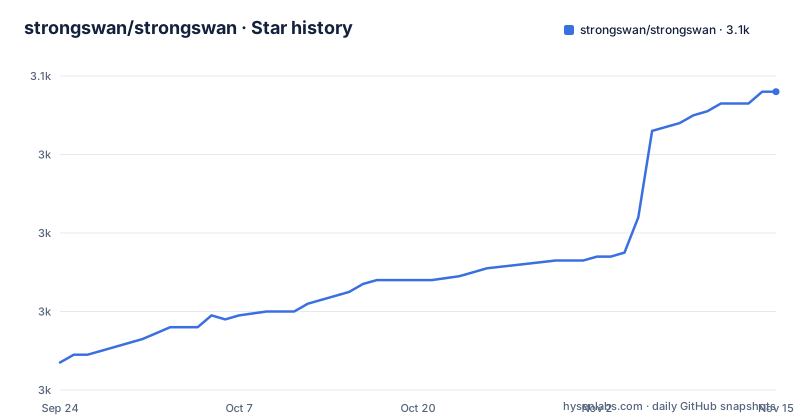
Star history
- strongswan/strongswan3,056 ★ · +69
| Repository | 2026-09-24 | 2026-11-15 |
|---|---|---|
| strongswan/strongswan | 3k | 3.1k |
69 Stars in the last 52 days, measured from the daily GitHub snapshot. Compare with other projects
Editorial analysis
The front page is a configuration guide, not an overview
The file at the default branch is headed as a configuration document and says so in its own first paragraph. It is a short introduction to the current command, which talks to the daemon through a configuration interface described as versatile, and it points at a second file for the older command that talks through a now deprecated interface. So the repository's landing page is a tutorial for one of two tools, and the tool you are likely to find a tutorial for online is the other one. Three references are given for anything the front page does not cover: the man pages, a separate documentation site, and the older wiki. That structure is deliberate and it is a reasonable one for a project that renamed its interface. It does mean a reader arriving at the repository for a general overview does not get one, and a reader copying an example from a third party may end up in the legacy file without being told which one they are in.
Peers are identified by certificate subject, not by address
Every example in the guide identifies a peer by the subject distinguished name taken from its end entity certificate, written out in full as a country, an organisation and a common name. The gateway on one side is told that the remote is, for example, a Swiss organisation with a particular common name, and the reverse configuration names the other gateway. The address is configured separately, as a remote address field. That separation is the mechanism: the certificate proves who the peer is and the address says where to send traffic, and the two are matched after authentication. It also means the distinguished name has to match exactly on both sides, including the punctuation and spacing, and that a certificate issued with a different organisation attribute will not be accepted even if the common name looks right. The guide says this in one sentence and it is the single most useful sentence in the file for anyone debugging a connection that will not come up.
Credentials and connections are loaded by two different commands
The quickstart describes a two step activation. One command loads the certificates and private keys into the daemon, which the guide calls by its internal name, and a second command loads the connections that are defined in the configuration file. They are separate invocations with separate effects, and the guide is explicit that the connection definitions do not arrive with the credentials. That is a small operational fact with a large failure surface: a configuration file can be complete, both files can be in the right directories, and the tunnel can still refuse to come up because only one of the two loads was run, or because the second was run and the first was not. The credentials themselves come from a directory tree with three parts, one for the certificate authority, one for end entity certificates, and one for private keys, all under a configuration directory that also holds the connection file. Either side can also use certificates from a third party authority, or generate its own with the project's own certificate tool.
The roadwarrior example differs from the other two in two ways
The third scenario is the one most deployments resemble, and it is configured differently from the first two in two specific ways. The gateway side has no remote address field at all, because the client it serves has an address the gateway cannot know in advance; only the client names the gateway. And the child's start action is start rather than trap, so the client initiates the connection immediately instead of waiting for the first packet that wants to go through the tunnel. In the first two scenarios the trigger is the trap, which sets the connection up automatically on the first plaintext packet that needs the tunnel, so nothing is negotiated until there is traffic. The roadwarrior scenario is also the one with a single client shown, named after the third host in the guide, even though the text describes the case as serving an arbitrary number of remote clients with dynamic addresses. The distinction is drawn in the prose rather than in the configuration.
The host to host example is deliberately not the minimal one
The second scenario connects two single hosts with nothing behind them, and the guide opens by making a remark that most tutorials would leave out: transport mode would be sufficient for a host to host connection, but the example uses the default tunnel mode instead. That is a deliberate choice to keep the examples uniform, and it has a cost. A reader who copies the example verbatim gets a configuration with more encapsulation than the case requires, and one whose troubleshooting behaviour is not the one they will hit with transport mode. It is also the kind of note that only appears in a document written by someone who has configured both and knows which surprises belong to which. The site to site example has the same property in a different form: both subnets are given as network ranges and both sides list the other side's network, which is exactly what makes it symmetric and easy to check by eye.
Two build systems, a separate Android makefile, and a fuzz directory
The tree is a conventional autotools project and a good deal more. There is a bootstrap script, a configure input, a makefile input, a macro directory and an installation document, which is the classic shape. Alongside that sit a makefile and a common configuration template named for Android, which is a second build system for a second platform rather than a plugin for the first. And there is a fuzzing directory, which for a VPN is a meaningful signal rather than a formality: a parser that faces the network is exactly where fuzzing pays. Two analysis services are configured as well, a coverage service and a static analysis one, and there is a file of leak suppression rules, which tells you the project runs a leak detector and has code whose leaks it has decided not to report. A Windows continuous integration configuration is also present, for a project whose own documentation is about Unix paths and Unix directory layout.
The license field is empty and a COPYING file sits at the root
The repository metadata reports no identifiable licence, while the top level of the tree contains a file named with the conventional name for a licence text. Both facts are visible here and neither resolves the other, so this is worth stating plainly rather than guessing at. The file that would settle it is the one in the tree, and it is the one to read before you vendor the code, redistribute a binary or build it into something you ship. The rest of the legal surface sits in the same place: a security policy for disclosure, a contributor guide, a hacking document for people working on the internals, an authors file and a news file alongside the changelog. The project is at version six point one, with the last three releases at six point zero point six in April, six point zero point seven in June and six point one in September, and the default branch received a push on 2 October 2026.
Editorial conclusion
Read the configuration file before anything else, because for this project that is where the design is explained. Three things decide whether it fits your deployment. Peer identity is taken from the certificate subject, so both ends must agree on a distinguished name and a mismatch there is the failure everyone hits. Credentials and connections are loaded by two different commands, so a configuration that looks complete can still be absent from the running daemon until you reload the right half. And the current file documents the modern interface while keeping the deprecated one in a separate document, which means examples you find elsewhere may target the older tool and its own syntax. The build is not a package manager project: there are two build systems in the tree and a separate makefile for Android, so read the installation document rather than assuming a configure and make cycle is the whole story. For anything that carries real traffic, the fuzzing directory and the leak suppression file in the same tree are the more reassuring signal.
Frequently asked questions
what is strongswan
strongSwan is an open source IPsec based VPN solution. The repository's front page is a configuration guide for its modern command, which talks to the daemon through a configuration interface, with the older command and its deprecated interface documented in a separate file beside it.
How does strongSwan identify VPN peers?
By the subject distinguished name contained in the end entity certificate, written as a country, organisation and common name. The address is configured separately as a remote address field, so the certificate proves identity and the address says where to send traffic, and both ends must agree on the distinguished name exactly.
How are credentials and connections loaded in strongSwan?
With two separate commands. One loads the certificates and private keys into the daemon, and a second loads the connection definitions from the configuration file. Running only one of them leaves the tunnel unable to come up even with a complete configuration file on disk.
What scenarios does the strongSwan configuration guide cover?
Three worked examples with full configurations for both ends: a site to site tunnel between two gateways joining two subnets, a host to host tunnel between two machines with nothing behind them, and a roadwarrior setup where one gateway serves an arbitrary number of remote clients with dynamic addresses.
Can strongSwan be used on Windows?
The repository file does not address it. The configuration guide describes Unix directory paths throughout, and the visible text says nothing about platform support, so a Windows question has to be answered from the documentation site or the wiki rather than from what is shown here.
Official sources
Add this badge to your README
If you maintain this project, the badge below links readers to this analysis and shows its maintenance status from the daily GitHub snapshot. Paste the markdown into your README; add ?metric=license or ?metric=stars to the image URL for a different field.

[](https://hysenlabs.com/projects/strongswan-strongswan)Star history chart for your README
[](https://hysenlabs.com/projects/strongswan-strongswan)Was this useful?