Carpoolear's frontend routes every build through one file, movilizame.js, and picks the app with TARGET_APP
The open source Vue.js frontend (mobile and cordova app) for the argentinian carpooling application: Carpoolear
At a glance
- What is it?
- The Vue and Cordova frontend for the Argentine carpooling application: a multi-project branch where a new app is a cloned project folder plus its own env files, Docker images that end in nginx, and a Playwright suite deliberately split so frontend tests need no backend.
- Who is it for?
- This repository suits a team that has to ship the same product as several branded apps, because TARGET_APP and the cloned project folders give you that without forking. It also suits a team that wants frontend tests to run on every pull request without a backend, since the mocked Playwright project is separate from the end-to-end one and the automation targets the frontend half.
- Can I use it commercially?
- Yes, with conditions. LGPL-3.0 is a weak copyleft licence: you can use it inside commercial and closed-source software, but if you distribute changes to its own files, you must publish those changes under the same licence.
- Is it still maintained?
- Yes. The repository received new commits within the last day.
- What is it written in?
- Mainly JavaScript, according to GitHub's language statistics.
Answers come from the project's GitHub data, last synced on October 23, 2026, and from our analysis. They are not legal advice.
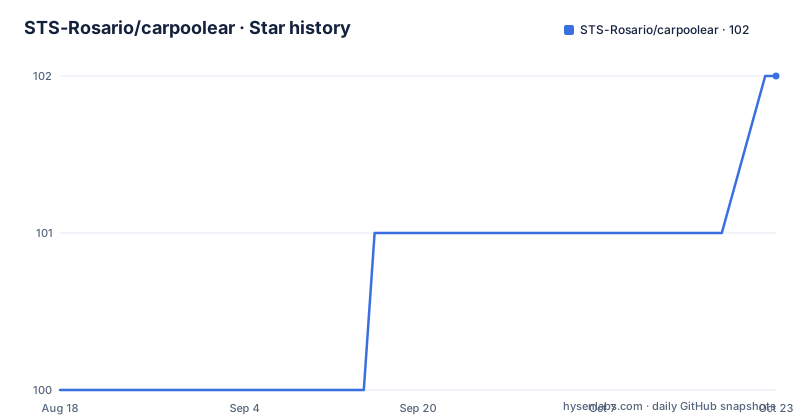
Star history
- STS-Rosario/carpoolear102 ★ · +2
| Repository | 2026-08-18 | 2026-10-23 |
|---|---|---|
| STS-Rosario/carpoolear | 100 | 102 |
2 Stars in the last 66 days, measured from the daily GitHub snapshot. Compare with other projects
Editorial analysis
TARGET_APP picks the project, and the default project is called default
Getting a working checkout takes the documented sequence, and the Node version is part of it rather than an afterthought:
gh repo clone STS-Rosario/carpoolear
cd carpoolear
nvm install 22 - you will need to install nvm first
nvm use 22
npm install
change API_URL in config/dev.env.js
npm run dev
The clone is done with the GitHub CLI, and the API_URL line is the one manual edit, made in config/dev.env.js if your backend is not where the default points. The branch is multi-project after that: one source tree serves several apps, and an environment variable chooses which one. On Linux and macOS you set TARGET_APP=myProject as a shell variable, and on Windows PowerShell the same thing is written as $env:TARGET_APP = "myProject". If no project is selected, the default project named default is used, and that name shows up in paths as well: the Dockerfile builds with TARGET_APP=default, and the production image copies dist/default/production/www into the web root. The dev server then serves with hot reload at localhost:8080, and a second script serves the same way using prod.env.
A new project is three clone operations in projects/ and config/
Creating an app is described as a sequence rather than a generator. First you select the project name, for example YOUR-PROJECT-NAME, then go into the ./projects folder, clone the default folder, rename the copy to YOUR-PROJECT-NAME, and customise the assets inside it: google-services.js, config.xml and the images. One requirement is specific: inside config.xml, under the cordova-plugin-facebook4 entry, you must put your own APP_ID and APP_NAME from Facebook, because that plugin is what wires the social login. Second, if you want to change a stylesheet or a Vue module such as main.css, you copy the file into the same folder and name it main.YOUR-PROJECT-NAME.css, and webpack resolves the correct file at compile time. Third, in ./config you clone dev.env.js and prod.env.js and save them as dev.YOUR-PROJECT-NAME.env.js and prod.YOUR-PROJECT-NAME.env.js, then fill in your values.
Every build script is one line through movilizame.js
There is no per-platform build logic in the package scripts at all. npm run dev is node movilizame serve, npm run prod is node movilizame serve --prod, npm run build is node movilizame build --prod, and the platform variants pass a flag rather than a different entry point: build:android is node movilizame build --prod --platform=android, build:ios is node movilizame prepare --prod --platform=ios, and build:web is node movilizame build-web --prod for the no-Cordova web build, with build-dev versions dropping --prod. The public scripts the README lists are a subset of the manifest. Two of the manifest entries are for mobile plumbing rather than building: cap:sync:android runs npx cap sync android followed by a fix script for Capacitor and Cordova Gradle, and build-capacitor-android-local builds, copies the output into a www directory and runs npx cap run android against a named target. The published apk lands in the dist folder.
Three Docker stages, and production is nginx serving static files
The Dockerfile is short enough to read in one pass and explains the deployment shape. The base stage is node:22 with a working directory of /app. The dev stage adds a global install of @vue/cli, cordova and ionic using npm install with --legacy-peer-deps and --ignore-scripts, installs the project the same way, and its default command is npm run dev. The build stage copies the package files, installs, copies the rest of the source, sets NODE_ENV=production and runs one command: npx cross-env PLATFORM=DESKTOP TARGET_APP=default SERVE=false CORDOVA=false node build/build.js. Those four variables are the whole configuration surface of the image build, and CORDOVA=false is how a desktop build avoids the mobile pipeline. The prod stage is nginx:alpine, copying /app/dist/default/production/www into /usr/share/nginx/html and exposing port 80.
docker-compose supplies the API URL and mounts the source over node_modules
The compose file describes one service, carpoolear_frontend, built from the local context with the dev target and run with npm run dev on an allocated tty. Its container name is prefixed from CONTAINER_PREFIX, defaulting to carpoolear. Four environment variables reach the app: HOST set to 0.0.0.0, API_URL defaulting to http://localhost:8000, WEB_URL defaulting to https://carpoolear.com.ar/app, and MERCADO_PAGO_PUBLIC_KEY which defaults to empty, since payments are optional. Port 8080 on the host maps to 8080 in the container, overridable through FRONTEND_PORT. The volume setup is the part worth copying: the repository is bind mounted to /app and /app/node_modules is then masked with a separate anonymous mount, which keeps the container's installed modules from being hidden by the host directory and is the usual way to make a bind-mounted dev container behave.
Playwright is split in two so the frontend suite needs no backend
The tests are two Playwright projects rather than one. The e2e directory holds full end-to-end tests that require a running backend, and e2e-frontend holds frontend-only tests where all API calls are mocked and no backend is needed. The commands line up with that split: npm run test:frontend runs the frontend project alone, npm run test:e2e:only runs the e2e project alone, and npm run test:e2e runs both. There is a screenshot project on top of that, test:e2e:screenshots against e2e-frontend/screenshots.spec.js, with a matching update command for when a UI change is intentional, and two UI modes for debugging with the Playwright UI. Browsers are installed once with npx playwright install --with-deps chromium, and the dev server the tests drive needs Node 22 or Docker. Frontend tests run automatically on every push and pull request to master through a GitHub Action named Frontend Tests.
Feature switches live in the backend database, not in this repository
The configuration table is unusual in where it lives: the properties are set in the carpoolear database rather than in a file you can read here, which means the frontend has switches it does not own. The rows cover identity and locale, such as admin_email, name_app, osm_country, country_name, locale and home_redirection, then behaviour toggles including module_validated_drivers for requiring validated drivers, enable_facebook, login_custom_header, enable_footer, disable_user_hints and allow_rating_reply. Two are presentation: trip_card_design takes default or light, where default is the custom theme and light is the optional one, and trip_stars switches user punctuation between stars and numbers. Three are JSON objects with documented shapes: donation, module_user_request_limited as an enabled flag with an hours_range of 8, and module_on_boarding_new_user as an enabled flag with cards set to 4.
Two licence statements disagree, and the tooling spans two eras
The project metadata records LGPL-3.0, while the README says the Carpoolear frontend is open-sourced software licensed under GPL 3.0 and links to a licence file in the backend repository. That is a real discrepancy and not a typo you should resolve by picking one. The repository is not archived, sits on master, has a last push dated 2026-09-23 and publishes no GitHub releases, and reports 101 stars, 64 forks and 41 open issues. The toolchain shows two eras side by side. The manifest requires Node 22.0.0 or newer and npm 10.0.0 or newer, and the scripts are built around vite.config.js, vitest.config.js and playwright.config.js. But the README still instructs contributors to respect a jshint configuration comment, /*jshint esversion: 6*/, while the tree carries .eslintrc.js, .eslintignore and .prettierrc, and lint is run with eslint rather than jshint. One rule survives from that older setup and still binds: all variable and method names must be in English.
Editorial conclusion
This repository suits a team that has to ship the same product as several branded apps, because TARGET_APP and the cloned project folders give you that without forking. It also suits a team that wants frontend tests to run on every pull request without a backend, since the mocked Playwright project is separate from the end-to-end one and the automation targets the frontend half. Two cautions. Most appearance and feature behaviour is configured in the backend database rather than in this repository, so a frontend change alone will not turn a feature on. And the licensing picture is inconsistent: the project metadata says LGPL-3.0 while the README says GPL 3.0 and links to the backend repository's licence file, so settle that before you distribute a build.
Frequently asked questions
What does carpooling mean?
Sharing car trips with other people as a matter of everyday routine. The Carpoolear README describes it as a practice that is popular in the United States and Europe, where it is done in an organised way with the aim of increasing the number of shared trips and making them happen with people beyond one's own neighbours and friends.
What does it mean for someone to carpool?
For a Carpoolear user it means offering or joining a car trip through a Facebook app with other users in their area. The project presents itself as the first Argentine Facebook app for that purpose, and an ad-hoc customisation for Argentina of the carpooling philosophy.
What is carpooling and how does it work in Carpoolear?
The mechanics sit in a separate backend: the properties that switch features on are configured in the carpoolear database, including module_trip_seats_payment for requiring online payment to travel, module_validated_drivers, api_crice with fuel_price for estimating a trip price, module_coordinate_by_message for coordinating in the chat view, and module_references. This repository holds only the Vue and Cordova frontend, and it reads its API location from config files or VITE_API_URL.
Why is it called car pooling?
The repository does not explain the name. It only describes the practice behind it: sharing car trips with other people, and in an organised way increasing the number of trips shared with people who are not only neighbours and friends.
Official sources
Add this badge to your README
If you maintain this project, the badge below links readers to this analysis and shows its maintenance status from the daily GitHub snapshot. Paste the markdown into your README; add ?metric=license or ?metric=stars to the image URL for a different field.

[](https://hysenlabs.com/projects/sts-rosario-carpoolear)Star history chart for your README
[](https://hysenlabs.com/projects/sts-rosario-carpoolear)Was this useful?