elFinder: the connector rename, volume drivers, and version pinning
📁 Open-source file manager for web, written in JavaScript using jQuery and jQuery UI
At a glance
- What is it?
- elFinder is a browser based file manager that runs a jQuery UI client against a PHP connector. Reading the install steps, the widget requirements and the release branches tells you what it will and will not do on your server.
- Who is it for?
- elFinder earns a place when the file manager has to sit on the same PHP host as the site and reach storage that site already runs, and the widget list tells you quickly whether your own jQuery UI build will carry it. Before deploying, pin a version above 2.1.69, write the connector configuration yourself, and confirm the thumbnail backend exists, since GD, Imagick or imagemagick is what turns image previews into anything at all.
- Can I use it commercially?
- Check first. The repository uses a licence we do not classify automatically, so read its LICENSE file before any commercial use.
- Is it still maintained?
- Yes. The repository last received commits 104 days ago.
- What is it written in?
- Mainly JavaScript, according to GitHub's language statistics.
Answers come from the project's GitHub data, last synced on November 15, 2026, and from our analysis. They are not legal advice.
Star history
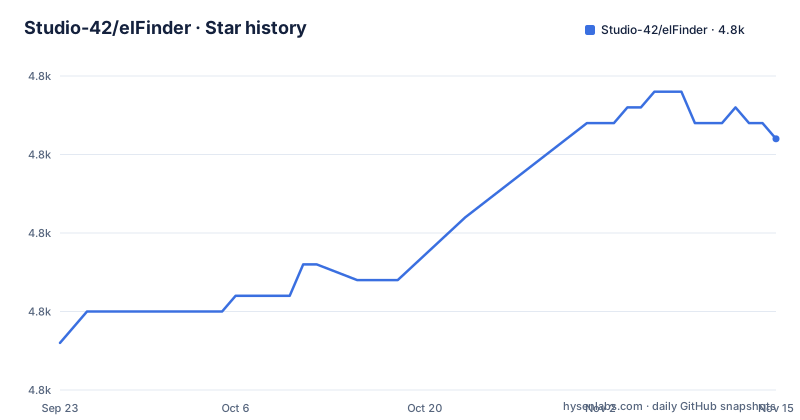
- Studio-42/elFinder4,816 ★ · +13
| Repository | 2026-09-23 | 2026-11-15 |
|---|---|---|
| Studio-42/elFinder | 4.8k | 4.8k |
13 Stars in the last 53 days, measured from the daily GitHub snapshot. Compare with other projects
Editorial analysis
Version 2.1.69 and earlier are flagged as a hazard on public servers
The README opens with a line in capitals: older versions of elFinder, in particular 2.1.69 or earlier, sitting on a public server may cause serious damage to your server and to visited users, and you should either update to the latest version or remove it from the server. That framing tells you how the project treats its own releases. Version 2.1.70 is the newest tagged build, published 2026-08-03, and the two releases before it, 2.1.69 and 2.1.68, both went out on 2026-05-07 hours apart. For readers, the consequence sits in dependency files. A composer.json or a lock file that pins studio-42/elfinder at 2.1.69 leaves the flagged code path in place, and a lock file written during that May window may hold either build.
Installation ends at one manual rename of connector.minimal.php-dist
Every documented install path ends at the same manual step. For a compressed build you download and unzip one of the archives to your PHP server, rename /php/connector.minimal.php-dist to /php/connector.minimal.php, then load /elfinder.html in a browser. For the uncompressed source you clone the repository instead, perform the same rename, and load /elfinder.src.html. A Composer installer for 2.1.x nightly is linked from the Installation section for people who would rather pull the release from Packagist than unpack it by hand.
$ git clone https://github.com/Studio-42/elFinder.gitThe rename is a manual step in both the build and source instructions, so a deploy script that unpacks and serves without the copy leaves the manager with no connector at all. The repository root ships five HTML entry points, elfinder.html, elfinder-minimal.html, elfinder.src.html, elfinder.legacy.html and elfinder.playground.html, and the FAQ is explicit about which one you want: source for debugging and development, builds for production.
The client binds to a named set of jQuery UI widgets
The client is a jQuery UI application, and the widget names are written down. jQuery 1.8.0 or newer and jQuery UI 1.9.0 or newer are the stated floors, the required widget list is draggable, droppable, resizable, selectable, button and slider, and sorter is listed as recommended with the reason attached: it is what makes the List column and the Places panel sortable. The newest version of both libraries is still what the README recommends. Those widget names map directly onto what you touch in the browser, which matters when a site bundles its own jQuery UI rather than loading the copy elFinder ships. Drag and drop to move or copy files, and the alt or option drag that pulls a file out to the desktop, sit on draggable and droppable. Standard selection with mouse or keyboard, and the resizable panes, sit on selectable and resizable. The lesson for integrators is to pin the widget set rather than the library version, then retest selection and drag after every jQuery UI upgrade.
Volume drivers and upload plugins decide what gets touched
What the file manager can reach is decided by the volume driver, and the project ships a wide spread of them: local file system, MySQL, FTP, SFTP, Box, Dropbox, GoogleDrive and OneDrive. Object storage is reached through the League\Flysystem driver kept in a separate repository, which the README links for AWS S3, Azure, Digital Ocean Spaces and more. Multi-root support means several volumes can be mounted at once. Archive work is server side, create and extract across zip, rar, 7z, tar, gzip and bzip2, and thumbnails for image and movie files need the GD or Imagick module or convert from imagemagick on the server. Five connector plugins change what happens on upload. AutoRotate turns JPEG files by their EXIF Orientation, AutoResize resizes on upload, Normalizer is a UTF-8 normalizer of file name and path, Sanitizer sanitizes file name and path, and Watermark prints a watermark. The last two matter most to an operator, because how a name lands on disk changes with the plugin you enable.
Three branches ship on three different schedules
Release lines sit on three branches with different jobs. master is the main development branch, 2.1-src is the 2.1 development branch and auto builds to 2.1 on commit, and 2.1 is the 2.1 nightly build branch. The download list offers stable elFinder 2.1.70, an older 2.0.9 marked deprecated, and a 2.1.x nightly archive. None of them is labelled long term support, and because 2.1 is rebuilt whenever 2.1-src changes, the nightly archive behind that link is a moving target. That is why the FAQ separates the trees: use the source for debugging and development, use the builds for production. The build is driven by package.json, whose main entry is Jakefile.js and whose two scripts shell out to jake.
"scripts": {
  "build": "mkdir ./build && jake -C ./build elfinder",
  "build-minimal": "mkdir ./build && jake -C ./build elfinder-minimal"
},
Those build dependencies are the whole toolchain, and the ranges are narrow.
"devDependencies": {
  "csso": "<2.0.0",
  "jake": "~8.0.12",
  "uglify-js": "~2.6.2"
}
Anyone reproducing a compressed build needs csso below 2.0.0, jake in the 8.0 line and uglify-js in the 2.6 line, not whatever those packages have grown into.
Upload paths and the JSON contract you have to fill in
Upload behaviour is the part most often tuned. The feature list names chunked file upload for large files, background upload of files and folders with HTML5 drag and drop support, uploading directly into the target folder, and taking either an upload form URL or a list of them. Editing happens in place too: Quicklook previews common file types, text files and images can be edited, directory sizes can be calculated, list view columns are configurable, and Places holds favourites. Extensibility runs on both sides through event handling of the backend and the client, and the wire format is a simple client server API based on JSON. For integration with CKEditor, TinyMCE and elRTE, the FAQ points to the wiki for instructions. Before you deploy, note that access rights, upload file types and the user interface are configurable, and the connector starts from /php/connector.minimal.php-dist, which the install steps have you rename.
iOS app mode and non-PHP stacks sit outside the tested set
Two boundaries are stated plainly. On the client, elFinder was tested in the newest Chrome, Edge, Firefox, IE and Opera, with a caution that Web App mode, the apple-mobile-web-app-capable meta tag, does not work perfectly on iOS. The mobile friendly view is a layout mode inside a browser tab, not a native application. On the server, any web server will do, but PHP 5.2 or newer is required with 5.4 recommended, and thumbnails need the GD or Imagick module or convert from imagemagick. PHP 7.1 or higher is recommended specifically to support non-ASCII characters in a file path or name on a Windows server, which is a naming problem you inherit if you skip it and only notice it once a folder of foreign-language names will not round trip. Teams not running PHP are pointed off the main README: ASP.NET and ASP.NET Core connectors appear under third party connectors as separate projects, alongside separate volume drivers and themes. Those connectors are separate projects, so what you install there is whatever its own author ships.
Editorial conclusion
elFinder earns a place when the file manager has to sit on the same PHP host as the site and reach storage that site already runs, and the widget list tells you quickly whether your own jQuery UI build will carry it. Before deploying, pin a version above 2.1.69, write the connector configuration yourself, and confirm the thumbnail backend exists, since GD, Imagick or imagemagick is what turns image previews into anything at all. Teams on .NET need the separate third party connector projects.
Frequently asked questions
What is elFinder and what is it used for
It is an open-source file manager for the web, written in JavaScript with jQuery and jQuery UI, and its interface is modelled on the Finder in Mac OS X. It gives a browser page copy, move, upload, create, rename and delete operations against files and folders on a remote server.
What are the alternatives to elFinder?
For a server that is not running PHP, the project points to separate ASP.NET and ASP.NET Core connector projects maintained outside the repository, and it also lists third party volume drivers and third party themes. No in-core alternative file manager is offered.
Should I use elFinder builds or source?
For debugging and development use the uncompressed source and load elfinder.src.html. For production use the compressed builds and load elfinder.html. Either way you rename /php/connector.minimal.php-dist to /php/connector.minimal.php first.
Does elFinder work on iOS as a standalone app?
Not perfectly. The project states that Web App mode, the apple-mobile-web-app-capable meta tag, does not work perfectly in elFinder. There is a mobile friendly view for touch devices, but it runs inside a browser tab rather than as a native app.
Official sources
Add this badge to your README
If you maintain this project, the badge below links readers to this analysis and shows its maintenance status from the daily GitHub snapshot. Paste the markdown into your README; add ?metric=license or ?metric=stars to the image URL for a different field.

[](https://hysenlabs.com/projects/studio-42-elfinder)Star history chart for your README
[](https://hysenlabs.com/projects/studio-42-elfinder)Was this useful?