The Notion MCP server ships a build and four doc files, and asks npm to rebuild on install
A Model Context Protocol server for connecting Notion to MCP-compatible clients
At a glance
- What is it?
- suekou/mcp-notion-server wraps the Notion API in MCP tools, but its packaging tells a more specific story: the MCP SDK and React are pinned to exact versions, prepare runs a full build on every install, and the published tarball carries build output and documentation instead of source.
- Who is it for?
- This is a well-organised Notion bridge for anyone who already runs an MCP host, and its install path is the shortest of the three in its own README: one npx line and a token. Two things are worth checking before you commit to it.
- Can I use it commercially?
- Yes. MIT is a permissive licence: you can use, modify and sell software built on it, as long as you keep its copyright and licence notices.
- Is it still maintained?
- Yes. The repository last received commits 107 days ago.
- What is it written in?
- Mainly TypeScript, according to GitHub's language statistics.
Answers come from the project's GitHub data, last synced on November 15, 2026, and from our analysis. They are not legal advice.
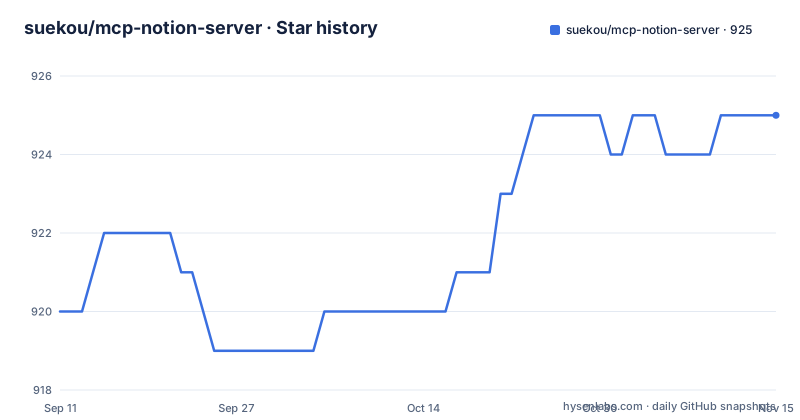
Star history
- suekou/mcp-notion-server925 ★ · +5
| Repository | 2026-09-11 | 2026-11-15 |
|---|---|---|
| suekou/mcp-notion-server | 920 | 925 |
5 Stars in the last 65 days, measured from the daily GitHub snapshot. Compare with other projects
Editorial analysis
Four runtime dependencies, two of them pinned to an exact version
The runtime dependency list is four lines long, and two of them carry no range at all:
  "dependencies": {
    "@modelcontextprotocol/sdk": "1.29.0",
    "react": "18.3.1",
    "react-dom": "18.3.1",
    "yargs": "^17.7.2",
    "zod": "^4.4.1"
  },
The MCP SDK sits at a single fixed version while yargs and zod are allowed to float. React appears in runtime dependencies rather than in the optional extras because the MCP Apps feature, the Data Source Explorer and the Page Workbench, are built from React components and ship in the same tarball. That means a host that only ever calls the plain tools still installs two React trees and react-dom.
The development side is pinned just as tightly. Every devDependency except typescript and the type packages carries an exact version: biome at 2.4.13, vite at 5.4.21, vitest at 3.0.9, tailwindcss at 3.4.17, postcss at 8.4.49, and vite-plugin-singlefile at 2.3.0. A repository that pins its build tooling this exactly is signalling that a floating minor version breaks something, which is a reasonable bet for a build step that bundles two web apps with Vite and inlines each one into a single file.
prepare runs the full build on every install in a checkout
The scripts block wires the build into the install lifecycle:
  "scripts": {
    "build": "tsc && node scripts/build-apps.mjs",
    "build:apps": "node scripts/build-apps.mjs",
    "prepare": "pnpm run build",
    "watch": "tsc --watch",
    "inspector": "pnpm dlx @modelcontextprotocol/inspector build/index.js",
    "test": "vitest run",
    "lint": "biome lint",
    "check": "biome check"
  },
`prepare` runs on install from a git checkout, which means the three commands in the development section do more than they look like. `pnpm install --frozen-lockfile` already compiles the TypeScript and bundles the apps before `pnpm run build` is typed, so the documented sequence runs the build twice on a fresh clone.
That is the cost of the source path. The quick start path, `npx -y @suekou/mcp-notion-server`, downloads a tarball whose build directory is already populated, and a package manager does not run prepare on a published tarball. So the same code is reachable two ways with very different amounts of work, and the README presents the slower one as the way to set up a development environment and the faster one as the way to use the server.
Biome owns the whole quality story, split into subcommands rather than one entry point: lint for linting only, format for writing, check for both, and write-adding variants of each.
The inspector points straight at build/index.js, so order matters
The MCP inspector command does not start a build first:
pnpm run inspectorwhich resolves to `pnpm dlx @modelcontextprotocol/inspector build/index.js`. That path is the same one `main` and `bin` point at in the manifest:
  "main": "build/index.js",
  "bin": {
    "mcp-notion-server": "build/index.js"
  },
So the inspector attaches to whatever was compiled last, and a checkout where the build has not run yet has no file for it to attach to. Nothing in the repository checks this. The same applies to the locally built host configuration, which launches the server with `node` and an absolute path into `build/`.
One naming detail is worth noting for anyone writing host configuration by hand. The published binary is named `mcp-notion-server`, not `@suekou/mcp-notion-server`, so a configuration that invokes the binary directly and one that invokes the package through `npx -y` are pointing at the same code by different routes. The quick start uses the package form, which relies on npx resolving the single entry in `bin`.
Because the build output is the interface, `tsc` alone is not the whole story. `build:apps` is a separate script that runs a Node file in `scripts/`, and the full build is the two of them joined by `&&`, so a failure in the app bundling step stops the command even if every TypeScript file compiled.
The published tarball carries build and docs, and leaves src behind
The `files` field decides what reaches npm:
  "files": [
    "build",
    "docs",
    "README.md"
  ],
Three entries. The compiled output, the documentation directory, and the README. Source is not in that list, so `src/`, `scripts/`, `biome.json`, `tailwind.config.ts`, and the two tsconfig files stay in the repository and never reach an install. The package is a compiled artifact, and the only way to read the TypeScript is to clone it.
Shipping `docs` is the more unusual half of that list. Four documents go out with every install: configuration, tools, workflows, and the MCP Apps write-up, all linked from the developer section of the README. A user who installed the package through npx gets the tool reference and the workflow guide on disk, which is genuinely convenient when an agent is calling unfamiliar tools and a human is trying to work out why a call failed.
The tarball therefore contains everything needed to run the server and to read its documentation, and none of the code that produced it. If you want to modify the tool set or the Notion request shapes, the build directory is not a starting point, and the version you get from the registry is whatever was on the machine that last ran prepare.
Capability grants decide which tools work at all
The setup path puts the Notion side ahead of the client side, and the order matters because a tool that reads is useless without the matching grant. Read content covers search, page reads, data source retrieval, and queries. Insert content covers creating pages and items and appending blocks. Update content covers updating pages, blocks, and data source schemas. Comment and user capabilities are listed as needed only for those specific tools.
The recommended grant for someone setting this up is read, insert, and update, with comment and user capabilities left off unless the comment and user lookup tools are actually going to be called. That is a sensible default for a server whose whole surface is write-capable, and it is worth keeping in mind that an agent driving this server can edit pages the moment update content is granted.
Access is granted per page or per database, and the grant cascades. Opening the Content access tab on the integration, or using the Connections menu on the target page, adds the integration to that object, and a connection added to a page can also reach that page's children. Notion grants no workspace-wide access by default, so a database shared at the top level and a page shared at the root are different starting points, and the reachable set grows downward from whatever was shared rather than outward.
Two tool families sit side by side, and the order of use is prescribed
The tool surface splits in two. There are simplified tools with fixed shapes: `notion_find` for search and target discovery, `notion_read_page` for compact reading that returns stable block IDs, `notion_inspect_data_source` for schema inspection, `notion_query_data_source_by_values` and `notion_create_data_source_item_from_values` for data source work with simple values, and a set of page editing tools covering paragraphs, headings, lists, todos, quotes, callouts, code blocks, dividers, and a Markdown append.
Alongside those sit raw Notion API tools for block, page, database, data source, comment, and user operations. The recommended workflow puts the simplified tools first and demotes the raw ones to a fallback, used only when the simplified shapes do not cover the Notion API shape a particular job needs.
The workflow is also an ordering, not a menu. Find the target, read the page for context and block IDs, inspect the data source schema before querying or creating items, use the by-values tools for ordinary work, then edit with the append and update tools. `notion_inspect_data_source` sits at step three on purpose: the schema comes before the query, so the values a call needs are known before it is made.
Two tool families means a larger surface for a model to choose between. The simplified tools exist to keep responses compact enough for daily agent work, and the raw ones exist for the cases that shape cannot express. Nothing in the repository measures that compactness.
A 2026 Notion API and a database split into data sources
The server targets Notion API `2026-03-11` and works against the current database and data source model rather than the older database-only shape. That distinction runs through the tool names: reads and queries are written against `notion_query_data_source_by_values` and `notion_inspect_data_source`, and creation goes through `notion_create_data_source_item_from_values`.
The naming is not cosmetic. A data source carries its own schema and property definitions, which is why schema inspection has its own tool and why it is placed before querying in the recommended order. Under the older shape a database held both the container and the schema, and a single query call covered what now takes an inspection and then a query.
Page editing follows the same pattern of narrowed tools. Instead of one generic append, there is `notion_append_markdown`, `notion_append_content`, `notion_update_content`, and `notion_update_content_batch`, and the block types named in the highlights, paragraphs, headings, lists, todos, quotes, callouts, code blocks, and dividers, are the ones these tools are described as handling. Batch updates exist as a separate tool from single updates, so a multi-block edit is one call rather than a loop.
The token itself is called an integration secret in the setup steps, and the value you copy from the Notion integrations dashboard becomes `NOTION_API_TOKEN` in the host configuration. Both example configurations in the README use the `secret_` prefix form.
A pnpm floor in the manifest that the README never states
The manifest pins the package manager and the runtime together:
  "packageManager": "[email protected]",
  "engines": {
    "node": ">=22",
    "pnpm": ">=10.24.0"
  }
The README says the project uses Node.js 22 or newer and pnpm, which is the whole of its installation requirement. It does not state the pnpm floor, and it does not state that the manifest also pins a specific pnpm release through `packageManager`. A contributor on pnpm 9 satisfies the prose and fails both fields.
The release history has its own texture. v2.0.0 shipped on 2026-05-05, then v2.0.1 and v2.0.2 both landed on 2026-06-22, about ten hours apart, and the manifest version is 2.0.2. The default branch was last pushed on 2026-07-31.
Two minor releases in the same day after a major version usually means one of them was a fix published quickly, and the pair gives no way to tell from the outside which. The `docs/release-notes.md` link in the README points at a file in the repository rather than at a changelog page, so the distinction between the two June builds is a question for that file.
Editorial conclusion
This is a well-organised Notion bridge for anyone who already runs an MCP host, and its install path is the shortest of the three in its own README: one npx line and a token. Two things are worth checking before you commit to it. First, every install in a checkout runs prepare, which is a full TypeScript build plus an app bundling step, so a read-only inspection of the source is slower than the single command in the quick start suggests. Second, the MCP SDK and both React packages are pinned to exact versions with no caret, so a host that resolves a different SDK version can produce a conflict that only shows up at install time. Anyone moving past personal use should read docs/workflows.md for error handling, since the README leaves the retry and rate-limit story to that file.
Frequently asked questions
Is Notion MCP free to use with suekou/mcp-notion-server?
The server itself is an MIT licensed npm package installed with npx, and the repository states no price, quota, or hosted tier anywhere. What you do need is a Notion internal integration with its own token, and Notion only grants an integration access to pages and databases that have been shared with it.
How do I give the Notion MCP server access to my workspace?
Open the Content access tab on the integration in the Notion integrations dashboard and select the pages or databases it may read or edit, or add the integration from the target page's `...` menu under Connections. Access is not workspace wide: a connection added to a page can also reach that page's children.
Which Notion capabilities do I have to enable for this server?
Read content covers search, page reads, data source retrieval, and queries. Insert content covers creating pages and items and appending blocks, and update content covers updating pages, blocks, and data source schemas. Comment and user capabilities are only needed for the comment and user lookup tools. The full setup guidance recommends read, insert, and update.
Can Codex or ChatGPT connect to suekou/mcp-notion-server?
The repository documents Claude Desktop, Cursor, and other MCP hosts, and its own configuration examples are written for those hosts. It does not document a ChatGPT connection, and it does not mention Codex at all, so neither path is covered by what this project states about itself.
Why do I need to build the project before running it locally?
The entry point is `build/index.js`, which is what `main`, the `mcp-notion-server` binary, and the MCP inspector command all point at. Compiling with tsc and bundling the apps with `node scripts/build-apps.mjs` is the `build` script, and `prepare` runs it automatically on install in a checkout, so the build usually happens before you need it.
Official sources
Add this badge to your README
If you maintain this project, the badge below links readers to this analysis and shows its maintenance status from the daily GitHub snapshot. Paste the markdown into your README; add ?metric=license or ?metric=stars to the image URL for a different field.

[](https://hysenlabs.com/projects/suekou-mcp-notion-server)Star history chart for your README
[](https://hysenlabs.com/projects/suekou-mcp-notion-server)Was this useful?