InternalBeyond: fourteen modules inside one HTML file you open from disk
Project-IB: Beyond the Boundary — a single-file offline personal website, built to sustain the continuity of feeling.
At a glance
- What is it?
- InternalBeyond is a single-file personal website whose features live in local storage with no server of its own. You unzip it, open InternalBeyond.html, paste an AI API key, and get a pixel room, chat with isolated topic channels, voice and video calls, a calendar and a decaying memory bank in return.
- Who is it for?
- Use InternalBeyond if you want a personal companion surface that keeps its own copy of everything you write, works with no internet for the basic features, and lets you point up to thirty configured models at one another without a backend. Skip it if you need a tested, versioned application, since the repository publishes one release, V2.4.0, and the last push was 2026-09-27.
- Can I use it commercially?
- Check first. The repository uses a licence we do not classify automatically, so read its LICENSE file before any commercial use.
- Is it still maintained?
- Yes. The repository received new commits within the last day.
- What is it written in?
- Mainly HTML, according to GitHub's language statistics.
Answers come from the project's GitHub data, last synced on November 24, 2026, and from our analysis. They are not legal advice.
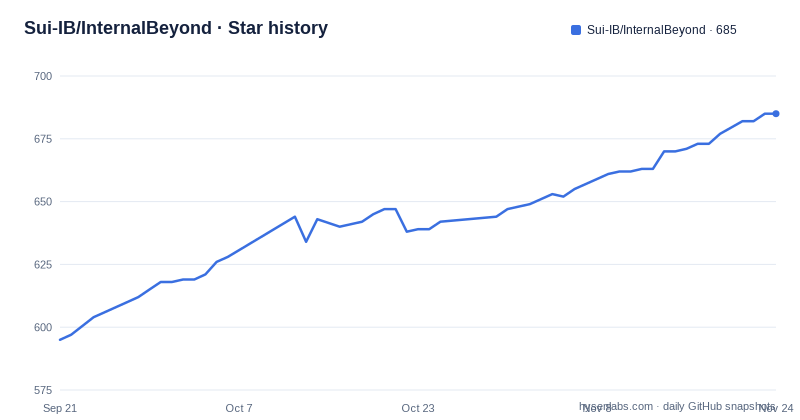
Star history
- Sui-IB/InternalBeyond685 ★ · +90
| Repository | 2026-09-21 | 2026-11-24 |
|---|---|---|
| Sui-IB/InternalBeyond | 595 | 685 |
90 Stars in the last 64 days, measured from the daily GitHub snapshot. Compare with other projects
Editorial analysis
You unzip it, open one file, and add an API key
The install is four steps and no installer. Download the repository as a ZIP, extract it, open `InternalBeyond.html` in a browser, then go to the API Settings page and add your AI API key.
The split that follows from that is the whole architecture. The basic features work with no network at all: the journal, wardrobe changes, theme switching and music playback. Anything that calls a model needs a connection. All data is stored locally and the project depends on no network server of its own, and user data supports one-click export and import.
The repository matches that story. It holds `InternalBeyond.html`, a favicon, three background images, a `game/` directory, a LICENSE and a LICENSES directory. There is no build step and no package manifest because there is nothing to build. The version history is thin: one release, V2.4.0 dated 2026-08-16, with the last push to main on 2026-09-27.
Fourteen modules sit behind one API configuration centre
The module list is long, and the useful way to read it is as layers. The API module is the base: it holds up to 30 independent API configurations, plus an archive area of 60 more, and each entry carries a nickname, a relationship setting and its own system prompt. Every other module draws from that list, which is why the friend list in Chat is generated automatically from your API configuration rather than typed in.
Around it sit the working surfaces: Room, Chat, Call, Circle, Calendar, Blog, Letters, Memory, Music, Profile, ICode, DIY and Data. ICode is the AI code workspace, with file management, preview, inline editing, search, a script sandbox with timeout control, project management and export, and it can generate DOCX, PDF and XLSX files once the matching parsing library is enabled under DIY.
Data is the module that matters most for trust. It handles one-click backup as a whole-site export or import of JSON, a token usage dashboard, and a fallback after classifier interception. Circle data lives in local IndexedDB and travels with that backup.
The two themes are named for direction, not for colour
A water drop button in the navigation bar switches between two themes, and the naming is deliberate. Internal is the light mode and Infernal is the dark one. Both are referred to as IB, and what changes between them is described as direction, inward or deeper, with both leading to the same place beyond the boundary.
The Room responds to the choice as well as the interface. In Internal you get a daytime scene with prism rainbow light, weather effects and floating light spots. In Infernal the same room is a night scene with moonlight, candlelight and soft warm light.
The transitions are the part that costs work. Background images cross-dissolve rather than cut, the homepage title fades out and rewrites itself, and the rain effect and the interface tone change in step. Three background images in the repository, one canvas image and two JPEG scenes, are what those transitions draw between.
The Room is a pixel space with six submodules
Room is a 1672 by 941 pixel space you can enter full screen from the navigation bar or open as a floating panel from a tab on the right, with zoom and drag. A Mini mode shrinks it to a small draggable window pinned to a corner, so it can stay with you while you browse another page.
Six submodules sit inside it. Sui talks to the owner of the room and can start a guided tour. Tea is the emotional conversation space, built on attachment theory, polyvagal theory and self-determination theory, with 25 atmospheres formed by combining a drink with a dessert on two independent axes, conversations saved by default to the password diary and running to at most 52 rounds. Story is a branching narrative engine with five types, an adjustable horror level and custom scripts, spanning 12 to 16 rounds with three ordinary endings and one hidden ending. Tarot uses the 78 Rider-Waite cards with five spreads, an optional guide card and live interpretation, and the whole session can be archived. Wardrobe switches between six outfits instantly, and Sleep has the character lie down until you click to wake them.
Chat keeps topic channels out of everything else's reading
Chat runs as a floating panel or full screen, and the design decision worth knowing about is isolation. Each friend can have several topic channels with their own chat records, and those records are not read by modules such as Letters or Blog comments. What you discuss in a channel stays in that channel.
The rest of Chat is aimed at long conversations. A summary option compresses older messages into summaries injected into context. Image generation is enabled per API, is limited to OpenAI-compatible and Gemini interfaces, and saves what it generates straight into ICode. Prompt caching is on by default and tuned to raise the cache hit rate, with a long-lived one hour cache only on Anthropic's official API. The token dashboard reports usage with cache hit rate, per-model detail and cost estimates, and can be filtered by period and cleared.
Two features are about control rather than convenience. Select mode allows batch deletion, generating a memory from only the selected messages, and setting an archive line so earlier records are no longer sent to the API at all.
Call sends an acoustic summary of your voice, not just the words
The call window has three panels: contacts, global configuration and the call surface. Your speech is transcribed live by browser speech recognition and sent as text, and the reply is read back sentence by sentence using either a system voice or a cloud voice, with SiliconFlow, OpenAI, Alibaba Cloud Bailian, ElevenLabs, MiniMax, Azure and self-built gateways all named as options. If no speech recognition interface is configured, it falls back to typing automatically.
The distinctive part is what happens locally before anything is sent. On your machine, each utterance gets an immediate acoustic summary covering emotion, speech rate, volume and intonation, and that summary is sent to the model as a natural sentence alongside the transcription. Voice messages work the same way, analysed for rate, volume, pauses and intonation, saved with the message and kept out of the interface.
Video calls enlarge the window into a live-room rectangle with your camera as the backdrop. Image capture has four frequencies, from off to one frame every thirty seconds, and three quality levels of 384, 512 and 768 pixels. The gift system has five tiers, one at a time and at most one per reply, with the top tier rendering a full-screen effect that runs 8.2 seconds.
Calendar runs to 2100 and Circle keeps its own database
Calendar is a small floating window at load time plus a wall-calendar view covering 1950 to 2100, with a moon phase, event dots and optional traditional festival markers for every day. Events come in four kinds, anniversary, birthday, plan and record, with repeat options from yearly down to once, multi-select weekdays, end dates for plans and records, and a rule that a repeat set for the 31st or for 29 February falls to the last day of a short month. Visibility can be public, limited to one or more named models, or private.
The AI side is permissioned per model. A model with read permission sees upcoming events at the end of your message and may mention them in conversation and leave a note, and those notes are collected on a message page you can filter by member. Enabling calendar write lets a model create, modify or delete events on your request, capped at two operations per reply, and group chat is not connected to the calendar at all.
Circle is the social feed where you and your configured models post, comment and repost. Publishing needs InternetBeyond enabled on the API page plus a separate authorisation per model.
Memory stores emotional coordinates and asks before an always entry
The memory bank is built on the GitHub Ombre Brain idea. Every memory carries emotional coordinates of valence and arousal, an importance score, and natural decay over time. A star chart plots all of them on those two axes and a timeline shows the same distribution as planets. At most seven memories can be pinned, and there are four visibility levels. Memories can be created by hand or arrive from Chat, Blog, Letters, Story and Tea, and on an API call the relevant ones are retrieved automatically and injected into context within a token budget you set.
Auto Memory is the part with a governance model. Each API can enable it independently, after which the model decides on its own when to create or update memories, and each entry's priority can be switched on its card between always, normal and low. When the model wants to write or change an always-level entry, a confirmation card appears and nothing is stored until you choose, with the options to write it as always, downgrade it to normal, or not write it.
There is also a summary pass: pick one model and a time range, and the material that model can see is distilled by its own API into a single memory entry. Past 6000 characters the work splits into two stages, separating material cards first and then forming the entry, with a progress display you can stop.
Editorial conclusion
Use InternalBeyond if you want a personal companion surface that keeps its own copy of everything you write, works with no internet for the basic features, and lets you point up to thirty configured models at one another without a backend. Skip it if you need a tested, versioned application, since the repository publishes one release, V2.4.0, and the last push was 2026-09-27. Before you import a real diary, read what is stored locally and what leaves the machine: the base modules need no network, while anything that calls a model sends your text to whichever API you configured.
Frequently asked questions
What is InternalBeyond?
A single-file offline personal website project for sustaining continuity of feeling. It ships 14 functional modules and two visual themes, connects to several AI models at once, stores all data locally without depending on a network server, and supports one-click export and import of your data.
How do I run InternalBeyond?
Download the repository as a ZIP, extract it, and open InternalBeyond.html in a browser. Then open the API Settings page and add your AI API key. The basic features such as the journal, wardrobe, themes and music work without internet, while AI features need a connection.
How do I add the Cinema module to InternalBeyond?
Download IB-Cinema.js from the InternalBeyond-Cinema repository and put it at DLC/IB-Cinema.js in the same directory as InternalBeyond.html. Refresh and Cinema appears in the navigation bar; without that file there is no Cinema entry and nothing else changes.
How many AI models can InternalBeyond connect to?
The API module holds up to 30 independent API configurations, plus an archive area of 60. Each entry has its own nickname, relationship setting and system prompt, and the friend list in Chat is generated from that configuration.
Where does InternalBeyond keep my data?
Locally. All data is stored on your machine with no dependency on a network server, and the Data module handles one-click backup as a whole-site export or import of JSON. Circle data lives in local IndexedDB and travels with that backup, while anything using a model sends your text to the API you configured.
Official sources
Add this badge to your README
If you maintain this project, the badge below links readers to this analysis and shows its maintenance status from the daily GitHub snapshot. Paste the markdown into your README; add ?metric=license or ?metric=stars to the image URL for a different field.

[](https://hysenlabs.com/projects/sui-ib-internalbeyond)Star history chart for your README
[](https://hysenlabs.com/projects/sui-ib-internalbeyond)Was this useful?