BigBanana AI Director: a keyframe pipeline for AI motion comics
BigBanana AI Director is an industrial-grade, all-in-one platform for AI short dramas, AI comics and AI film direction, built for creators to efficiently produce finished videos from an idea. It abandons the traditional 'card-draw' style generation in favor of a 'Script-to-Asset-to-Keyframe' industrial workflow, turning a single sentence into a complete short drama from script to finished film, with precise control over character consistency, scene continuity and camera movement.
At a glance
- What is it?
- BigBanana AI Director is a Docker-served workbench for AI motion comics that pins a character with a costume photo, a wardrobe and context aware generation, then drives every shot from a start frame and an end frame. It is a controllable production line rather than a one click generator, and its public repository no longer carries the source that runs it.
- Who is it for?
- BigBanana AI Director suits serialised creators who can live with per shot decisions and who pay per model call. It does not suit anyone chasing a one click viral clip, a team that needs to read the running source, or a commercial launch without a signed permission.
- Can I use it commercially?
- Check first. The repository uses a licence we do not classify automatically, so read its LICENSE file before any commercial use.
- Is it still maintained?
- Yes. The repository last received commits 17 days ago.
- What is it written in?
- GitHub does not report a main language for this repository.
Answers come from the project's GitHub data, last synced on October 23, 2026, and from our analysis. They are not legal advice.
Star history
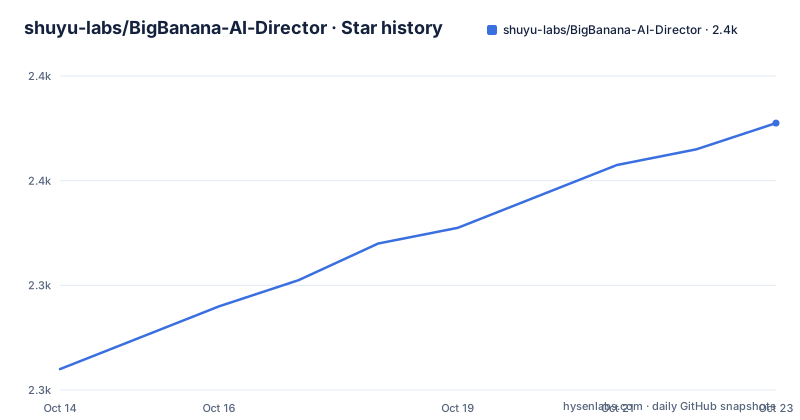
- shuyu-labs/BigBanana-AI-Director2,371 ★ · +47
| Repository | 2026-10-14 | 2026-10-23 |
|---|---|---|
| shuyu-labs/BigBanana-AI-Director | 2.3k | 2.4k |
47 Stars in the last 9 days, measured from the daily GitHub snapshot. Compare with other projects
Editorial analysis
Character consistency is the failure this workbench is built around
BigBanana AI Director is a one-stop workbench for AI short drama and motion comic production, carrying a project from premise to exported master. Its own diagnosis is blunt about what breaks in competing generators: the fatal defect is not resolution and not dubbing, it is character consistency, a face that changes the moment the camera cuts to the next shot. The tool is built around that single complaint. Instead of the reroll habit it rejects as draw-a-card generation, it asks you to fix the cast and the set before anything moves.
The stated users are serialised creators who need the same face across many episodes, teams adapting web novel IP, and studios that think in scripts and accept light manual correction on storyboard and dialogue. The project rules out anyone who wants a viral clip out of a single button press, and it says so plainly: this is an industrial production tool, not a one click toy.
Script-to-Asset-to-Keyframe makes the order itself the product
The workflow is named Script-to-Asset-to-Keyframe, and every screen exists to enforce that order. A project hub holds recent projects, account entry, model configuration, a global asset library and whole-library import and export. Inside a project, content is organised as project, then season, then episode, and a whole novel can be imported and split into episode drafts automatically.
Before any episode is built, worldview anchors are laid down: maps, regions, locations and music style, alongside character, scene and prop resources, and those anchors keep feeding later story, asset and shot generation. Narrative planning then breaks an outline, a novel excerpt or a one-line idea into structured roles, scenes, props and shots, with language, target duration, visual style and model combination set as configuration rather than retyped per prompt. A pre-review step shows the whole automatic production plan shot by shot and lets you choose the nine grid storyboard path or the start and end frame path for each individual shot. Prompt management closes the loop with per stage templates, character and scene entries, and a rollback to an older prompt edit when a result turns out unstable.
Costume photo, wardrobe and context as three locks on a face
Three mechanisms hold a character together. The first is the costume photo system: one standard reference image per character, used as the visual anchor that every shot generation refers back to. The second is the wardrobe, which lets one character carry several looks, such as daily wear, battle gear or an injured state, with every variant derived from the Base Look so the face survives the costume change.
The third is context aware generation. A shot is produced against the current scene image, the character's current costume reference and the prop reference rather than from zero, which is the difference between a model that knows the story so far and one that rediscovers it per shot. Props are treated as first class assets with their own prompt, reference image and shape reference. Missing character, scene or prop images can be filled in in bulk so a shot never runs without context, and assets can be pulled from project resources or a cross project library, which is what makes a cast reusable in the next episode.
Nine grid previews and start/end frames decide the shot
Shot construction is where the control shows. A grid workbench lists every shot and, per shot, the narrative action, the characters, the scene and the props in play. Keyframes can be generated, uploaded, inherited from an earlier shot or edited. A nine grid step produces nine candidate viewpoints first, and you keep the whole frame or crop a single cell as the first frame, settling composition before any motion is requested. That is the practical meaning of the keyframe idea borrowed from animation: draw first, move second.
Two video paths run from there, single image image-to-video or interpolation between a start frame and an end frame, with the Veo model filling the gap between two images you have already approved. Delivery is the fourth phase: a timeline preview with render progress and logs, a CutOS style rough cut for reordering, trimming and filtering, and export of a master video, a compressed clip package or source assets for Premiere or Resolve. Episode level backup covers moving a project between devices.
Four containers sit behind the port your browser opens
There are three ways to run it. A browser version at director.tree456.com needs no install, an Electron desktop client covers Windows 10 and macOS 11 with an installer of about 122MB and no extra runtime, and the self hosted path is one command:
docker-compose up -dThat starts four services and you then open localhost:3005. Only the web service publishes a host port; the other three are internal to the compose network.
web:
  image: registry.cn-hangzhou.aliyuncs.com/tree456/bigbanana-ai-director:web-3.4.1
  container_name: bigbanana-ai-director-web
  ports:
    - "3005:80"
  depends_on:
    - media-proxy
    - new-api-proxy
    - cutos-api
restart: unless-stoppedmedia-proxy:
image: registry.cn-hangzhou.aliyuncs.com/tree456/bigbanana-ai-director:media-3.4.1
container_name: bigbanana-ai-director-media-proxy
environment:
MEDIA_PROXY_PORT: "8787"
MEDIA_PROXY_ALLOWED_HOSTS: "volces.com"cutos-api:
image: registry.cn-hangzhou.aliyuncs.com/tree456/bigbanana-ai-director:cutos-3.4.1
container_name: bigbanana-ai-director-cutos-api
environment:
CUTOS_API_PORT: "8789"
DASHSCOPE_API_KEY: ${DASHSCOPE_API_KEY:-}Read the port column before starting. 3005 is the only host port, while 8787, 8788 and 8789 are exposed only inside the compose network, so a default install gives you the workbench UI and nothing else.
Local IndexedDB storage does not make the Docker build offline
The privacy claim needs a closer look. Project data is kept mainly in the browser environment, in IndexedDB, with scripts, character settings and generated frames staying on the local device. That statement is about your content database, not about your network.
A self hosted install is still a small server. Beside the web container you get a media proxy, a model proxy and the CutOS API. The media proxy fetches remote assets and is restricted to volces.com over https, with a 120000 millisecond timeout, a 4096 character limit on URLs and a wildcard origin under `MEDIA_PROXY_CORS_ORIGIN`. Put 3005 behind anything other than localhost and you have published an open relay for the whitelisted hosts. Model traffic leaves your machine either way, because the project states that you register with the AI providers yourself and configure your own API Key. The same page draws a line under what local storage is good for: solo creation and light collaboration, with real time multi user work pointed at the commercial build.
The compose file never says how the model gateway is reached
A close read turns up three things a skim misses. First, the model gateway. The public build is said to reach text, image and video models through AntSK API by default, with OpenAI or Google official services offered as an alternative, and yet the only credential passed to any container in the shipped file is `DASHSCOPE_API_KEY`, which goes to cutos-api rather than to the model proxy. The proxy that fronts model traffic, new-api-proxy, ships with `NEW_API_ALLOWED_HOSTS` set to an empty string and `NEW_API_ALLOW_PRIVATE_HOSTS` set to false, so the container meant to reach your chosen gateway starts with no host allowlist and refuses private addresses. Neither the documentation nor the file says which values belong there.
Second, the pinned build. All four images are cut at 3.4.1, while the last push to the repository was on 2026-09-19, a later date than that build. Running the shipped compose file gives you the 3.4.1 workbench, not whatever sits at the head of main.
Third, the terms. The code terms are CC BY-NC-SA 4.0 and commercial use needs authorisation at [email protected], which sits awkwardly beside a product that advertises no software licence fee and keeps its repository as documentation plus a compose entry.
When a prompt-to-clip generator is the better tool
The project's own comparison with Keling and Jimeng style generators is the clearest statement of the trade. Those tools sit at the image or video generation core: one image or one clip per attempt, text description as the main control, results that drift between attempts, weak scene continuity, cloud upload of source material, and a high automation level paired with low control.
BigBanana moves the effort upstream instead. You pay for asset preparation once, a costume photo per character and a concept image per scene, and every later shot inherits that context. That costs more before you see any motion and less per shot once the cast exists.
Pick the generator when you need one clip today and nothing has to match anything. Pick this workbench when the same face must survive to episode three, when a nine grid choice has to precede the motion, or when the finished material must reach Premiere or Resolve as source assets. It is the wrong tool for real time collaboration on one project, and for anyone who needs to read or patch the code that is actually running.
Editorial conclusion
BigBanana AI Director suits serialised creators who can live with per shot decisions and who pay per model call. It does not suit anyone chasing a one click viral clip, a team that needs to read the running source, or a commercial launch without a signed permission. Before committing, check the two gaps the documentation leaves open: which hosts go into `NEW_API_ALLOWED_HOSTS` so `new-api-proxy` can reach your gateway, and whether [email protected] grants commercial rights under CC BY-NC-SA 4.0 before you build a season on it.
Frequently asked questions
Is BigBanana AI Director free to use?
The software carries no licence fee, no subscription and no paid feature tier for the Docker image, the desktop client or the hosted version. AI model calls are billed by each provider on actual usage, and you supply your own API Key, so the real cost follows how many shots you generate.
Can I use BigBanana AI Director without AntSK API?
The public build defaults to AntSK API as the single entry point for text, image and video models, and you can point it at OpenAI or Google official services instead. Private model gateways and deep customisation are handled through the commercial source delivery rather than the public repository.
Where does BigBanana AI Director keep my project data?
Mainly in the browser's IndexedDB, so scripts, character settings and generated frames stay on your own device. The documentation says that arrangement suits individual creation and light collaboration, and points multi user real time work at the commercial build.
Is there a BigBanana AI Director desktop app for Windows or macOS?
Yes, an Electron client for Windows 10 and above and macOS 11 and above, with an installer of roughly 122MB that needs no extra runtime or dependency. The hosted browser version and the Docker deployment are the two routes that install nothing at all.
Can I use characters and episodes made with BigBanana AI Director commercially?
Output belongs to the creator, but the project code is under CC BY-NC-SA 4.0, so commercial use needs authorisation at [email protected]. Each AI provider also sets its own terms for generated content, and those apply on top of the project terms.
Official sources
Add this badge to your README
If you maintain this project, the badge below links readers to this analysis and shows its maintenance status from the daily GitHub snapshot. Paste the markdown into your README; add ?metric=license or ?metric=stars to the image URL for a different field.

[](https://hysenlabs.com/projects/shuyu-labs-bigbanana-ai-director)Star history chart for your README
[](https://hysenlabs.com/projects/shuyu-labs-bigbanana-ai-director)Was this useful?