How to install Supabase, and why this repository is not your backend
The Postgres development platform for web, mobile and AI applications.
At a glance
- What is it?
- supabase/supabase is the TypeScript monorepo behind Studio, the docs site, the design system and a large examples tree. The database, auth and storage services most people mean by Supabase live in other repositories, and a pnpm-only hook keeps npm out.
- Who is it for?
- Adopt this repository if you are changing Studio, the documentation or the example apps, and treat the hosted product as a separate dependency you sign up for. Do not expect a local backend from it: the README says those services live in other repositories, and dev:studio-local only runs pnpm setup:cli and starts Studio with NODE_ENV=test MODE=test.
- Can I use it commercially?
- Yes. Apache-2.0 is a permissive licence: you can use, modify and sell software built on it, as long as you keep its copyright and licence notices.
- Is it still maintained?
- Yes. The repository last received commits 1 day ago.
- What is it written in?
- Mainly TypeScript, according to GitHub's language statistics.
Answers come from the project's GitHub data, last synced on November 12, 2026, and from our analysis. They are not legal advice.
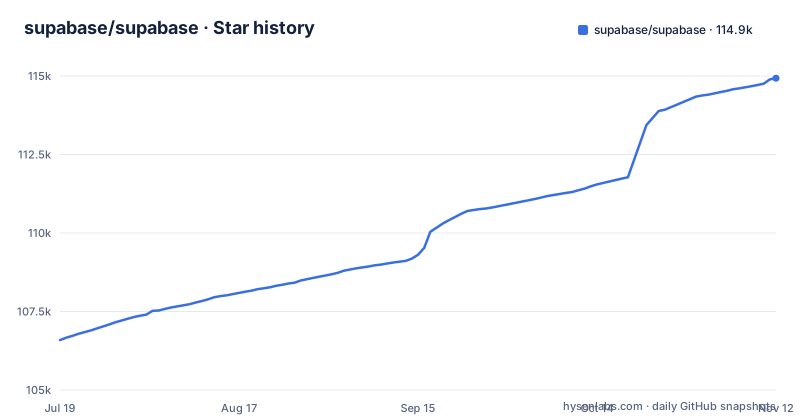
Star history
- supabase/supabase114,930 ★ · +8,340
| Repository | 2026-07-19 | 2026-11-12 |
|---|---|---|
| supabase/supabase | 106.6k | 114.9k |
8,340 Stars in the last 116 days, measured from the daily GitHub snapshot. Compare with other projects
Editorial analysis
The repository builds Studio, not the Postgres your app queries
supabase/supabase is a TypeScript pnpm monorepo under the Apache-2.0 licence, and the name invites a mistake. The top level holds apps/, packages/, blocks/, i18n/, examples/, e2e/, docker/ and supabase/, alongside pnpm-workspace.yaml, turbo.jsonc, tsconfig.json, an AGENTS.md and a knip.jsonc.
The components usually described as Supabase are not in that tree. PostgREST, GoTrue, Realtime, storage-api, pg_graphql and postgres-meta each have their own repository, and the README links out to every one of them. What you clone is the control plane: the Studio dashboard, the documentation site, the design system, the marketing site and a large examples/ tree.
Two consequences follow. If you want to run the product, the README points at the hosted dashboard and says you can sign up and start using Supabase without installing anything, with self-hosting and local development handled by separate documentation pages. If you want to change the product, this is the right repository, and DEVELOPERS.md is where a contributor starts.
only-allow rejects npm before a single dependency resolves
Installation has one gate and it is not optional. The root package.json sets preinstall to npx only-allow pnpm, next to a pnpm-workspace.yaml and a turbo.jsonc, so the workspace is pnpm plus Turborepo. An npm or yarn install here is refused before anything downloads.
npx only-allow pnpmFor the dashboard there are two routes. The script dev:studio-local first sets up the CLI, then starts Studio with NODE_ENV=test MODE=test:
pnpm setup:cli && NODE_ENV=test MODE=test pnpm --prefix ./apps/studio devOr you build the image the way package.json describes it:
docker build . -f apps/studio/Dockerfile --target production -t supabase-studio:local --build-arg NEXT_PUBLIC_STUDIO_AUTH_MODE=supabase --no-cacheThat build argument decides which authentication mode the dashboard is compiled against. A sibling script passes STUDIO_FRAMEWORK=tanstack to produce supabase-studio:local-tanstack, so a developer who wants the Tanstack build should expect a different image tag and a different compile, not a runtime switch. The Makefile adds a third path for the web app, vercel dev --listen 8080 --local-config vercel-local.json, which puts the site on port 8080 through Vercel's local CLI.
Realtime polls replication, rewrites rows as JSON, and leaves the client filter undocumented
Realtime is an Elixir server and its data path has three stated steps: it listens to PostgreSQL inserts, updates and deletes over websockets, it polls Postgres built-in replication functionality for database changes, converts those changes to JSON, then broadcasts the JSON over websockets to authorized clients.
Two words in that description carry the cost. Poll means the change stream is not a direct socket to the database. The server asks replication what changed and formats it afterwards, so every change pays at least one conversion hop before a browser sees it, and the README gives no figure for that delay. Authorized is a claim, not a mechanism. What grants a client access, which setting replication must be in, and what a subscriber receives when a row-level rule denies it are not covered by the README's Realtime description.
The same silence applies to volume. The README's Realtime description states no cap on changed rows per broadcast, no backpressure policy, and nothing about what happens when a subscriber reconnects mid stream. The consequence for a reader is concrete: you cannot size a realtime feature from that description, and you cannot reason about whether a filter is enforced server-side or in the client. Treat the REST surface as the part you can verify from here, and fetch the answers on replication configuration from the project documentation before you ship subscriptions.
PostgREST, pg_graphql and postgres-meta all read the same schema
Several HTTP surfaces sit on one database and each has a different job. PostgREST is a web server that turns your PostgreSQL database directly into a RESTful API, which makes the table layout the endpoint layout. pg_graphql is a PostgreSQL extension that exposes a GraphQL API, so the same table is reachable at a second URL with a second type system to keep in step. Storage is a RESTful API for managing files in S3, with Postgres handling permissions. postgres-meta is a RESTful API for managing your Postgres: fetching tables, adding roles, running queries. Envoy is listed as the cloud-native, high-performance edge and service proxy.
The decision underneath all of it is that the database is the source of truth, authorization included. The client libraries follow the same logic. The stated approach is modular, and each sub-library is a standalone implementation for a single external system, so postgrest-js talks to PostgREST, auth-js to GoTrue, realtime-js to the Realtime server, storage-js to Storage and functions-js to Functions.
The cost to a reader is review scope. A schema change is an API change, and the GraphQL layer has to be checked whenever the REST layer is.
The Makefile writes to a web/ directory the repository root does not list
The Makefile shows where this repository drifted. Its help text offers github.contributors, github.issues, github.repos and github.traction, and the targets that write data curl the GitHub API into JSON files, for example:
curl -sS https://api.github.com/repos/supabase/supabase/issues | jq -r 'map_values({username: .user.login, avatar_url: .user.avatar_url}) | unique | sort_by(.username)' > $(REPO_DIR)/web/src/data/contributors/issues.jsonThe destination is $(REPO_DIR)/web/src/data/. There is no web entry in the top level of the repository. The web applications live under apps/. A contributor who runs make github.contributors therefore writes into a directory they have to create by hand, at a path nothing else in the repo uses. github.traction is worse: it cds into $(REPO_DIR)/web and runs npm run traction, in a workspace that is otherwise pnpm-only.
These targets cannot regenerate anything for you as they stand. Read them as website tooling left from an older layout rather than a supported refresh path. If a task depends on that contributor data being current, generate it yourself and keep the output under apps/.
There is no backend in the tree, and dev:studio-local admits it
Read dev:studio-local again: it sets NODE_ENV=test MODE=test before starting Studio. The neighbouring scripts are all filters over the same workspace, dev:studio, dev:docs, dev:kb, dev:www, dev:design-system on the way in and build:studio, build:docs, build:kb on the way out. Every one of them starts a front end. None of them starts Postgres, GoTrue, Realtime, Storage or PostgREST, because each of those is a separate repository and, in the hosted case, a separate service.
So the services themselves come from the other repositories, not from this clone. A docker/ directory sits at the top level, and the README sends self-hosting and local development to supabase.com/docs/guides/hosting/overview and supabase.com/docs/guides/local-development.
The consequence lands on anyone planning to self-host. Pinning versions across six services is work the hosted product does for you, and this repository is where you report a dashboard bug, not where you fix a connection string.
Release tags say Developer Update while package.json stays at version 0.0.0
Version information here is split across two places that disagree, and that is the upgrade cost. The root package.json carries "version": "0.0.0" and "private": true, so the workspace is never published to a registry. Git history carries tags such as v1.26.08, named Developer Update - August 2026, from 2026-08-07, v1.26.07 from 2026-07-09 and v1.26.05 from 2026-05-07. The last push was on 2026-11-02 and the repository is not archived.
For a contributor the practical consequence is that 0.0.0 tells you nothing about which release you have checked out. Pin by commit when you reproduce a dashboard bug, and read the release note instead of the package.json field. The tag names also say what the tags are for: broad developer updates across a monorepo rather than per package semantic versions, and the build scripts route through turbo, so one tag covers apps/, packages/ and blocks/ at once. The default branch is master.
One more signal for anyone writing a tutorial. The examples/ tree carries an archive/ directory next to live ones such as slack-clone, todo-list and with-cloudflare-workers. Read archive/ as a sign that examples are rotated rather than kept forever, and do not build a walkthrough around a path you found in there without checking that it still builds.
Editorial conclusion
Adopt this repository if you are changing Studio, the documentation or the example apps, and treat the hosted product as a separate dependency you sign up for. Do not expect a local backend from it: the README says those services live in other repositories, and dev:studio-local only runs pnpm setup:cli and starts Studio with NODE_ENV=test MODE=test. Before filing a dashboard bug or pinning a build, check the commit hash rather than the version field, because package.json reports 0.0.0 while the tags run to v1.26.08.
Frequently asked questions
What is the point of Supabase?
It puts a hosted Postgres database behind a REST API, JWT based authentication, file storage and realtime subscriptions, so a developer can get a backend without assembling those pieces. The project describes itself as the Postgres development platform for web, mobile and AI applications.
What is Supabase vs Firebase?
The project's own position is that it is not a one to one mapping of Firebase. It aims at a Firebase-like developer experience built on Postgres and other open source tools carrying an MIT, Apache 2, or equivalent licence, rather than on a document store.
how to install supabase
For the hosted product you sign up at the dashboard and start using it without installing anything. For this repository, the root package.json sets preinstall to npx only-allow pnpm, so npm and yarn installs are refused and the pnpm workspace is the only route.
how to install supabase cli
The root package.json has a dev:studio-local script that runs pnpm setup:cli first, which prepares the CLI inside the workspace.
how to use supabase storage
Storage is a RESTful API for managing files in S3, with Postgres handling permissions.
What is Supabase AI used for?
The feature list names an AI and vector/embeddings toolkit, and the repository carries an examples/ai directory alongside examples/prompts. The list does not state which models the toolkit serves or what it costs to run.
Official sources
Where this project is recommended
Where developers are discussing it
Posts on Hacker News, dev.to and Lobsters that link to this repository, found by our scan of those communities. 1 in the last 30 days; newest first.
- Supabase in 2026: Is This Open Source Backend Worth a Try?dev.to · Oct 20, 2026 · 7 points · 2 comments
Add this badge to your README
If you maintain this project, the badge below links readers to this analysis and shows its maintenance status from the daily GitHub snapshot. Paste the markdown into your README; add ?metric=license or ?metric=stars to the image URL for a different field.

[](https://hysenlabs.com/projects/supabase-supabase)
[](https://hysenlabs.com/projects/supabase-supabase)Star history chart for your README
[](https://hysenlabs.com/projects/supabase-supabase)Was this useful?