grok-cli: the repository is grok-cli, the package is grok-dev, and the tags say grok-dev
An open-source coding agent for the Grok API
At a glance
- What is it?
- A community-built terminal coding agent for the publicly available Grok API, built with Bun and OpenTUI, with sub-agents on by default, Telegram remote control, media generation, scheduling and a headless prompt mode. The self-management commands work only for the script install, recurring schedules need a background daemon, and the package manifest has no CommonJS entry at all.
- Who is it for?
- grok-cli is worth trying if you want a Grok-backed agent with a headless mode that fits a script or a scheduled job, because the prompt flag, the JSON event stream and the tool-round cap are what make it usable outside an interactive terminal. Four things to check first.
- Can I use it commercially?
- Yes. MIT is a permissive licence: you can use, modify and sell software built on it, as long as you keep its copyright and licence notices.
- Is it still maintained?
- Yes. The repository last received commits 131 days ago.
- What is it written in?
- Mainly TypeScript, according to GitHub's language statistics.
Answers come from the project's GitHub data, last synced on November 14, 2026, and from our analysis. They are not legal advice.
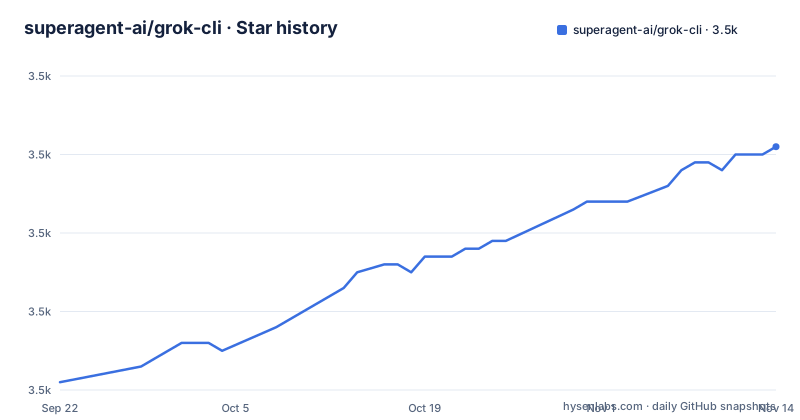
Star history
- superagent-ai/grok-cli3,511 ★ · +30
| Repository | 2026-09-22 | 2026-11-14 |
|---|---|---|
| superagent-ai/grok-cli | 3.5k | 3.5k |
30 Stars in the last 53 days, measured from the daily GitHub snapshot. Compare with other projects
Editorial analysis
Three different names for one project
The repository, the published package and the release tags each use a different name.
The repository is called grok-cli. The manifest names the package differently, as grok-dev, at version 1.1.7. The tags follow the package rather than the repository, so they read like scoped package versions, with the three most recent being the May 2026 release, one in early May and one in April.
That is a workable convention, since publishing under a name that is not already taken on the registry is a normal reason to differ. But it means three things that look for this project miss: the readme's own install line for the global package, a search for the repository name in a package listing, and any automation that assumes the tag matches the version.
The manifest also records the author as a generic label rather than a person or an organisation, and the licence as MIT.
Not affiliated with xAI, and generated media is saved because their URLs expire
The second thing in the file is a disclaimer, and it is specific.
The project is described as community-built and open source, and as not affiliated with, endorsed by, or sponsored by xAI Corp. It states that Grok is a trademark of xAI Corp, and that the tool uses the publicly available Grok API.
That last clause is the whole scope of the project: an agent written by third parties against a documented public endpoint. Nothing in the file suggests access beyond that.
One feature row is candid about a limitation. Generated files from the media tools are saved locally, and the stated reason is that you can reuse them after the xAI URLs expire. So the tool treats the provider's file links as temporary by design, and the copy under a local directory is the durable artefact.
The configuration surface follows the same pattern. Every setting is an environment variable with a documented default: the API key, an overridable base URL whose default is the vendor endpoint, a default model, and a token ceiling.
Self-management is documented as working only for the script install
There are two install routes and they are not equivalent.
The first pipes a downloaded script into a shell:
curl -fsSL https://raw.githubusercontent.com/superagent-ai/grok-cli/main/install.sh | bashThe second installs the published package globally, and the file says it requires Bun on your PATH.
Under a heading marked script-installed only, four self-management commands are listed: an update command, an uninstall command, and two uninstall variants, one that shows what it would remove and one that keeps the configuration.
So the convenience of not managing the install is the thing that costs you the ability to update or remove it from inside the tool. A global package install has no equivalent, and the file does not say how to update it.
The prerequisites are modest either way: an API key from the vendor, and a modern terminal for the interactive interface. The headless prompt mode is explicitly stated not to depend on terminal support, which is what makes it usable from a script.
Four terminals are recommended, and one sub-agent needs Accessibility permission
The interactive interface is built on a terminal UI library, and four emulators are documented and recommended: WezTerm and Alacritty as cross-platform, and Ghostty and Kitty on macOS and Linux.
What is absent is as informative as what is present. There is no entry for the default terminal on macOS or Linux, and none for a Windows terminal, while the whole list is Unix-flavoured. The file does hedge that other modern terminals may work.
The headless mode sidesteps this entirely, which the file points out directly. One prompt, then exit, with a directory flag, a tool-round cap, a JSON output format, a batch API flag and a verify command among the options.
The permission requirement belongs to a different feature. Host desktop automation through the built-in computer sub-agent needs Accessibility access granted to the terminal application in the system privacy settings on macOS, and the automation library behind it is stated to target macOS only. So the one capability that reaches outside the terminal is also the one with the narrowest platform support.
Recurring schedules need a daemon, and one-time schedules do not
Scheduling is requested in natural language rather than configured through a file. You describe a schedule, including a name, a cadence and the task, and the tool creates it.
The asymmetry is in what runs it. One-time schedules start immediately in the background and finish on their own. Recurring schedules require a background daemon to be started, and they keep running only for as long as that daemon is alive.
So the scheduling feature has a different lifecycle from everything else in the tool. Everything else is a command you run and a process that exits. A recurring schedule is a long-lived service, and if the daemon is not running the schedule silently does not fire.
Saved schedules are browsable from inside the interface with a slash command rather than from the command line, which is the only feature in the file described that way.
The desktop sub-agent drives by accessibility refs, not by looking
The computer sub-agent is the most interesting design decision in the file, because it does not work the way the screenshots suggest.
The primary workflow is a cycle: take an accessibility snapshot, act on a reference from that snapshot, then snapshot again. References are stable handles of the form shown in the example, so the agent clicks or types at a target it identified structurally rather than at a pixel it recognised. Screenshots exist, but they are described as available for visual confirmation rather than as the path to prefer.
The action set follows from that: a click, a type and a scroll, all addressed by reference.
Two operational details. Captures are written under a dot-directory in the working tree by default, so they land in the project you are working on rather than in a temporary directory. And if the runtime blocks the native binary download during install, there is a manual postinstall step to run through node instead.
That last one is the shape of the whole feature: an agent driving another program's accessibility tree, on one operating system, with permission granted by hand.
Three integration mechanisms share one dependency list
The manifest is a short list, and reading it as a set of protocols rather than as packages explains the design.
There is the model provider layer and the Model Context Protocol, which appear as a provider package, a protocol SDK and a model-context package, so the agent can talk to external tools over that protocol. There is the Telegram path, which appears as a bot framework, and that is the remote control feature. And there are two packages for the language server protocol and its type definitions, so the agent can speak to language servers.
Alongside those sit a package manager's own dependency resolver, which is how the agent installs things, and the ripgrep package, so the search binary arrives through the dependency tree rather than being assumed present on the machine.
The build side is small and consistent. Type checking, a bundler compile step to a standalone binary, tests through a runner invoked by the runtime package, and a single formatter and linter covering both. The package exports map has an import and a types condition and no require condition, so there is no CommonJS entry.
Editorial conclusion
grok-cli is worth trying if you want a Grok-backed agent with a headless mode that fits a script or a scheduled job, because the prompt flag, the JSON event stream and the tool-round cap are what make it usable outside an interactive terminal. Four things to check first. If you installed with the global package manager you have no self-update and no uninstall command, because those are documented as working only for the script install. If you want recurring schedules you need a long-running background daemon, while one-time schedules do not. If you want the desktop automation sub-agent it is macOS only and needs Accessibility permission for your terminal, and the primary path is accessibility refs rather than screenshots. And if your application is CommonJS, there is no require entry in the package exports, so the agent cannot be imported that way at all.
Frequently asked questions
what is grok cli
It is a community-built, open-source terminal coding agent that connects to xAI's publicly available Grok API, built with Bun and OpenTUI. It offers X and web search, the Grok model lineup, sub-agents on by default, remote control from a phone over Telegram, image and video generation, scheduling, and a headless prompt mode.
how to install grok cli
Two ways. Pipe the install script into a shell with curl, which is the route that also gives you the update and uninstall commands, or install the published package globally with bun add -g grok-dev, which requires Bun on your PATH. Either way you need a Grok API key from x.ai.
is grok cli official
No. The disclaimer states the project is community-built and is not affiliated with, endorsed by, or sponsored by xAI Corp, and that Grok is a trademark of xAI Corp. The tool uses the publicly available Grok API.
Official sources
Add this badge to your README
If you maintain this project, the badge below links readers to this analysis and shows its maintenance status from the daily GitHub snapshot. Paste the markdown into your README; add ?metric=license or ?metric=stars to the image URL for a different field.

[](https://hysenlabs.com/projects/superagent-ai-grok-cli)Star history chart for your README
[](https://hysenlabs.com/projects/superagent-ai-grok-cli)Was this useful?